
1. Introduzione
This manual provides detailed instructions for the installation, operation, and maintenance of your DALY Smart BMS LiFePo4 4S 12V 200A with Programmable Bluetooth Module. This Battery Management System (BMS) is designed to protect and manage LiFePo4 battery packs, ensuring their safe and efficient operation. Please read this manual thoroughly before installation and use.
2. Informazioni sulla sicurezza
Always observe the following safety precautions to prevent injury or damage to the BMS and battery pack:
- Installazione professionale consigliata: Installation should be performed by qualified personnel with experience in battery systems and electronics.
- Polarità corretta: Ensure all connections are made with correct polarity. Incorrect wiring can cause severe damage to the BMS and battery.
- Isolamento: Properly insulate all exposed wires and terminals to prevent short circuits.
- Voltage Compatibilità: Verify that the BMS voltage and cell count match your battery pack configuration (4S 12V LiFePo4).
- Evitare acqua e umidità: Do not expose the BMS to water, moisture, or corrosive environments.
- Temperatura: Operate the BMS within its specified temperature range.
- Spegnimento di emergenza: Familiarize yourself with emergency shutdown procedures for your battery system.
3. Contenuto della confezione
Verifica che tutti gli articoli siano presenti nel tuo pacco:
- DALY Smart BMS (200A FAN LiFePo4 4S 12V BT)
- Balance Wires
- Bluetooth Module (for Mobile APP IOS & Android)
- UART Cable (for PC screen connection)
- English Version Wiring Manual (this document)

Image: Contents of the DALY Smart BMS package.
4. Caratteristiche del prodotto
The DALY Smart BMS offers comprehensive protection and monitoring for your LiFePo4 battery pack:
- Capacità di corrente elevata: Supports up to 200A continuous discharge and 100A charge current.
- Programmable Temperature Protection: Automatically stops current flow if battery temperature limits are exceeded.
- Programmable Over-charge/Over-discharge Protection: Prevents damage by stopping charging or discharging when voltage limits are reached.
- Programmable Over-current Protection: Safeguards against excessive current during charging and discharging.
- Voltage Bilanciamento: High detection precision for voltage balancing across cells.
- SOC Calculation: Precise State of Charge (SOC) calculation with automatic learning function.
- Connettività Bluetooth: Wireless monitoring and parameter setting via Android or iPhone mobile application.
- Progettazione delle porte comuni: Utilizes a single port for both charging and discharging.
- Ventola di raffreddamento integrata: Ensures optimal operating temperature for high current applications.

Immagine: Oltreview of the 12 protection functions provided by the DALY Smart BMS.

Image: Internal component breakdown of the DALY Smart BMS.
5. Guida all'installazione
Careful wiring is critical for the correct and safe operation of the BMS. Follow these steps precisely:
5.1 Schema elettrico

Image: Wiring diagram for the DALY Smart BMS.
5.2 Step-by-Step Wiring
- Preparare gli strumenti: Ensure you have necessary tools such as a soldering machine (if needed, suggest using 662°F/350°C), scissors, double-sided tape, tin wire, and a multimeter.
- Collegare i cavi di bilanciamento: First, connect the balance wires to your battery pack. Ensure the balance wires are welded correctly.
- Connect BMS to Battery: Connect the main negative terminal (B-) of the battery pack to the B- terminal on the BMS. Connect the main positive terminal (B+) of the battery pack to the P+ terminal (if applicable, or ensure the charger/load positive connects directly to battery B+).
- Connect Balance Wire Harness: Plug the balance wire harness into the BMS connection port. Ensure the red balance wire is connected to the highest positive cell.
- Collegare il carico/caricabatterie: Connect the negative terminal of your motor/load and charger to the P- terminal on the BMS. The positive terminals of the motor/load and charger connect directly to the battery pack's positive terminal (B+).
- Install Cooling Fan: Keep the red cooling surface of the BMS uncovered to allow for proper fan operation.
- Verificare il cablaggio: Before proceeding, use a multimeter to measure the voltage between adjacent balance cables. This voltage should approximate the nominal voltage of a single cell string, confirming correct wiring.
- Attiva BMS: Plug in the NTC (temperature sensor) and Bluetooth module. Press the activation button on the BMS to power it on.
Nota importante: Disconnect balance wires and the BMS connection port before welding black and red balance wires on the battery pack.
Video: This video demonstrates the connection process for the DALY Smart BMS, including measuring cell voltages, connecting the balance wires, activating the BMS, and connecting to the mobile application.
6. Guida operativa
The DALY Smart BMS can be monitored and configured using a mobile application via Bluetooth or a PC software via UART.
6.1 Installazione e connessione dell'app mobile
- Scarica l'app: Cercare "Smart BMS" in the Huawei App Gallery or Apple App Store and download the application.
- Apri l'app e connettiti: Open the Smart BMS app on your mobile device. Ensure Bluetooth is enabled. The app will display available BMS devices. Select the corresponding device number to connect.
- View Parametri: Una volta connesso, puoi view real-time battery parameters such as total voltage, current, State of Charge (SOC), individual cell voltage temperatura.
- Imposta parametri: Navigate to the "Parameter Settings" section. For initial power-on, the battery capacity must be set to the actual capacity of your battery pack. The initial password for parameter modification is 123456. You can also adjust protection thresholds for over-charge, over-discharge, over-current, and temperature.

Image: DALY Smart BMS connected to a mobile application for monitoring and control.
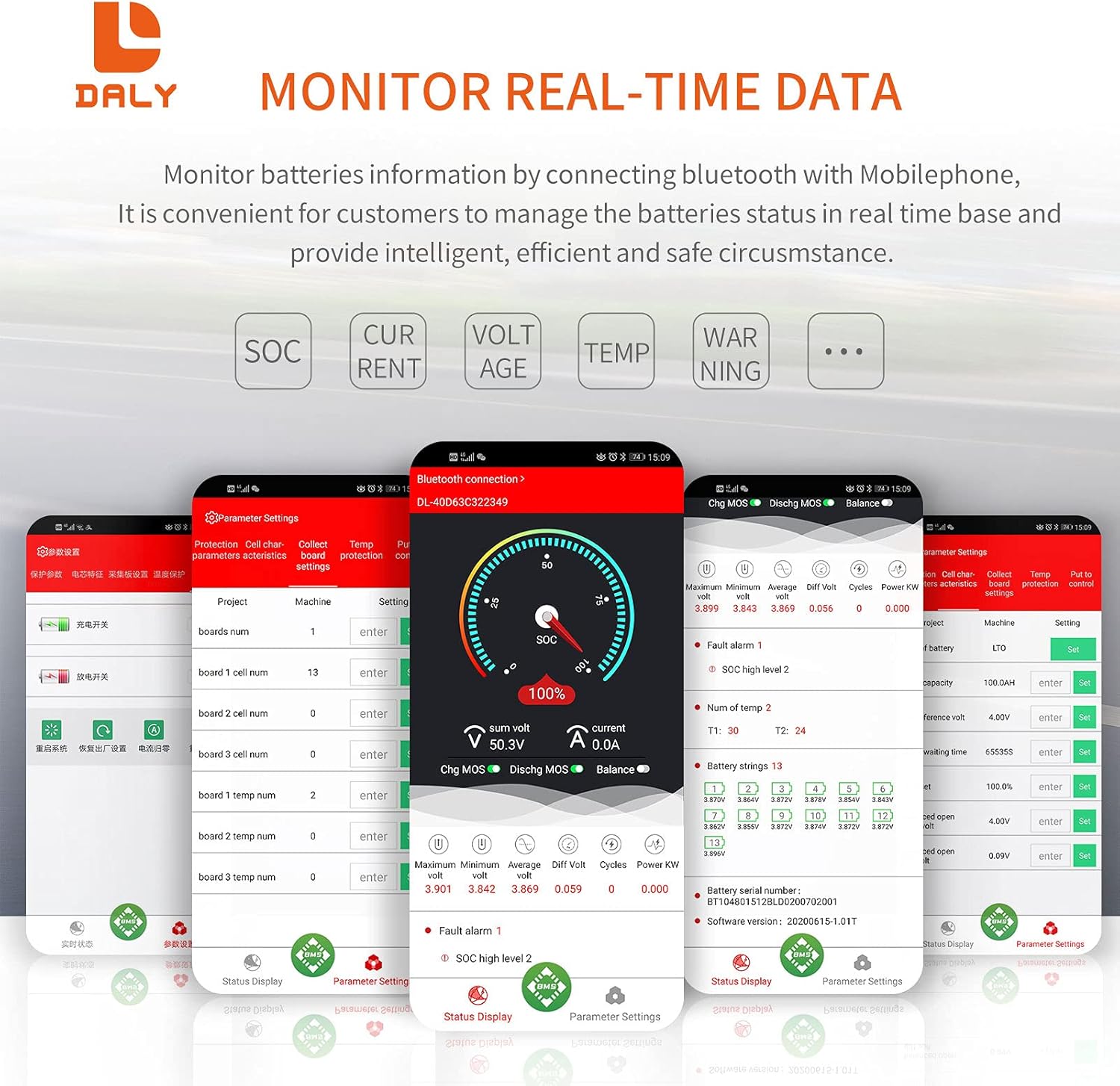
Image: Real-time data monitoring interface of the Smart BMS app.
6.2 Connessione software PC
Connect the UART cable from the BMS to your computer. Open the host computer software to view detailed battery information and adjust parameters. The PC software provides a comprehensive display of battery status and settings.
7. Manutenzione
To ensure the longevity and optimal performance of your DALY Smart BMS and battery pack:
- Ispezione regolare: Controllare periodicamente tutti i collegamenti elettrici per verificarne la tenuta e l'eventuale presenza di segni di corrosione o danni.
- Pulizia: Keep the BMS free from dust and debris, especially around the cooling fan.
- Aggiornamenti software: Check for available firmware updates for the BMS and app to ensure you have the latest features and bug fixes.
- Stato della batteria: Monitorare il volume delle celle della batteriatages and temperatures regularly through the app to detect any anomalies early.
8. Risoluzione Dei Problemi
If you encounter issues with your DALY Smart BMS, consider the following common problems and solutions:
| Problema | Possibile causa | Soluzione |
|---|---|---|
| BMS not activating/no power | Cablaggio errato, basso livello della batteriatage, activation button not pressed. | Verify all wiring according to the diagram. Ensure battery voltage is above the minimum threshold. Press the activation button on the BMS. |
| Problemi di connessione Bluetooth | Bluetooth module not plugged in, module faulty, app issues, out of range. | Ensure Bluetooth module is securely connected. Restart the app and phone's Bluetooth. Move closer to the BMS. |
| Over-charge/Over-discharge protection triggered | Volume della batteriatage ha superato/sceso al di sotto dei limiti stabiliti. | Check charger output voltage or load. Allow battery to return to safe voltage. Rifview and adjust protection parameters in the app if necessary (with caution). |
| Protezione da sovracorrente attivata | Load drawing too much current, short circuit. | Reduce load or check for short circuits. Review and adjust over-current parameters in the app if necessary (with caution). |
| Cella volumetage squilibrio | Natural cell variation, prolonged disuse. | The BMS has an active balancing function. Ensure the battery is charged to full capacity to allow balancing to occur. If severe, manual balancing may be required by a professional. |
9. Specifiche
Key technical specifications for the DALY Smart BMS LiFePo4 4S 12V 200A:
| Caratteristica | Specificazione |
|---|---|
| Tipo di prodotto | Smart BMS for LiFePo4 Battery |
| Configurazione delle celle | 4S (4 Series) |
| Volume Nominaletage | 12V |
| Corrente di scarica continua | 200A |
| Corrente di carica continua | 100A |
| Protezione da sovracorrente di scarica | 300A ± 30A (Configurable) |
| Overcharge Current Protection | 300A ± 30A (Configurable) |
| Sovraccarico voltage (per stringa) | 3.75V ± 0.05V (Configurable) |
| Volume di scaricamento eccessivotage (per stringa) | 2.2V ± 0.1V (Configurable) |
| Volume di caricatage | 14.6V (Configurable) |
| Comunicazione | UART (Single Communication), Bluetooth |
| Output Wire Gauge | Cavo AWG 6 |
| Balance Wires Gauge/Length | 24AWG / 350mm |
| Dimensioni del prodotto | 235 mm x 130 mm x 52 mm (circa 9.21 x 4.72 x 2.09 pollici) |
| Peso dell'articolo | ~1844g (approx. 4.07 pounds) |
| Materiale | Rame |

Image: Fan specifications and physical dimensions of the BMS.
10. Garanzia e supporto
For warranty information, technical support, or service inquiries, please refer to the official DALY webo contatta il tuo punto vendita. Conserva la ricevuta d'acquisto come prova d'acquisto per eventuali reclami in garanzia.