
1. Introduzione
The EVTSCAN PM8908C is a non-contact voltage detector pen designed for safe and efficient electrical testing. It features multi-sensor technology, an LED indicator, and a wide voltage sensitivity range of AC 12V-1000V, making it suitable for various household and industrial applications. This manual provides essential information for the safe and proper use of your device.
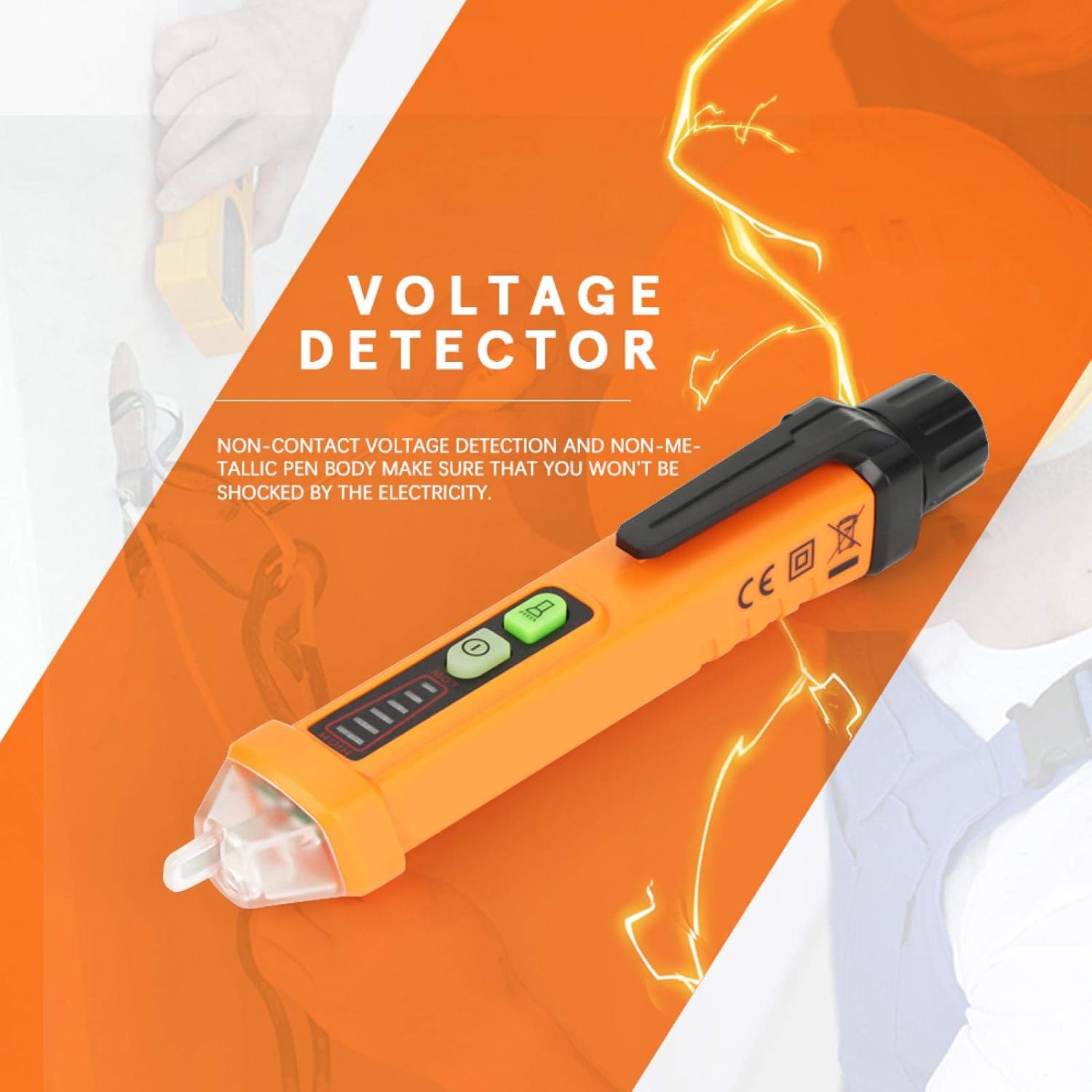
Immagine 1: Generale view of the EVTSCAN PM8908C Non-Contact Voltage Penna Tester.
2. Informazioni sulla sicurezza
- Always adhere to local safety regulations and standards when working with electricity.
- The device is designed for non-contact voltage detection. Do not attempt to make direct contact with live circuits.
- il volumetage detection pen complies with EU safety standards EN61010-1-2-030 1000V CAT III.
- Assicurarsi che il dispositivo sia in buone condizioni di funzionamento prima di ogni utilizzo. Non utilizzarlo se danneggiato.
- Do not rely solely on this device for determining if a circuit is de-energized. Always verify with a known working voltage fonte.
- Tenere fuori dalla portata dei bambini.
3. Caratteristiche del prodotto
- Volume senza contattotage rilevamento per una maggiore sicurezza.
- Non-metallic pen body to prevent electrical shock.
- Compliance with EU safety standards (EN61010-1-2-030 1000V CAT III) and environmental certifications (ROHS/REACH).
- Automatic selection of 3 sensitivity levels (High, Medium, Low) for accurate detection.
- Voltage sensitivity range: AC 12V-1000V.
- Frequency range: 50-500Hz.
- Sound and light alarm mode for clear indications.
- Integrated flashlight for use in dimly lit areas.
- Durable engineering plastic construction, wear-resistant and insulated.
- Intelligent chips for auto sensitivity, auto shutdown, NCV null and live line testing.
- Indicazione di batteria scarica.
- Funzione di spegnimento automatico per preservare la durata della batteria.
4. Contenuto della confezione
Il pacchetto include i seguenti articoli:
- 1 x EVTSCAN PM8908C Voltage Penna tester
- 1 x Manuale utente (questo documento)
Note: 2pcs 1.5V AA Batteries are NOT included and must be purchased separately.
5. Impostazione
5.1 Installazione della batteria
- Unscrew the battery cap at the rear of the voltage tester pen.
- Inserire due (2) batterie AA da 1.5 V, assicurandosi della corretta polarità (+/-).
- Riavvitare saldamente il tappo della batteria in posizione.
- The device will indicate low battery when replacement is needed.

Immagine 2: Primo piano view of the non-contact tip and the battery compartment for installation.
6. Istruzioni per l'uso
6.1 Accensione/spegnimento
- Press the power button (usually marked with a circle and a vertical line) to turn the device on.
- Press and hold the power button to turn the device off. The device also features an auto power-off function after a period of inactivity.
6.2 Senza contatto voltage (NCV) Rilevamento
- Hold the pen with the tip near the object to be tested (e.g., wire, outlet).
- The device will automatically select the appropriate sensitivity (High, Medium, Low) to detect the electromagnetic field.
- A sound alarm and flashing LED indicator will activate when AC voltage is detected. The intensity of the alarm and the number of illuminated LED segments indicate the strength of the detected voltage.
6.3 Live/Null Wire Identification
- When testing an AC circuit, the device can distinguish between live and null (neutral) wires.
- Place the tip near each wire. A stronger indication (faster beeping, brighter LED, more segments lit) typically signifies the live wire. A weaker or no indication suggests the null wire.
6.4 Funzione torcia
- Press the flashlight button (if separate, or a quick press of the power button on some models) to turn the built-in white LED flashlight on or off. This is useful for working in dark environments.

Image 3: The LED flashlight function in use, illuminating a power strip for better visibility.
6.5 Indicazione di batteria scarica
- When the battery power is low, the device will provide a visual or audible alert. Replace the batteries promptly to ensure accurate readings.
7. Manutenzione
- Pulizia: Pulire il dispositivo con un panno asciutto e morbido. Non utilizzare detergenti abrasivi o solventi.
- Sostituzione della batteria: Replace batteries when the low battery indicator appears. Always use new 1.5V AA batteries. Remove batteries if the device will not be used for an extended period to prevent leakage.
- Magazzinaggio: Conservare il dispositivo in un luogo fresco e asciutto, lontano dalla luce solare diretta e da temperature estreme.
8. Risoluzione Dei Problemi
- Il dispositivo non si accende:
- Controllare se le batterie sono installate correttamente.
- Sostituirle con nuove batterie AA da 1.5 V.
- Assicurarsi che il pulsante di accensione sia premuto saldamente.
- nessun volumetage detection or inconsistent readings:
- Ensure the device tip is close enough to the object being tested.
- Controllare il livello della batteria e sostituirla se è scarica.
- Verify the device is functioning by testing a known live circuit.
- La torcia non funziona:
- Controllare il livello della batteria.
- Ensure the flashlight button is pressed correctly.
9. Specifiche
| Caratteristica | Specificazione |
|---|---|
| Modello | PM8908C |
| Voltage Sensibilità | CA 12V-1000V |
| Frequenza | Frequenza |
| Sensibilità NCV | Selezione automatica di 3 tipi (Alto, Medio, Basso) |
| Modalità allarme | Suono e luce |
| Colore della luce del flash | Bianco |
| Spegnimento automatico | SÌ |
| Indicazione di batteria scarica | SÌ |
| Identificazione del filo sotto tensione/nullo | SÌ |
| Temperatura di esercizio | 0-50 ℃ (32-122 ℉) |
| Temperatura di conservazione | -20-60 ℃ (-4-140 ℉) |
| Umidità | <85% UR |
| Fonte di alimentazione | 2 batterie AA da 1.5 V (NON incluse) |
| Dimensioni | 16 x 2 x 2 cm (x 6.30 0.79 x 0.79 a) |
| Peso | Approx. 64g (0.05 kg) |
| Standard di sicurezza | EN61010-1-2-030 1000V CAT III |
| Environmental Certs | ROHS/REACH |

Image 4: Illustration of the dimensions of the EVTSCAN PM8908C voltage tester pen.
10. Garanzia e supporto
For warranty information or technical support, please refer to the product packaging or contact the seller/manufacturer directly. Keep your purchase receipt for warranty claims.