
1. Introduzione
This manual provides essential information for the safe and efficient operation of your DALY Smart Battery Management System (BMS) for LiFePo4 8S 24V 40A batteries. The BMS is designed to protect your battery pack from various electrical anomalies and allows for monitoring and parameter adjustment via Bluetooth-enabled mobile applications or PC software.
2. Caratteristiche del prodotto
- Progettazione delle porte comuni: Supports both charging and discharging through the same port.
- Capacità di corrente elevata: Supports up to 40A continuous discharge and 20A charge current.
- Programmable Protections:
- Protezione sovraccarica
- Protezione da scarica eccessiva
- Over-current protection (charge and discharge)
- Over-volumetage protezione
- Low temperature charging protection (down to -1°C)
- NTC temperature protection
- Protezione da cortocircuito
- Funzioni intelligenti: Precise State of Charge (SOC) calculation with automatic learning, automatic charge battery function, and static balance function.
- Connettività Bluetooth: Monitor battery status and adjust parameters wirelessly via Android or iOS mobile applications.
- Supporto software per PC: Manage and monitor the BMS via a PC interface using a UART cable.

3. Specifiche
| Caratteristica | Valore |
|---|---|
| Dimensioni del prodotto | 5.04 x 2.6 x 0.71 pollici |
| Peso dell'articolo | 12.8 once |
| Marca | DALY |
| Tecnologia di connettività | Bluetooth |
| Fonte di alimentazione | Alimentato a batteria |
| Standard di comunicazione wireless | Bluetooth |
| Dispositivi compatibili | Telefoni cellulari |
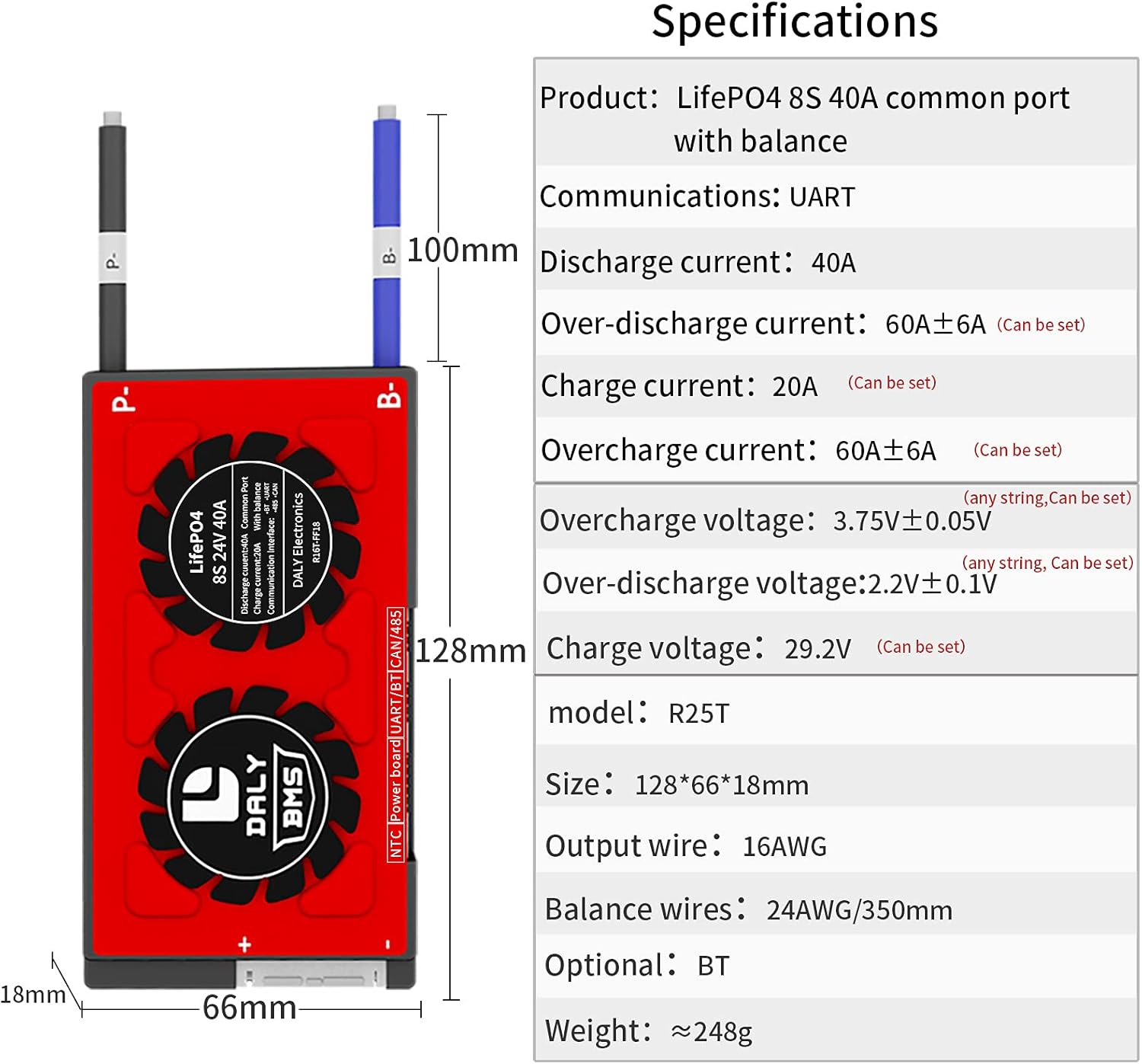
| Corrente di scarica | 40A (continuo) |
| Corrente di carica | 20A (continuo) |
| Protezione da sovracorrente di scarica | 60A ± 6A (Configurable) |
| Overcharge Current Protection | 60A ± 6A (Configurable) |
| Sovraccarico voltage | 3.75V ± 0.05V (per string, Configurable) |
| Volume di scaricamento eccessivotage | 2.2V ± 0.1V (per string, Configurable) |
| Volume di caricatage | 29.2V (Configurable) |

4. Contenuto della confezione
Upon receiving your DALY Smart BMS, please verify that all components are included:
- SMART BMS Unit (1)
- Balance Wires (1 set)
- Bluetooth Module (1)
- UART Cable (for PC connection) (1)
- English Version Wiring Manual (1)

5. Informazioni sulla sicurezza
WARNING: Improper installation or use of a BMS can lead to serious injury, fire, or damage to property. Always exercise caution when working with high-voltage sistemi di batterie.
- Prima di applicare l'alimentazione, assicurarsi che tutti i collegamenti siano corretti e sicuri.
- Always disconnect the power source before performing any maintenance or wiring changes.
- Indossare dispositivi di protezione individuale (DPI) adeguati, tra cui guanti isolanti e protezioni per gli occhi.
- Non cortocircuitare i terminali della batteria o i collegamenti del BMS.
- Operate the BMS within its specified voltage e limiti di corrente.
- Tenere il BMS lontano da acqua, umidità e temperature estreme.
- In caso di dubbi su un passaggio, consultare un professionista qualificato.
6. Impostazione
6.1. Schema elettrico
Carefully follow the wiring diagram provided. Ensure that the balance wires are connected to the correct cell terminals in sequence, starting from the negative terminal of the first cell (B-) to the positive terminal of the last cell (B+).

6.2. Initial Activation and Connection
- Verificare il cablaggio: Before connecting the BMS, measure the voltage between adjacent balance cables to ensure the wiring is correct and matches the nominal voltage di una singola stringa.
- Connect BMS: Plug in the NTC temperature sensor and the Bluetooth module to the BMS.
- Attiva BMS: Press the button on the Bluetooth module to activate the smart BMS.
- Scarica l'app: Download the "Smart BMS" application from your mobile device's app store (Huawei or Apple App Store).
- Connessione tramite Bluetooth: Open the Smart BMS APP and connect to the corresponding Bluetooth device ID.
- Initial Parameter Setup: For the first power-on, the battery capacity must be set to the actual capacity of your battery pack. The initial password for parameter settings is 123456. Adjust other parameters as needed under the guidance of your battery manufacturer.
7. Funzionamento
Once the BMS is properly installed and configured, you can monitor its status and the battery pack's health using the Smart BMS mobile application or PC software.
- Monitoraggio in tempo reale: The app displays critical information such as total voltage, singola cella voltages, current, temperature, and State of Charge (SOC).
- Regolazione dei parametri: Access the "Parameter Settings" section (password: 123456) to fine-tune protection thresholds for voltage, current, and temperature according to your battery specifications.
- Calibrazione automatica: The battery is automatically calibrated when charged until the voltage reaches a high level 2 alarm.

8. Manutenzione
Proper maintenance ensures the longevity and optimal performance of your battery pack and BMS.
- Ispezione regolare: Controllare periodicamente tutti i collegamenti elettrici per verificarne la tenuta e l'eventuale presenza di segni di corrosione o danni.
- Aggiornamenti software: Keep the Smart BMS mobile application and PC software updated to the latest version for improved features and bug fixes.
- Condizioni ambientali: Ensure the BMS and battery pack are operated within recommended temperature and humidity ranges. Avoid direct sunlight or extreme cold.
- Pulizia: Mantenere l'unità BMS pulita e priva di polvere e detriti. Utilizzare un panno asciutto e morbido per la pulizia.
9. Risoluzione Dei Problemi
This section addresses common issues you might encounter with your DALY Smart BMS.
- BMS non si attiva: Ensure all balance wires are correctly connected and the main battery terminals (B- and P-) are properly wired. Press the activation button on the Bluetooth module.
- Problemi di connessione Bluetooth: Verify the Bluetooth module is securely plugged into the BMS. Ensure Bluetooth is enabled on your mobile device and the "Smart BMS" app has necessary permissions. Try restarting the app or your device.
- Volume erratotage Letture: Double-check all balance wire connections. Loose or incorrect connections can lead to inaccurate cell voltage letture.
- BMS Shuts Down Unexpectedly: This often indicates a protection trigger (e.g., over-current, over-voltage, sotto-volumetage, or temperature). Check the alarm messages in the app for details. Address the underlying cause (e.g., reduce load, check charger, inspect battery cells).
- Problemi di bilanciamento: Se cella voltages are consistently out of balance, ensure the balance wires are correctly installed. The BMS has a passive balancing function; for severely mismatched cells, external balancing might be required or cells may need replacement.
- App/PC Software Not Displaying Data: Confirm the Bluetooth module or UART cable is properly connected and the BMS is active. Ensure the app/software is the correct version and compatible with your BMS model.
For persistent issues not covered here, please refer to the detailed wiring manual included in your package or contact DALY customer support.
10. Garanzia e supporto
For warranty information, please refer to the documentation provided at the time of purchase or contact your vendor. DALY provides technical support for their products. For assistance, please visit the official DALY website or contact their customer service department with your product model and purchase details.