
Madoec B097NYQ2MN
Madoec Fingerprint Door Lock (Model B097NYQ2MN) User Manual
1. Introduzione
This manual provides comprehensive instructions for the installation, operation, and maintenance of your Madoec Fingerprint Door Lock. Designed for indoor use in homes, bedrooms, offices, and apartments, this biometric keyless entry system offers multiple unlocking methods for enhanced security and convenience. Please read this manual thoroughly before attempting installation or operation to ensure proper function and safety.
2. Informazioni sulla sicurezza
- Prima dell'installazione, assicurarsi che tutti i componenti siano presenti e integri.
- Do not expose the lock to water or excessive humidity.
- Use only specified battery types (AAA batteries, not included).
- Keep emergency keys in a safe place outside the locked area.
- Evitare di utilizzare detergenti abrasivi o solventi sulla superficie della serratura.
- This lock is designed for indoor use only.
3. Contenuto della confezione
Verifica che tutti gli articoli elencati di seguito siano inclusi nel tuo pacchetto:
- Front Handle (with fingerprint sensor and keypad)
- Maniglia posteriore
- Lock Body (latch mechanism)
- Locking Plate (strike plate)
- Lock Box (strike box)
- Handle Keys (2)
- Chiave esagonale
- Spillo
- Viti Lunghe (2)
- Standoffs (2)
- Screw Accessories (various screws for installation)
- Manuale dell'utente (questo documento)
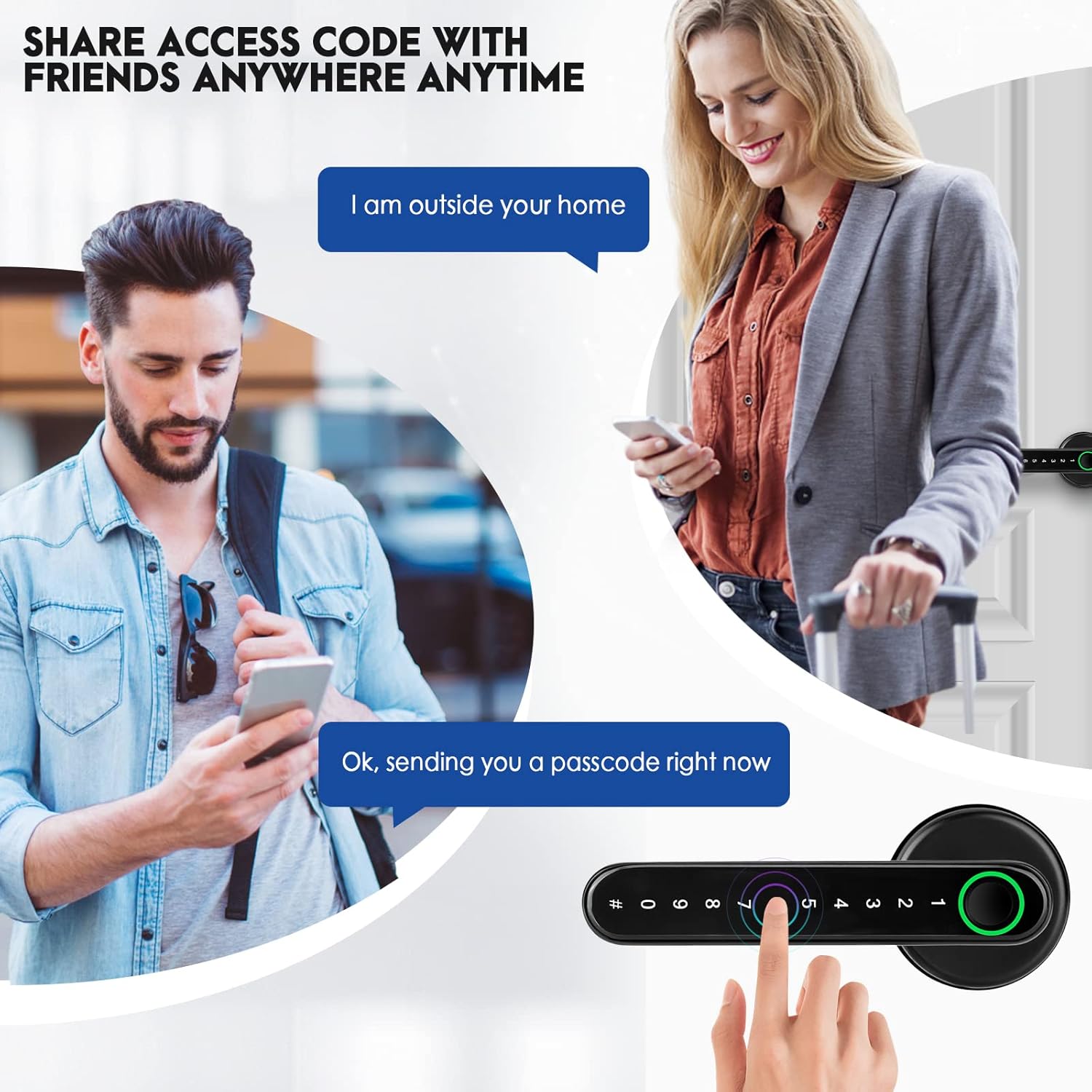
Image: All components of the Madoec Fingerprint Door Lock, including front and rear handles, latch, strike plate, keys, and various screws.
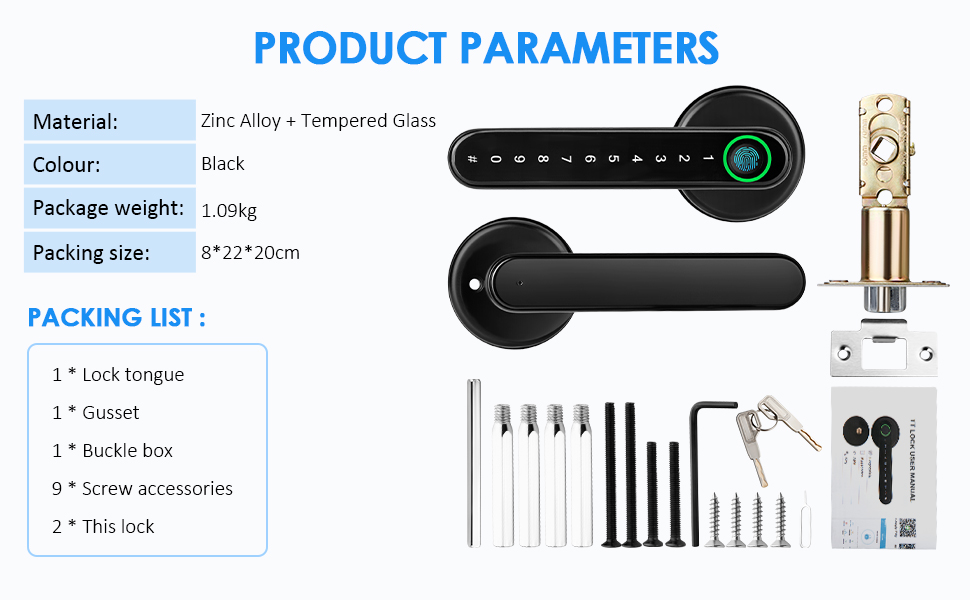
Image: Diagram illustrating the packing list and main components of the Madoec Fingerprint Door Lock.
4. Specifiche
| Caratteristica | Dettaglio |
|---|---|
| Marca | Madoec |
| Caratteristica speciale | Impronta digitale |
| Tipo di blocco | Biometrico, tastiera |
| Dimensioni articolo (L x P x A) | 3.15 x 8.66 x 7.87 pollici |
| Materiale | Zinco |
| Usi consigliati | Residential and office security |
| Colore | Nero |
| Numero di pezzi | 1 (complete set) |
| Tipo di controllore | Android, iOS (via app) |
| Metodo di controllo | Tocco |
| Protocollo di connettività | Bluetooth |
| Peso dell'articolo | 2.2 libbre (circa 1 chilogrammo) |
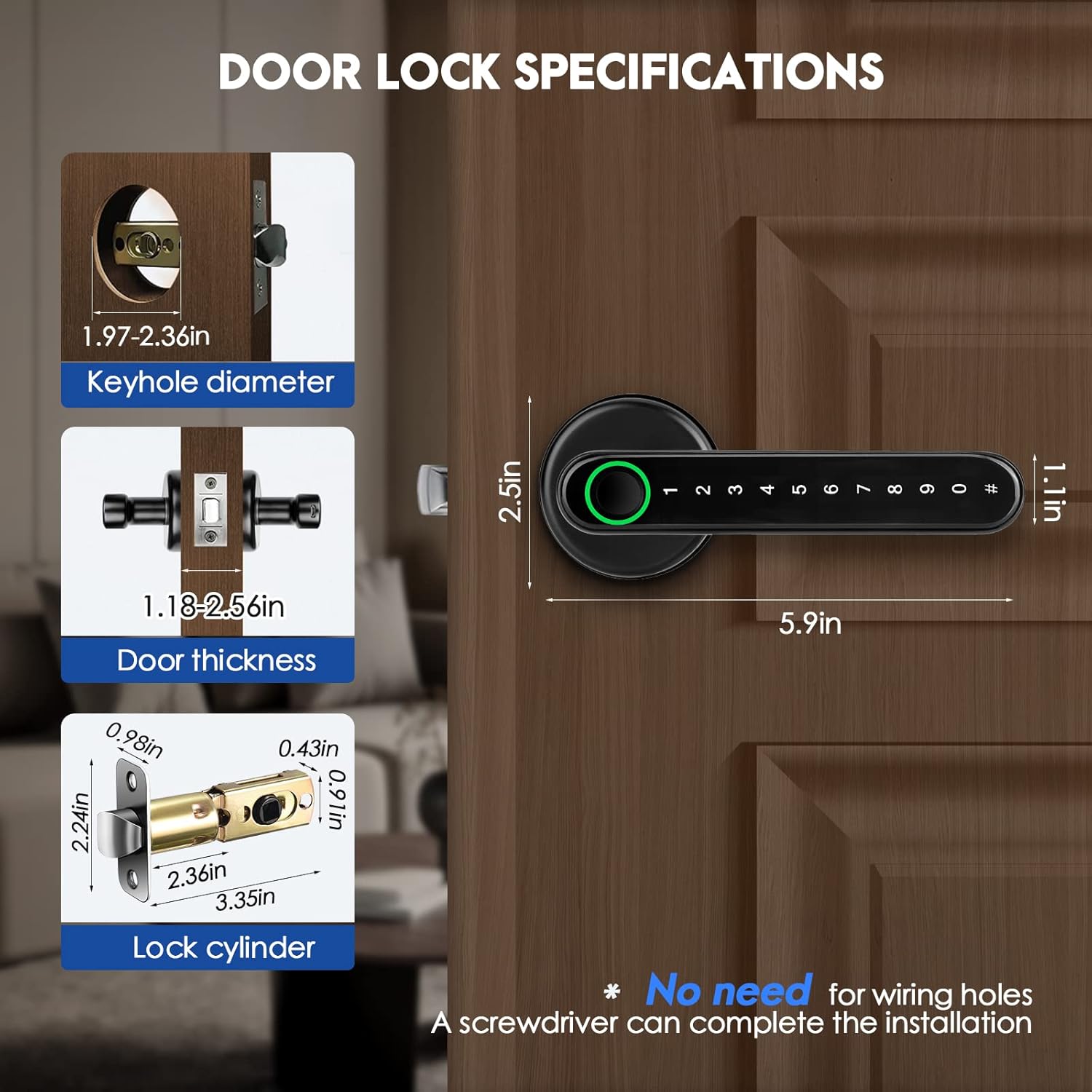
Image: Detailed dimensions for keyhole diameter, door thickness, and lock cylinder, crucial for pre-installation checks.
5. Configurazione e installazione
Follow these steps to install your Madoec Fingerprint Door Lock. A screwdriver is the only tool required for most installations, as no extra drilling is needed for standard door preparations.
5.1 Controllo pre-installazione
- Ensure your door's keyhole diameter is between 1.97-2.36 inches.
- Verify your door thickness is between 1.18-2.56 inches.
- Check the lock cylinder dimensions to ensure compatibility.

Image: Visual guide demonstrating the process of replacing an existing door handle with the Madoec Fingerprint Door Lock.
5.2 Passaggi di installazione
- Adjust Latch Length: Adjust the latch length according to your door hole. Ensure the square hole remains square when adjusting the deadbolt.
- Installa fermo: Inserire il meccanismo di chiusura nel bordo della porta e fissarlo con le viti.
- Prepare Front Handle: Pass the data wire through the square spindle. Ensure the spindle is correctly inserted into the front handle. Install the threaded connection columns onto the front handle.
- Attach Front Handle: Carefully align the front handle with the latch and door, feeding the data wire through the appropriate opening.
- Prepare Rear Handle: Loosen the screw on the inside handle to open the battery cover. Connect the data wire, ensuring the red side aligns with the red side of the base.
- Installa le batterie: Inserire 4 batterie AAA nel vano batterie.
- Attach Rear Handle: Secure the rear handle to the door, aligning it with the front handle and tightening the screws.
- Funzionalità di prova: After installation, test the door's opening and closing mechanism.
Video: A detailed guide on how to install and program the Madoec smart door handle, provided by the manufacturer LQKYWNA.

Image: Illustration showing the reversible design of the door handle, allowing for convenient installation regardless of door opening direction (left or right).
6. Istruzioni per l'uso
The Madoec Fingerprint Door Lock offers multiple convenient ways to unlock your door.
6.1 Sblocco tramite impronta digitale
Place your registered fingerprint on the sensor located on the handle. The lock will unlock within approximately 3 seconds if the fingerprint is recognized. A green light indicates successful authentication, while a red light signifies failure.

Image: Demonstrates the quick 3-second fingerprint unlock feature of the door handle.

Image: Visual representation of the green light for certified access and red light for failed authentication on the fingerprint sensor.
6.2 Keypad Unlock
Enter your programmed passcode on the illuminated keypad. The lock will disengage upon correct entry.
6.3 Sblocco con chiave meccanica
In case of emergency or battery depletion, use the provided mechanical keys to unlock the door manually.

Image: Shows the emergency key slot and the USB power supply interface for temporary power.
6.4 App Control (TTLOCK App)
The lock can be managed via the TTLOCK app on your Android or iOS device. This allows for adding fingerprints, creating temporary passcodes, and monitoring access.
- Download the TTLOCK app from your device's app store.
- Segui le istruzioni nell'app per associare il tuo lucchetto tramite Bluetooth.
- Use the app to add new fingerprints, set custom passcodes, or generate one-time/timed access codes.

Image: Illustrates the convenience of sharing access codes with others remotely using the mobile application.
6.5 Funzione di blocco automatico
The Madoec Fingerprint Door Lock is designed to auto-lock closed doors, providing peace of mind and preventing accidental unlocking.

Image: Highlights the auto-lock feature, ensuring the door is secured automatically after closing.
7. Manutenzione
7.1 Sostituzione della batteria
The lock requires 4 AAA batteries (not included). When the battery is low, the lock will provide an audible or visual alert. To replace:
- Loosen the screw on the inside handle to open the battery cover.
- Rimuovere le vecchie batterie.
- Inserire nuove batterie AAA, assicurandosi della corretta polarità.
- Chiudere il coperchio della batteria e serrare la vite.

Image: Shows the battery compartment of the Madoec Fingerprint Door Lock, indicating where to insert the AAA batteries.
7.2 Pulizia
Wipe the lock's surface with a soft, dry cloth. Do not use harsh chemicals or abrasive materials, as these can damage the finish or electronic components.
8. Risoluzione Dei Problemi
If you encounter issues with your Madoec Fingerprint Door Lock, refer to the following common problems and solutions:
- Il lucchetto non risponde: Check battery levels. If batteries are depleted, use the emergency key or connect a USB power source to the emergency interface.
- Impronta digitale non riconosciuta: Ensure your finger is clean and dry. Try re-registering your fingerprint through the TTLOCK app. Ensure your finger covers the entire sensor area.
- La tastiera non si illumina o non risponde: Controllare il livello delle batterie. Se sono scariche, sostituirle o utilizzare l'alimentazione di emergenza.
- La porta non si blocca/sblocca correttamente: Verify that the lock body and strike plate are correctly aligned and installed. Check for any obstructions in the door frame.
- Problemi di connettività dell'app: Ensure Bluetooth is enabled on your device and you are within range of the lock. Restart the app or your phone if necessary.
9. Informazioni sulla garanzia
The Madoec Fingerprint Door Lock comes with a standard manufacturer's warranty covering defects in materials and workmanship. Please refer to your purchase documentation or contact customer support for specific warranty terms and conditions.
10. Assistenza clienti
For further assistance, technical support, or inquiries regarding your Madoec Fingerprint Door Lock, please refer to the contact information provided with your product packaging or visit the official Madoec websito.
Ask a question about this manual
Ask about setup, troubleshooting, compatibility, parts, safety, or missing instructions. Manuals+ will review the question and use this page’s manual context to help answer it.