
1. Introduzione
1.1 Prodotto finitoview
The Retevis RB21 is a versatile 4G LTE network radio designed for extensive communication. It combines the functionality of a walkie-talkie with essential smartphone features, offering unlimited communication range across 2G/3G/4G networks. This device is suitable for various professional and outdoor activities, ensuring reliable connectivity.
1.2 Caratteristiche principali
- Unlimited Range Communication: Utilizes 2G/3G/4G networks for nationwide coverage.
- Supporto per scheda SIM: Compatible with major network operators (Vodafone, T-Mobile, Telefonica, O2, e-Plus).
- Connettività Wi-Fi e Bluetooth: Allows communication via Wi-Fi without a SIM card, and supports Bluetooth accessories.
- Posizionamento GPS: Integrated GPS function for location tracking and navigation.
- Zello Application Support: Facilitates communication with companions using Zello and similar PTT applications.
- Memoria e archiviazione: Dotato di 1 GB di RAM e 8 GB di memoria interna.
- Display: Features a 2.4-inch touchscreen for easy navigation.
- Durata: IP54 water and dust resistance for robust performance in various environments.
- Batteria a lunga durata: Powered by a 2800mAh rechargeable Li-ion battery with USB charging.
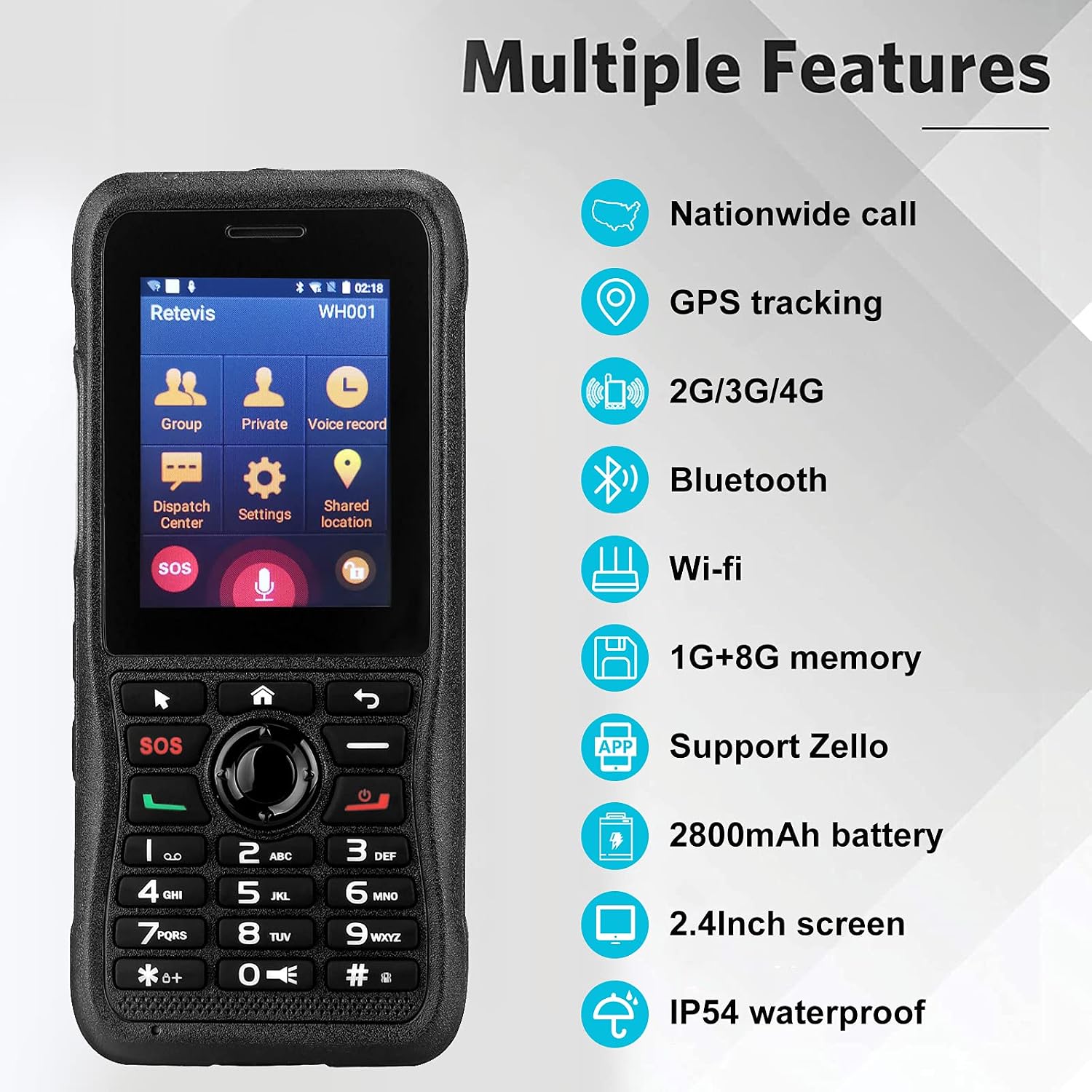
This image highlights the comprehensive features of the Retevis RB21, such as its ability for nationwide calls, GPS tracking, multi-network support (2G/3G/4G), wireless connectivity (Bluetooth, Wi-Fi), ample memory (1GB RAM + 8GB storage), Zello application compatibility, a powerful 2800mAh battery, a clear 2.4-inch screen, and IP54 water resistance.
2. Contenuto della confezione
Si prega di selezionare la casella per i seguenti elementi:
- Retevis RB21 Network Radio Unit
- Batteria ricaricabile agli ioni di litio (2800 mAh)
- Cavo di ricarica USB
- Adattatore di alimentazione (se incluso)
- Clip per cintura
- Manuale d'uso

This image provides a detailed look at the Retevis RB21 device from various angles, illustrating its physical components including the screen, keypad, side buttons, charging port, and the detachable belt clip, which are typically included in the package.
3. Guida all'installazione
3.1 Installazione della scheda SIM e della batteria
- Rimuovere la cover posteriore: Gently pry open the back cover of the device.
- Inserire la carta SIM: Locate the SIM card slot. Insert your single SIM card into the designated slot with the gold contacts facing down, ensuring it is properly seated.
- Inserire la batteria: Place the 2800mAh Li-ion battery into the battery compartment, aligning the contacts.
- Sostituisci la cover posteriore: Fissare saldamente la cover posteriore finché non scatta in posizione.
3.2 Ricarica del dispositivo
- Collegare il cavo di ricarica USB alla porta di ricarica del dispositivo.
- Connect the other end of the USB cable to a power adapter or a computer's USB port.
- The charging indicator will illuminate. Allow the device to charge fully before first use.

This image shows the Retevis RB21 powered on, displaying its user interface. This is relevant for the setup section as it indicates the device is ready for initial configuration after battery and SIM installation.
4. Istruzioni per l'uso
4.1 Accensione/spegnimento
To power on the device, press and hold the Power button until the screen illuminates. To power off, press and hold the Power button, then select 'Power Off' from the options.
4.2 Comunicazione di base (PTT)
The Retevis RB21 functions as a Push-To-Talk (PTT) device. Once configured with a network or Wi-Fi connection and a compatible application like Zello:
- Select your desired contact or group from the main menu.
- Per trasmettere la tua voce, tieni premuto il pulsante PTT dedicato sul lato del dispositivo.
- Release the PTT button to listen for incoming messages.
4.3 Using Zello and GPS Features
The device supports the Zello application for instant communication. The integrated GPS function allows for location tracking and sharing, which can be utilized within compatible applications for enhanced coordination.

This image demonstrates the Retevis RB21's utility for communication in mobile environments, such as logistics or transportation, highlighting its GPS and 4G capabilities for maintaining contact with teams anytime, anywhere.
5. Manutenzione
5.1 Pulizia
Regularly clean the device with a soft, dry cloth. Avoid using harsh chemicals or abrasive cleaners. For stubborn dirt, a slightly damp cloth can be used, ensuring no moisture enters ports or openings.
5.2 Resistenza all'acqua e alla polvere
The Retevis RB21 has an IP54 rating, meaning it is protected against dust ingress and splashing water from any direction. While it offers good protection, it is not fully waterproof. Avoid submerging the device in water or exposing it to heavy rain.

This image visually represents the IP54 rating of the Retevis RB21, showing its resilience against dust and water splashes, which is important for understanding its maintenance and usage in challenging environments.
6. Risoluzione Dei Problemi
6.1 Problemi comuni e soluzioni
- Il dispositivo non si accende:
- Ensure the battery is correctly installed and fully charged. Connect the device to a charger to confirm if it's a battery issue.
- Nessun segnale di rete:
- Check if the SIM card is properly inserted and activated. Verify that you are within a 2G/3G/4G network coverage area. If using Wi-Fi, ensure the Wi-Fi network is active and you have the correct password.
- Cannot transmit or receive messages:
- Confirm that your device is connected to the internet (via SIM data or Wi-Fi). Ensure the Zello or other PTT application is running and you are logged in. Check your selected contact or group for communication.
- Il GPS non funziona:
- Ensure GPS is enabled in the device settings. Move to an open area with a clear view del cielo per una migliore ricezione satellitare.
7. Specifiche tecniche
| Caratteristica | Specificazione |
|---|---|
| Numero di modello | RB21 |
| Sistema operativo | Androide 7.1 |
| Memoria RAM | 1 GB |
| Capacità di archiviazione | 8 GB |
| Dimensioni dello schermo | 2.4 pollici |
| Risoluzione dello schermo | 320x240 |
| Tecnologia cellulare | 4G (2G, 3G, 4G, LTE) |
| Tecnologia senza fili | GSM, LTE, UMTS |
| Supporto operatore wireless | O2, T-Mobile, Vodafone |
| Funzionalità GPS | SÌ |
| Valutazione della resistenza all'acqua | IP54 (non impermeabile) |
| Capacità della batteria | 2800 mAh agli ioni di litio |
| Peso dell'articolo | 60 grammi |
| Dimensioni | Dimensioni: 6 x 2.1 x 13.5 cm |
| Dispositivi compatibili | Retevis RB21 devices, PoC devices on the same network, Bluetooth devices, Wi-Fi networks |
8. Garanzia e supporto
8.1 Informazioni sulla garanzia
Retevis offre una garanzia di 2 anni per il corpo della radio e di 1 anno per gli accessori. Inoltre, è prevista una politica di reso senza motivo entro 30 giorni. Oltre il periodo di garanzia, sono disponibili servizi di manutenzione, i cui costi sono a carico dell'acquirente.
8.2 Assistenza clienti
For any inquiries or support needs, please contact Retevis customer service via Amazon. Responses are typically provided within 12 hours.