
1. Introduzione
The LiebeWH VC837 is a 6000-count auto-ranging digital multimeter designed for accurate and reliable electrical measurements. It features a non-contact AC voltage (NCV) sensor, True RMS measurement, and functions for measuring voltage, current, resistance, capacitance, frequency, duty cycle, diode, continuity, and temperature. Its compact and portable design makes it a convenient tool for various electrical tasks.

Figura 1.1: Fronte view of the LiebeWH VC837 Digital Multimeter, displaying its clear LCD and rotary switch.
2. Informazioni sulla sicurezza
Always read and understand all safety instructions before using this multimeter.
- Do not touch the metal parts of the test leads with your hands during measurement to ensure personal safety.
- Ensure the multimeter is set to the correct function and range before connecting to the circuit.
- Non applicare mai voltage or current that exceeds the maximum rated limits of the multimeter.
- Prestare la massima attenzione quando si lavora con circuiti sotto tensione. Alta vol.tagpossono essere pericolosi.
- Per garantire letture accurate, sostituire le batterie quando compare l'indicatore di batteria scarica.
- Non utilizzare il multimetro se appare danneggiato o se la custodia è aperta.
3. Componenti del prodotto
Il pacchetto in genere include i seguenti articoli:
- 1 x LiebeWH VC837 Digital Multimeter
- 2 cavi di prova (rosso e nero)
- 1 x Thermal Contact (Thermocouple for temperature measurement)
- 1 x Manuale utente

Figure 3.1: The VC837 Multimeter shown with its standard accessories: test leads and a thermocouple.
4. Impostazione
4.1. Installazione della batteria
The multimeter requires 2 x AAA 3V batteries (not included). To install or replace batteries:
- Assicurarsi che il multimetro sia spento.
- Individuare il vano batteria sul retro del dispositivo.
- Utilizzare un cacciavite per aprire il coperchio del vano batteria.
- Inserire due batterie AAA, rispettando la polarità corretta (+/-).
- Riposizionare il coperchio del vano batteria e fissarlo con la vite.

Figura 4.1: Posteriore view of the VC837 Multimeter, indicating the battery compartment location.
4.2. Collegamento dei puntali di prova
Connect the test leads to the appropriate input jacks for your desired measurement:
- Collegare il nero puntale di prova per il COM Jack (comune).
- Per volumetage, resistance, capacitance, frequency, diode, and continuity measurements, connect the rosso puntale di prova per il VΩmA cricco.
- Per misure di corrente fino a 600 mA, collegare il rosso puntale di prova per il VΩmA cricco.
- Per misure di corrente fino a 10A, collegare il rosso puntale di prova per il 10A cricco.
5. Istruzioni per l'uso
The VC837 features a rotary switch for function selection and several buttons for additional features.
5.1. Rotary Switch Functions
Turn the rotary switch to select the desired measurement function:
- OFF: Powers off the multimeter.
- V~: Volume ACtage misurazione.
- V=: Volume DCtage misurazione.
- Ω / ->| / Buzzer: Resistance, Diode Test, and Continuity Test. Use the SELEZIONA/ID pulsante per scorrere queste funzioni.
- Hz °C °F / NCV: Frequency, Temperature (Celsius/Fahrenheit), and Non-Contact Voltage detection. Use the SELEZIONA/ID pulsante per scorrere queste funzioni.
- uA / mA / A: Microampecco, Milliampere, and Ampere current measurements (AC/DC). Use the SELEZIONA/ID button to cycle through AC/DC modes.
5.2. Funzioni dei pulsanti
- SELEZIONA/ID: Cycles through sub-functions within a rotary switch position (e.g., Resistance, Diode, Continuity; or AC/DC for current).
- PORTATA/RELAZIONE: Manually selects measurement range (disables auto-ranging) or activates Relative mode.
- PRESA/*: Freezes the current display reading (Data Hold). Long press to activate backlight.
5.3. Esecuzione delle misurazioni
Fasi generali di misurazione:
- Connect the test leads correctly to the multimeter and the circuit.
- Ruotare l'interruttore rotante sulla funzione desiderata.
- Leggere il valore di misurazione sul display LCD.
Example: Measuring DC Voltage
- Collegare il cavo nero a COM e il piombo rosso a VΩmA.
- Portare il selettore rotativo su V=.
- Connect the test leads across the component or circuit where you want to measure DC voltage.
- Leggi il vol.tage valore sul display.
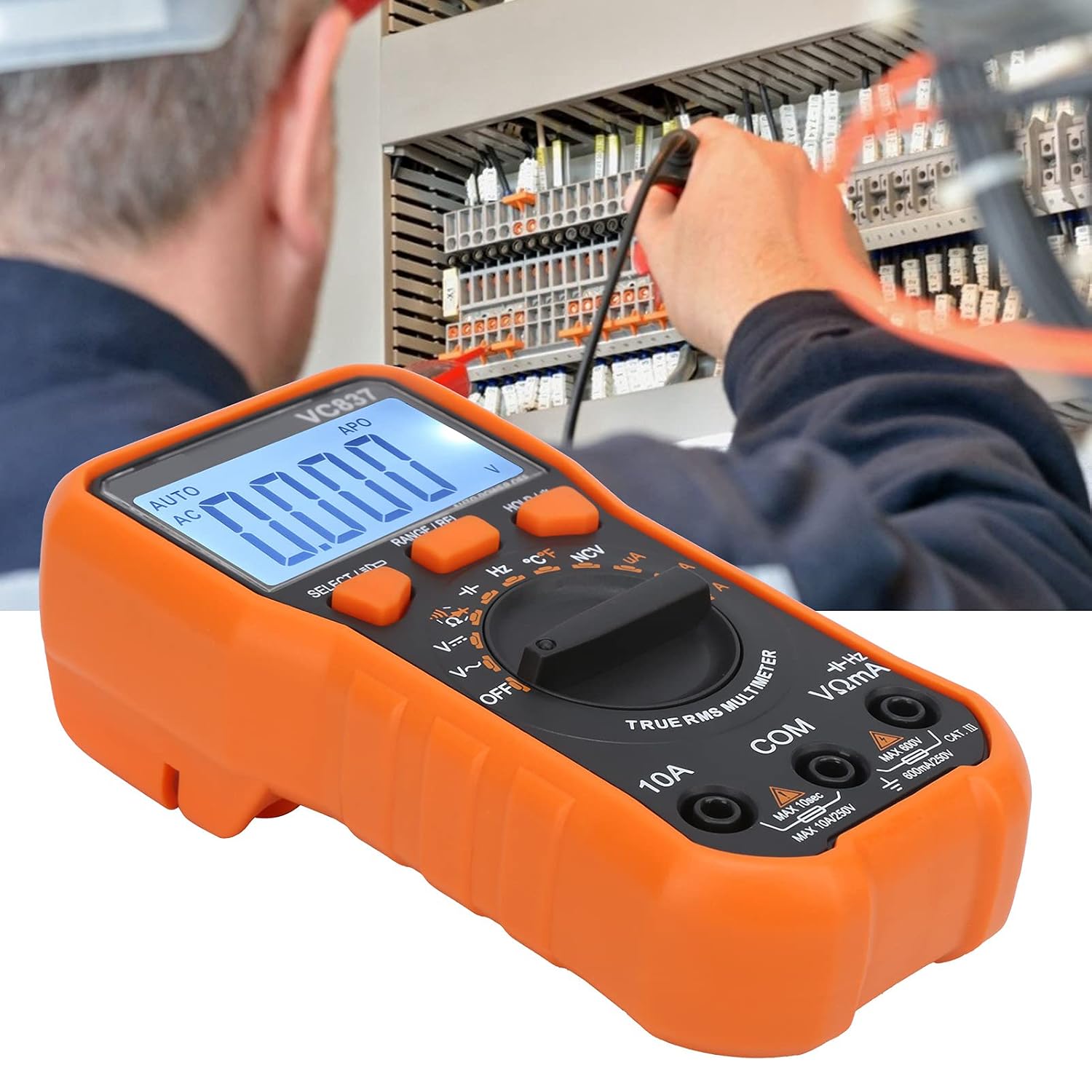
Figure 5.1: The VC837 Multimeter being used to measure electrical parameters in a circuit.
5.4. Vol. senza contattotage (NCV) Rilevamento
Per rilevare il volume CAtage senza contatto diretto:
- Ruotare il selettore in posizione Hz °C °F / NCV posizione.
- Premere il tasto SELEZIONA/ID button until NCV is active (indicated on the display).
- Move the top edge of the multimeter near the conductor. The NCV sensor will detect AC voltage, indicated by an audible beep and LED light.
6. Manutenzione
6.1. Pulizia
Pulisci la custodia con l'adamp panno e detersivo delicato. Non utilizzare abrasivi o solventi.
6.2. Sostituzione della batteria
Per le istruzioni sulla sostituzione delle batterie, fare riferimento alla Sezione 4.1. Sostituire tempestivamente le batterie quando compare l'indicatore di batteria scarica per mantenere la precisione della misurazione.
6.3. Sostituzione del fusibile
This multimeter may contain internal fuses for protection. Fuse replacement should only be performed by qualified personnel. Refer to the full manual for specific fuse ratings and replacement procedures.
7. Risoluzione Dei Problemi
- Nessun display / Display debole:
Check battery installation and polarity. Replace batteries if they are low or depleted. - Letture errate:
Ensure the correct function and range are selected. Check test lead connections. Verify the circuit is properly connected. - Indicazione "OL" (sovraccarico):
The measured value exceeds the selected range. Switch to a higher range or ensure the input is within the multimeter's maximum specifications. - Il multimetro non si accende:
Check batteries. Ensure the rotary switch is not stuck between positions.
8. Specifiche
| Caratteristica | Specificazione |
|---|---|
| Modello | VC837 |
| Display | 6000 Counts LCD (approx. 61 x 28 mm) |
| Alimentazione elettrica | 2 batterie AAA da 3 V (non incluse) |
| Samptasso di ling | 3 volte / secondo |
| Risposta in frequenza CA | Da 40 Hz a 2 kHz |
| Impedenza di ingresso | 10 MΩ |
| Spegnimento automatico | Circa 15 minuti |
| Basso volumetage Allarme | Al di sotto di 2.4 V. |
| Modalità operativa | Auto or Manual Ranging |
| Materiale | addominali |
9. Garanzia e supporto
For detailed warranty information and customer support, please refer to the specific warranty card included with your product or visit the official LiebeWH websito. Conserva la ricevuta d'acquisto come prova d'acquisto.