
BirdDog BD-BDPF120
Manuale utente della telecamera box BirdDog PF120 Full HD NDI 20x
Model: BD-BDPF120
1. Introduzione
The BirdDog PF120 is a high-performance Full HD NDI box camera designed for professional video production environments. It features an Exmor R back-illuminated sensor, 20x optical zoom, and a full color matrix, all housed within a durable all-metal chassis. This manual provides essential information for the proper setup, operation, and maintenance of your PF120 camera.
2. Contenuto della confezione
Si prega di verificare che tutti gli articoli elencati di seguito siano inclusi nel pacco. Se alcuni articoli risultano mancanti o danneggiati, contattare immediatamente il fornitore.
- BirdDog PF120 Full HD NDI 20x Box Camera
- Adattatore di alimentazione (CC 12V)
- Copriobiettivo
- Documentazione (Guida rapida, Informazioni sulla sicurezza)
3. Prodotto finitoview
The BirdDog PF120 is engineered for versatility and robust performance. Key features include:
- Full NDI support for seamless integration into IP workflows.
- 20x optical zoom for detailed close-ups.
- Exmor R back-illuminated sensor for superior low-light performance.
- Durable all-metal housing.
- Multiple connectivity options including HDMI, NDI/PoE, RS-232, and USB2.0.
Fotocamera a 3.1° Viewe componenti

Figura 3.1: Fronte view of the BirdDog PF120 camera, showcasing the lens and the BirdDog logo on the side panel.
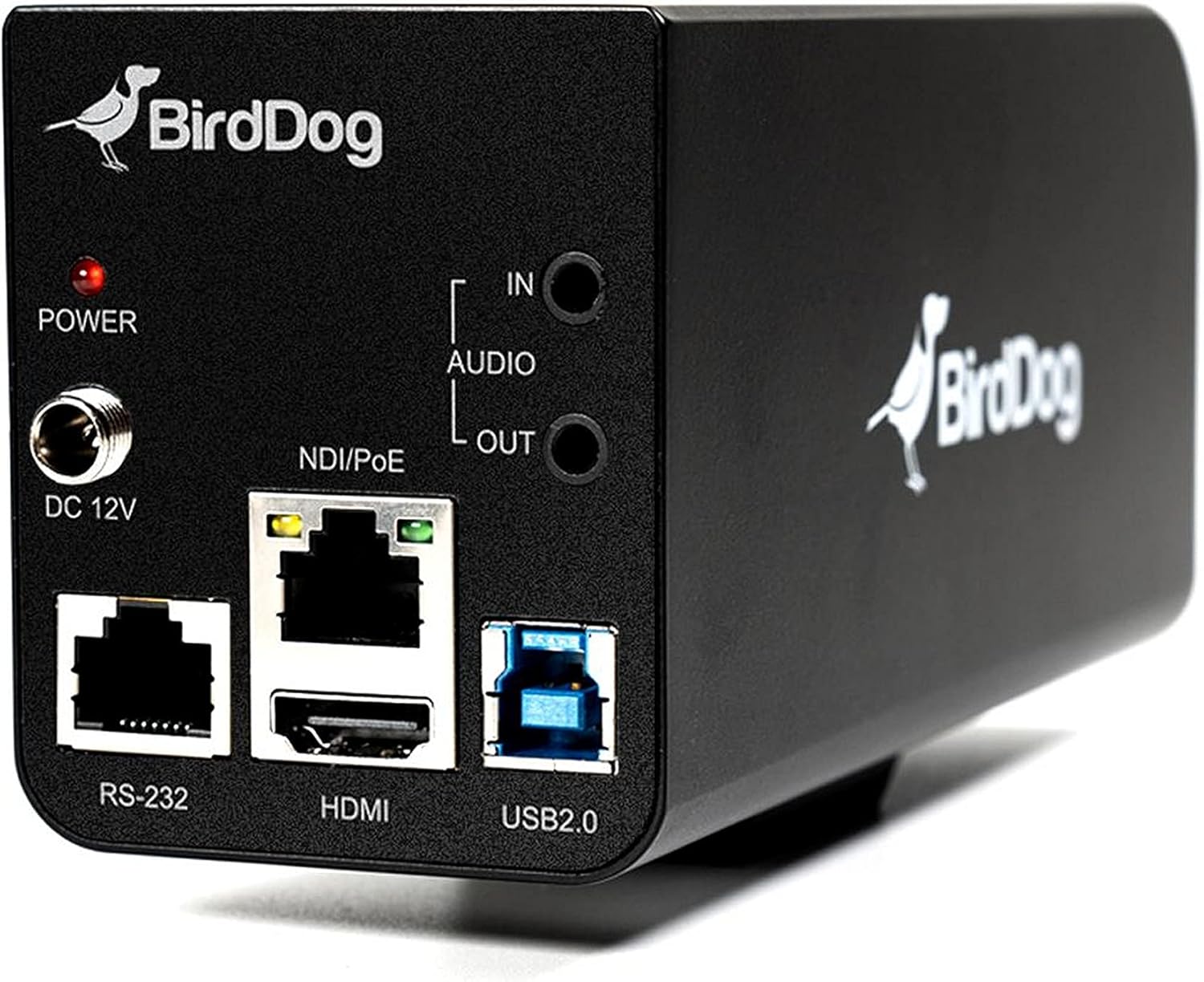
Figura 3.2: Rear panel of the BirdDog PF120, displaying the power input (DC 12V), audio input/output, NDI/PoE port, HDMI output, RS-232 port, and USB2.0 port.
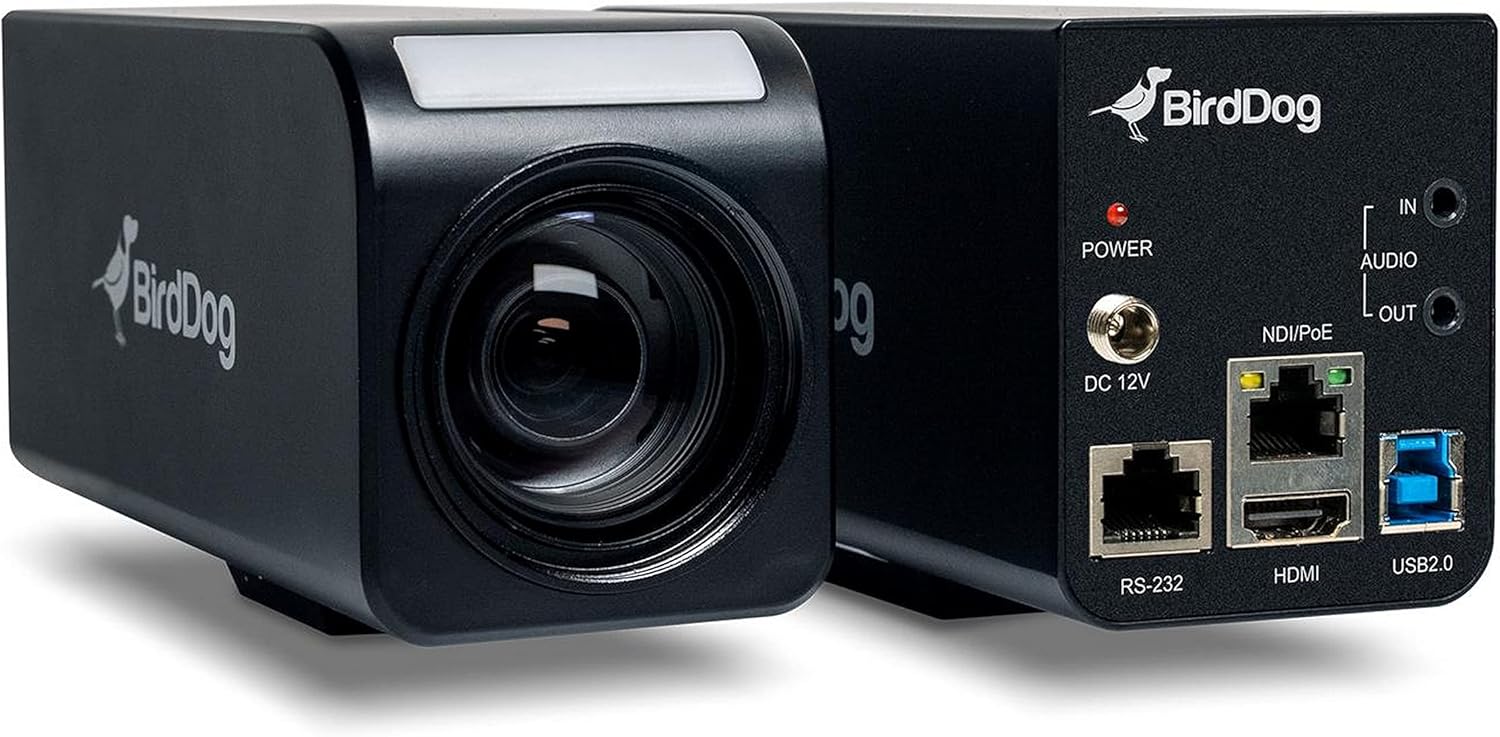
Figura 3.3: Combinato view of the BirdDog PF120, showing both the front lens assembly and the rear connectivity panel.

Figura 3.4: Superiore view of the BirdDog PF120 camera, highlighting the sleek design and BirdDog branding.
4. Impostazione
4.1 Accensione
- Connect the supplied DC 12V power adapter to the "DC 12V" port on the rear of the camera.
- Collegare l'adattatore di alimentazione a una presa di corrente adatta.
- Alternatively, if using a PoE-enabled network switch, connect an Ethernet cable to the "NDI/PoE" port. The camera will power on via Power over Ethernet.
4.2 Network Connection (NDI)
- Connect an Ethernet cable from the "NDI/PoE" port on the camera to your network switch or router.
- Ensure your network is configured to support NDI protocols.
- The camera will obtain an IP address automatically via DHCP. For static IP configuration, refer to the BirdDog Central application or web interfaccia.
4.3 uscita video
- NDI Output: The primary video output is via NDI over the Ethernet connection.
- Uscita HDMI: Connect an HDMI cable from the "HDMI" port on the camera to a monitor or video switcher for direct video monitoring.
5. Utilizzo della fotocamera
5.1 Accesso al Web Interfaccia
- Once connected to the network, use the BirdDog Central application or an IP scanner to discover the camera's IP address.
- Aprire un web browser e inserisci l'indirizzo IP della telecamera per accedervi web interfaccia.
- Dal web interface, you can configure video settings, network parameters, and control camera functions.
5.2 Controllo della telecamera
The PF120 can be controlled via:
- NDI Tools: Utilize NewTek NDI Tools (e.g., NDI Studio Monitor) for basic control.
- BirdDog Central / Cam Control: BirdDog's dedicated software provides comprehensive control over camera settings, including zoom, focus, iris, and color matrix.
- RS-232: Connect a compatible serial controller to the RS-232 port for hardware control.
- Telecomando: The camera supports remote control methods as specified in the product documentation.
5.3 Zoom e messa a fuoco
The PF120 features a 20x optical zoom lens. Zoom and focus adjustments are typically made through the web interface or compatible control software.
6. Manutenzione
- Pulizia: Use a soft, dry cloth to clean the camera body. For the lens, use a specialized lens cleaning solution and microfiber cloth. Avoid abrasive cleaners.
- Aggiornamenti del firmware: Periodically check the BirdDog website for firmware updates. Keeping the firmware updated ensures optimal performance and access to new features.
- Magazzinaggio: Quando non viene utilizzata per lunghi periodi, conservare la fotocamera in un luogo fresco e asciutto, lontano dalla luce solare diretta e da temperature estreme.
7. Risoluzione Dei Problemi
7.1 Nessun potere
- Assicurarsi che l'adattatore di alimentazione sia collegato saldamente sia alla fotocamera sia a una presa di corrente funzionante.
- If using PoE, verify that the Ethernet cable is connected to a PoE-enabled port on your switch and that the switch is providing power.
7.2 No NDI Signal
- Controllare la connessione del cavo Ethernet.
- Verify that the camera has obtained an IP address (check your router's DHCP client list or use BirdDog Central).
- Ensure your network firewall is not blocking NDI traffic.
- Confirm that NDI tools or software on your receiving device are correctly configured to discover NDI sources.
7.3 Problemi di qualità dell'immagine
- Check lens for smudges or dust and clean if necessary.
- Adjust focus settings via the web interfaccia o software di controllo.
- Review exposure, white balance, and color matrix settings in the camera's web interfaccia.
8. Specifiche
| Caratteristica | Dettaglio |
|---|---|
| Numero di modello | BD-BDPF120 |
| Risoluzione di acquisizione video | Formato: 1080p |
| Risoluzione video efficace | 720 pixel |
| Zoom ottico | 20x |
| Tipo di zoom | Digital Zoom, Optical Zoom |
| Tecnologia di connettività | Cablato |
| Protocollo di connettività | Wi-Fi (for control/management, NDI is primary video) |
| Metodo di controllo | Remote, Iris, RS-232 |
| Fonte di alimentazione | AC/DC, PoE |
| Cosatage | 5 watt |
| Materiale | Metallo |
| Dimensioni articolo (L x P x A) | 9.9 x 9 x 3.6 pollici |
| Peso dell'articolo | 2.94 libbre |
| Tipo di montaggio | Wall Mount (as per spec, but typically box cameras are versatile) |
| Valutazione internazionale di protezione | Grado di protezione IP65 |
| Tecnologia a bassa luminosità | Colore notturno |
9. Garanzia e supporto
For warranty information and technical support, please refer to the official BirdDog website or contact your authorized BirdDog reseller. Keep your proof of purchase for warranty claims.
BirdDog Official Websito: www.bird-dog.tv
Ask a question about this manual
Ask about setup, troubleshooting, compatibility, parts, safety, or missing instructions. Manuals+ will review the question and use this page’s manual context to help answer it.