
Introduzione
This manual provides instructions for the proper use and maintenance of your Argus 60 Capacity Slide Projector Magazine Tray. This tray is designed to hold up to 60 individual 35mm slides, facilitating their organization and projection with compatible Argus slide projectors. Please read this manual thoroughly before using the product.
Impostare
Before using the slide magazine tray, ensure it is clean and free from dust or debris. The tray is designed for easy loading of 35mm slides.
- Ispezionare il vassoio: Examine the tray for any visible damage. The black plastic construction should be intact, and the slide slots should be clear.
- Preparare le diapositive: Ensure your 35mm slides are clean and correctly oriented for projection.
- Carica diapositive: Carefully insert each slide into an individual slot within the magazine tray. Ensure the slide is fully seated and oriented correctly for your projector's feeding mechanism. The tray can hold up to 60 slides.

Immagine 1: Dall'alto verso il basso view of the slide magazine tray, illustrating the individual slots for slide insertion.
Once all desired slides are loaded, the tray is ready to be inserted into a compatible Argus slide projector.
Operativo
This section describes how to use the Argus 60 Capacity Slide Projector Magazine Tray with a compatible slide projector.
- Spegnimento del proiettore: Always ensure your slide projector is turned off and unplugged before inserting or removing the slide tray.
- Inserisci vassoio: Align the loaded magazine tray with the projector's tray slot. Gently push the tray into the projector until it clicks securely into place. Refer to your specific projector's manual for exact insertion procedures.
- Accendi il proiettore: Plug in and turn on your slide projector.
- Begin Projection: Use the projector's controls to advance slides and begin your presentation. The tray will feed slides sequentially.
- Rimuovere il vassoio: After use, turn off and unplug the projector. Press any tray release buttons on the projector and gently pull the magazine tray out.
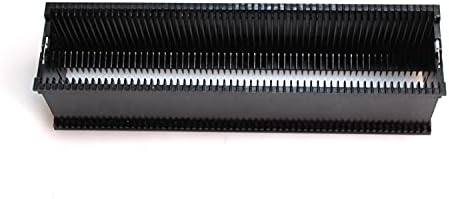
Immagine 2: Lato view of the slide magazine tray, highlighting its robust construction and design for slide handling.
Manutenzione
Proper maintenance ensures the longevity and optimal performance of your slide magazine tray.
- Pulizia: Use a soft, dry, lint-free cloth to wipe the exterior of the tray. For stubborn dust or grime, a slightly damp È possibile utilizzare un panno imbevuto di sapone neutro, quindi asciugare accuratamente. Evitare detergenti abrasivi o solventi.
- Rimozione della polvere: Use a can of compressed air to remove dust from inside the slide slots. Ensure the air is directed away from any sensitive components of a projector if cleaning while inserted.
- Magazzinaggio: Store the tray in a cool, dry place, away from direct sunlight and extreme temperatures. Keep it covered or in a protective case to prevent dust accumulation.
- Gestione: Handle the tray carefully to avoid dropping it or applying excessive force, which could damage the plastic or internal mechanisms.
Risoluzione dei problemi
This section addresses common issues you might encounter with your slide magazine tray.
- Il vassoio non si inserisce correttamente:
- Check for obstructions in the projector's tray slot or on the tray itself.
- Ensure the tray is correctly aligned with the projector's mechanism.
- Verify that the projector is powered off before insertion.
- Slides Jamming:
- Ensure slides are properly seated in their individual slots and are not bent or damaged.
- Clean any dust or debris from the slide slots and the projector's slide gate.
- Verify that the slides are of the correct size (35mm) for the tray and projector.
- Tray Not Advancing Slides:
- This issue is typically related to the projector's internal mechanism. Refer to your projector's user manual for troubleshooting slide advancement problems.
- Ensure the tray is fully inserted and locked into place.
Specifiche
| Caratteristica | Dettaglio |
|---|---|
| Capacità | 60 Slides |
| Materiale | Plastica nera |
| Compatibilità | Compatible with Argus slide projectors (verify specific model compatibility with your projector's manual) |
| Peso dell'articolo | 1 libbra (circa 0.45 kg) |
| ASIN | B097S87BPW |
| Produttore | Argo |
| Data prima disponibilità | 23 giugno 2021 |
Garanzia e supporto
For specific warranty information or technical support regarding your Argus 60 Capacity Slide Projector Magazine Tray, please refer to the documentation provided with your original purchase or contact Argus customer service directly. As this product is often sold as an accessory or used item, warranty terms may vary.
For further assistance, please visit the official Argus website or consult your slide projector's manual for compatibility and operational details.