
Introduzione
This manual provides detailed instructions for the setup, operation, and maintenance of your Depusheng MX8 Professional 8-Channel Audio Mixer. Please read this manual thoroughly before using the device to ensure proper function and to prevent damage. Keep this manual for future reference.
Informazioni sulla sicurezza
- Alimentazione elettrica: Utilizzare solo l'adattatore di alimentazione specificato. Assicurarsi che il volumetage corrisponde all'alimentazione elettrica locale.
- Acqua e umidità: Non esporre il mixer ad acqua, pioggia o umidità eccessiva. Evitare di posizionare oggetti contenenti liquidi sull'unità.
- Ventilazione: Assicurare un'adeguata ventilazione attorno all'unità. Non ostruire le aperture di ventilazione.
- Calore: Tenere l'unità lontana da fonti di calore quali termosifoni, bocchette di ventilazione, stufe o altri apparecchi che producono calore.
- Manutenzione: Non tentare di riparare l'unità da soli. Per qualsiasi intervento di assistenza, rivolgersi a personale qualificato.
- Potenza fantasma: When using condenser microphones, ensure +48V phantom power is activated. Turn off phantom power before connecting or disconnecting microphones to prevent damage.
Contenuto della confezione
Dopo aver aperto la confezione, verificare che tutti gli articoli siano presenti e in buone condizioni:
- Depusheng MX8 Audio Mixer Unit
- Adattatore di alimentazione
- Manuale d'uso
Prodotto finitoview e controlli
Familiarize yourself with the layout and functions of the Depusheng MX8 mixer.
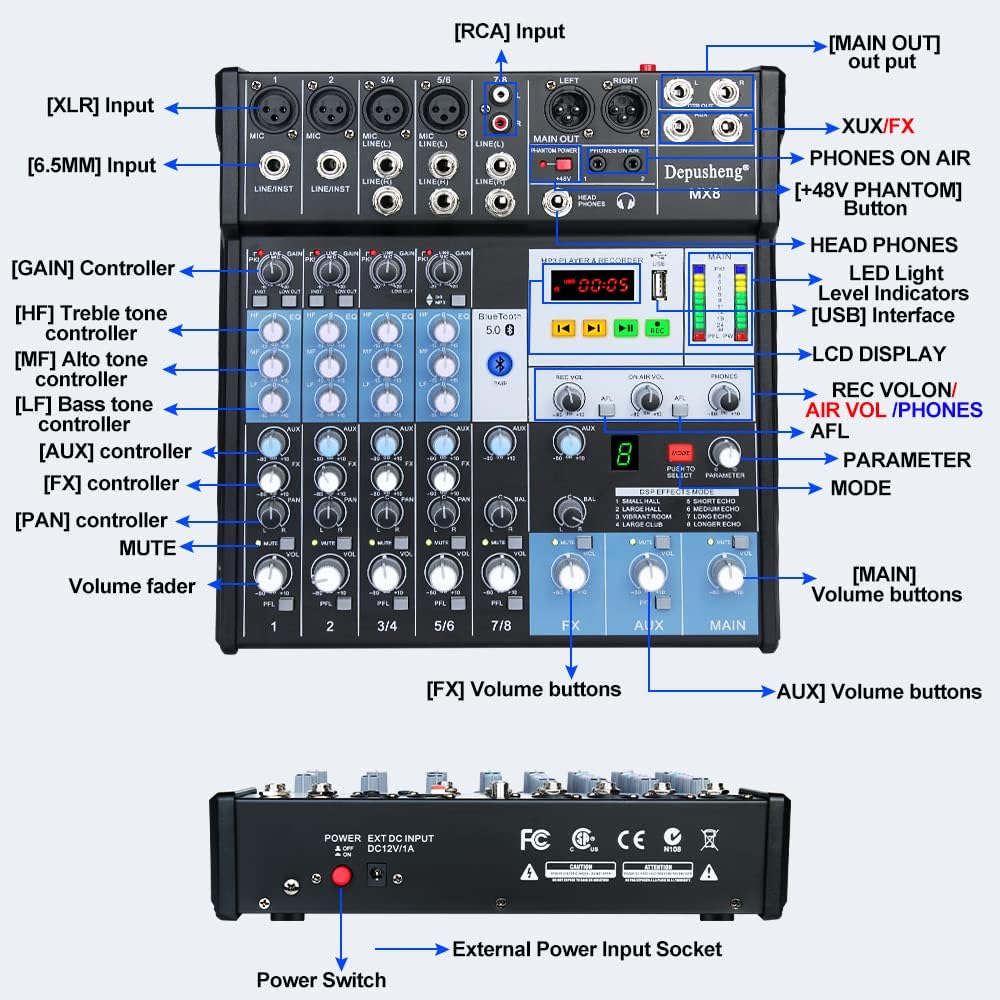
Figura 1: Pannello frontale sopraview of the Depusheng MX8 mixer, showing various input/output jacks, control knobs, faders, and the MP3 player/recorder section.
The mixer features multiple input channels, equalization controls, DSP effects, Bluetooth connectivity, and USB playback/recording capabilities. Key components include:
- Interfacce di ingresso: XLR, 6.5mm (1/4 inch) Line/Instrument, RCA.
- Interfacce di uscita: Main Out (XLR, 6.5mm), Control Room Out, Aux Out, FX Send, Headphone Out.
- Controlli del canale: GAIN, High (HF), Mid (MF), Low (LF) tone controllers, AUX, FX, PAN, MUTE, Volume fader.
- MP3 Player & Recorder: USB interface, LCD display, control buttons, LED indicator lights.
- Effetti DSP: Mode selection and parameter adjustment for 8 built-in effects.
- Potenza fantasma: +48V button for condenser microphones.
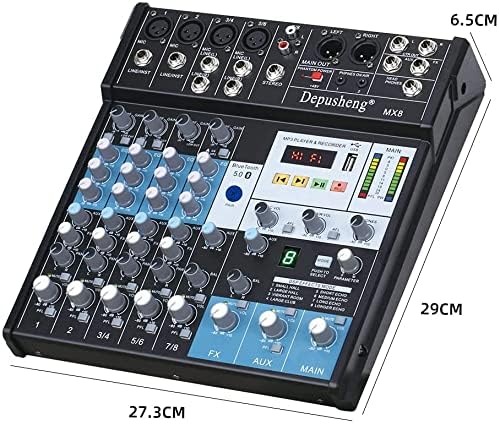
Figura 2: Dimensions of the Depusheng MX8 Audio Mixer.
Impostare
Follow these steps to set up your Depusheng MX8 mixer.
1. Collegamento elettrico
Connect the provided power adapter to the 'DC12V/1A' input socket on the rear of the mixer. Plug the adapter into a suitable power outlet. Use the power switch located next to the power input to turn the unit on or off.
2. Collegamenti del microfono
- Microfoni dinamici: Connect dynamic microphones using XLR cables to the MIC inputs or 6.5mm (1/4 inch) TS/TRS cables to the LINE/INST inputs.
- Microfoni a condensatore: Connect condenser microphones using XLR cables to the MIC inputs. Press the +48V FANTASMA button to supply power to the microphone. Ensure the button is off before connecting or disconnecting.
3. Collegamento delle cuffie
Connect your monitor headphones to the HEAD PHONES output jack using a 6.5mm (1/4 inch) TRS connector. Adjust the headphone volume using the dedicated TELEFONI manopola.
4. Amplifier or Mobile Speaker Connection
Collegare il MAIN OUTMAIN (XLR or 6.5mm) of the mixer to the input of your amplifier or powered speakers. Adjust the main output volume using the PRINCIPALE volume fader.
5. Connessione al computer
Connect the mixer to your computer using a USB cable. The mixer functions as a USB soundcard, allowing for audio input and output with your computer.

Figura 3: Connection diagram illustrating various devices connected to the Depusheng MX8 mixer.
Operazione
1. Equalization (EQ) Adjustment
Each channel features a 3-band equalizer to shape the tone of your audio source. Adjust the knobs for High (HF), Mid (MF), and Low (LF) frequencies to achieve your desired sound.

Figura 4: Tre-stage equalization controls for adjusting high, mid, and low frequencies.
2. Effetti DSP
The mixer includes 8 Digital Signal Processing (DSP) reverb effects. Use the MODALITÀ button to cycle through the effects (Small Hall, Large Hall, Vibrant Room, Large Club, Short Echo, Medium Echo, Long Echo, Longer Echo). Adjust the PARAMETRO manopola per regolare con precisione l'effetto selezionato.

Figura 5: DSP effects section with 8 reverb options.
3. Connessione Bluetooth
Per connettere un dispositivo Bluetooth:
- Assicurarsi che il mixer sia acceso.
- Attiva il Bluetooth sul tuo dispositivo mobile.
- Cercare available devices and select "Depusheng-MX8" to pair.
- Una volta effettuato il collegamento, puoi trasmettere l'audio in modalità wireless dal tuo dispositivo al mixer.

Figura 6: Establishing a wireless Bluetooth connection with the mixer.
4. Riproduzione e registrazione USB
The mixer supports USB playback and recording functions:
- Riproduzione USB: Inserisci un'unità flash USB contenente audio files into the USB port. Use the MP3 player controls (play, pause, skip) to navigate and play music.
- Registrazione USB: Premere il tasto RICORDA button on the MP3 player/recorder section to start recording audio directly to a connected USB flash drive.
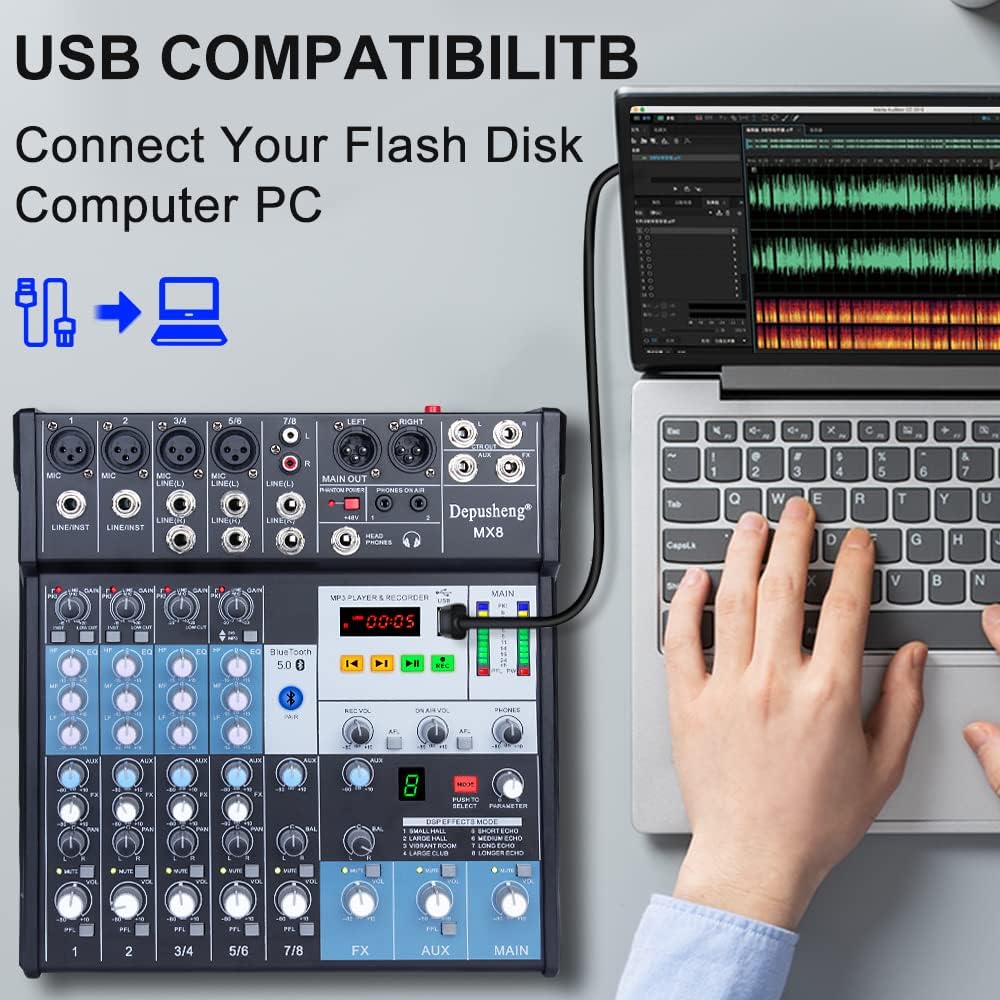
Figura 7: Connecting a USB flash drive to the mixer for playback or recording.
5. Computer Recording
To record audio to your computer:
- Connect the mixer to your computer via USB.
- Open your preferred Digital Audio Workstation (DAW) or recording software on your computer.
- Select the mixer as your audio input device within the software settings.
- Adjust input levels on the mixer and in your software, then begin recording.
1 video: Demonstrates various setup and operation aspects of the Depusheng MX8 mixer, including connecting microphones (0:08-0:22), adjusting EQ (0:23-0:26), connecting headphones (0:31-0:38), connecting to an amplifier/speakers (0:39-0:46), selecting DSP effects (0:47-0:53), Bluetooth pairing (0:54-1:06), USB playback (1:08-1:16), and computer recording (1:27-1:31).
Manutenzione
To ensure the longevity and optimal performance of your Depusheng MX8 mixer, follow these maintenance guidelines:
- Pulizia: Utilizzare un panno morbido e asciutto per pulire l'esterno dell'unità. Non utilizzare detergenti abrasivi, solventi o cere.
- Magazzinaggio: Quando non in uso, conservare il mixer in un luogo fresco e asciutto, lontano dalla luce solare diretta e da temperature estreme.
- Protezione dalla polvere: Quando non lo si utilizza, coprire il mixer con una copertura antipolvere per evitare l'accumulo di polvere nei fader e nelle manopole.
Risoluzione dei problemi
If you encounter issues with your Depusheng MX8 mixer, refer to the following common problems and solutions:
| Problema | Possibile causa | Soluzione |
|---|---|---|
| Nessun potere | Adattatore di alimentazione non collegato o difettoso; interruttore di alimentazione spento. | Check power connections; ensure power switch is on; try a different outlet. |
| Nessuna uscita audio | Incorrect cable connections; main volume fader down; amplifier/altoparlanti spenti o disattivati. | Verify all audio cable connections; increase main volume; check ampstato del lificatore/altoparlante. |
| Il microfono non funziona | Microphone not connected properly; GAIN knob too low; +48V phantom power off for condenser mics. | Check microphone connection; increase GAIN; activate +48V for condenser mics. |
| Problemi di connessione Bluetooth | Dispositivo non in modalità di associazione; mixer non rilevabile; interferenza. | Ensure mixer is in Bluetooth mode; restart both devices; move closer to the mixer. |
| La riproduzione USB non funziona | Unità USB non formattata correttamente; non supportata file formato; unità USB difettosa. | Ensure USB is FAT32 formatted; use supported audio formats (e.g., MP3); try another USB drive. |
Specifiche
- Numero di canali: 8
- Tecnologia di connettività: Bluetooth, USB
- Fonte di energia: Elettrico con cavo
- Peso dell'articolo: 5.41 libbre (2.46 chilogrammi)
- Dimensioni della confezione: 15.08 x 12.28 x 3.82 pollici
- Effetti DSP: 8 effetti riverbero integrati
- Potenza fantasma: +48V
Garanzia e supporto
For warranty information or technical support, please refer to the documentation included with your purchase or contact Depusheng customer service. Keep your proof of purchase for any warranty claims.