
Introduzione
The Poly DA75 is a versatile USB-A/USB-C digital adapter designed to connect Poly Quick Disconnect (QD) headsets to computers. It ensures clear audio quality for call center environments, supporting both USB-A and USB-C connections for compatibility with various systems. This adapter is engineered to work seamlessly with platforms such as Avaya, Genesys, and Cisco, providing a reliable audio solution for professionals.
Le caratteristiche principali includono:
- Connettività universale: Equipped with both USB-A and USB-C connectors on the cable for broad compatibility with new and legacy equipment.
- Intelligent Headset Recognition: Automatically adjusts audio performance to the specific Poly Quick Disconnect headset for optimized call quality.
- Acoustic Protection: Incorporates features to manage safe volume levels, protecting user hearing.
- Platform Integration: Fully compatible with leading call center platforms including Avaya, Genesys, and Cisco.
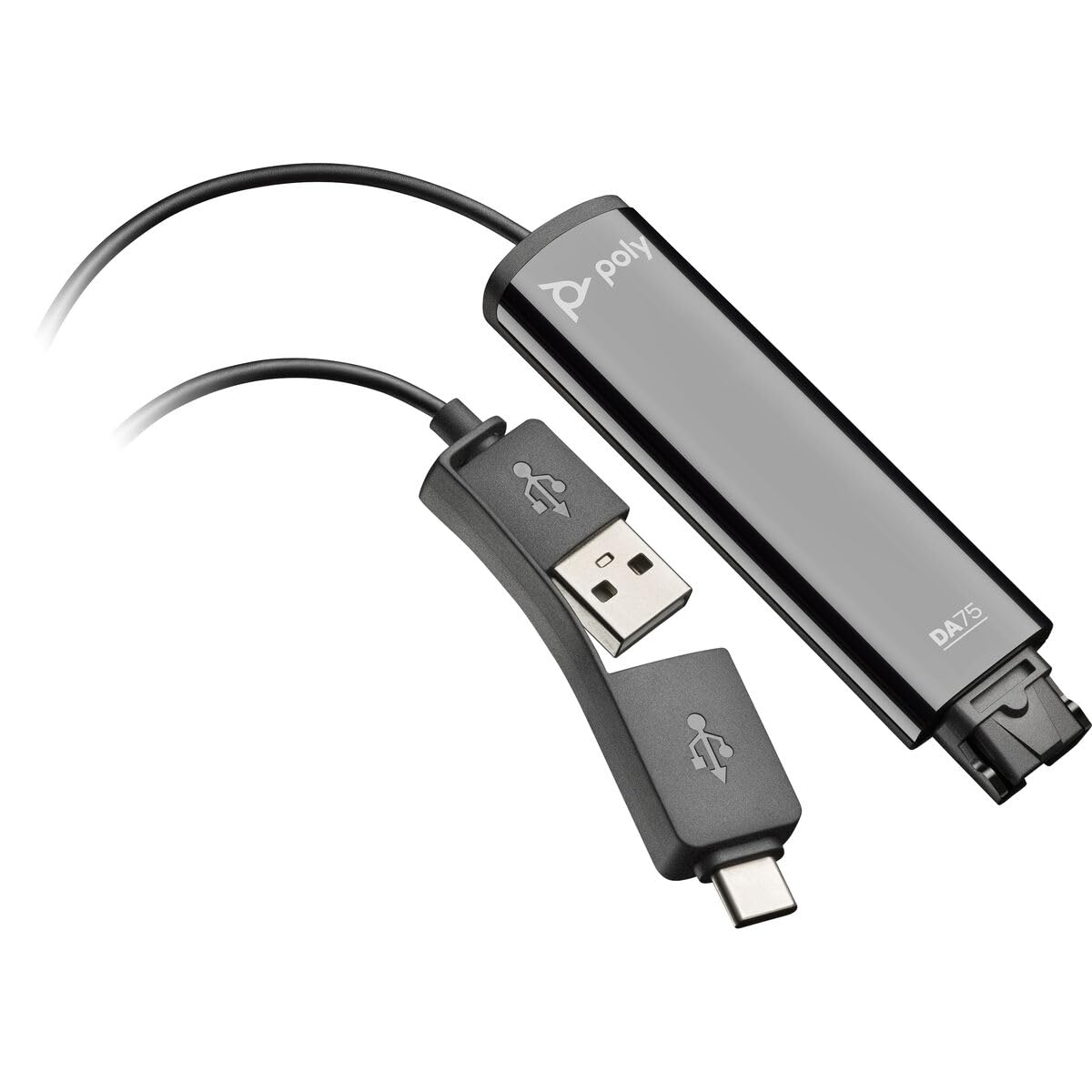
Image: The Poly DA75 USB-A/USB-C Digital Adapter, showing its dual USB-A and USB-C connectors and the Quick Disconnect port for headsets.
Cosa c'è nella scatola
The Poly DA75 package typically includes the following items:
- Poly DA75 USB-A/USB-C Digital Adapter
- Documentazione (Guida rapida, Informazioni sulla sicurezza)
Note: Headsets are sold separately and are not included with the DA75 adapter.
Impostare
Follow these steps to set up your Poly DA75 Digital Adapter:
- Connetti l'auricolare: Connect your Poly Quick Disconnect (QD) headset to the QD port on the Poly DA75 adapter. Ensure the connection is secure.
- Connessione al computer:
- If your computer has a USB-A port, use the USB-A connector on the DA75 cable.
- If your computer has a USB-C port, use the USB-C connector on the DA75 cable.
Plug the appropriate USB connector into an available USB port on your computer.
- Installazione del driver: The DA75 is a plug-and-play device. Your operating system (Windows, macOS) should automatically detect the device and install the necessary drivers. This process may take a few moments.
- Verifica il riconoscimento del dispositivo:
- Finestre: Vai a Settings > System > Sound or Pannello di controllo > Audio. The Poly DA75 should appear as an audio input and output device.
- Mac OS: Vai a System Settings > Sound. The Poly DA75 should appear as an input and output device.
Select the Poly DA75 as your default communication device for both playback and recording.
- Configurazione software: If you are using communication software (e.g., Avaya, Genesys, Cisco, Microsoft Teams, Zoom), ensure that the Poly DA75 is selected as the audio device within the application's settings.
Istruzioni per l'uso
The Poly DA75 adapter facilitates audio communication through your connected Poly QD headset. Its operation is primarily managed through your computer's operating system and communication software.
- Effettuare/ricevere chiamate: Use your communication software to initiate or answer calls. The audio will be routed through your connected Poly QD headset via the DA75 adapter.
- Controllo del volume: Adjust the listening volume using your computer's system volume controls or the volume controls within your communication application.
- Microfono disattivato: Mute and unmute your microphone using the controls provided by your communication software.
- Ottimizzazione audio: The DA75 automatically optimizes audio for your specific Poly QD headset. No manual adjustments are typically required for audio profiles.
Manutenzione
To ensure the longevity and optimal performance of your Poly DA75 Digital Adapter, follow these maintenance guidelines:
- Pulizia: Gently wipe the adapter with a soft, dry, anti-static cloth. Do not use liquid cleaners or abrasive materials.
- Magazzinaggio: Conservare l'adattatore in un luogo fresco e asciutto, lontano dalla luce solare diretta e da temperature estreme.
- Gestione: Evitare di piegare o torcere eccessivamente il cavo, soprattutto in prossimità dei connettori, per evitare danni interni.
- Connettività: Ensure the Quick Disconnect (QD) connection and USB connections are clean and free of debris before connecting.
Risoluzione dei problemi
If you encounter issues with your Poly DA75 Digital Adapter, refer to the following troubleshooting steps:
| Problema | Possibile causa | Soluzione |
|---|---|---|
| Nessun audio dall'auricolare |
|
|
| Il microfono non funziona |
|
|
| Adapter not recognized by computer |
|
|
Specifiche
| Caratteristica | Dettaglio |
|---|---|
| Numero di modello | 218266-01 |
| Marca | POLI |
| Tipo di connettore | USB-A, USB-C (dual connector) |
| Dispositivi compatibili | Poly Quick Disconnect (QD) Headsets |
| Usi specifici | PC, Call Center Platforms (Avaya, Genesys, Cisco) |
| Colore | Nero |
| Dimensioni articolo (L x P x A) | 0.98 x 0.39 x 2.95 pollici |
| Peso dell'articolo | 30 grammi |
| Numero di porte | 2 (USB-A/USB-C to QD) |
| Codice UPC | 197029650054, 017229175112 |
Garanzia e supporto
Informazioni sulla garanzia: The Poly DA75 Digital Adapter comes with a Garanzia limitata del produttore di 2 anniLa presente garanzia copre i difetti di materiali e fabbricazione in condizioni di normale utilizzo. Si prega di conservare la prova d'acquisto per eventuali reclami in garanzia.
Supporto tecnico: For technical assistance, product inquiries, or warranty service, please contact Poly customer support. Visit the official Poly website for the most up-to-date support contact information, FAQs, and additional resources.
Risorse online: Supporto Poli Websito