
Redragon K601-RGB
Redragon DITI K601-RGB One-Handed Gaming Keyboard Instruction Manual
Introduzione
Welcome to the instruction manual for your new Redragon DITI K601-RGB One-Handed Gaming Keyboard. This compact mechanical keyboard is designed for competitive gaming, offering programmable macro keys, customizable RGB backlighting, and durable blue mechanical switches for a tactile and responsive experience. This manual will guide you through the setup, operation, maintenance, and troubleshooting of your device.

Immagine: The Redragon DITI K601-RGB One-Handed Gaming Keyboard showcasingrazie al suo design compatto e alla vivace retroilluminazione RGB.
Informazioni sulla sicurezza
- Tenere la tastiera lontana da liquidi e da umidità eccessiva.
- Evitare temperature estreme.
- Non tentare di smontare o modificare la tastiera. Ciò potrebbe invalidare la garanzia e causare danni.
- Pulisci la tastiera con un panno morbido e asciutto. Evita prodotti chimici aggressivi.
- Questo prodotto non è resistente all'acqua.
Contenuto della confezione
Si prega di controllare il contenuto della confezione una volta disimballata per assicurarsi che siano presenti tutti gli articoli:
- Redragon DITI K601-RGB One-Handed Gaming Keyboard
- Cavo USB
- Manuale dell'utente (questo documento)
Guida all'installazione
1. Collegamento della tastiera
- Individua una porta USB disponibile sul tuo PC o laptop.
- Plug the USB connector of the Redragon DITI K601-RGB keyboard into the USB port.
- Il sistema operativo rileverà e installerà automaticamente i driver necessari.
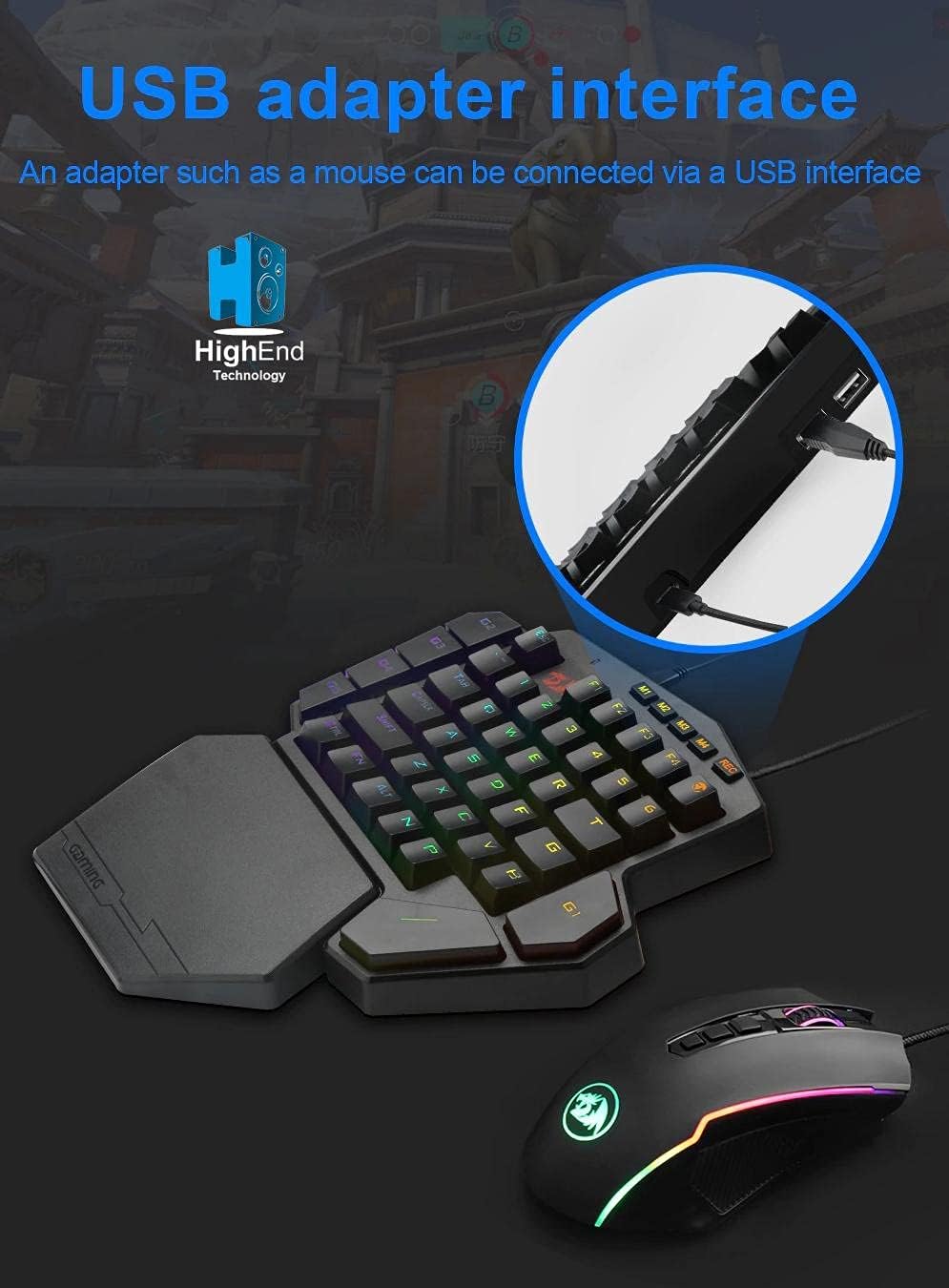
Immagine: Illustrates connecting the Redragon DITI K601-RGB keyboard via its USB interface to a computer.
2. Driver and Software Installation (Optional for Advanced Features)
For full customization, including macro programming and advanced RGB lighting effects, it is recommended to install the Redragon software.
- Visita il sito ufficiale di Redragon webposto (www.redragonzone.com) e vai alla sezione supporto o download.
- Cercare the DITI K601-RGB model and download the latest driver and software package.
- Seguire le istruzioni sullo schermo per completare l'installazione.
Istruzioni per l'uso
Funzioni chiave di base
The DITI K601-RGB features a compact layout optimized for gaming. Standard keys function as labeled.

Immagine: Avvicinamento view of the Redragon DITI K601-RGB keyboard, highlighting the dustproof blue mechanical switches and keycap design.
Programmazione macro
The keyboard supports custom macro programming for enhanced in-game control. This feature is managed through the Redragon software.
- Open the Redragon DITI K601-RGB software.
- Navigate to the "Macro" tab or section.
- Create a new macro by recording key presses and delays.
- Assign the created macro to one of the programmable keys (e.g., G1-G5 or M1-M4, if available on your model).
- Salva il tuo profile.

Immagine: Screenshot of the Redragon DITI K601-RGB software's main page, illustrating the custom macro programming interface and profile gestione.
Personalizzazione dell'illuminazione RGB
Customize the RGB backlighting to match your setup or mood using the dedicated software.
- In the Redragon software, locate the "Light" or "RGB" settings.
- Choose from various preset lighting effects or create your own custom patterns.
- Regola luminosità, velocità e combinazioni di colori.
- Save your preferred lighting profile.
Manutenzione
Pulizia
- Scollegare la tastiera dal computer prima di pulirla.
- Utilizzare un panno morbido e privo di lanugine per pulire la superficie della tastiera.
- Per rimuovere polvere e detriti tra i tasti, utilizzare aria compressa.
- Non utilizzare detergenti liquidi, solventi o materiali abrasivi.
Magazzinaggio
Quando non viene utilizzata per lunghi periodi, conservare la tastiera in un luogo fresco e asciutto, lontano dalla luce solare diretta e da temperature estreme.
Risoluzione dei problemi
La tastiera non risponde
- Assicurarsi che il cavo USB sia collegato saldamente sia alla tastiera che al computer.
- Prova a collegare la tastiera a una porta USB diversa.
- Riavvia il computer.
- Check your computer's Device Manager to see if the keyboard is recognized. Reinstall drivers if necessary.
I tasti non funzionano correttamente
- Pulire con aria compressa la zona circostante i tasti interessati per rimuovere eventuali detriti.
- If using custom macros, ensure they are correctly programmed and assigned in the software.
- Prova la tastiera su un altro computer per escludere problemi specifici del sistema.
Problemi di illuminazione RGB
- Ensure the Redragon software is running and the lighting settings are correctly configured.
- Check for any firmware updates for the keyboard on the Redragon websito.
- Reset lighting settings to default within the software.
Specifiche del prodotto
| Marca | Drago rosso |
| Numero di modello | K601-RGB |
| Connettività | USB cablato |
| Dispositivi compatibili | PC, laptop |
| Tipo di tastiera | Tastiera da gioco meccanica |
| Tipo di interruttore | Interruttori meccanici blu |
| Caratteristiche speciali | Programmable Macro Keys, Customizable RGB Lighting, Gaming Design |
| Colore | Nero |
| Uso consigliato | Gaming (FPS, LoL, PUBG) |
| Disposizione della tastiera | Compact QWERTY (One-Handed) |
| Resistenza all'acqua | Non resistente all'acqua |
| Componenti inclusi | Cavo USB |
Informazioni sulla garanzia
Redragon products typically come with a limited manufacturer's warranty. Please refer to the warranty card included with your product or visit the official Redragon webPer i termini e le condizioni di garanzia dettagliati specifici per la tua regione, visita il sito. Conserva la prova d'acquisto per eventuali reclami in garanzia.
Assistenza clienti
If you encounter any issues or have questions not covered in this manual, please contact Redragon customer support.
- Websito: www.redragonzone.com (Controllare i contatti di supporto regionali)
- E-mail: Fare riferimento al websito per indirizzi email di contatto specifici.
- Telefono: Fare riferimento al websito per numeri di contatto specifici.
Ask a question about this manual
Ask about setup, troubleshooting, compatibility, parts, safety, or missing instructions. Manuals+ will review the question and use this page’s manual context to help answer it.