
Prodotto finitoview
The EWO'S XRT140 Universal Remote Control is designed as a direct replacement for various VIZIO Smart TV remotes. This product has been professionally inspected and tested to ensure it functions and appears like new. It offers seamless control over your VIZIO Smart TV, providing a reliable and user-friendly experience.

Immagine: frontale e laterale view of the EWO'S XRT140 Universal Remote Control, showcasinil suo design ergonomico e la disposizione dei pulsanti.
Guida all'installazione
The EWO'S XRT140 remote control is designed for immediate use with compatible VIZIO Smart TVs. No pairing or programming is required.
Installazione della batteria
- Individuare il vano batterie sul retro del telecomando.
- Far scorrere per aprire il coperchio del vano batterie.
- Insert two (2) 1.5V AAA batteries, ensuring the positive (+) and negative (-) terminals align correctly with the indicators inside the compartment.
- Chiudere saldamente il coperchio del vano batterie.
Once batteries are installed, the remote is ready to operate your VIZIO Smart TV.
Utilizzo del telecomando
This section details the functions of the buttons on your EWO'S XRT140 Universal Remote Control.
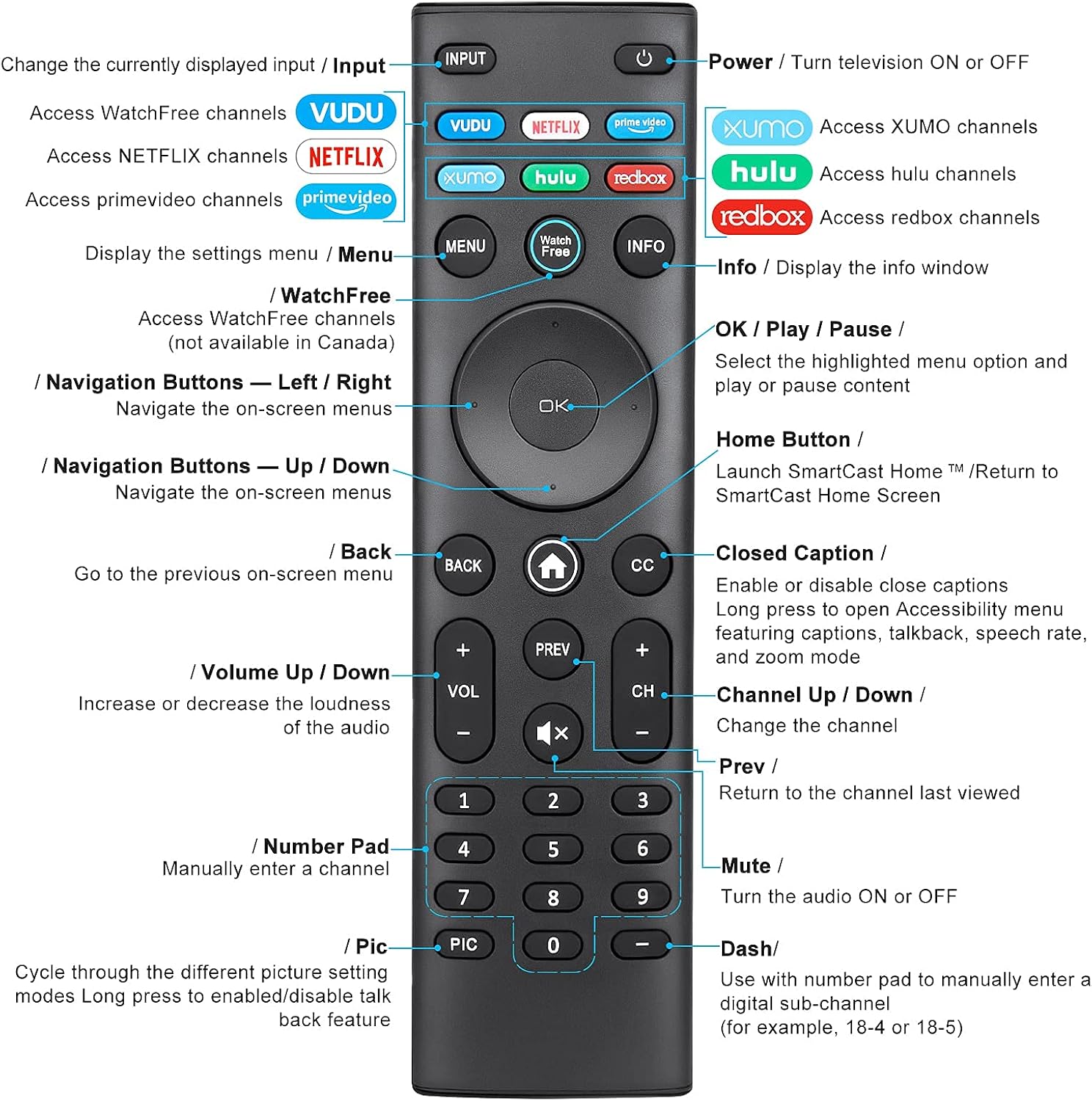
Image: Detailed diagram of the EWO'S XRT140 remote control, labeling each button with its corresponding function.
Funzioni dei pulsanti:
- INGRESSO: Change the currently displayed input source.
- POTENZA (⏻): Turn the television ON or OFF.
- VUD: Access VUDU channels.
- Italiano: Access Netflix channels.
- prime video: Access Prime Video channels.
- XUMO: Access XUMO channels.
- hulu: Access Hulu channels.
- redbox: Access Redbox channels.
- MENU: Display the settings menu.
- WatchFree: Access WatchFree channels (Note: May not be available in all regions, e.g., Canada).
- INFORMAZIONI: Display the info window.
- OK / Play / Pause: Select the highlighted menu option and play or pause content.
- Pulsanti di navigazione (su/giù/sinistra/destra): Naviga tra i menu sullo schermo.
- Home Button (⌂): Launch SmartCast Home or return to the SmartCast Home Screen.
- INDIETRO: Go to the previous on-screen menu.
- CC (sottotitoli): Enable or disable closed captions. Long press to open Accessibility menu featuring captions, talkback, speech rate, and zoom mode.
- VOL +/- (Volume su/giù): Aumenta o diminuisce il volume dell'audio.
- PRECEDENTE: Return to the channel last viewed.
- CH +/- (Canale su/giù): Cambia canale.
- MUTE (🔇): Turn the audio ON or OFF.
- Tastierino numerico (0-9): Manually enter a channel number.
- PIC: Cycle through different picture setting modes. Long press to enable/disable talk back feature.
- DASH (-): Use with the number pad to manually enter a digital sub-channel (e.g., 18-4 or 18-5).
Caratteristiche principali
- Risposta immediata: This remote control boasts a quick transmission and response time of 0.2 seconds, ensuring minimal delay between your command and the TV's action.
- Pulsanti resistenti: The buttons are rigorously tested to support over 150,000 clicks, providing long-lasting reliability.
- Gamma estesa: The remote transmits a signal effectively over long distances, up to 12 meters (40 feet), allowing for flexible viewposizioni di avanzamento.
- Design di alta qualità: Upgraded with a high-end glossy finish, the remote is made from durable ABS material, making it safe for use by children.
- Pulsanti di scelta rapida dedicati: Features 7 convenient shortcut buttons for popular streaming services like VUDU, Netflix, Prime Video, XUMO, Hulu, and Redbox, plus a WatchFree button for quick access.
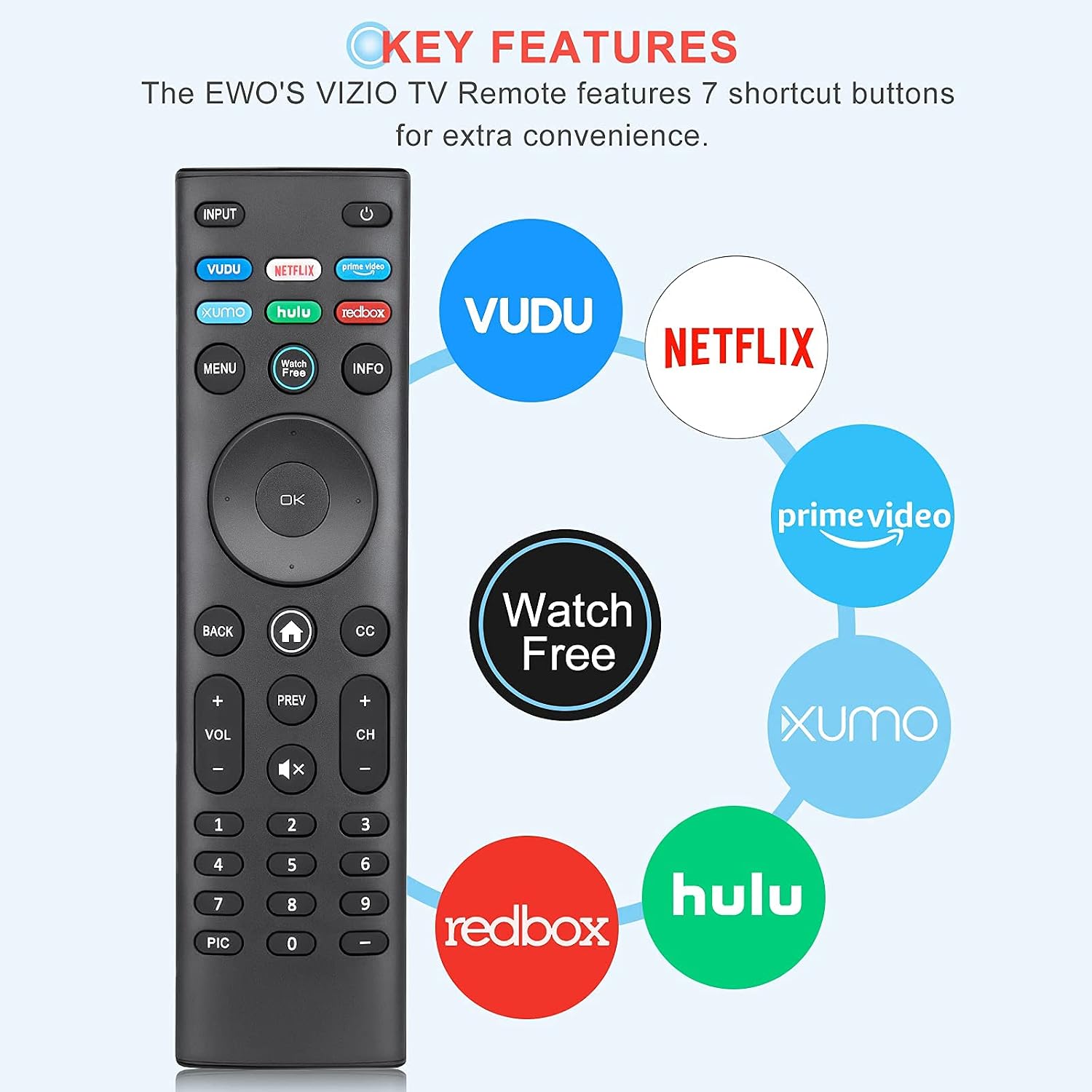
Image: The EWO'S XRT140 remote control with its 7 shortcut buttons for streaming services highlighted, emphasizing convenience.

Image: A hand holding the EWO'S XRT140 remote, with text indicating its fast response time and high click durability.

Image: An illustration demonstrating the EWO'S XRT140 remote's ability to transmit signals over 40 feet, highlighting its long-distance capability.
Compatibilità
The EWO'S XRT140 Universal Remote Control is designed for broad compatibility with VIZIO Smart TVs and various VIZIO remote models.
Compatible VIZIO TV Series:
- All VIZIO LED LCD HD UHD HDR Smartcast 4K 3D Smart TVs
- Including D-Series, E-Series, M-Series, P-Series, PX-Series, V-Series, and OLED-Series.

Image: The EWO'S XRT140 remote alongside various VIZIO SmartCast TV models, illustrating its broad compatibility.
Compatible VIZIO Remote Models:
The XRT140 is a universal remote control compatible with, but not limited to, the following VIZIO remote models:
- XRT112
- XRT122
- XRT302
- XRT135
- XRT510
- XRT500
- XRT100
- XRT136
- VR1
- VR2
- VR10
- VR15

Image: The EWO'S XRT140 remote displayed next to several other VIZIO remote models, indicating its universal compatibility.
Manutenzione
Una cura e una manutenzione adeguate prolungheranno la durata del tuo telecomando.
Pulizia:
- Pulire il telecomando con un panno morbido e asciutto.
- Per sporco ostinato, leggermente dampPulire il panno con acqua o con un detergente delicato e non abrasivo. Non spruzzare il detergente direttamente sul telecomando.
- Evitare l'uso di prodotti chimici aggressivi, solventi o spugne abrasive, poiché potrebbero danneggiare la superficie del telecomando o i componenti interni.
Cura della batteria:
- Sostituire le batterie quando le prestazioni del telecomando diminuiscono o il telecomando smette di rispondere.
- Sostituire sempre entrambe le batterie contemporaneamente con batterie nuove dello stesso tipo (AAA).
- If the remote will not be used for an extended period (e.g., several weeks or months), remove the batteries to prevent leakage and potential damage to the remote.
Risoluzione dei problemi
Se riscontri problemi con il telecomando, fai riferimento ai seguenti passaggi comuni per la risoluzione dei problemi:
| Problema | Possibile causa | Soluzione |
|---|---|---|
| Il telecomando non risponde | Batterie scariche o inserite in modo errato | Sostituire le batterie con nuove batterie AAA da 1.5 V, assicurandosi della corretta polarità. |
| Il telecomando funziona in modo intermittente | Low battery power; Obstruction between remote and TV; Remote sensor on TV is blocked. | Replace batteries. Ensure a clear line of sight between the remote and the TV's IR sensor. Remove any objects blocking the TV's sensor. |
| Pulsanti specifici non funzionanti | Sporco o detriti sotto il pulsante; malfunzionamento del pulsante. | Clean the remote surface around the button. If the issue persists, the button may be faulty. |
| Remote range is reduced | Low battery power; Interference from other electronic devices. | Replace batteries. Move other electronic devices away from the TV or remote. |
Specifiche del prodotto
| Specificazione | Dettaglio |
|---|---|
| Marca | EWO'S |
| Modello | XRT140 |
| Dispositivi compatibili | Television (VIZIO Smart TVs) |
| Portata massima | 40 piedi (circa 12 metri) |
| Tipo di batteria | 2 x AAA (non incluso) |
| Peso dell'articolo | 2.39 once |
| Dimensioni del pacco | 8.19 x 3.66 x 0.83 pollici |
| ASIN | B098YWCB68 |
| Codice UPC | 656942198109 |
| Data prima disponibilità | 8 luglio 2021 |
Garanzia e supporto
As an Amazon Renewed product, the EWO'S XRT140 Universal Remote Control is backed by the Amazon Renewed Guarantee. This ensures that the product has been professionally inspected and tested to work and look like new.
If you are not satisfied with your purchase, renewed products are eligible for replacement or refund under the Amazon Renewed Guarantee. Please refer to the Amazon Renewed program terms and conditions for specific details regarding returns, replacements, and refunds.
For further assistance or inquiries, please contact Amazon customer support or refer to the Amazon Renewed Store for more information.
Amazon Renewed Store Link: Visita lo Store Amazon Renewed