
Introduzione
This manual provides comprehensive instructions for the setup, operation, and maintenance of your POLONO PL60 Thermal Label Printer. Please read this guide thoroughly before using the printer to ensure optimal performance and longevity.
Contenuto della confezione
Verifica che tutti gli articoli elencati di seguito siano inclusi nel tuo pacchetto:
- 1 Grey POLONO PL60 Thermal Label Printer
- 1 Cavo di alimentazione
- Cavo USB 1
- 1 U Disk (containing printer driver, installation guide, setup guide, and user manual)
- 1 Guida rapida
- 10pcs 4"x6" Labels (sample)

Image: All components included in the POLONO PL60 printer package, including the printer, cables, U disk, quick start guide, and sample etichette.
Istruzioni di installazione
- Connect Power and USB Cable: Connect the power cord to the printer and a power outlet. Connect the USB cable from the printer to your computer (Windows or Mac).

Image: Step 1 of setup, showing the power and USB cables being connected to the printer.
- Installa il driver: Insert the included U Disk into your computer. Install the printer driver. Alternatively, download the latest driver from the official POLONO website. The printer is compatible with Windows and Mac operating systems. Note: This printer does not support Bluetooth or Chromebook.

Image: The POLONO PL60 printer connected to a laptop, indicating compatibility with Mac and Windows systems.
- Carica etichette: Open the printer cover. Place the thermal labels into the label compartment, ensuring the print side faces up. Adjust the label guides to fit the label width snugly. Close the cover.

Image: Step 3 of setup, demonstrating how to load labels into the printer's compartment.
- Automatic Label Alignment: After loading labels and closing the cover, press the feed button on the printer. The printer will automatically detect the label size and align the labels for printing.

Image: The POLONO PL60 printer with labels loaded, showing the automatic label detection feature.
Istruzioni per l'uso
Etichette di stampa
The POLONO PL60 printer uses advanced thermal direct technology, eliminating the need for ink or toner. It supports label widths from 1.57 inches (40 mm) to 4.65 inches (118 mm).
- Prepara il tuo documento: Ensure your label design or shipping label is correctly formatted for a 4x6 inch label (or other supported sizes).
- Seleziona stampante: In your computer's print dialog, select "POLONO PL60" as your printer.
- Impostazioni di stampa: Adjust print settings as needed. For optimal print quality, you may need to adjust the print density/darkness and speed in the printer preferences. Slower speeds generally result in better print quality.
- Avvia stampa: Click "Print" to send the label to the printer. The printer can achieve speeds of 150mm/s, printing approximately 72 labels per minute.

Image: The POLONO PL60 printer printing a label, highlighting its high efficiency and print quality.
Adjusting Print Darkness and Speed (Windows Example)
To customize print quality, follow these steps:
- Go to your computer's Impostazioni > Stampanti e scanner.
- Selezionare il POLONO Label Printer e clicca Maneggio.
- Vai a Preferenze della stampante.
- Nel Impostazioni avanzate finestra, clicca su Velocità e seleziona Customize Print Speed. Adjust the slider to a slower speed for better print quality.
- Similarly, adjust Oscurità settings to achieve desired label contrast.
Video: Instructions on how to adjust the print darkness settings for the POLONO PL60 printer.
Dimensioni delle etichette supportate
The printer supports various label sizes, including:
- 4"x6"
- 3"x2"
- 3"x1"
- 2"x1"
- 2-5/16" x 4"
- 2.25"x1.25"
- 2-inch round labels
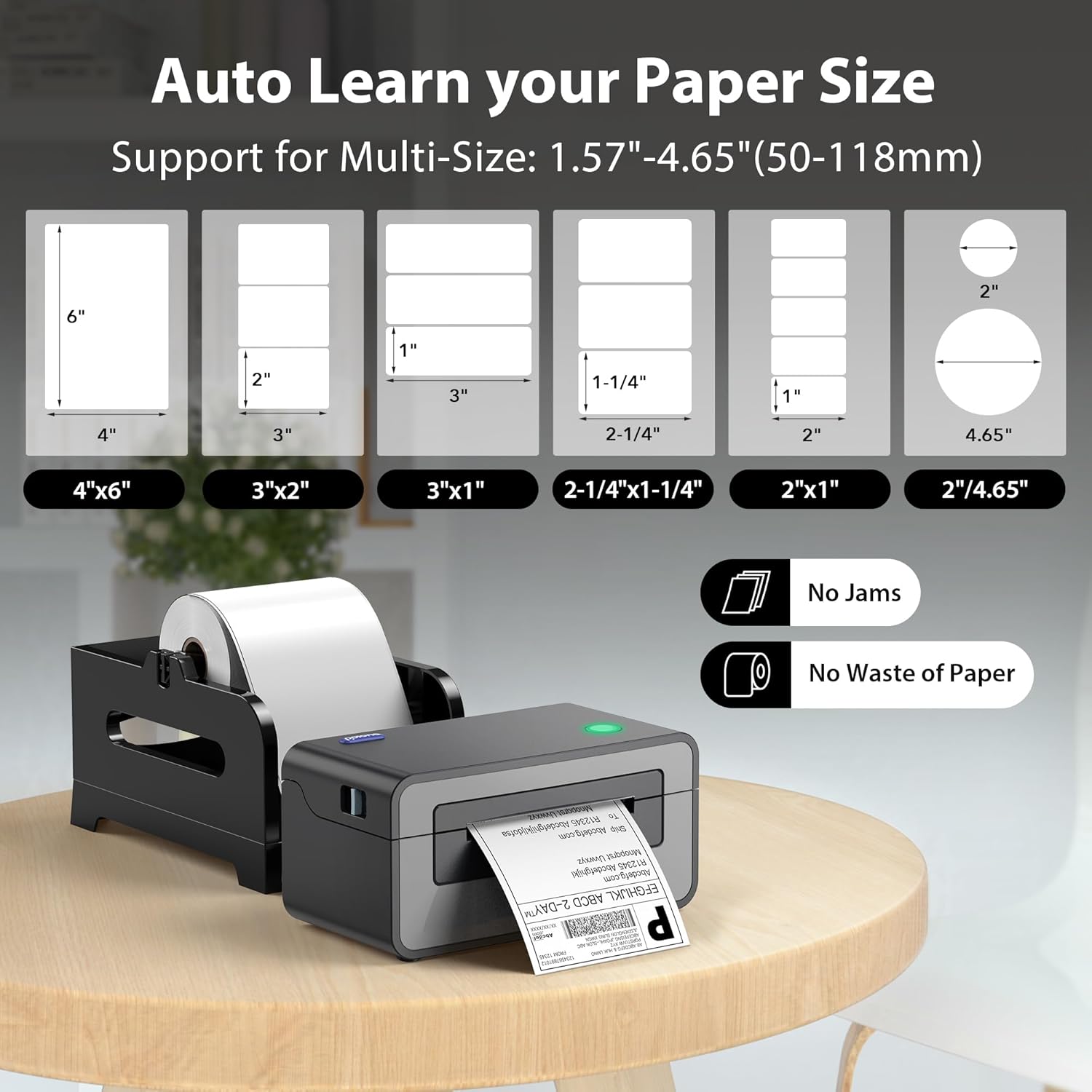
Image: Visual representation of different label sizes that the POLONO PL60 printer can automatically detect and print.
Manutenzione
The POLONO PL60 is a thermal direct printer, meaning it does not require ink cartridges or toner. This simplifies maintenance significantly.
- Pulizia della testina di stampa: Periodically clean the print head with an alcohol wipe to ensure clear print quality. Refer to the detailed user manual on the U Disk for specific cleaning instructions.
- Pulizia generale: Mantenere la stampante libera da polvere e detriti. Utilizzare un panno morbido e asciutto per pulire l'esterno.
Risoluzione dei problemi
Problemi comuni e soluzioni
- Printer Not Responding / Not Printing:
- Ensure the power cord and USB cable are securely connected.
- Verify the printer is turned on (indicated by the LED light).
- Check if the correct printer driver is installed and updated.
- For Mac users experiencing issues, try uninstalling the driver, deleting the printer from your computer settings, then reinstalling the driver from the provided U Disk and re-adding the printer.
- Stampa sbiadita o di scarsa qualità:
- Adjust the print darkness setting in your printer preferences (refer to "Adjusting Print Darkness and Speed" section).
- Assicuratevi di utilizzare etichette termiche di alta qualità.
- Pulire la testina di stampa come descritto nella sezione Manutenzione.
- Labels Not Feeding Correctly / "Out of Labels" Error:
- Ensure labels are loaded correctly with the print side up.
- Adjust the label guides to fit the label width.
- Press the feed button to allow the printer to automatically detect and align the labels.
Specifiche
| Caratteristica | Dettaglio |
|---|---|
| Marca | POLONO |
| Nome del modello | PL60 |
| Tecnologia di connettività | USB |
| Tecnologia di stampa | Termico |
| Colore | Grigio |
| Uscita della stampante | Monocromo |
| Velocità di stampa massima (monocromatica) | 150mm/s (72 labels/minute) |
| Peso dell'articolo | 1.9 chilogrammi |
| Dimensioni del prodotto (P x L x A) | 11.5" x 6" x 6" |
| Risoluzione | 203 x 203 DPI |
| Dimensione massima del supporto | 4 x 6 pollici |
| Formati di carta supportati | 4"x6", 3"x2", 3"x1", 2"x1", 2.25"x1.25", 2-5/16" x 4", 2" Circle Inches |
| Dispositivi compatibili | Laptops, Mac, PC, Windows |
Garanzia e supporto
The POLONO PL60 Thermal Label Printer comes with a Garanzia limitata del produttore di 1 anni.
For further assistance, detailed user manuals, and driver downloads, please refer to the included U Disk or visit the official POLONO websito.
Puoi anche accedere al Guida per l'utente (PDF) per ulteriori informazioni.