
DATOUBOSS 12V 2000W EU
Manuale dell'utente dell'inverter a onda sinusoidale pura DATOUBOSS 2000W
Model: 12V 2000W EU
Marca: DATOUBOSS
1. Introduzione
This manual provides essential information for the safe and efficient operation of your DATOUBOSS 2000W Pure Sine Wave Inverter. This inverter converts 12V DC power from batteries into stable 220V-240V AC 50Hz power, suitable for a wide range of electronic devices and household appliances. Please read this manual thoroughly before use and keep it for future reference.
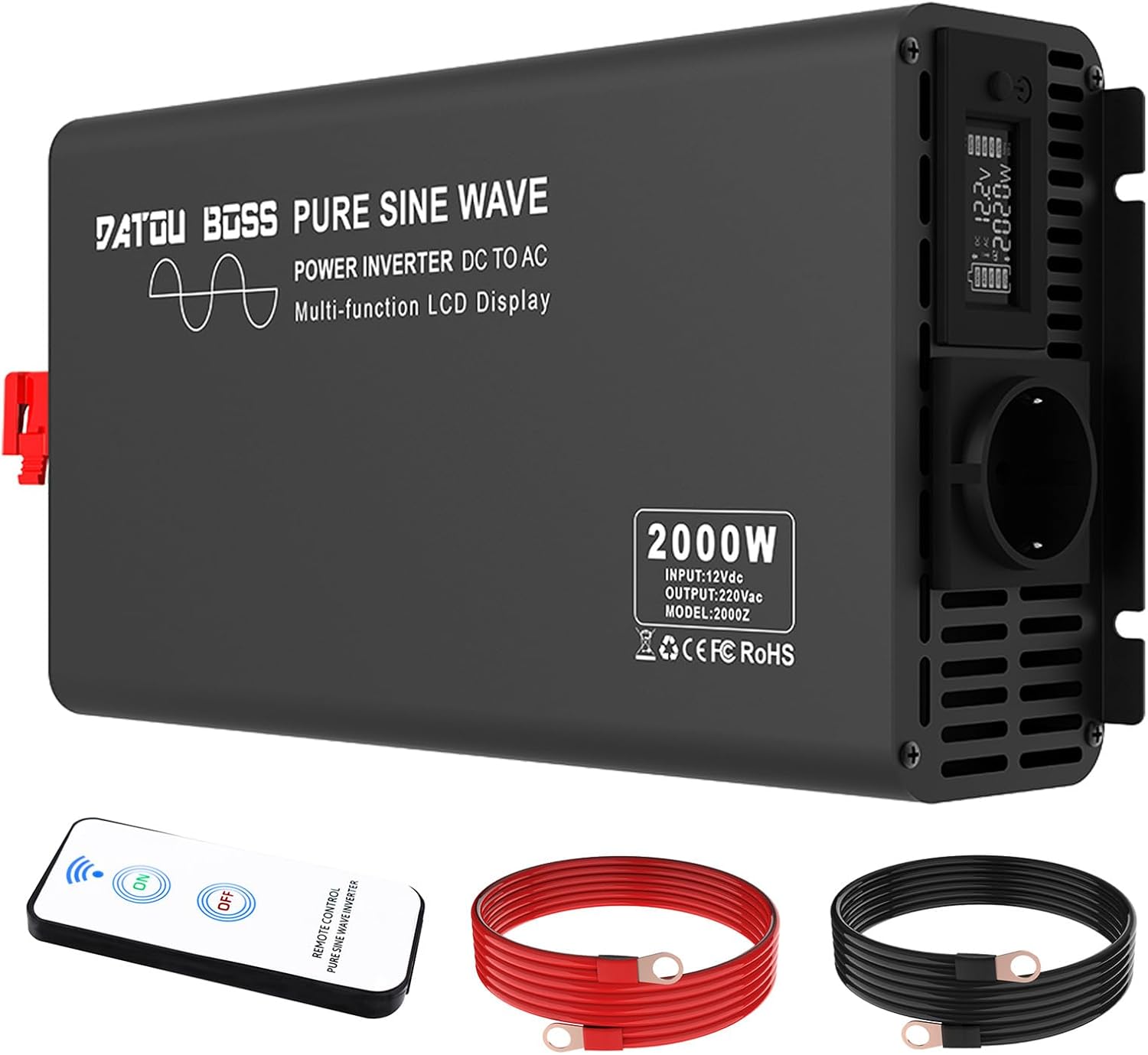
Image: The DATOUBOSS 2000W Pure Sine Wave Inverter, shown with its included remote control and power cables.
2. Informazioni importanti sulla sicurezza
Avvertimento: This product must be used with a 12V DC battery. Ensure that the positive and negative poles are connected correctly during the initial setup. If the device does not start, please check if the starting current of the connected device exceeds the rated power of the inverter. If you receive the product with damaged packaging, scratches, or functional problems, please contact us immediately. We will address your concerns as quickly as possible.
- Always connect the inverter to a 12V DC power source.
- Ensure correct polarity when connecting battery cables.
- Do not exceed the inverter's rated power (2000W continuous, 4000W peak).
- Evitare cortocircuiti e collegamenti con polarità inversa.
- Garantire una ventilazione adeguata per evitare il surriscaldamento.
- Tenere l'inverter lontano da acqua, umidità e materiali infiammabili.
- Non tentare di smontare o modificare l'inverter.

Image: Icons representing the inverter's safety features, including energy efficiency, rapid heat dissipation, undervoltage protezione, overvoltage protection, overload protection, short circuit protection, overheating protection, and reverse polarity protection.
3. Caratteristiche del prodotto
- Uscita onda sinusoidale pura: Provides clean and stable power, comparable to grid electricity, making it safe for sensitive electronic devices such as laptops, smartphones, and other household appliances.
- Alta efficienza: Conversion efficiency of over 95% ensures minimal power loss during long-term use.
- Schermo LCD: Automatically detects and displays input and output voltage, power, frequency, and battery level in real-time, providing clear operational status.
- Protezione avanzata: Features Soft Start Technology and isolated input/output design. Includes comprehensive safety protections against undervoltage, voltage, overheating, overload, short circuit, and reverse polarity.
- Costruzione durevole: Robusto alluminio casing provides advanced protection and promotes efficient heat dissipation, extending the inverter's lifespan.
- Integrated Cooling Fans: Built-in fans effectively circulate air within the inverter for optimal cooling.

Image: An illustration demonstrating the smooth, stable pure sine wave output of the inverter, highlighting its efficient and stable power delivery.

Immagine: Un esploso view of the inverter showing the internal cooling fans, illustrating how they provide effective air circulation.
4. Configurazione e installazione
4.1 Contenuto della confezione
Prima dell'installazione, verificare che tutti gli elementi siano presenti nella confezione:
- Manuale d'uso
- 2 x 20-Inch Cables (Red and Black)
- Inverter a onda sinusoidale pura da 2000 W.
- 1 x telecomando
4.2 Collegamento dell'inverter
- Preparare la batteria: Assicurati che la batteria da 12 V CC sia completamente carica e in buone condizioni.
- Collegare i cavi:
- Connect the red (positive) cable to the positive (+) terminal of the inverter and then to the positive (+) terminal of the battery.
- Connect the black (negative) cable to the negative (-) terminal of the inverter and then to the negative (-) terminal of the battery.
Importante: Always ensure correct polarity. Incorrect connection can damage the inverter and battery.
- Connessioni sicure: Tighten all connections firmly to prevent loose contacts and ensure optimal power transfer.
- Posizionamento: Place the inverter in a well-ventilated area, away from direct sunlight, heat sources, and moisture. Ensure there is enough space around the unit for proper airflow.

Immagine: Un dettaglio view of the inverter's connection points, including the fan, pure copper terminals, power switch, and AC outlets, illustrating proper connection setup.
5. Funzionamento
5.1 Accensione/Spegnimento
- Per accendere: After connecting the inverter to the battery, press the power button on the inverter. The LCD display will illuminate, showing real-time data.
- Per spegnere: Press the power button again. The LCD display will turn off.
5.2 Wireless Remote Control Pairing
If your model includes a remote control, follow these steps to pair it:
- Press and hold the power button on the inverter until a blinking red dot appears on the display.
- Point the remote control towards the inverter and press the power button on the remote control.
- The pairing process between the inverter and the remote control is now complete.
5.3 Collegamento degli elettrodomestici
Once the inverter is powered on, you can connect your AC appliances to the EU outlets on the inverter. Ensure the total wattage of connected appliances does not exceed the inverter's continuous power rating (2000W).

Image: The inverter shown powering various household and electronic devices, including an iPad, mobile phones, microwave, laptop, camera, water kettle, hairdryer, chainsaw, and refrigerator, demonstrating its versatility.

Image: Icons illustrating common applications for the inverter, such as powering laptops, TVs, microwaves, coffee machines, hairdryers, and air conditioners.

Image: Icons illustrating the inverter's capability to power various tools, including electric chainsaws, electric drills, cutting machines, and circular saws.
6. Manutenzione
Una manutenzione regolare garantisce la longevità e le prestazioni ottimali del vostro inverter.
- Pulizia: Pulire periodicamente l'esterno dell'inverter con un panno asciutto e morbido. Non utilizzare detergenti liquidi o solventi.
- Ventilazione: Ensure the cooling vents are free from dust and obstructions. Blocked vents can lead to overheating.
- Connessioni: Regularly check all cable connections to ensure they are secure and free from corrosion. Loose connections can cause power loss or overheating.
- Magazzinaggio: Quando non viene utilizzato per lunghi periodi, conservare l'inverter in un luogo fresco e asciutto, lontano dalla luce solare diretta e da temperature estreme.
7. Risoluzione Dei Problemi
Se riscontri problemi con l'inverter, fai riferimento ai seguenti problemi comuni e alle relative soluzioni:
| Problema | Possibile causa | Soluzione |
|---|---|---|
| L'inverter non si accende. |
|
|
| Nessuna uscita CA. |
|
|
| Il display LCD mostra il codice di errore. | Specific protection activated (e.g., undervoltage, voltage, sovraccarico). | Refer to the LCD display for the specific error and consult the relevant section in this manual or contact customer support. |
| Fan runs constantly or is very loud. | Temperatura interna elevata dovuta a carico pesante o scarsa ventilazione. | Reduce the load or improve ventilation around the inverter. |
Se il problema persiste dopo aver provato queste soluzioni, contattare l'assistenza clienti DATOUBOSS.
8. Specifiche
| Caratteristica | Dettaglio |
|---|---|
| Numero di modello | 12V 2000W EU |
| Potenza nominale | 2000 Watt |
| Potenza di picco | 4000 Watt |
| Ingresso volumetage | 12V CC |
| Volume di uscitatage | 220V-240V CA |
| Frequenza di uscita | 50 Hz |
| Forma d'onda di uscita | Onda sinusoidale pura |
| Efficienza di conversione | >95% |
| Dimensioni del prodotto | Dimensioni: 41 x 0.01 x 17.5 cm |
| Peso | 4.5 chilogrammi |
| Fonte di alimentazione | Alimentato a batteria |
| Applicazioni consigliate | Vehicle, Office, Home |
| Paese di origine | Cina |
9. Garanzia e supporto
DATOUBOSS is committed to providing high-quality products and excellent customer service. Your inverter comes with a manufacturer's warranty.
- Periodo di garanzia: Il prodotto è coperto da una garanzia di 24 mesi.
- Politica di ritorno: Approfitta della garanzia di reso incondizionata di 30 giorni.
- Assistenza clienti: DATOUBOSS offers 24/7 customer support. If you have any questions, concerns, or require assistance, please contact us. We are recognized by over 100,000 customers in more than 100 countries worldwide.


Image: A customer service representative ready to assist, alongside icons indicating 24-hour support, a 30-day return guarantee, and a 24-month warranty.
10. Applicazioni del prodotto
The DATOUBOSS Pure Sine Wave Inverter is an excellent choice for various applications, providing reliable power wherever you need it.
- Utilizzo mobile: Perfect for RVs, trucks, cars, and boats, allowing you to power devices on the go.
- Attività all'aperto: Ideale per camping, road trips, and outdoor events, providing power for lights, small appliances, and charging devices.
- Home and Office: Can be used as a backup power source for essential electronics during outages or for powering devices in remote areas.
- Luoghi di lavoro: Suitable for powering various tools and equipment in field work or construction.

Image: A family enjoying an outdoor meal near their camper van, with the inverter providing power, illustrating its use in campscenari.

Image: A couple relaxing outdoors with a camper van in the background, using the inverter to power their devices, showcasing its utility in remote settings.

Image: People gathered around a barbecue, with the inverter visible, suggesting its use for outdoor gatherings and events.

Image: A couple enjoying a camping trip by a lake, with the inverter providing power for their setup.

Image: A couple camping and playing guitar, with the inverter nearby, highlighting its use for leisure activities.

Image: A collage of images showing the inverter being used in various situations: camping, outdoor office, emergency, field work, recreation, and during a power outage, emphasizing its versatility for converting power anytime, anywhere.

Image: A camper van parked by the sea with a solar panel, illustrating the inverter's use in mobile and off-grid setups.
Ask a question about this manual
Ask about setup, troubleshooting, compatibility, parts, safety, or missing instructions. Manuals+ will review the question and use this page’s manual context to help answer it.