
PHILIPS 43PUS7556/12
PHILIPS 43PUS7556/12 4K UHD LED Smart TV User Manual
Modello: 43PUS7556/12
Introduzione
This user manual provides comprehensive instructions for the PHILIPS 43PUS7556/12 4K UHD LED Smart TV. Please read this manual carefully before using your television to ensure proper setup, operation, and maintenance. Keep this manual for future reference.
Informazioni importanti sulla sicurezza
Quando si utilizza questo televisore, seguire sempre le precauzioni di sicurezza di base per ridurre il rischio di incendi, scosse elettriche e lesioni.
- Non esporre il televisore alla pioggia o all'umidità.
- Non ostruire le aperture di ventilazione.
- Garantire una corretta messa a terra.
- Scollegare il televisore durante i temporali o quando non viene utilizzato per lunghi periodi.
- Affidare tutti gli interventi di assistenza a personale qualificato.
Contenuto della confezione
Verificare che tutti gli articoli siano presenti nel pacco:
- PHILIPS 43PUS7556/12 4K UHD LED Smart TV
- Telecomando
- Cavo di alimentazione
- Tabletop Stand (if applicable)
- Guida rapida
- Safety and Legal Leaflet
- Batterie per telecomando
Impostare
1. Fissaggio del supporto
If you are not wall-mounting the television, attach the tabletop stand as follows:
- Carefully place the television face down on a soft, flat surface to prevent screen damage.
- Allineare il supporto con i fori di montaggio nella parte inferiore del televisore.
- Fissare il supporto utilizzando le viti in dotazione. Assicurarsi che il supporto sia saldamente fissato.

Immagine: Posteriore view of the television, illustrating the stand attachment points and various input/output ports. This image helps in identifying where to connect the stand and external devices.
2. Collegamento di dispositivi esterni
The PHILIPS 43PUS7556/12 TV offers multiple connectivity options. Refer to the image below for port locations.
- HDMI: Collega lettori Blu-ray, console di gioco o decoder. Questo modello è dotato di 3 porte HDMI.
- USB: Connect USB storage devices for media playback. This model features 2 USB ports.
- Antenna/cavo: Collega l'ingresso dell'antenna o della TV via cavo.
- Collegamento Ethernet: For a wired internet connection. Wi-Fi is also available.

Immagine: dettagliata view of the television's rear panel, highlighting the HDMI, USB, and other connectivity ports. This visual aid assists users in correctly identifying and connecting their external devices.
3. Accensione
- Collegare il cavo di alimentazione al televisore e poi a una presa a muro.
- Press the power button on the remote control or on the television itself.
- Seguire le istruzioni sullo schermo per la configurazione iniziale, inclusa la selezione della lingua, la connessione di rete (Wi-Fi o Ethernet) e la scansione dei canali.
Istruzioni per l'uso
Funzioni del telecomando
Familiarize yourself with the remote control buttons for easy navigation.
- Energia: Accende o spegne la TV.
- Fonte: Seleziona le sorgenti di ingresso (HDMI 1, HDMI 2, TV, ecc.).
- Pulsanti di navigazione (su/giù/sinistra/destra): Navigazione nei menu e nelle opzioni.
- OK: Conferma le selezioni.
- Indietro/Esci: Ritorna al menu precedente o esce dal menu corrente.
- Volume +/-: Regola il livello del volume.
- Canale +/-: Cambia canale TV.
- Smart TV/Casa: Accesses the Smart TV interface (SAPHI OS).
Smart TV Features (SAPHI OS)
The PHILIPS 43PUS7556/12 runs on the SAPHI operating system, providing access to various apps and streaming services.

Image: Screenshot of the Philips Smart TV home screen, displaying the SAPHI OS interface with icons for popular streaming applications such as YouTube, Netflix, and Prime Video. This illustrates the user interface for accessing smart features.
- Premere il tasto TV intelligente or Casa sul telecomando.
- Use the navigation buttons to browse through available applications.
- Select an app (e.g., Netflix, YouTube, Amazon Prime Video) and press OK per lanciarlo.
- Ensure your TV is connected to the internet for optimal Smart TV functionality.

Immagine: Un altro view of the Philips Smart TV interface, specifically highlighting the logos of popular streaming services like Netflix, Rakuten TV, YouTube, and Amazon Prime Video. This confirms the availability of these services on the TV.
Impostazioni immagine e audio
Personalizza il tuo viewesperienza di ascolto e di ascolto:
- Modalità immagine: Access settings to adjust brightness, contrast, color, and sharpness. Pre-set modes like Standard, Vivid, Movie, and Game are available.
- Modalità audio: Adjust audio settings, including bass, treble, and balance. This TV supports Dolby Atmos for immersive sound.
- Dolby Vision: The TV supports Dolby Vision for enhanced HDR content. Ensure your content source also supports Dolby Vision for the best experience.

Image: The Philips 43PUS7556/12 television screen displaying a dynamic, colorful image, accompanied by icons indicating key features such as LED display technology, Dolby Vision Atmos, and UltraHD HDR. This visually represents the TV's display capabilities.
Manutenzione
Pulizia della televisione
- Scollegare sempre il televisore prima di pulirlo.
- Utilizzare un panno morbido e privo di lanugine per pulire delicatamente lo schermo e il telaio.
- Per segni ostinati, dampImmergere il panno in una piccola quantità d'acqua o in un detergente per schermi delicato e non abrasivo. Non spruzzare il detergente direttamente sullo schermo.
- Avoid using alcohol, solvents, or ammonia-based cleaners, as these can damage the screen.
Sostituzione della batteria del telecomando
When the remote control's performance decreases, replace the batteries:
- Aprire il coperchio del vano batterie sul retro del telecomando.
- Rimuovere le vecchie batterie.
- Insert new batteries, ensuring correct polarity (+ and -).
- Chiudere il coperchio del vano batterie.
Risoluzione dei problemi
Se riscontri problemi con il tuo televisore, fai riferimento alle seguenti soluzioni comuni:
Nessun potere
- Assicurarsi che il cavo di alimentazione sia collegato saldamente sia al televisore sia alla presa a muro.
- Verificare che la presa a muro funzioni collegandovi un altro dispositivo.
- Prova a premere il pulsante di accensione sul televisore stesso, non solo sul telecomando.
Nessuna immagine, ma il suono è presente
- Verificare che sia selezionata la sorgente di ingresso corretta (ad esempio, HDMI 1, TV).
- Controllare i collegamenti dei cavi tra la TV e i dispositivi esterni.
- Adjust picture settings (brightness, contrast).
Nessun suono, ma l'immagine è presente
- Assicurarsi che il volume non sia disattivato o impostato su zero.
- Controllare i collegamenti dei cavi audio.
- Verify sound output settings on the TV (e.g., internal speakers, external audio system).
Il telecomando non funziona
- Sostituire le batterie del telecomando.
- Assicurarsi che non vi siano ostacoli tra il telecomando e il sensore IR del televisore.
- Puntare il telecomando direttamente verso la TV.
Smart TV Apps Not Loading or Slow
- Controlla la tua connessione Internet (Wi-Fi o Ethernet).
- Riavviare il televisore scollegandolo dalla presa di corrente per qualche minuto, quindi ricollegandolo.
- Assicurarsi che il software della TV sia aggiornato.
Specifiche
The following table outlines the key technical specifications for the PHILIPS 43PUS7556/12 TV.
| Caratteristica | Specificazione |
|---|---|
| Marca | PHILIPS |
| Numero di modello | 43PUS7556/12 |
| Dimensioni dello schermo | 43 pollici |
| Tecnologia di visualizzazione | GUIDATO |
| Risoluzione | Risoluzione 4K (3840 x 2160) |
| Frequenza di aggiornamento | Frequenza 60 Hz |
| Sistema operativo | SAPHI |
| Connettività | Wifi bluetooth |
| Porte HDMI | 3 |
| Porte USB | 2 |
| Uscita audio | 20 L |
| Caratteristiche speciali | Dolby Vision, Dolby Atmos, Freeview HD |
| Colore | Nero |
| Dimensioni (senza supporto) | 82.1 mm (profondità) |
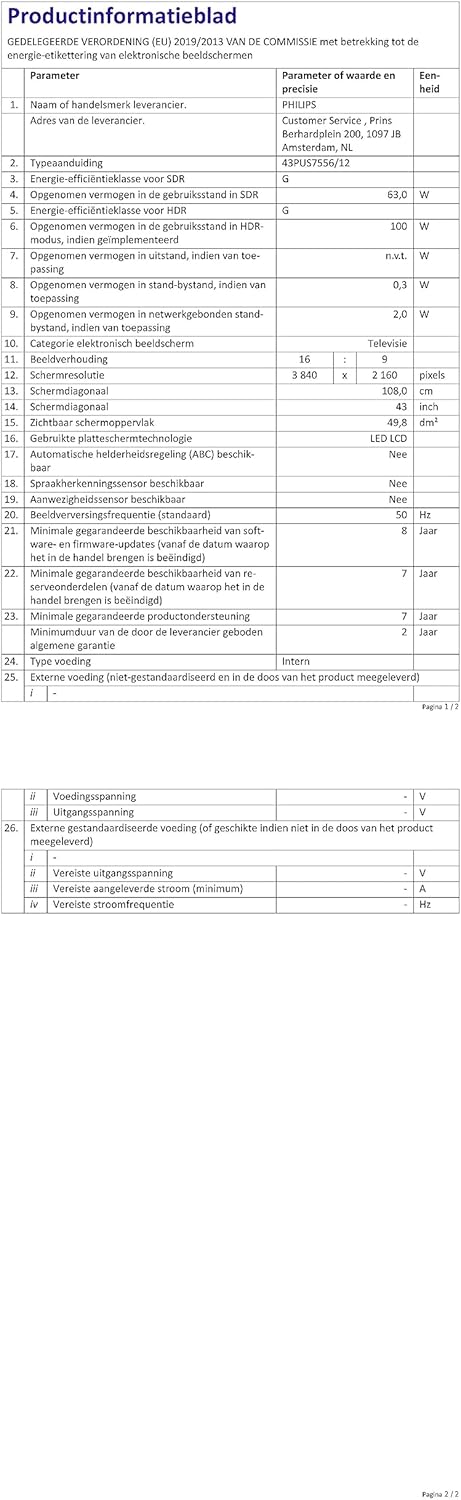
Image: A technical specification sheet for the Philips 43PUS7556/12 television, detailing various parameters and values. This document provides comprehensive technical data for the product.

Image: Another technical specification sheet for the Philips 43PUS7556/12 television, presented in Dutch, listing detailed product information and performance metrics. This provides additional technical context.

Image: A diagram illustrating the physical dimensions of the 43-inch Philips 43PUS7556/12 television, including width, height, and depth measurements. This helps users understand the TV's physical footprint.
Garanzia e supporto
Informazioni sulla garanzia
This product comes with a manufacturer's warranty. Please refer to the warranty card included in your package for specific terms and conditions. The typical warranty period for consumer electronics is 2 years from the date of purchase.
- Disponibilità minima garantita dei pezzi di ricambio: 7 anni
- Supporto minimo garantito per il prodotto: 7 anni
Assistenza clienti
For further assistance, technical support, or service inquiries, please contact PHILIPS customer support. You can find contact details on the official PHILIPS website or in the documentation provided with your television.
When contacting support, please have your model number (43PUS7556/12) and serial number ready.
Ask a question about this manual
Ask about setup, troubleshooting, compatibility, parts, safety, or missing instructions. Manuals+ will review the question and use this page’s manual context to help answer it.