EmpireTech IPC-Color4K-X 8MP AI Bullet IP Camera User Manual
Model: IPC-Color4K-X
1. Prodotto finitoview
The EmpireTech IPC-Color4K-X is an 8-megapixel (8MP) AI Bullet IP Camera designed for surveillance applications. It features a 1/1.2" CMOS image sensor for ultra-low light performance, delivering high-definition 4K (3840 × 2160) video at 30 frames per second. This camera supports full-color imaging even in low-light conditions, enhanced by built-in warm LED illumination with a maximum distance of 60 meters (196.85 ft).
Key features include built-in dual microphones and a speaker for two-way audio, ePOE and standard POE (Power over Ethernet) for flexible power and network connectivity, and advanced AI capabilities such as motion detection, video metadata, IVS (Intelligent Video System), FD (Face Detection), and people counting. The camera is rated IP67 for weather resistance, making it suitable for both indoor and outdoor use.
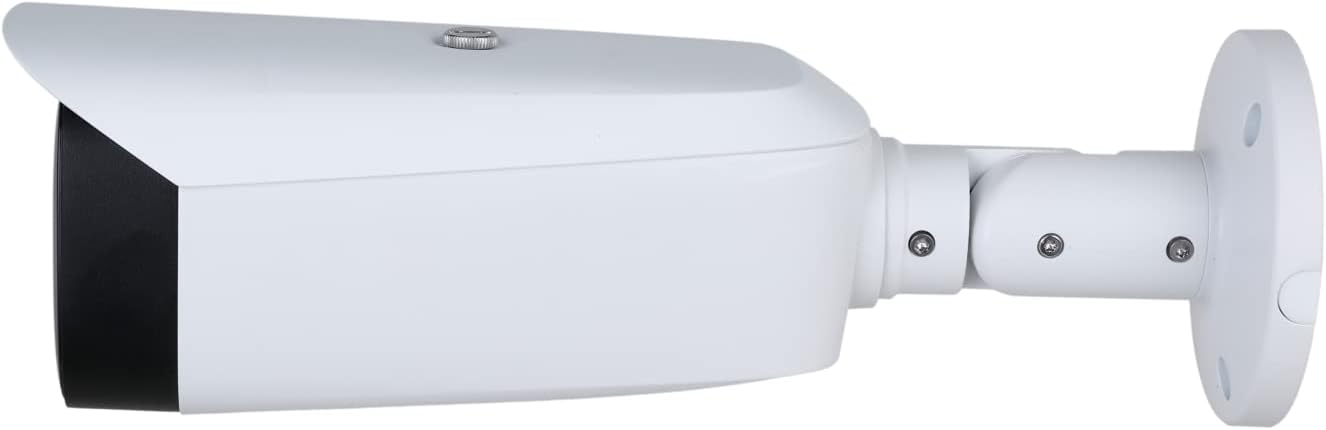
Figura 1.1: Fronte view of the EmpireTech IPC-Color4K-X camera, showing the dual lenses and warm LED lights.
Video 1.1: This video demonstrates the 4K Full Color 8MP IP Camera (IPC-Color4K-X) in operation, showcasing its ability to capture clear, full-color video.
2. Impostazione
2.1 Contenuto della confezione
Prima dell'installazione, verificare che tutti i componenti siano presenti:
EmpireTech IPC-Color4K-X Camera
Staffa di fissaggio
Connettore impermeabile
Cavo Ethernet (corto)
Pack of Screws and Hex Key
Guida rapida
Segno di sorveglianza
2.2 Installazione fisica
The camera can be wall-mounted or ceiling-mounted. Use the provided mounting template to drill pilot holes. Secure the mounting plate with screws, then attach the camera to the plate and adjust its position. Ensure the power ports are not directly exposed to water or moisture.
Figure 2.1: Dimensional diagram of the IPC-Color4K-X camera, illustrating its physical measurements and mounting hole pattern for precise installation.
2.3 Connessione di rete
Connect the camera to your network using an Ethernet cable. The camera supports ePOE and standard POE, allowing both power and data transmission over a single Ethernet cable. If not using POE, a DC 12V power adapter (not included) is required.
For outdoor installations, utilize the waterproof connector to protect the Ethernet cable connection from moisture.
2.4 Configurazione iniziale
Download the Reolink App or Client software on your smartphone or PC. Scan the QR code on the device or manually input the device details to add the camera. Follow the on-screen instructions to complete the initial setup, including setting a device password.
3. Istruzioni per l'uso
3.1 Vivere View e controlli di base
Access the live video feed through the Reolink App or Client software. You can view the 180-degree panoramic image and use digital zoom to focus on specific areas. The camera provides clear and detailed images even in low-light conditions due to its full-color AI capabilities and warm LED lights.
Video 3.1: This video demonstrates night video capabilities of an EmpireTech IPC-Color4K-T camera, which shares similar low-light performance features with the IPC-Color4K-X.
3.2 Rilevamento del movimento e funzionalità AI
The camera's deep learning algorithm supports advanced AI features including motion detection, IVS, FD, and people counting. Configure detection zones and sensitivity settings within the camera's interface to receive alerts for specific events.
Video 3.2: This video provides instructions on how to set up the EPTZ (Electronic Pan-Tilt-Zoom) function for the IPC-Color4K-T180/B180 camera, which is similar to the IPC-Color4K-X model. It demonstrates configuring IVS rules and utilizing the multi-view box for detailed monitoring.
3.3 Audio bidirezionale
With built-in dual microphones and a speaker, the camera enables two-way communication. This feature allows you to listen to audio from the camera's location and speak through the camera using the app.
3.4 EPTZ Functionality
The EPTZ feature allows for digital pan, tilt, and zoom within the 4K image without physical camera movement. This enables closer inspection of detected objects or areas of interest. Configure EPTZ linkage with IVS rules for automatic tracking of detected events.
Video 3.3: This video explains how to set up Auto Tracking Web 5, a feature that allows the camera to automatically follow detected motion. This functionality is relevant for optimizing the EPTZ capabilities of the IPC-Color4K-X.
4. Manutenzione
4.1 Pulizia
To ensure optimal image quality, regularly clean the camera lens with a soft cloth. Avoid using harsh chemicals or abrasive materials that could damage the lens or housing.
4.2 Aggiornamenti firmware
Periodically check for and install firmware updates to ensure your camera has the latest features, security patches, and performance improvements. Refer to the manufacturer's website or app for update instructions.
4.3 Gestione scheda SD
The camera supports a Micro SD card up to 512GB for local storage. Ensure you use a high-endurance SD card for continuous recording. The camera will overwrite older files once the storage is full. Regularly back up important footage.
5. Risoluzione Dei Problemi
If you encounter issues with your camera, consider the following:
Nessuna alimentazione/connettività: Verify the Ethernet cable connection and ensure your POE switch/injector is functioning correctly. If using a power adapter, confirm it's a DC 12V adapter and properly connected.
Unclear Picture: Clean the camera lens. Check for any obstructions. Adjust brightness and other display settings in the app. Ensure the camera is not pointing towards direct light sources or glass windows.
Problemi di rilevamento del movimento: Adjust the sensitivity settings for motion detection. Review and refine the configured detection zones (IVS rules) to ensure they cover the desired areas and exclude irrelevant ones.
EPTZ Linkage Not Working: Ensure that IVS rules (tripwire or intrusion) are properly configured and enabled, as EPTZ linkage relies on these triggers.
6. Specifiche
Caratteristica
Specificazione
Numero di modello
IPC-Color4K-X
Sensore di immagine
8-MP 1/1.2" CMOS
Risoluzione video
4K (3840 × 2160) @30 fps
Connettività
Ethernet (ePOE and POE)
Audio
Built-in Dual Mic and Speaker
Visione notturna
Full-Color AI, Warm LED (60m/196.85 ft)
Caratteristiche AI
Video Metadata, IVS, FD, People Counting
Magazzinaggio
Supports max. 512 G Micro SD card
Resistenza alle intemperie
Grado di protezione IP67
Fonte di alimentazione
Corded Electric (POE/ePOE or 12V DC)
Peso dell'articolo
3.08 libbre
Dimensioni del pacco
13.46 x 6.61 x 6.46 pollici
Video 6.1: This video demonstrates the IPC-Color4K-X camera undergoing a waterproof test, confirming its IP67 weather resistance rating.
7. Garanzia e supporto
This product is backed by EmpireTech. For technical support, warranty claims, or further assistance, please contact EmpireTech customer service. Protection plans (2-Year, 3-Year, and Complete Protect) are available for extended coverage. Each item includes a unique code verified before shipping to ensure authenticity.