
Introduzione
This comprehensive instruction manual provides detailed guidance for the EmpireTech 4K 8MP 1/1.2" CMOS Ultra Low Light Full-Color AI Bullet IP Camera (Model IPC-Color4K-X 2.8mm). It covers essential information regarding setup, operation, maintenance, and technical specifications to ensure optimal performance and longevity of your surveillance camera.
Caratteristiche principali
- 8-MP 1/1.2" CMOS image sensor for low illuminance and high image definition. Outputs max. 8 MP (3840 × 2160) @30 fps.
- Built-in dual microphone and one speaker for two-way audio communication.
- Integrated warm light with a maximum illumination distance of 60 meters (196.85 ft) for full-color imaging in low-light conditions.
- Supports advanced deep learning algorithms including video metadata, IVS (Intelligent Video System), FD (Face Detection), and people counting.
- Supports max. 512 G Micro SD card for local storage.
- IP67 weather-resistant rating for outdoor use.
Prodotto finitoview
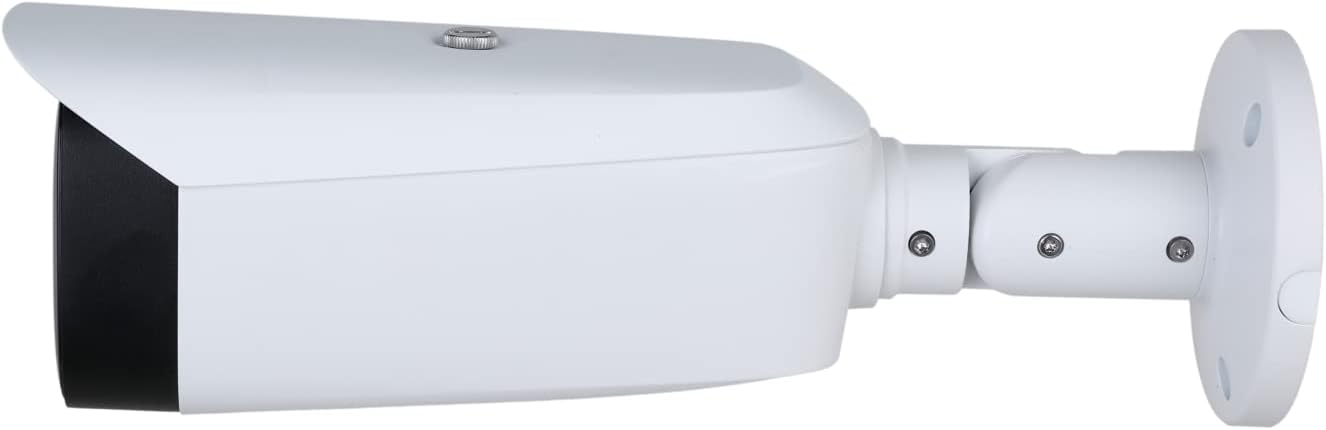
Figura 1: Lato view of the EmpireTech 4K 8MP Bullet IP Camera, showcasing its sleek white housing and robust design suitable for outdoor installation.

Figura 2: Davanti view of the camera, highlighting the lens and the built-in warm LEDs that provide full-color night vision capabilities.

Figura 3: Technical drawing illustrating the precise dimensions of the camera in both millimeters and inches, crucial for accurate installation planning.
Cosa c'è nella scatola
- EmpireTech 4K 8MP Bullet IP Camera (IPC-Color4K-X 2.8mm)
- Mounting hardware (as detailed)
- Guida rapida
Impostare
1. Installazione fisica
Mount the camera securely in your desired outdoor location. The camera is designed for easy installation with its included mounting hardware. Ensure the camera's field of view covers the intended surveillance area. The IP67 rating ensures protection against dust and water, making it suitable for various weather conditions.
2. Alimentazione e connessione di rete
The IPC-Color4K-X supports Power over Ethernet (PoE) and ePoE, allowing a single Ethernet cable to provide both power and data connectivity. Connect the camera to a PoE-enabled switch or NVR using an Ethernet cable. Alternatively, a 12V power adapter can be used if PoE is not available (power adapter not included).
3. Initial Configuration via Mobile App
Scarica e installa Amcrest View Pro app (or a compatible client software) on your smartphone. Follow the on-screen instructions to add your camera to the app. You will typically scan a QR code located on the camera to initiate the setup process.
During the initial login, the default username is 'admin' and the default password is 'admin'. It is highly recommended to change the default password immediately to a strong, unique password to enhance security.
Istruzioni per l'uso
1. Vivere View e riproduzione
Accedi ai feed video in diretta e ai video registratitage through the mobile app or client software. The camera outputs max. 8 MP (3840 × 2160) resolution at 30 frames per second, providing clear and detailed images.
2. Audio bidirezionale
Utilize the built-in dual microphone and speaker for two-way audio communication. This feature allows you to listen to the surveillance area and speak through the camera, enhancing monitoring and interaction capabilities.
3. Smart Features (AI Analytics)
The camera incorporates deep learning algorithms for advanced surveillance:
- IVS (Sistema Video Intelligente): Configure tripwire and intrusion detection rules to trigger alarms or recordings when predefined events occur.
- Face Detection (FD): Identify and record faces within the camera's view.
- Conteggio persone: Monitor and count individuals entering or exiting a specified area.
- Metadati video: Capture and analyze data related to video content for enhanced security insights.
4. Night Vision and Illumination
The built-in warm light provides full-color imaging even in ultra-low light conditions, with an effective illumination distance of up to 60 meters. This ensures clear and detailed footaggiorno e notte.
5. Archiviazione locale
The camera supports a Micro SD card (up to 512 GB) for local storage of recordings. This provides a reliable backup or primary storage solution, independent of network connectivity.
Manutenzione
- Pulizia delle lenti: Regularly clean the camera lens with a soft, lint-free cloth to ensure optimal image quality. Avoid abrasive materials that could scratch the lens.
- Protezione dalle intemperie: While the camera is IP67 rated for dust and water resistance, ensure all connections are properly sealed to prevent moisture ingress, especially for non-PoE power connections.
- Aggiornamenti del firmware: Periodically check for and install firmware updates to ensure your camera has the latest features, security patches, and performance improvements.
Risoluzione dei problemi
- La fotocamera non si accende: Verify the PoE connection to your switch/NVR or ensure the 12V power adapter (if used) is correctly connected and supplying power. Try a different Ethernet cable or PoE port.
- Picture Not Clear: Clean the camera lens for any dirt, dust, or spiderwebs. Ensure the lighting conditions in the surveillance area are adequate. Consider upgrading the camera's firmware to the latest version.
- Out of Focus: This model features a fixed 2.8mm lens. Ensure the camera is positioned at an appropriate distance for the desired clarity.
- Nessun avviso di rilevamento del movimento: Check the IVS rules configuration in the camera settings. Adjust sensitivity levels and ensure detection zones are correctly defined. Verify push notification and email alert settings in the app.
Specifiche
| Caratteristica | Dettaglio |
|---|---|
| Nome del modello | Telecamera IP POE |
| Risoluzione video efficace | 8MP (3840×2160) |
| Frequenza dei fotogrammi | 30 fotogrammi al secondo |
| Sensore di immagine | CMOS da 1/1.2" |
| Lente | 2.8 mm (fisso) |
| Visione notturna | Full-Color with Warm LED (60m / 196.85 ft) |
| Audio | Built-in Dual Mic and Speaker (Two-way audio) |
| Magazzinaggio | Micro SD card (Max 512 G) |
| Connettività | Wired (ePOE and POE) |
| Resistenza alle intemperie | Grado di protezione IP67 |
| Caratteristiche AI | Video metadata, IVS, FD, People Counting |
| Dimensioni | 11.4 x 3.7 x 3.3 pollici |
| Peso dell'articolo | 3 libbre |
Garanzia e supporto
Your EmpireTech 4K 8MP Full-Color AI Bullet IP Camera comes with comprehensive support options:
- Piani di protezione: Extend your coverage with optional 2-Year or 3-Year Protection Plans.
- Politica di ritorno: Questo prodotto è idoneo per una politica di reso/sostituzione di 30 giorni.
- Supporto del produttore: Per ulteriore assistenza, visitare il EmpireTech Store on Amazon.
Galleria multimediale
1 video: This video demonstrates the 4K Full Color 8MP IP Camera (IPC-Color4K-X) in action, showcasing its high-resolution imaging capabilities and full-color performance.
2 video: Watch the IPC-Color4K-X undergo a waterproof test, demonstrating its robust IP67 rating and durability against water exposure.
3 video: A night video captured by an EmpireTech camera (IPC-Color4K-T), illustrating the impressive low-light and full-color night vision performance of EmpireTech's AI cameras.
4 video: This video provides a step-by-step guide on how to set up the EPTZ (Electronic Pan Tilt Zoom) function on EmpireTech cameras (IPC-Color4K-T180/B180), demonstrating advanced tracking capabilities.