
Introduzione
The Macally BTBLZKEYSG is a full-size backlit Bluetooth keyboard designed specifically for Mac and iOS devices. It features a MacOS-specific layout with 107 scissor-switch keys and 14 convenient shortcuts, enhancing workflow and productivity. This keyboard allows seamless pairing and switching between up to three Bluetooth-enabled devices, including MacBooks, iMacs, iPhones, and iPads. The integrated white LED backlighting offers three adjustable brightness levels for comfortable typing in various lighting conditions. Powered by a built-in 1500mAh rechargeable battery, it provides extended usage time between charges.
Contenuto della confezione
- Macally BTBLZKEYSG Backlit Bluetooth Keyboard
- Cavo di ricarica USB-C
- Manuale di istruzioni
Caratteristiche del prodotto
- Tasti retroilluminati: Crisp white LEDs with 3 brightness levels for typing in low-light environments. Backlight can be turned off.
- MacOS Specific Layout: 107 scissor-switch keys with 14 macOS shortcuts for familiar and efficient use.
- Multi-Device Bluetooth: Easily pair and switch between up to 3 Bluetooth-enabled devices (Mac, iPhone, iPad) within a 30 ft wireless range.
- Batteria ricaricabile: Built-in 1500mAh battery provides 1 to 4 weeks of runtime with backlighting on. USB-C charging cable included.
- Design sottile e confortevole: Only 0.87 inches thin with an integrated kickstand for ergonomic typing.
Impostare
1. Ricarica della tastiera
Before initial use, fully charge the keyboard. Connect the supplied USB-C charging cable to the keyboard's USB-C port and the other end to a USB power source (e.g., computer USB port, USB wall adapter). The LED indicator will show charging status.
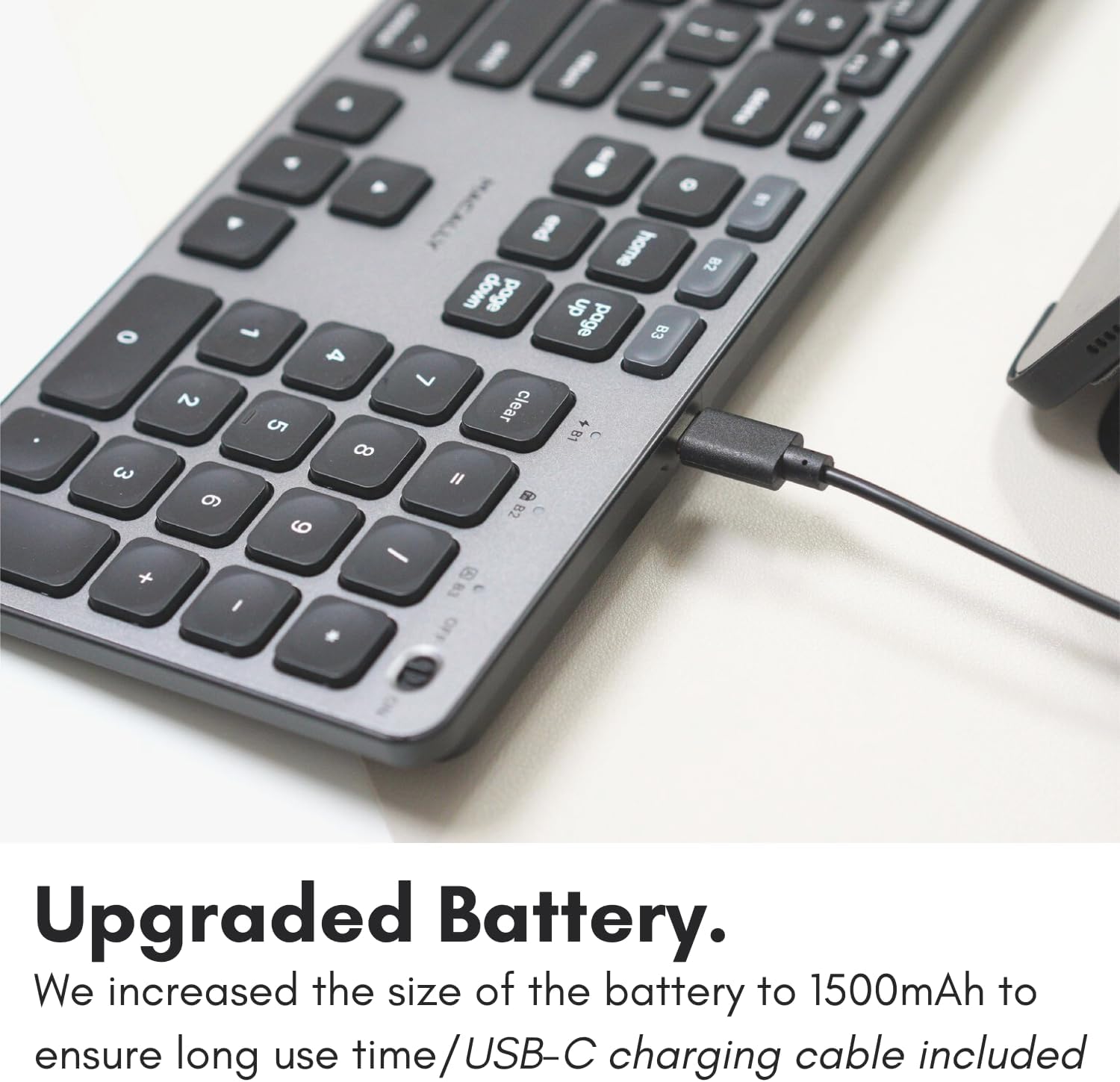
Image: The USB-C charging port on the side of the Macally BTBLZKEYSG keyboard, with the charging cable inserted.
2. Accensione
Locate the power switch on the keyboard, usually on the top right edge. Slide the switch to the 'ON' position.
3. Associazione con un dispositivo
- Assicurati che la tastiera sia accesa.
- Press and hold one of the Bluetooth pairing keys (B1, B2, or B3) for 3-5 seconds until the corresponding LED indicator above the key starts blinking rapidly. This indicates the keyboard is in pairing mode.
- On your Mac or iOS device, go to Impostazioni di sistema (O Preferenze di sistema) > Bluetooth.
- Look for "Macally BTBLZKEYSG" (or similar name) in the list of available devices and click/tap to connect.
- Se richiesto, inserisci il codice di associazione visualizzato sullo schermo utilizzando la tastiera e premi Entrare.
- Once connected, the LED indicator for the selected Bluetooth channel will stop blinking and remain solid for a few seconds before turning off.

Image: The Macally BTBLZKEYSG keyboard shown with a MacBook and an iPad, illustrating its multi-device capability.
Istruzioni per l'uso
MacOS Specific Keys and Shortcuts
The keyboard features a standard MacOS layout, including function keys (F1-F12) that double as media and system control shortcuts. Use the Fn key in combination with these keys to access their secondary functions.
- Fn+F1: Diminuire la luminosità dello schermo
- Fn+F2: Aumentare la luminosità del display
- Fn+F3: Controllo missione
- Fn+F4: rampa di lancio
- Fn+F7: Traccia precedente
- Fn+F8: Riproduci/Pausa
- Fn+F9: Traccia successiva
- Fn+F10: Disattiva volume
- Fn+F11: Diminuire il volume
- Fn+F12: Aumentare il volume
Controllo della retroilluminazione
The keyboard's backlight can be adjusted to three brightness levels or turned off completely. Use the dedicated backlight control keys, typically located near the function keys or arrow keys, to cycle through the brightness settings.

Image: The Macally BTBLZKEYSG keyboard with its white LED backlighting illuminated at different intensity levels.
Passaggio tra dispositivi associati
To switch between your paired Bluetooth devices, simply press the corresponding Bluetooth pairing key (B1, B2, or B3) that your device is connected to. The keyboard will automatically connect to the selected device.
Manutenzione
Per garantire la longevità e le prestazioni ottimali della tastiera, seguire queste linee guida per la manutenzione:
- Pulizia: Utilizzare un panno morbido e privo di lanugine leggermente dampened with water or a mild cleaning solution to wipe the keyboard surface. Avoid harsh chemicals or abrasive materials.
- Rimozione della polvere: Utilizzare aria compressa per rimuovere polvere e detriti dagli spazi tra i tasti.
- Magazzinaggio: When not in use for extended periods, store the keyboard in a dry, cool place.
- Evitare i liquidi: Non esporre la tastiera a umidità eccessiva e non versarvi sopra liquidi.
Risoluzione dei problemi
| Problema | Soluzione |
|---|---|
| La tastiera non si accende. | Ensure the power switch is in the 'ON' position. Charge the keyboard using the supplied USB-C cable. |
| La tastiera non si associa al dispositivo. | Ensure the keyboard is in pairing mode (LED blinking). Check your device's Bluetooth settings to ensure Bluetooth is enabled and the keyboard is visible. Try restarting both the keyboard and your device. |
| La tastiera si disconnette frequentemente. | Ensure the keyboard is within the 30 ft wireless range of your device. Check for interference from other wireless devices. Ensure the keyboard battery is sufficiently charged. |
| La retroilluminazione non funziona. | Press the backlight control keys to cycle through brightness levels. Ensure the keyboard battery is charged, as low battery may disable backlighting. |
| I tasti non rispondono. | Check the Bluetooth connection. If connected, try restarting the keyboard. Ensure no debris is lodged under the keys. |
Specifiche
| Caratteristica | Dettaglio |
|---|---|
| Numero di modello | BTBLZKEYSG |
| Connettività | Bluetooth, senza fili |
| Dispositivi compatibili | Mac Mini / Pro Studio, iMac, Macbook Air, MacBook Pro, iPhone, iPad |
| Descrizione della tastiera | Backlit Keyboard for Mac |
| Caratteristiche speciali | Backlit, Multi-Device Bluetooth, Rechargeable |
| Colore | Grigio |
| Retroilluminazione della tastiera | Single Color (White), 3 Brightness Levels |
| Dimensioni del prodotto | 16.8 cm L x 4.6 cm P x 0.87 cm A |
| Numero di chiavi | 107 |
| Fonte di alimentazione | Alimentato a batteria (ricaricabile da 1500 mAh) |
| Tipo di interruttore | Tactile Scissor Keys |
| Disposizione della tastiera | QWERTY (MacOS) |
| Materiale | Alluminio |
| Codice UPC | 701107500362 |
Video ufficiale del prodotto
Video: Un oltreview of the Macally Backlit Bluetooth Keyboard for Mac & iOS, highlighting its features and compatibility.
Garanzia e supporto
The Macally BTBLZKEYSG Backlit Bluetooth Keyboard comes with a warranty of up to two years. For technical support, warranty claims, or further assistance, please visit the official Macally websito o contattare il loro servizio clienti.