
Bytech BYOPCA103BK
Manuale utente del cavo di ricarica 3 in 1 BYTECH
Model: BYOPCA103BK | Brand: Bytech
Introduzione
The BYTECH 3-in-1 Charging Cable (Model BYOPCA103BK) is a versatile USB cable designed for charging and syncing a wide range of electronic devices. It features a standard USB Type-A connector on one end and a multi-connector head on the other, providing Lightning, USB Type-C, and Micro USB compatibility. This cable offers a convenient solution for users with multiple device types, ensuring high-speed charging and data transfer.
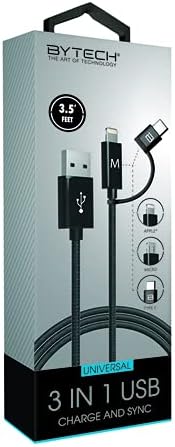
Image: The BYTECH 3-in-1 Charging Cable, showcasing its universal compatibility with various device types.
Impostazione e connessione
Using the BYTECH 3-in-1 Charging Cable is straightforward. Follow these steps to connect your devices:
- Identify the USB-A End: Locate the standard USB Type-A connector. This end typically connects to a power adapter (wall charger), a computer's USB port, or a power bank.
- Collegamento alla fonte di alimentazione/computer: Insert the USB Type-A end firmly into a compatible USB port on your charging device or computer.
- Select the Appropriate Device Connector: The other end of the cable features three integrated connectors:
- Fulmine: Per dispositivi Apple iPhone, iPad e iPod.
- USB Tipo-C: For newer Android smartphones, tablets, laptops, and other USB-C enabled devices.
- Micro USB: For older Android smartphones, tablets, power banks, and various other electronic gadgets.
- Collegati al tuo dispositivo: Carefully insert the chosen connector into the charging/data port of your electronic device. Ensure it is inserted correctly to avoid damage.
- Verifica connessione: Il dispositivo dovrebbe indicare che è in carica o è connesso per il trasferimento dati.
Istruzioni per l'uso
This cable supports both charging and data synchronization, depending on the connected device and power source.
Ricarica
- Connect the USB-A end to a compatible USB wall adapter, car charger, or power bank.
- Connect the appropriate device connector (Lightning, USB-C, or Micro USB) to your smartphone, tablet, or other compatible device.
- The cable is designed for high-speed charging, ensuring efficient power delivery to your device.
Sincronizzazione dei dati
- Connect the USB-A end to a USB port on your computer (PC or Mac).
- Connect the appropriate device connector to your smartphone or tablet.
- Il computer dovrebbe riconoscere il dispositivo connesso, consentendoti di trasferire files, photos, videos, and other data. Follow your device's specific instructions for data transfer.
Manutenzione e cura
To ensure the longevity and optimal performance of your BYTECH 3-in-1 Charging Cable, please follow these maintenance guidelines:
- Evitare di piegarsi: Non piegare o crimpare eccessivamente il cavo, soprattutto in prossimità dei connettori, poiché ciò potrebbe danneggiare i fili interni.
- Disconnessione corretta: Quando si scollega un dispositivo o una fonte di alimentazione, tirare sempre dalla testa del connettore e non dal cavo stesso.
- Mantenere asciutto: Protect the cable from moisture and liquids. Do not use it in wet environments.
- Pulisci delicatamente: If necessary, wipe the cable and connectors with a soft, dry cloth. Avoid using harsh chemicals or abrasive materials.
- Magazzinaggio: Store the cable in a cool, dry place, away from direct sunlight and extreme temperatures. Coiling it loosely can prevent tangles and damage.
- Ispezionare regolarmente: Controllare periodicamente il cavo e i connettori per verificare la presenza di segni di usura, sfilacciamento o danni. Interrompere l'uso se si notano danni.
Risoluzione dei problemi
If you encounter issues with your BYTECH 3-in-1 Charging Cable, try the following solutions:
- Dispositivo non in carica:
- Assicurarsi che entrambe le estremità del cavo siano collegate saldamente.
- Prova un alimentatore o una porta USB diversi.
- Test the cable with a different device to rule out a device-specific issue.
- Check if the correct connector (Lightning, USB-C, Micro USB) is being used for your device.
- Ricarica lenta:
- Assicurati che l'adattatore di alimentazione fornisca una potenza in uscita sufficiente (ad esempio, 5 V/2 A o superiore per una ricarica più rapida).
- Evitare di utilizzare il dispositivo in modo eccessivo durante la ricarica.
- Chiudi le applicazioni in background sul tuo dispositivo.
- Problemi di trasferimento dati:
- Ensure the USB-A end is connected to a computer's data-enabled USB port, not just a charging port.
- Check your device's settings to ensure it's set to "File Transfer" or "MTP" mode, not just "Charging."
- Try restarting both your device and computer.
- Danni al cavo: If the cable appears frayed, bent, or damaged, discontinue use immediately and replace it.
Specifiche
| Caratteristica | Dettaglio |
|---|---|
| Marca | Tecnologia Bytech |
| Nome del modello | 3 in 1 |
| Numero modello articolo | BYOPCA103BK |
| Tipo di connettore | USB Type-A, USB Type-C, Lightning |
| Tipo di cavo | USB |
| Dispositivi compatibili | Laptop, personal computer, tablet, smartphone |
| Caratteristica speciale | Ad alta velocità |
| Usi consigliati | Ricarica di dispositivi elettronici |
| Colore | Nero |
| Connector Gender | da maschio a maschio |
| Forma | Piatto |
| Numero di pin | 8 |
| Uso interno/esterno | Al chiuso |
| Numero di articoli | 1 |
| Tipo di pacchetto cliente | coiled in protective tubing |
| Volume massimotage | 5 Volt |
| Materiale esterno | Plastica/Gomma |
| Produttore | BYTECH |
| Codice UPC | 805112034765 |
| Dimensioni del pacco | 7 x 5 x 3 pollici |
| Peso dell'articolo | 1 libbre |
| ASIN | B09BBK4X64 |
| Data prima disponibilità | 27 luglio 2021 |
Garanzia e supporto
For warranty information or technical support regarding your BYTECH 3-in-1 Charging Cable, please refer to the manufacturer's official webo contattare il servizio clienti. Conservare la ricevuta d'acquisto come prova d'acquisto per eventuali reclami in garanzia.
Manufacturer: BYTECH
Per ulteriore assistenza, visitare www.bytechintl.com (example link, actual link not provided in input).
Ask a question about this manual
Ask about setup, troubleshooting, compatibility, parts, safety, or missing instructions. Manuals+ will review the question and use this page’s manual context to help answer it.