
Introduzione
Thank you for choosing the HBN 6L Automatic Pet Feeder. This device is designed to provide convenient and reliable feeding for your cats and dogs, ensuring they receive their meals on schedule and in controlled portions. This manual provides detailed instructions for setup, operation, maintenance, and troubleshooting to help you get the most out of your pet feeder.
The HBN Automatic Pet Feeder features a 6-liter capacity, Wi-Fi connectivity for app control, voice recording, and dual power supply options for uninterrupted feeding.
Componenti del prodotto
Familiarize yourself with the main components of your HBN Automatic Pet Feeder:
- Top Cover Desiccant Box: Keeps food fresh.
- Grain Barrel: The main food storage container (6L capacity).
- Pulsante di reset: Per reimpostare il dispositivo.
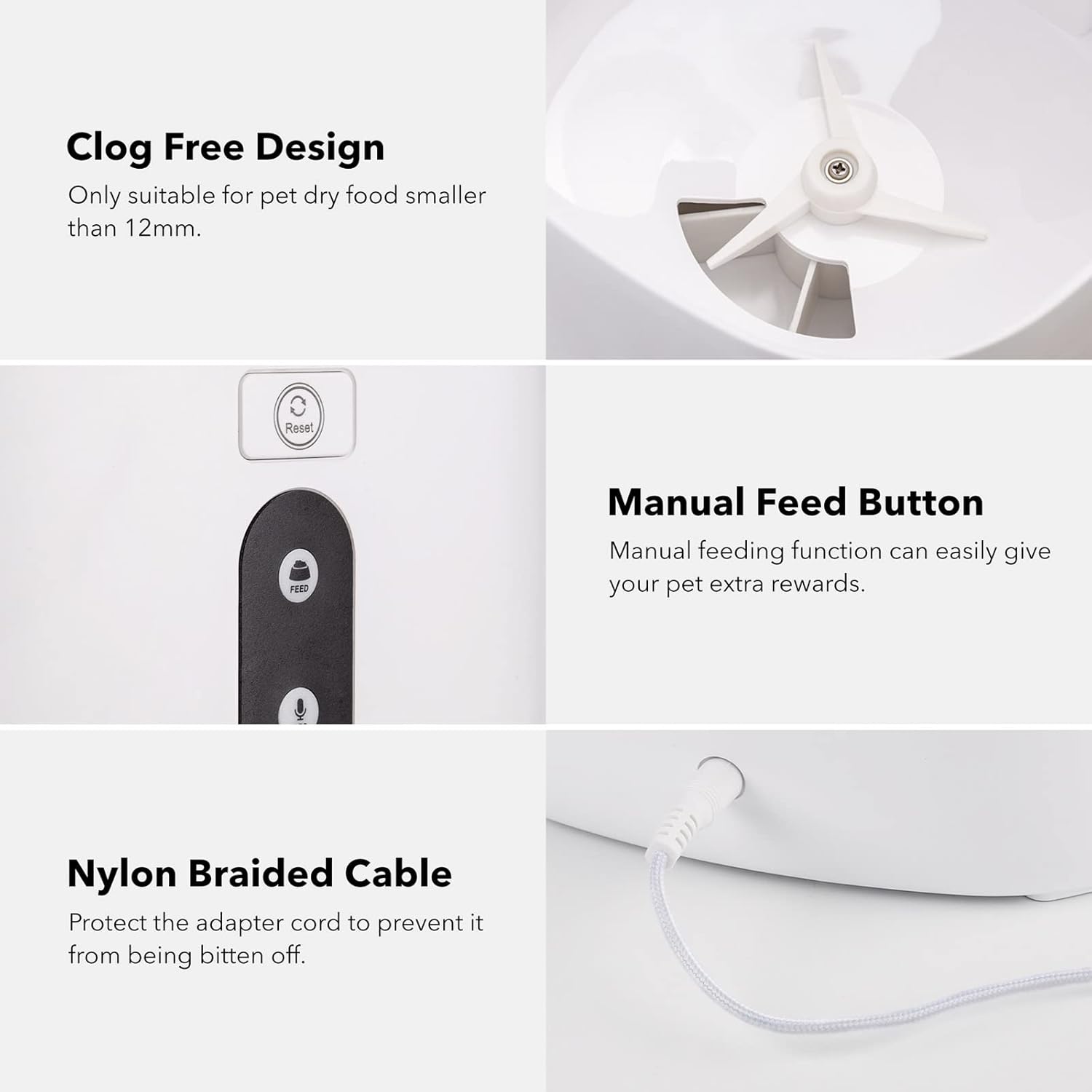
- Pulsante di alimentazione: For manual food dispensing.
- Pulsante Registra/Riproduci: For recording and playing voice messages.
- Ciotola per il cibo: Staccabile per una facile pulizia.
- Adattatore di alimentazione: For primary power supply.
- Vano batteria: Located at the bottom for backup D batteries.

Impostare
1. Alimentazione
The feeder operates primarily via the included 5V DC power adapter. For backup power during outages, install three (3) D-cell alkaline batteries (not included) into the battery bay located at the bottom of the unit.

Nota: While batteries provide backup power, the feeder's Wi-Fi functions and app control may be limited or unavailable during a power outage. The backup batteries primarily ensure manual feeding is possible and programmed settings are retained.
2. Fill the Food Container
- Rimuovere il coperchio superiore.
- Pour dry pet food into the grain barrel. Ensure the food particle size is between 2-10 mm to prevent clogging.
- Riposizionare saldamente il coperchio superiore.
3. Connessione dell'app (Wi-Fi)
- Download the "HBN Smart" app from your device's app store.
- Register or log in to your HBN Smart account.
- Ensure your mobile device is connected to a 2.4GHz Wi-Fi network. The feeder does not support 5GHz Wi-Fi.
- In the app, follow the instructions to add a new device. You may need to press and hold the Reset Button on the feeder until the indicator light flashes to enter pairing mode.
- During pairing, ensure your device's "Local Network" access is enabled for the HBN Smart app.
Istruzioni per l'uso
1. Smart Feeding (App Control)
Use the HBN Smart app to program feeding schedules and portions:
- Programma dei pasti: Set up to 30 meals per day.
- Controllo delle porzioni: Each meal can have up to 10 portions. Each portion is approximately 10 grams. Adjust portions based on your pet's size and dietary needs. For example, a standard 8-11 lb cat typically needs about 64g (6-7 portions) per day.
- Alimentazione a distanza: Dispense food instantly from anywhere using the app.

2. Registrazione vocale
Record a personalized voice message to play during feeding times:
- Press and hold the Record/Play Button.
- Speak your message (e.g., "Here, [Pet's Name]! Time to eat!").
- Release the button to save the recording. The message will play automatically during scheduled feedings.
3. Alimentazione manuale
To dispense food manually, press the Feeding Button on the unit. Each press will dispense one portion of food.
4. Controllo vocale (integrazione Alexa)
The HBN Automatic Pet Feeder supports voice control through Amazon Alexa:
- Ensure your feeder is successfully connected to the HBN Smart app.
- Apri l'app Amazon Alexa.
- Enable the "HBN Smart" skill.
- Follow the Alexa app instructions to discover your device.
- Once connected, you can use voice commands such as, "Alexa, ask Pet Feeder to feed my [pet's name] [number] portion of food."

Manutenzione
Istruzioni per la pulizia
Una pulizia regolare garantisce l'igiene e il corretto funzionamento:
- Prima di procedere alla pulizia, scollegare l'adattatore di alimentazione e rimuovere eventuali batterie di riserva.
- The food storage container (grain barrel) and food bowl are removable and washable. Hand wash these components with mild soap and water.
- Assicurarsi che tutti i componenti siano completamente asciutti prima di rimontarli e riempirli nuovamente con il cibo.
- Do not immerse the main unit (containing electronics) in water. Wipe it clean with a damp stoffa.
Compatibilità alimentare
This feeder is designed for dry pet food only. The recommended particle size is 2-10 mm to prevent blockages in the dispensing mechanism.
Risoluzione dei problemi
- La mangiatoia non eroga cibo: Check if the food container is empty or if food is clumped. Ensure the power adapter is securely connected or backup batteries are installed and functional. Verify that the food particle size is within the 2-10 mm range.
- App cannot connect to the feeder: Ensure your mobile device is connected to a 2.4GHz Wi-Fi network (5GHz is not supported). Confirm that the feeder is in pairing mode (indicator light flashing). Check if the HBN Smart app has "Local Network" access enabled in your phone's settings. Try resetting the feeder and attempting to pair again.
- Il controllo vocale Alexa non funziona: Verify that the feeder is successfully connected to the HBN Smart app. Ensure the "HBN Smart" skill is enabled in your Amazon Alexa app and that device discovery has been completed.
- Portions seem too small: Each portion is approximately 10 grams. For larger pets or those requiring more food, increase the number of portions per meal in the HBN Smart app. This feeder is generally recommended for small to medium-sized pets.
- Feeder stopped working after a period: Check power connections. If using backup batteries, ensure they are not depleted. Clean the feeder thoroughly, especially the dispensing mechanism, to rule out blockages. If issues persist, contact customer support.
Specifiche
| Caratteristica | Dettaglio |
|---|---|
| Numero di modello | E6-VOXM-LHY5 |
| Marca | HBN |
| Capacità | 6 litri (circa 25.3 tazze) |
| Materiale | Acrilonitrile Butadiene Stirene (ABS) |
| Specie bersaglio | Gatto, cane (razze di piccola e media taglia) |
| Connettività | Wi-Fi a 2.4 GHz |
| Alimentazione elettrica | Adattatore CC da 5 V (primario), 3 batterie D-cell (di riserva, non incluse) |
| Caratteristiche speciali | Portion Control, Timer, Voice Recording, App Control, Alexa Integration |
| Tipo di cibo consigliato | Dry Food (2-10 mm particle size) |
| Cura del prodotto | Hand Wash removable parts, wipe main unit clean |
| Peso dell'articolo | 0.35 Ounces (Note: This weight seems unusually low and may refer to packaging or a specific component. Actual product weight is typically higher.) |
Garanzia e supporto
For warranty information or technical support, please refer to the contact details provided with your purchase or visit the official HBN webluogo. Conserva la ricevuta di acquisto per eventuali richieste di garanzia.