Introduzione
Welcome to your Retoo Bluetooth Android Gamepad. This manual provides essential information for setup, operation, maintenance, and troubleshooting to ensure optimal performance and an enjoyable gaming experience. Please read this guide carefully before using the product.
Prodotto finitoview
The Retoo Bluetooth Android Gamepad is designed for mobile gaming, offering a comfortable and familiar control experience. It features a classic button layout, an integrated phone clip, and a long-lasting battery for extended play.

Figure 1: Retoo Bluetooth Android Gamepad. A black and red Bluetooth gamepad with dual analog sticks and a phone clip.
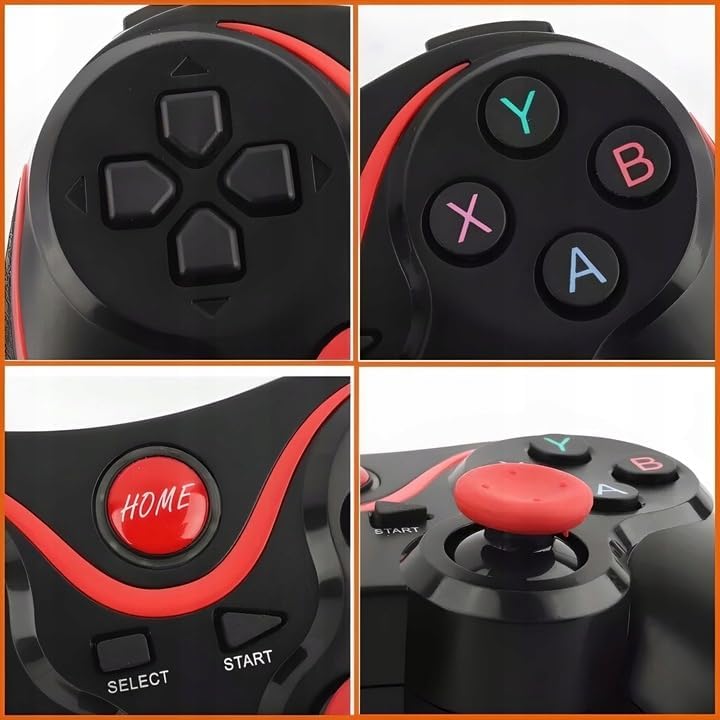
Figura 2: dettagliata view of the gamepad's D-pad, action buttons (A, B, X, Y), HOME button, and analog sticks.
Contenuto della confezione
- 1 x Retoo Bluetooth Android Gamepad
- 1 cavo di ricarica USB
- 1 x Manuale utente (questo documento)
Caratteristiche principali
- 400 mAh Integrated Battery: Enjoy extended gaming sessions with the powerful built-in battery. Features an intelligent power-saving system.
- Connettività Bluetooth 3.0: Ensures quick and stable connection to your mobile device.
- Design ergonomico: Designed for comfort during long gaming sessions, with anti-slip grips.
- Classic Button Layout: Familiar button arrangement for intuitive gameplay.
- Clip per telefono integrata: Securely holds your smartphone for an immersive mobile gaming experience.

Figure 3: The gamepad shown next to a battery icon indicating its 400 mAh capacity.

Figure 4: The gamepad with a smartphone securely mounted in its integrated clip, displaying a game.
Configurazione e abbinamento
Follow these steps to connect your Retoo Bluetooth Gamepad to your device:
- Charge the Gamepad: Before first use, ensure the gamepad is fully charged using the provided USB cable. The micro USB port is located on the front edge of the controller.

Figure 5: A close-up side view of the gamepad highlighting the micro USB charging port.
- Attiva Bluetooth: On your mobile device (Android smartphone or tablet), go to the settings menu and activate Bluetooth.
- Enter Pairing Mode (Android Normal Mode): Premere e tenere premuto il tasto pulsante 'A' (blue) and simultaneously press the Pulsante 'HOME' (red). The LED indicator on the gamepad will start blinking, indicating it's in pairing mode.
- Connetti dispositivo: On your mobile device, search for available Bluetooth devices. Select "Retoo Gamepad" or a similar name from the list. Once connected, the LED on the gamepad will glow steadily.
- Altre modalità: This gamepad supports multiple operating modes. Refer to the included quick start guide for specific button combinations for other modes (e.g., iOS, PC).

Figure 6: An image showing the gamepad surrounded by icons representing compatible devices like Android, Windows, TV boxes, and tablets.
Istruzioni per l'uso
Uso generale
Once paired, the gamepad can be used to navigate menus and play compatible games. The classic button layout ensures a familiar gaming experience across various titles.
Using the Phone Clip
The integrated phone clip allows you to attach your smartphone directly to the gamepad for a portable gaming setup. Adjust the clip to securely hold your phone without obstructing the screen or buttons.

Figure 7: A user holding the gamepad with a smartphone mounted in the clip, actively playing a game.
Risparmio energetico
The gamepad features an intelligent power-saving system. If left idle for a period, it will automatically enter a low-power state to conserve battery. Press any button to wake it up and resume play.
Manutenzione
- Ricarica: Recharge the gamepad when the battery is low. Use the provided USB cable and connect it to a standard USB power source (e.g., computer USB port, USB wall adapter).
- Pulizia: Wipe the gamepad with a soft, dry cloth. Avoid using harsh chemicals or abrasive cleaners, as these may damage the surface or internal components.
- Magazzinaggio: Store the gamepad in a cool, dry place away from direct sunlight and extreme temperatures. Keep it away from moisture and dust.
Risoluzione dei problemi
Problemi di connessione
- Gamepad Not Pairing: Ensure Bluetooth is enabled on your device. Make sure the gamepad is in the correct pairing mode (e.g., A + HOME for Android normal mode). Try restarting both the gamepad and your device.
- Connessione instabile: Ensure your device is within the 10-meter Bluetooth range. Avoid obstacles that might interfere with the signal.
Compatibilità del gioco
- Il gioco non risponde: Not all games are designed for gamepad compatibility. If a game does not respond as expected, consider using third-party applications that allow button mapping from the gamepad to on-screen touch controls.
Problemi di potenza
- Gamepad Not Turning On: Ensure the battery is charged. Connect the gamepad to a power source and try again. If the issue persists, contact customer support.
Specifiche
| Caratteristica | Dettaglio |
|---|---|
| Numero di modello | E075 |
| Connettività | Bluetooth 3.0 |
| Capacità della batteria | 400 mAh agli ioni di litio |
| Campo di funzionamento | Fino a 10 metri |
| Dimensioni (L x P x A) | Dimensioni: 15 x 10.3 x 5.5 cm |
| Peso | 170 grammi |
| Paese di origine | Cina |

Figura 8: Un overhead view of the gamepad with measurements indicating its length (15cm), width (12cm), and height (11cm, referring to the overall depth/height with phone clip).
Garanzia e supporto
For warranty information or technical support, please refer to the retailer's policy or contact Retoo customer service through their official channels. Keep your proof of purchase for any warranty claims.