
1. Introduzione
This instruction manual provides detailed information on the setup, operation, maintenance, and troubleshooting for your Aibecy withzoom 1080P 3X Optical Zoom Webcam. Please read this manual thoroughly before using the product to ensure proper functionality and to prevent damage.
2. Prodotto finitoview
2.1 Caratteristiche principali
- 1080P Full HD Video Resolution
- Obiettivo con zoom ottico 3X
- 355° Horizontal Rotation and 90° Vertical Rotation
- Funzionamento del telecomando
- Connettività USB
- Compatible with Windows, Mac, Linux, and Chromebook operating systems
- Infrared (IR) support
2.2 Contenuto della confezione
Verificare che tutti gli articoli siano presenti nel pacco:
- Aibecy withzoom Webcamma
- Telecomando
- Adattatore di alimentazione CA.
- Cavo USB
- Staffa di fissaggio
- Viti per l'installazione

Figura 1: Contenuto della confezione
2.3 Diagramma del prodotto

Figura 2: Fronte View e componenti
- Obiettivo HD: Cattura video ad alta definizione.
- 355° Rotating Gimbal: Allows for wide-angle coverage and precise positioning.
- IR Infrared Receiver: Riceve i segnali dal telecomando.
- Indicatore di alimentazione: Mostra lo stato di alimentazione del dispositivo.
- Remote Indicator: Lights up when a remote control signal is received.
3. Guida all'installazione
3.1 Metodi di installazione
The Aibecy withzoom webcam offre opzioni di installazione flessibili:
- Posizionamento della tabella: Place the camera on a flat surface such as a desk or conference table.
- Montaggio a soffitto: Use the included mounting bracket and screws to attach the camera to the ceiling. Ensure the image flip function is enabled if mounting upside down.
- Montaggio a staffa: Attach the camera to a tripod or other compatible bracket using the screw hole at the bottom.

Figura 3: Opzioni di installazione
3.2 Collegamento della fotocamera
Segui questi passaggi per connettere il tuo webCamera:
- Collegamento elettrico: Connect the AC power adapter to the camera's 12V power input port and plug it into a power outlet.
- Connessione USB: Connect the USB cable from the camera's USB port to an available USB port on your computer (Windows, Mac, Linux, or Chromebook). The camera is plug-and-play and does not require driver software.
- Optional RS232/RS422 Connection: If advanced control via RS232 or RS422 is required, connect the appropriate cable from the camera to your control device.

Figura 4: schema di collegamento
Once connected, open your video conferencing software (e.g., Zoom, Skype, Microsoft Teams) and select the Aibecy withzoom camera as your video input device.
4. Istruzioni per l'uso
4.1 Funzionamento di base
- Accensione: After connecting the power adapter, the camera will automatically power on. The Power Indicator light will illuminate.
- Spegni: Disconnect the power adapter from the camera.
4.2 Utilizzo del telecomando
Il telecomando incluso consente di regolare facilmente le funzioni della telecamera.

Figura 5: Webcam and Remote Control
- Camera Selection Buttons: If multiple cameras are connected, use these buttons to select the camera you wish to control.
- Controllo della velocità di rotazione: Adjust the pan/tilt speed for smoother movements.
- Pan/Tilt/Zoom (PTZ) Controls: Use the directional arrows to pan (left/right) and tilt (up/down) the camera. Use the zoom in/out buttons to adjust the optical zoom.
- Preset Function Area: Save and recall specific camera positions and zoom levels using the preset buttons.
4.3 Camera Movement and Zoom
The camera supports wide-range movement for comprehensive coverage:
- Rotazione orizzontale: The camera head can rotate 355 degrees horizontally.
- Rotazione verticale: The camera head can tilt 90 degrees vertically.
- Zoom ottico: Utilize the 3X optical zoom to focus on specific areas without loss of image quality.
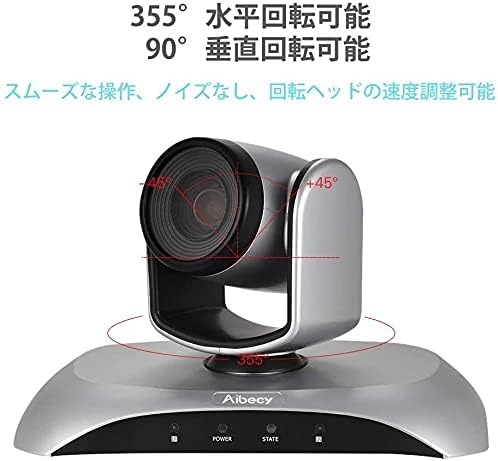
Figure 6: Camera Rotation Capabilities
4.4 Funzione di capovolgimento dell'immagine
If the camera is mounted upside down (e.g., on a ceiling), you can use the image flip function to correct the video orientation.

Figure 7: Image Flip Function in Use
Refer to the remote control instructions for the specific button to activate or deactivate the image flip function.
5. Manutenzione
Una corretta manutenzione garantisce la longevità e le prestazioni ottimali del tuo webCamera.
- Pulizia: Utilizzare un panno morbido e asciutto per pulire il corpo macchina. Per l'obiettivo, utilizzare un panno e una soluzione specifici per la pulizia delle lenti. Evitare detergenti o solventi abrasivi.
- Magazzinaggio: Quando non viene utilizzata per lunghi periodi, conservare la fotocamera in un luogo fresco e asciutto, lontano dalla luce solare diretta e da temperature estreme.
- Gestione: Evitare di far cadere la fotocamera o di sottoporla a forti urti.
6. Risoluzione Dei Problemi
If you encounter issues with your Aibecy withzoom webcam, refer to the table below for common problems and solutions.
| Problema | Possibile causa | Soluzione |
|---|---|---|
| No image or video output | Power not connected; USB cable loose; Incorrect camera selected in software. | Ensure power adapter is securely connected. Check USB cable connection. Select the Aibecy withzoom camera in your video conferencing software settings. |
| Il telecomando non funziona | Batteries low/dead; Obstruction between remote and camera; Remote not pointed at IR receiver. | Replace remote control batteries. Ensure a clear line of sight to the camera's IR receiver. Point the remote directly at the camera. |
| Image is upside down | Camera mounted upside down and image flip not activated. | Activate the image flip function using the remote control. |
| Scarsa qualità video | Insufficient lighting; Dirty lens; Network bandwidth issues. | Ensure adequate lighting in the room. Clean the camera lens. Check your internet connection speed. |
7. Specifiche tecniche
| Caratteristica | Specificazione |
|---|---|
| Marca | Aibezia |
| Numero di modello | withzoom |
| Risoluzione di acquisizione video | Formato: 1080p |
| Zoom ottico | 3X |
| Rotazione orizzontale | 355° |
| Rotazione verticale | 90° |
| Tecnologia di connettività | USB |
| Dispositivi compatibili | Windows, Mac, Linux, Chromebook |
| Caratteristiche speciali | Remote Control, Infrared |
| Stabilizzazione dell'immagine | NO |
| Dimensioni del pacco | Dimensioni: 29.7 x 22.4 x 19.9 cm |
| Peso dell'articolo | 1.51 kg |
8. Informazioni di supporto
For further assistance or inquiries not covered in this manual, please refer to the official Aibecy support channels or contact your retailer. Keep your purchase receipt for warranty purposes.


