
1. Introduzione
The Tronsmart Studio Metal Speaker is a portable Bluetooth speaker designed to deliver high-definition surround sound. Featuring 30W output, SoundPulse technology, and TuneConn for multi-speaker synchronization, it offers a versatile audio experience. Its durable metal construction and IPX4 water resistance make it suitable for various indoor and outdoor environments.

Image 1.1: The Tronsmart Studio Metal Speaker, showcasing its sleek design on a music sheet.
2. Contenuto della confezione
Upon opening the Tronsmart Studio Metal Speaker package, you should find the following items:
- Tronsmart Studio Metal Speaker
- Cavo di ricarica USB-C
- Cavo audio AUX da 3.5 mm
- Manuale d'uso
- Scheda di garanzia

Image 2.1: All items included in the Tronsmart Studio Metal Speaker retail package.
3. Prodotto finitoview
Per un utilizzo ottimale, familiarizza con i comandi e le porte dell'altoparlante.
3.1 Controlli del pannello superiore

Image 3.1: Top panel of the speaker with control buttons.
- Pulsante di accensione: Tenere premuto per accendere/spegnere.
- Volume basso (-): Diminuire il volume.
- Pulsante Play/Pausa: Riproduci o metti in pausa la riproduzione audio.
- Pulsante traccia precedente: Passa alla traccia precedente.
- Pulsante traccia successiva: Passa alla traccia successiva.
- Pulsante Bluetooth: Premere per accedere alla modalità di associazione Bluetooth.
- Pulsante Modalità: Switch between input modes (Bluetooth, AUX, Micro SD).
- SoundPulse Button: Activate/deactivate SoundPulse audio enhancement.
- Broadcast Mode Button: Initiate or join multi-speaker synchronization.
3.2 Porte laterali

Image 3.2: Side panel of the speaker with various input ports.
- Porta di ricarica USB-C: Per caricare l'altoparlante.
- Porta AUX-in: For wired audio connection using a 3.5mm cable.
- Slot per scheda microSD: For playing audio directly from a Micro SD card.
4. Impostazione
4.1 Ricarica dell'altoparlante
- Collegare il cavo di ricarica USB-C in dotazione alla porta USB-C dell'altoparlante.
- Collegare l'altra estremità del cavo a un adattatore di alimentazione USB compatibile (non incluso).
- Le spie luminose di carica si illumineranno per indicare lo stato di carica.
- Una volta completata la carica, le spie luminose cambieranno colore o si spegneranno.
4.2 Accensione/Spegnimento
- To power on, press and hold the Power Button for approximately 2 seconds until you hear an audible prompt.
- To power off, press and hold the Power Button for approximately 2 seconds until you hear an audible prompt.
4.3 Associazione Bluetooth
- Ensure the speaker is powered on and in Bluetooth mode (the Bluetooth indicator light will be blinking). If not, press the Mode Button to switch to Bluetooth mode.
- Sul tuo dispositivo (smartphone, tablet, laptop), attiva il Bluetooth e cerca i dispositivi disponibili.
- Select "Tronsmart Studio" from the list of devices.
- Una volta effettuata la connessione, la spia luminosa del Bluetooth diventerà fissa e verrà emesso un suono di conferma.
4.4 Collegamento AUX
- Connect one end of the 3.5mm AUX audio cable to the speaker's AUX-in port.
- Collegare l'altra estremità al jack di uscita audio del dispositivo.
- The speaker will automatically switch to AUX mode, or you may need to press the Mode Button to select AUX.
4.5 Riproduzione della scheda Micro SD
- Inserire una scheda Micro SD (con audio files) into the Micro SD card slot on the speaker.
- The speaker will automatically switch to Micro SD mode and begin playing audio, or you may need to press the Mode Button to select Micro SD.
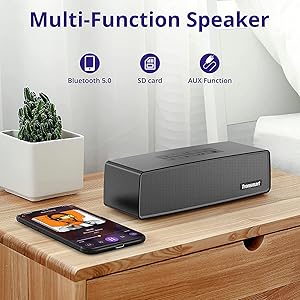
Image 4.1: The Tronsmart Studio speaker supports multiple input methods including Bluetooth, Micro SD, and AUX.
5. Istruzioni per l'uso
5.1 Controllo audio di base
- Regolazione del volume: Premere i pulsanti Volume su (+) o Volume giù (-).
- Riproduci/Pausa: Premere il pulsante Riproduci/Pausa.
- Traccia successiva: Press the Next Track Button.
- Traccia precedente: Press the Previous Track Button.
5.2 SoundPulse Technology
Press the SoundPulse Button to activate or deactivate the SoundPulse audio enhancement. This technology is designed to provide a more dynamic and detailed sound experience with enhanced bass.

Image 5.1: SoundPulse technology enhances the audio output of the Tronsmart Studio speaker.
5.3 TuneConn (Multi-Speaker Synchronization)
The Tronsmart Studio speaker features patented TuneConn technology, allowing you to synchronize audio across 100+ compatible speakers for an immersive sound experience.
- Ensure all Tronsmart Studio speakers are powered on and in Bluetooth mode.
- Connect your device to one speaker via Bluetooth (this will be the primary speaker).
- On the primary speaker, press the Broadcast Mode Button. The indicator light will flash.
- On other Tronsmart Studio speakers (secondary speakers), press their Broadcast Mode Buttons. They will automatically search for and connect to the primary speaker.
- Una volta connessi, tutti gli altoparlanti riprodurranno l'audio sincronizzato.

Image 5.2: Multiple Tronsmart Studio speakers synchronized using TuneConn technology for a home theater setup.
5.4 Assistente vocale
To activate your device's voice assistant (e.g., Siri, Google Assistant, Cortana), press and hold the Voice Assistant button (often indicated by a microphone icon) for 2 seconds. This feature works when the speaker is connected via Bluetooth to a compatible smartphone.
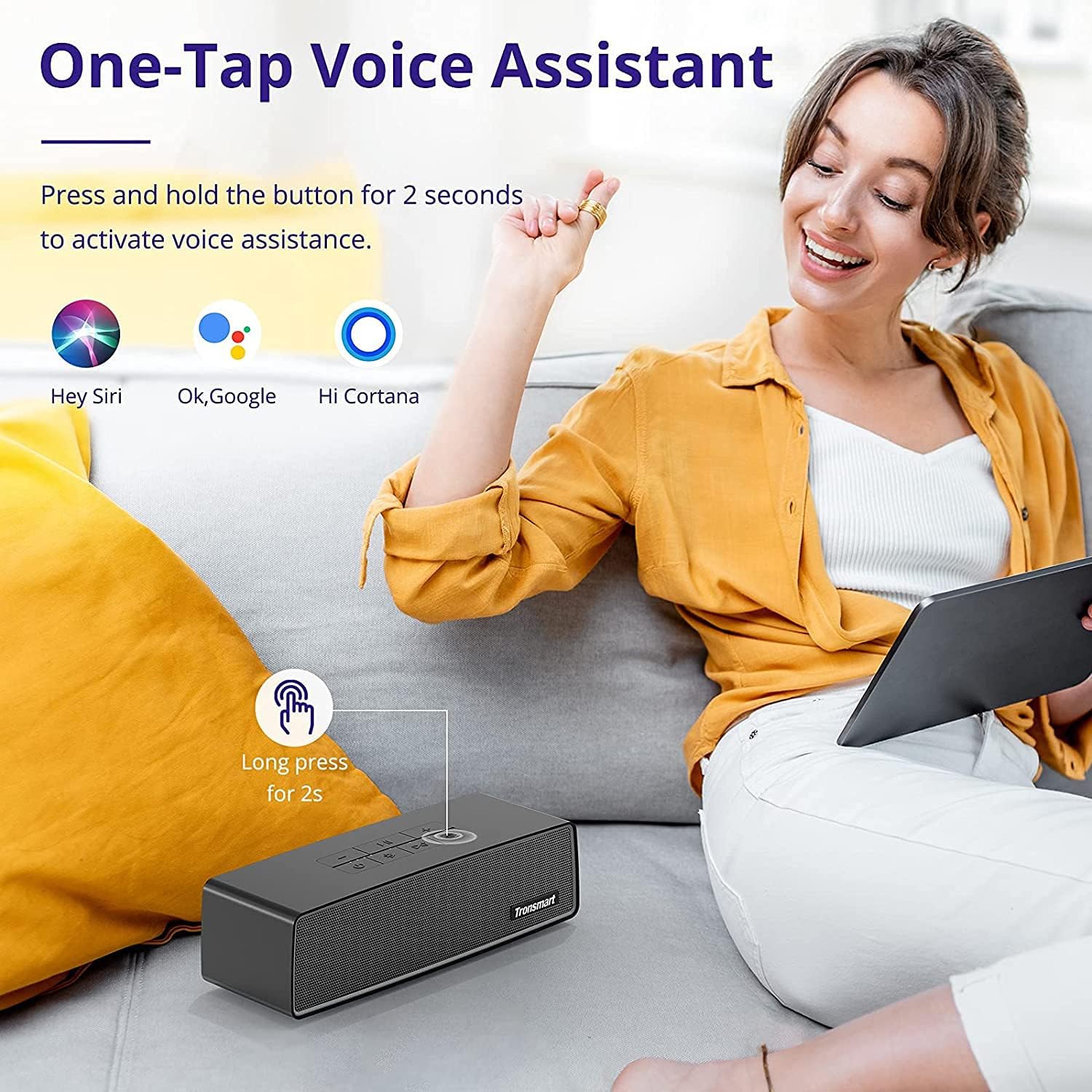
Image 5.3: Activating the voice assistant feature on the Tronsmart Studio speaker.
6. Ricarica e batteria
The Tronsmart Studio speaker is equipped with a built-in 5000mAh battery, providing up to 15 hours of playtime on a single charge. Actual battery life may vary based on volume level, audio content, and usage of features like SoundPulse or TuneConn.

Image 6.1: The Tronsmart Studio speaker offers up to 15 hours of playtime.
7. Resistenza all'acqua
The Tronsmart Studio speaker has an IPX4 water resistance rating. This means it is protected against splashing water from any direction. It is suitable for use in environments where it might encounter light splashes or rain, but it should not be submerged in water.

Image 7.1: The speaker's IPX4 rating provides protection against splashes.
8. Manutenzione
- Pulire l'altoparlante con un panno morbido e asciutto. Non utilizzare detergenti abrasivi o solventi.
- Evitare di esporre l'altoparlante a temperature estreme, alla luce solare diretta o a elevata umidità.
- Quando non si utilizza l'altoparlante per lunghi periodi, conservarlo in un luogo fresco e asciutto.
- Non tentare di smontare o riparare l'altoparlante da soli, poiché ciò invaliderebbe la garanzia.
9. Risoluzione Dei Problemi
| Problema | Possibile causa | Soluzione |
|---|---|---|
| L'altoparlante non si accende. | Batteria scarica. | Caricare completamente l'altoparlante. |
| Impossibile effettuare l'associazione tramite Bluetooth. | Altoparlante non in modalità di associazione; Bluetooth del dispositivo disattivato; troppo lontano dall'altoparlante. | Assicurati che l'altoparlante sia in modalità di associazione Bluetooth. Disattiva/attiva il Bluetooth del dispositivo. Avvicina il dispositivo all'altoparlante. |
| Audio cuts out in AUX mode. | Loose cable connection; faulty cable. | Ensure 3.5mm cable is securely connected. Try a different AUX cable. |
| Buttons are hard to see. | Condizioni di scarsa illuminazione. | Operate the speaker in well-lit environments. |
| La durata della batteria è più breve del previsto. | High volume usage; continuous use of SoundPulse/TuneConn. | Reduce volume. Limit continuous use of power-intensive features. |
10. Specifiche
| Caratteristica | Dettaglio |
|---|---|
| Marca | Tronsmart |
| Numero di modello | Tronsmart Studio US |
| Potenza massima in uscita dell'altoparlante | 30 Watt |
| Tecnologia di connettività | Bluetooth |
| Modalità di uscita audio | Stereo, Surround |
| Tipo di montaggio | Libera installazione |
| Tipo di altoparlante | Suono Surround |
| Caratteristiche aggiuntive | Portatile |
| Tipo di controllore | Pulsante |
| È impermeabile | Vero (IPX4) |
| Metodo di controllo | Applicazione |
| Dimensioni dell'altoparlante | 7 centimetri |
| Tecnologia senza fili | Bluetooth |
| Protocollo di connettività | Bluetooth |
| Tipo di driver audio | Driver dinamico |
| Numero di canali audio | 2.1 |
| Dispositivi compatibili | Computer portatile, smartphone, tablet |
| Fonte di alimentazione | Alimentato a batteria |
11. Video ufficiale del prodotto
Video 11.1: Un funzionario sopraview of the Tronsmart Studio Portable Speaker, highlighting its features and design.
12. Garanzia e supporto
The Tronsmart Studio Metal Speaker comes with a limited warranty. Please refer to the included Warranty Card in your package for specific terms and conditions, including warranty duration and coverage details. For further support, product registration, or to access updated drivers and firmware, please visit the official Tronsmart websito o contattare il loro servizio clienti.
Per maggiori informazioni, visita il Negozio Tronsmart su Amazon.