
1. Introduzione
Thank you for choosing the Benss Portable AM FM Radio, Model BD07. This compact and lightweight radio is designed for reliable reception of AM and FM broadcasts, offering clear audio through its built-in speaker or a connected headphone. Its battery-powered operation makes it ideal for both everyday listening and emergency situations. Please read this manual carefully to ensure proper use and maintenance of your device.
2. Prodotto finitoview
Familiarize yourself with the components of your Benss Portable AM FM Radio.
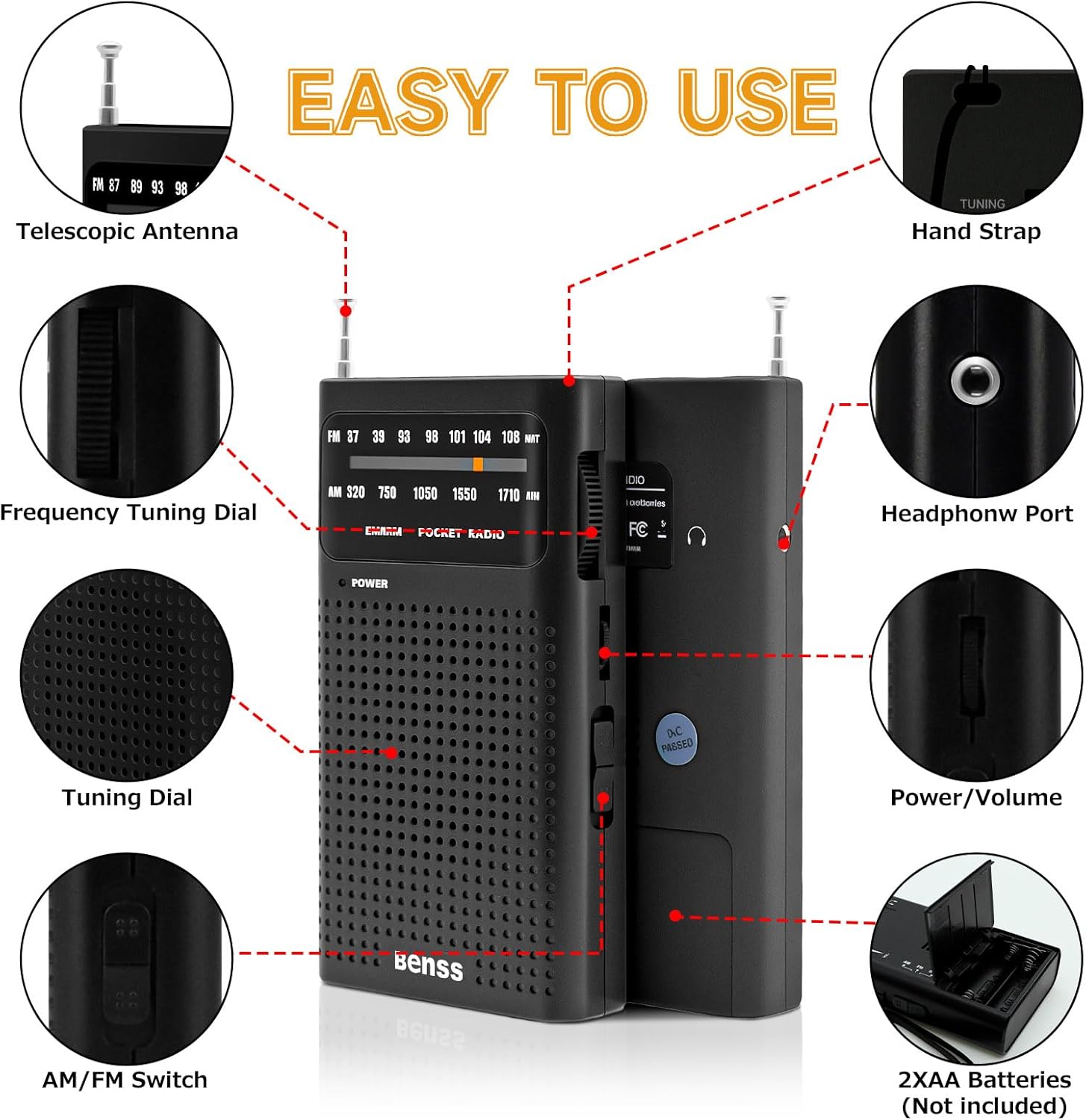
Immagine 2.1: Labeled diagram showing the radio's components, including the telescopic antenna, tuning dials, AM/FM switch, headphone port, and battery compartment.
Componenti chiave:
- Antenna telescopica: Si estende per una migliore ricezione FM.
- Frequency Tuning Dial: Utilizzato per selezionare le stazioni radio.
- Interruttore AM/FM: Toggles between AM and FM radio bands.
- Controllo di potenza/volume: Manopola rotante per accendere/spegnere la radio e regolare il volume.
- Headphone Port (3.5mm): Per l'ascolto privato con le cuffie.
- Vano batteria: Contiene due batterie AA.
- Cinghia da polso: Per un trasporto comodo.
3. Impostazione
3.1 Installazione della batteria
The Benss Portable AM FM Radio operates on two AA batteries (not included).
- Individuare il coperchio del vano batteria sul retro della radio.
- Far scorrere il coperchio aperto nella direzione indicata dalla freccia.
- Inserire due batterie AA, assicurandosi che la polarità sia corretta (+ e -) come indicato all'interno del vano.
- Chiudere saldamente il coperchio del vano batterie.

Immagine 3.1: Battery compartment on the back of the radio, open for AA battery insertion.
4. Istruzioni per l'uso
4.1 Accensione/spegnimento e controllo del volume
- Per accendere la radio ON, rotate the Power/Volume control knob clockwise until you hear a click and the power indicator light illuminates.
- Continue rotating the knob clockwise to increase the volume.
- Per accendere la radio SPENTO, rotate the Power/Volume control knob counter-clockwise until it clicks and the power indicator light turns off.

Immagine 4.1: Davanti view of the radio, highlighting the power indicator and tuning display.
4.2 Selecting AM or FM Band
Use the AM/FM switch located on the side of the radio to select your desired frequency band.

Immagine 4.2: Lato view of the radio, illustrating the AM/FM band selection switch.
4.3 Sintonizzazione su una stazione
- Estendi l'antenna telescopica per una ricezione FM ottimale. Per la ricezione AM, l'antenna interna è generalmente sufficiente, ma ruotando la radio si può migliorare il segnale.
- Slowly rotate the Frequency Tuning Dial (located on the side) to scan for stations.
- Observe the tuning indicator in the display window to help pinpoint stations.
- Adjust the antenna position and radio orientation for the clearest sound.
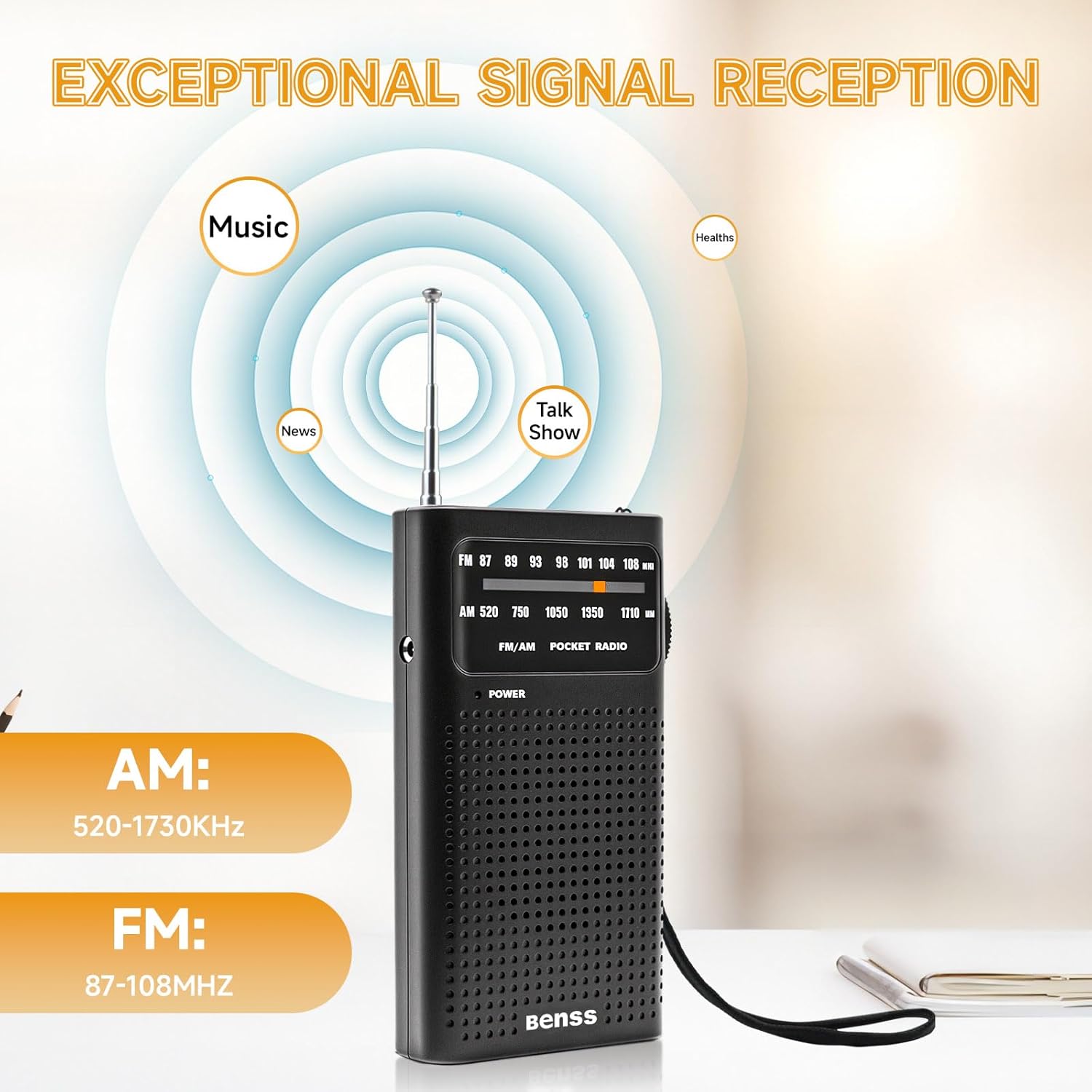
Immagine 4.3: Radio displaying AM and FM frequency ranges, illustrating signal reception capabilities.
4.4 Uso delle cuffie
For private listening, plug any standard 3.5mm headphones into the headphone port located on the side of the radio. The built-in speaker will automatically mute when headphones are connected.

Immagine 4.4: User enjoying the radio with headphones for private listening.
5. Manutenzione
5.1 Pulizia
- Pulire la radio con un panno morbido e asciutto.
- Do not use liquid cleaners, abrasive pads, or chemical solvents, as these can damage the surface.
5.2 Cura della batteria
- Rimuovere le batterie se la radio non verrà utilizzata per un periodo prolungato per evitare perdite.
- Replace both batteries simultaneously; do not mix old and new batteries or different types of batteries.
5.3 Conservazione
- Conservare la radio in un luogo fresco e asciutto, lontano dalla luce solare diretta e da temperature estreme.
- Tenere fuori dalla portata dei bambini.
6. Risoluzione Dei Problemi
Se riscontri problemi con la radio, consulta i seguenti problemi comuni e le relative soluzioni:
| Problema | Possibile causa | Soluzione |
|---|---|---|
| Nessun potere | Le batterie sono scariche o inserite in modo errato. | Controllare la polarità delle batterie; sostituirle con batterie AA nuove. |
| Ricezione scarsa / Statica | Segnale debole; antenna non estesa; interferenza. | Extend the telescopic antenna fully. Rotate the radio for better signal. Move away from electronic devices that may cause interference. |
| Nessun suono dall'altoparlante | Volume troppo basso; cuffie collegate. | Aumentare il volume. Scollegare le cuffie, se presenti. |
| Difficoltà di messa a punto | È richiesta una messa a punto precisa. | Slowly adjust the tuning dial for precise station selection. |
7. Specifiche
Technical details for the Benss Portable AM FM Radio BD07:
| Caratteristica | Dettaglio |
|---|---|
| Numero di modello | BD07 |
| Marca | Bensì |
| Dimensioni (L x P x A) | 13 cm x 6 cm x 1 cm (circa 5.1 x 2.4 x 0.4 pollici) |
| Peso | 135 g (circa 4.8 once) |
| Gamma di frequenza FM | 87 - 108 MHz |
| Intervallo di frequenza AM | 520 - 1730 kHz |
| Fonte di alimentazione | 2 batterie AA (non incluse) |
| Uscita audio | Altoparlante integrato, jack per cuffie da 3.5 mm |
| Caratteristiche speciali | Portable, Telescopic Antenna |
| Colore | Nero |
8. Informazioni sulla sicurezza
- Non esporre la radio ad acqua, umidità o temperature estreme.
- Evitare di far cadere la radio o di sottoporla a forti urti.
- Do not attempt to disassemble or modify the radio. This will void any potential warranty and could cause damage.
- Smaltire le batterie usate in modo responsabile secondo le normative locali.
- L'ascolto a volumi elevati per periodi prolungati può causare danni all'udito.
9. Garanzia e supporto
Specific warranty information for the Benss Portable AM FM Radio BD07 is not provided in this manual. For warranty details or technical support, please refer to the product packaging or contact the retailer where the product was purchased. You may also visit the official Benss websito per ulteriore assistenza.