
cimetech KF10
cimetech KF10 Wireless Keyboard and Mouse Combo User Manual
Modello: KF10
Brand: cimetech
1. Introduzione
Thank you for choosing the cimetech KF10 Wireless Keyboard and Mouse Combo. This product is designed to provide a comfortable, efficient, and quiet typing and navigation experience for your computer. With its ultra-slim design, stable 2.4G wireless connection, and silent keys, it is ideal for various environments, including home, office, and travel.
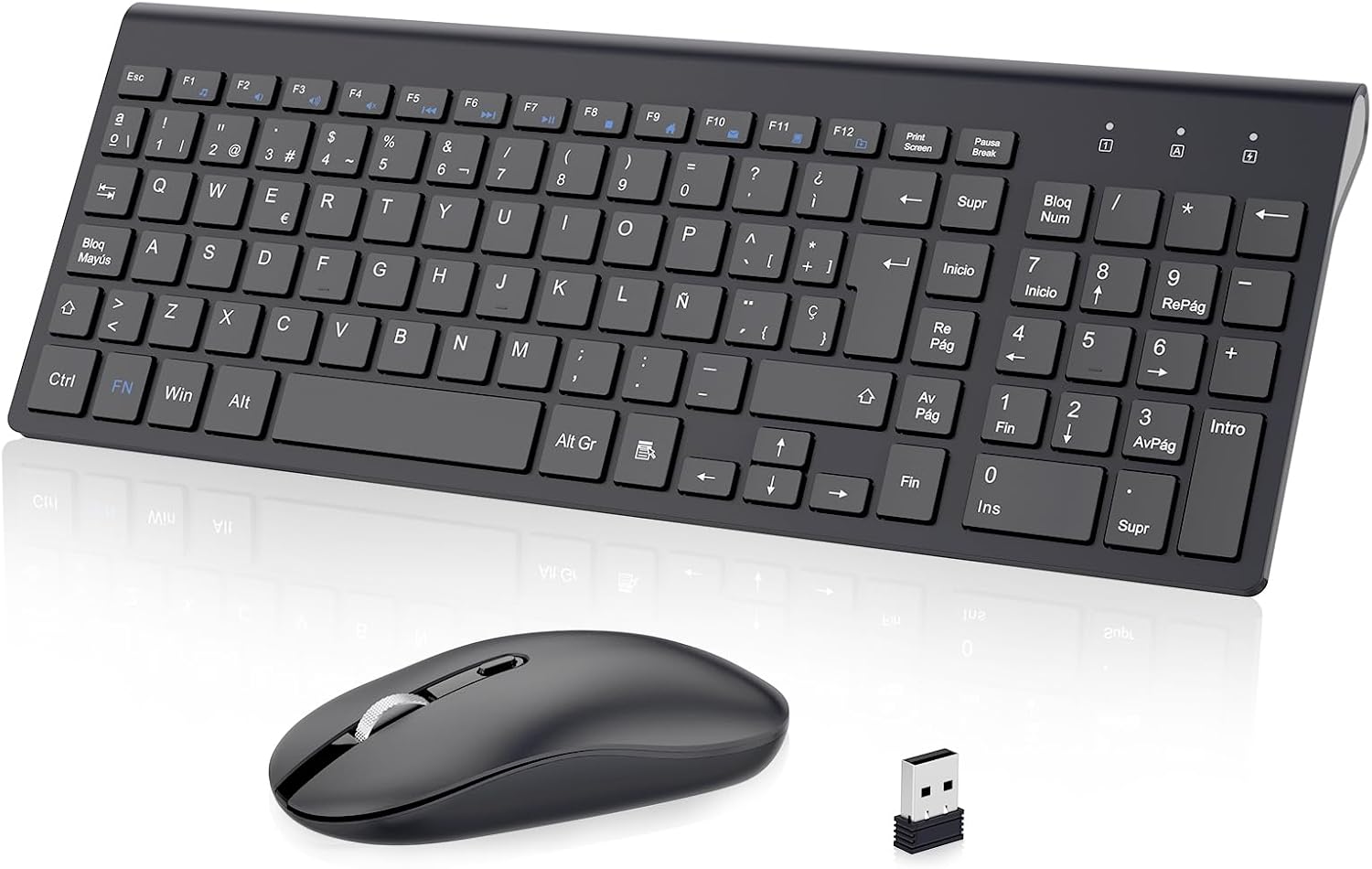
Figure 1: cimetech KF10 Wireless Keyboard and Mouse Combo.
2. Contenuto della confezione
- 1 x cimetech Wireless Keyboard
- 1 x cimetech Wireless Mouse
- 1 x 2-in-1 USB Receiver (stored inside the mouse)
- 1 x Manuale utente
3. Guida all'installazione
3.1. Installazione delle batterie
The keyboard requires 2 AAA batteries and the mouse requires 1 AA battery (batteries are not included). Please ensure correct polarity when inserting the batteries.
3.2. Locating the USB Receiver
The 2-in-1 USB receiver for both the keyboard and mouse is conveniently stored inside the mouse. To access it, open the battery compartment cover on the underside of the mouse.

Figure 2: The USB receiver is stored in the mouse's battery compartment.
3.3. Connecting to Your Device (Plug and Play)
- Rimuovere il ricevitore USB dal vano batterie del mouse.
- Collega il ricevitore USB a una porta USB disponibile sul tuo computer o laptop.
- Accendere il mouse utilizzando l'interruttore On/Off situato nella parte inferiore.
- The keyboard and mouse will automatically connect to your device. No additional drivers are required.

Figure 3: Simply plug the USB receiver into your device for instant connection.
Video 1: Demonstrates the setup process for the cimetech Wireless Keyboard and Mouse Combo, highlighting its ergonomic, silent, and portable features, along with the plug-and-play setup and energy-saving mode.
4. Istruzioni per l'uso
4.1. Utilizzo della tastiera
- Layout a grandezza naturale: The keyboard features a full-size layout with 102 keys (Spanish QWERTY layout), including a numeric keypad for efficient data entry.
- Tasti multimediali: Utilize the 12 multimedia function keys (F1-F12, often combined with the 'Fn' key) for quick access to media controls, volume, and other common functions.
- Digitazione silenziosa: The advanced scissor-switch keys provide a comfortable, responsive, and significantly quieter typing experience compared to traditional keyboards.

Figure 4: The silent keys reduce typing noise by up to 90%.
4.2. Utilizzo del mouse
- Clic silenziosi: The mouse features silent buttons, ensuring a quiet working environment without disruptive clicking sounds.
- DPI regolabile: The mouse offers adjustable DPI levels (800/1200/1600 PPP) to customize cursor sensitivity for precise control. Press the DPI button on top of the mouse to cycle through the settings.
- Design ambidestro: Il mouse è progettato per essere utilizzato comodamente sia dagli utenti mancini che da quelli destrorsi.
Figure 5: The silent mouse features adjustable DPI settings for customized sensitivity.
5. Modalità di risparmio energetico
To conserve battery life, both the keyboard and mouse feature an automatic sleep mode:
- Il mouse entrerà in modalità sospensione dopo 8 minuti di inattività.
- La tastiera entrerà in modalità sospensione dopo 3 minuti di inattività.
To wake the devices, simply press any key on the keyboard or move/click the mouse. The devices will reactivate within 3 seconds.

Figure 6: Automatic sleep mode helps save battery power.
6. Funzionalità finiteview
- 2.4G Stable Wireless Connection: Provides a powerful and reliable connection up to 10 meters (33 feet) without delays or dropouts.
- Design ultra sottile e portatile: The keyboard is only 0.7 inches thick, making the combo easy to carry and space-saving.
- Silent Typing and Clicking: Advanced scissor-switch keys and silent mouse buttons ensure a quiet working environment.
- Design ergonomico: The keyboard is designed with an inclination angle to alleviate muscle strain during long hours of work.

Figure 7: The ergonomic design provides a comfortable typing experience.

Figure 8: Dimensions illustrating the ultra-thin and lightweight design of the keyboard and mouse.
7. Compatibilità
The cimetech KF10 Wireless Keyboard and Mouse Combo is widely compatible with various operating systems and devices:
- Sistemi operativi: Windows 2000 / ME / XP / Vista / 7 / 8 / 10.
- Dispositivi compatibili: Desktops, Chromebooks, PCs, laptops, and more with an available USB port.

Figure 9: The combo is compatible with Windows operating systems and various computer types.
8. Manutenzione
- Keep the keyboard and mouse clean by wiping them with a soft, dry cloth.
- Avoid exposing the devices to excessive moisture or extreme temperatures.
- Quando non lo si utilizza per lunghi periodi, spegnere il mouse per preservare la durata della batteria.
- Store the USB receiver inside the mouse to prevent loss when transporting the devices.
9. Risoluzione Dei Problemi
| Problema | Possibile soluzione |
|---|---|
| Tastiera/mouse non rispondono |
|
| Connessione lenta o intermittente |
|
| Il cursore del mouse è irregolare o non si muove fluidamente |
|
10. Specifiche
| Caratteristica | Dettaglio |
|---|---|
| Tecnologia di connettività | Wireless a 2.4 GHz (ricevitore USB) |
| wireless Range | Fino a 10 metri (33 piedi) |
| Disposizione della tastiera | Spanish QWERTY (102 keys) |
| Tipo di tastiera | Ultra-slim, Scissor-switch keys |
| Impostazioni DPI del mouse | 800/1200/1600 PPP (Adjustable) |
| Orientamento del mouse | Ambidestro |
| Fonte di alimentazione | Keyboard: 2 x AAA batteries (not included) Mouse: 1 x AA battery (not included) |
| Sistemi operativi compatibili | Windows 2000 / ME / XP / Vista / 7 / 8 / 10 |
| Dimensioni del prodotto (tastiera) | Circa. 36.8 x 13.8 x 0.6 cm |
| Peso del prodotto | 610 g (peso totale della confezione) |
11. Garanzia e supporto
cimetech products come with a 12-month warranty. For any questions, technical support, or warranty claims, please contact cimetech customer service. Professional customer service is available 24 hours to provide a satisfactory solution.
Ask a question about this manual
Ask about setup, troubleshooting, compatibility, parts, safety, or missing instructions. Manuals+ will review the question and use this page’s manual context to help answer it.