
Introduzione
This manual provides comprehensive instructions for the Allimity AH59-02530A replacement remote control. This remote is designed to be compatible with various Samsung Blu-ray Home Entertainment System models, including HT-H4200R, HT-F4500, HT-FM45/ZA, HT-H4500R, HT-H4550R, HT-J4500, HT-J5500W, HT-JM41, and HT-J4100. No programming or setup is required; simply insert batteries to begin operation.
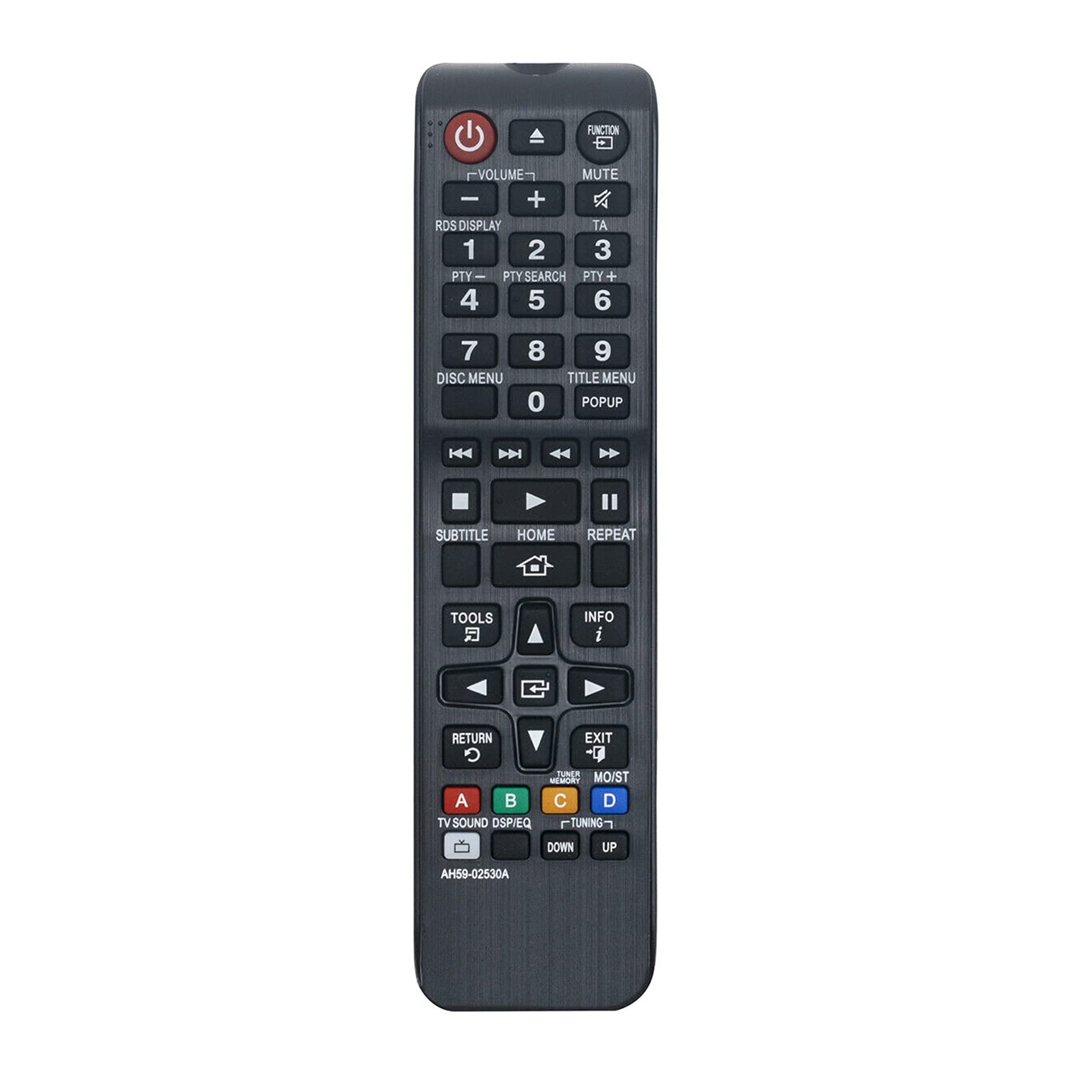
Figura 1: Angolato view of the Allimity AH59-02530A remote control, showcasing its layout and buttons.
Impostare
Installazione della batteria
The Allimity AH59-02530A remote control requires two AAA alkaline batteries (not included) for operation. Follow these steps to install the batteries:
- Individuare il coperchio del vano batterie sul retro del telecomando.
- Premere la linguetta e far scorrere il coperchio verso il basso per aprire il vano.
- Inserire due nuove batterie alcaline AAA, assicurandosi che i terminali positivo (+) e negativo (-) corrispondano agli schemi all'interno del vano.
- Riposizionare il coperchio del vano batteria finché non scatta in posizione.

Figura 2: Posteriore view del telecomando con il vano batterie aperto, che mostra gli slot per due batterie AAA.
Once batteries are installed, the remote is ready for use with your compatible Samsung Home Entertainment System.
Istruzioni per l'uso
This remote control is designed to replicate the functions of your original Samsung remote. Point the remote directly at your Samsung Home Entertainment System for optimal performance. Below is a general guide to common button functions:

Figura 3: Fronte view del telecomando, evidenziando i vari pulsanti funzione.
- Pulsante di accensione (⏻): Turns the home entertainment system on or off.
- Pulsante funzione: Cycles through available input sources or functions.
- Volume (+/-): Adjusts the audio volume level.
- Pulsante muto: Silences or restores the audio.
- Pulsanti numerici (0-9): Used for direct input, such as track selection or menu navigation.
- Disc Menu / Title Menu / POPUP: Accesses disc-specific menus or pop-up menus.
- Controlli di riproduzione (Riproduci, Pausa, Stop, Avanti veloce, Riavvolgi, Salta): Controlla la riproduzione multimediale.
- Pulsante HOME: Returns to the main home screen or menu of the system.
- Tastierino di navigazione (su, giù, sinistra, destra, Invio): Utilizzato per navigare nei menu e confermare le selezioni.
- Pulsante RETURN: Torna alla schermata o al menu precedente.
- Pulsante EXIT: Esce dal menu o dalla funzione corrente.
- Pulsante STRUMENTI: Accede alle impostazioni rapide o al menu degli strumenti.
- Pulsante INFO: Displays information about the current content or system status.
- Pulsanti colorati (A, B, C, D): These buttons (Red, Green, Yellow, Blue) provide access to specific functions depending on the content or menu displayed on your screen.
For specific functions related to your Samsung Home Entertainment System model, refer to your system's original user manual.
Manutenzione
Sostituzione della batteria
Replace batteries when the remote control's response becomes sluggish or inconsistent. Always replace both AAA batteries at the same time with new alkaline batteries. Do not mix old and new batteries, or different types of batteries.
Pulizia
Per pulire il telecomando, strofinarlo delicatamente con un panno morbido e asciutto. Non utilizzare detergenti liquidi, spray o materiali abrasivi, poiché potrebbero danneggiare la superficie o i componenti interni del telecomando.
Magazzinaggio
Quando non si utilizza il telecomando per lunghi periodi, si consiglia di rimuovere le batterie per evitare perdite che potrebbero danneggiarlo.
Risoluzione dei problemi
- Il telecomando non risponde:
- Assicurarsi che le batterie siano inserite correttamente con la polarità corretta (+/-).
- Sostituisci le vecchie batterie con nuove batterie alcaline AAA.
- Ensure there are no obstructions between the remote control and the home entertainment system's infrared receiver.
- Confirm the remote is pointed directly at the system.
- Raggio operativo limitato:
- The maximum effective range is approximately 33 feet (10 meters). Ensure you are within this range.
- Bright light sources, such as direct sunlight or strong fluorescent lights, can interfere with the infrared signal. Try to minimize such interference.
- Funzioni specifiche non funzionanti:
- Verify that your Samsung Home Entertainment System model is listed as compatible.
- Some advanced functions might be specific to the original remote or require specific system settings.
Specifiche
| Marca | ALLIMITÀ |
| Numero di modello | AH59-02530A |
| Tecnologia di connettività | Infrarossi |
| Dispositivi compatibili | Samsung Blu-ray Home Entertainment Systems (HT-H4200R, HT-F4500, HT-FM45/ZA, HT-H4500R, HT-H4550R, HT-J4500, HT-J5500W, HT-JM41, HT-J4100) |
| Tipo di batteria | 2 batterie alcaline AAA (non incluse) |
| Portata massima | 33 piedi (10 metri) |
| Colore | Nero |
| Dimensioni articolo (L x P x A) | 6"L x 2"W x 0.5"H (approximately) |
| Peso dell'articolo | 2 Ounces (approximately) |
Informazioni sulla garanzia
Specific warranty details for the Allimity AH59-02530A remote control are typically provided by the seller or manufacturer at the time of purchase. Please refer to your product packaging, purchase receipt, or contact the seller directly for information regarding warranty coverage and terms.
Supporto
For technical assistance, troubleshooting beyond this manual, or inquiries about your Allimity AH59-02530A remote control, please contact the seller or manufacturer directly. Contact information can usually be found on the product packaging or the platform where the item was purchased.