
1. Introduzione
This manual provides instructions for the proper setup, operation, and maintenance of your Bytech TBMOMO119AC Foldable Tablet Stand. Please read this manual thoroughly before using the product to ensure optimal performance and longevity.
2 Caratteristiche
The Bytech TBMOMO119AC Foldable Tablet Stand is designed to provide a stable and adjustable platform for your tablet or other compatible portable electronic devices. Key features include:
- Design pieghevole: Consente uno stoccaggio compatto e una facile trasportabilità.
- Regolabile Viewing angoli: Provides multiple height and angle settings for comfortable viewing.
- Ventilazione: Open design helps prevent device overheating.
- Ampia compatibilità: Suitable for tablets and other devices ranging from 7 to 15 inches.
- Costruzione durevole: Made from robust materials for long-lasting use.
3. Contenuto della confezione
Si prega di verificare che tutti gli articoli siano presenti nel pacco:
- 1 x Bytech TBMOMO119AC Foldable Tablet Stand
4. Istruzioni per l'installazione
Follow these steps to set up your tablet stand:
- Aprire il supporto: Gently pull the two main support arms outwards until the stand is fully extended and stable on a flat surface.
- Regola altezza e angolazione: The stand features adjustable hinges. Carefully lift or lower the support arms to achieve your desired viewing height and angle. Ensure both sides are adjusted evenly for stability.
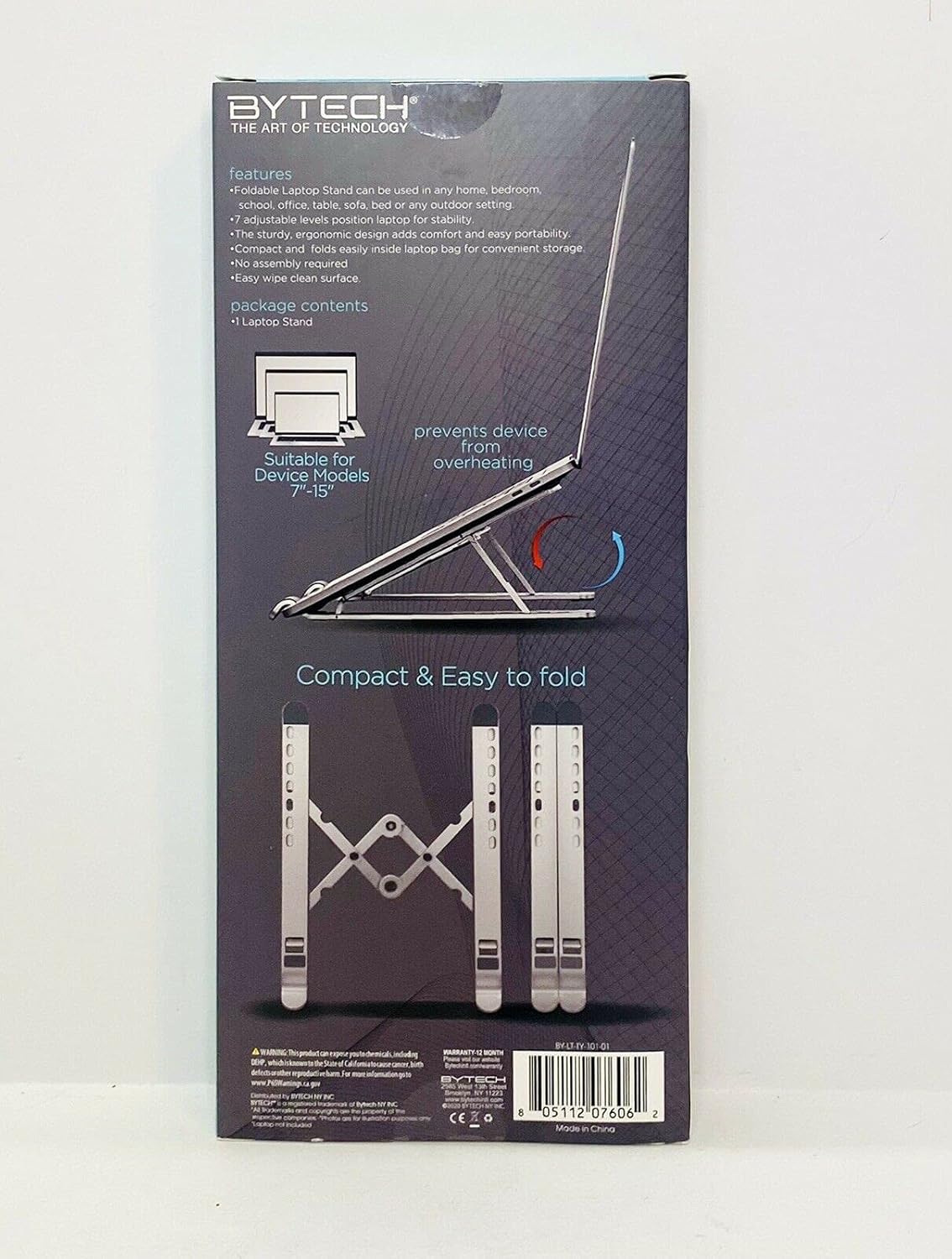
Image 1: The Bytech TBMOMO119AC Foldable Tablet Stand fully extended and ready for use. This image shows the stand's adjustable arms and base, designed to securely hold a tablet.

Image 2: The Bytech TBMOMO119AC Foldable Tablet Stand in its compact, folded state, illustrating its portability and ease of storage.
5. Istruzioni per l'uso
To use your tablet stand:
- Posiziona il tuo dispositivo: Carefully place your tablet or compatible device onto the support hooks at the front of the stand. Ensure the device rests securely against the back support.
- Aggiustamenti finali: Make any final adjustments to the stand's height and angle to achieve your preferred viewing position. Ensure the stand remains stable with your device in place.
6. Manutenzione
To maintain your Bytech TBMOMO119AC Foldable Tablet Stand:
- Pulizia: Pulisci il supporto con un panno morbido eamp panno per rimuovere polvere e macchie. Evitare l'uso di prodotti chimici aggressivi o detergenti abrasivi.
- Magazzinaggio: Quando non lo si utilizza, ripiegare il supporto nella sua forma compatta e conservarlo in un luogo asciutto, lontano dalla luce solare diretta.
7. Risoluzione Dei Problemi
If you encounter issues with your tablet stand, consider the following:
- Instabilità del supporto: Ensure the stand is fully unfolded and placed on a flat, stable surface. Verify that both adjustable arms are set to the same height and angle.
- Dispositivo non sicuro: Confirm that your device is properly seated on the support hooks and rests against the back support. The stand is designed for devices between 7 and 15 inches.
8. Specifiche
| Marca | Tecnologia Bytech |
| Numero di modello | TBMOMO119AC |
| Colore | Nero |
| Dispositivi compatibili | Tablet (7-15 pollici) |
| Tipo di montaggio | Pieghevole |
| Lunghezza regolabile | SÌ |
| Peso dell'articolo | 0.17 chilogrammi |
| Materiale | Plastica |
| Codice UPC | 805112077328 |
9. Garanzia e supporto
The Bytech TBMOMO119AC Foldable Tablet Stand comes with a Garanzia di 12 mesi from the date of purchase. This warranty covers manufacturing defects under normal use. For warranty claims or technical support, please contact your retailer or the Bytech customer service department.