
ACETECH AECTECH-Raider-Tracer Unit with M14 CCW Thread for Airsoft only
Manuale utente del modulo blaster Raider dell'unità tracciante Airsoft ACETECH
Model: AECTECH-Raider-Tracer Unit with M14 CCW Thread for Airsoft only
Brand: ACETECH
1. Introduzione
This manual provides comprehensive instructions for the safe and effective use of your ACETECH Airsoft Tracer Unit Raider Blaster Module. This device is designed to enhance your airsoft experience by providing realistic muzzle flash and tracer effects for green/gel BBs. Please read this manual thoroughly before operation to ensure proper functionality and longevity of the product.

Figure 1: ACETECH Airsoft Tracer Unit Raider Blaster Module.
2. Caratteristiche del prodotto
The ACETECH Raider Blaster Module offers advanced features for an immersive airsoft experience:
- Three Mode Operation: Easily switch between Tracer and Flame mode, Tracer only mode, or Flame only mode to suit your tactical needs.
- Costruzione durevole: Manufactured from highly durable aluminum alloy, ensuring resilience and longevity in demanding airsoft environments.
- Blaster M Module Included: Comes with the Blaster M module for enhanced performance and effects.
- Glow-in-the-Dark LED Lighting: Specifically designed for use with green/gel tracer BBs, providing a bright, visible tracer effect.
- 14mm CCW Negative Thread: Compatible with most airsoft replicas featuring a 14mm counter-clockwise threaded barrel.

Figure 2: Illustration of the tracer unit's effect on BBs.
3. Impostazione
Follow these steps to properly set up your ACETECH Raider Blaster Module:
- Contenuto della confezione: Carefully remove the tracer unit and any included accessories from the packaging.
- Carica l'unità: Before first use, fully charge the tracer unit using the provided USB charging cable. Connect the cable to the charging port on the unit and a compatible USB power source (e.g., computer USB port, wall adapter). The charging indicator light will typically change color or turn off when fully charged.
- Attach to Airsoft Replica: The Raider Blaster Module features a 14mm CCW (Counter-Clockwise) negative thread. Align the tracer unit with the outer barrel of your airsoft replica and rotate it counter-clockwise until it is securely fastened. Do not overtighten.
- Load Tracer BBs: Ensure you are using high-quality green or gel tracer BBs for optimal glow effect. Load them into your airsoft replica's magazine as usual.
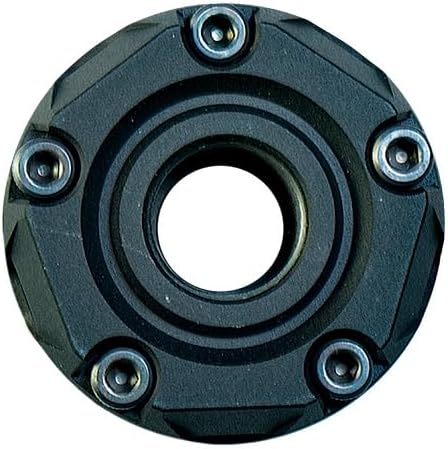
Figura 3: Posteriore view showing the 14mm CCW threading.

Figure 4: Components of the Raider Blaster Module.

Figure 5: Internal Blaster M module.
4. Istruzioni per l'uso
The Raider Blaster Module offers versatile lighting effects. Refer to the following for operation:
- Accensione/spegnimento: Locate the power button (refer to product diagram if available). Press and hold for a few seconds to turn the unit on or off.
- Selezione della modalità: Once powered on, short press the power button to cycle through the three available modes:
- Tracer and Flame: Activates both the tracer illumination for BBs and the simulated muzzle flash effect.
- Tracer Only: Activates only the tracer illumination for BBs.
- Solo Fiamma: Activates only the simulated muzzle flash effect.
- Sparo: With the unit attached and desired mode selected, fire your airsoft replica as normal. The tracer unit will automatically detect BBs passing through and activate the chosen lighting effects.

Figura 6: Fronte view showing the LED array.
Video 1: Official demonstration of the ACETECH Raider Blaster Module's features and effects, including tracer and flame simulation.
5. Manutenzione
Proper maintenance ensures the longevity and optimal performance of your tracer unit:
- Pulizia: Use a soft, dry cloth to wipe down the exterior of the unit. Avoid using abrasive cleaners or solvents that could damage the finish or internal components.
- Pulizia interna: If dust or debris accumulates inside the BB path, gently use a cotton swab or compressed air to clear it. Ensure the unit is powered off before cleaning.
- Magazzinaggio: When not in use, store the tracer unit in a cool, dry place away from direct sunlight and extreme temperatures. It is recommended to fully charge the unit before long-term storage and recharge it every few months to maintain battery health.
- Evitare l'esposizione all'acqua: This device is not waterproof. Avoid exposing it to rain, splashes, or submersion in water.
6. Risoluzione Dei Problemi
If you encounter issues with your ACETECH Raider Blaster Module, refer to the following common solutions:
| Problema | Possibile causa | Soluzione |
|---|---|---|
| L'unità non si accende. | Batteria scarica o scarica. | Caricare completamente l'unità utilizzando il cavo USB in dotazione. |
| Tracer effect is weak or inconsistent. | Using non-tracer BBs or low-quality tracer BBs. Unit not fully charged. Internal sensor obstructed. | Ensure you are using high-quality green or gel tracer BBs. Fully charge the unit. Clean the internal BB path for any obstructions. |
| L'effetto fiamma non funziona. | È stata selezionata la modalità errata. | Cycle through modes to select "Tracer and Flame" or "Flame Only" mode. |
| Unit is loose on the airsoft replica. | Not tightened sufficiently or incorrect thread type. | Ensure the unit is securely threaded onto the 14mm CCW barrel. Verify your airsoft replica has a 14mm CCW thread. |
If the problem persists after attempting these solutions, please contact ACETECH customer support.
7. Specifiche
| Attributo | Dettaglio |
|---|---|
| Marca | ACETECH |
| Nome del modello | AECTECH-Raider-Tracer Unit with M14 CCW Thread for Airsoft only |
| Colore | Nero |
| Materiale | Alluminio |
| Peso dell'articolo | 0.3 chilogrammi |
| Dimensioni imballo articolo (L x P x A) | 5.28 x 3.86 x 2.8 pollici |
| Tipo di potenza della pistola ad aria compressa | Elettrico |
| Tipo di materiale della canna | Metallo |
| Materiale del telaio | Metallo |
| Tipo di sport | Softair |
8. Garanzia e supporto
For detailed warranty information and customer support, please refer to the official ACETECH webo contattare direttamente il servizio clienti. Conservare la prova d'acquisto per eventuali reclami in garanzia.
You can visit the official ACETECH store for more information: ACETECH Store
Ask a question about this manual
Ask about setup, troubleshooting, compatibility, parts, safety, or missing instructions. Manuals+ will review the question and use this page’s manual context to help answer it.