
1. Introduzione
Thank you for choosing the A4tech FG1112 Fstyler Wireless Keyboard and Mouse Set. This compact and efficient combo provides a reliable 2.4GHz wireless connection, offering convenience and comfort for your daily computing needs. The keyboard features a Q Turkish layout with FN multimedia keys, while the mouse offers precise 1200 DPI optical tracking. This manual will guide you through the setup, operation, and maintenance of your new device.
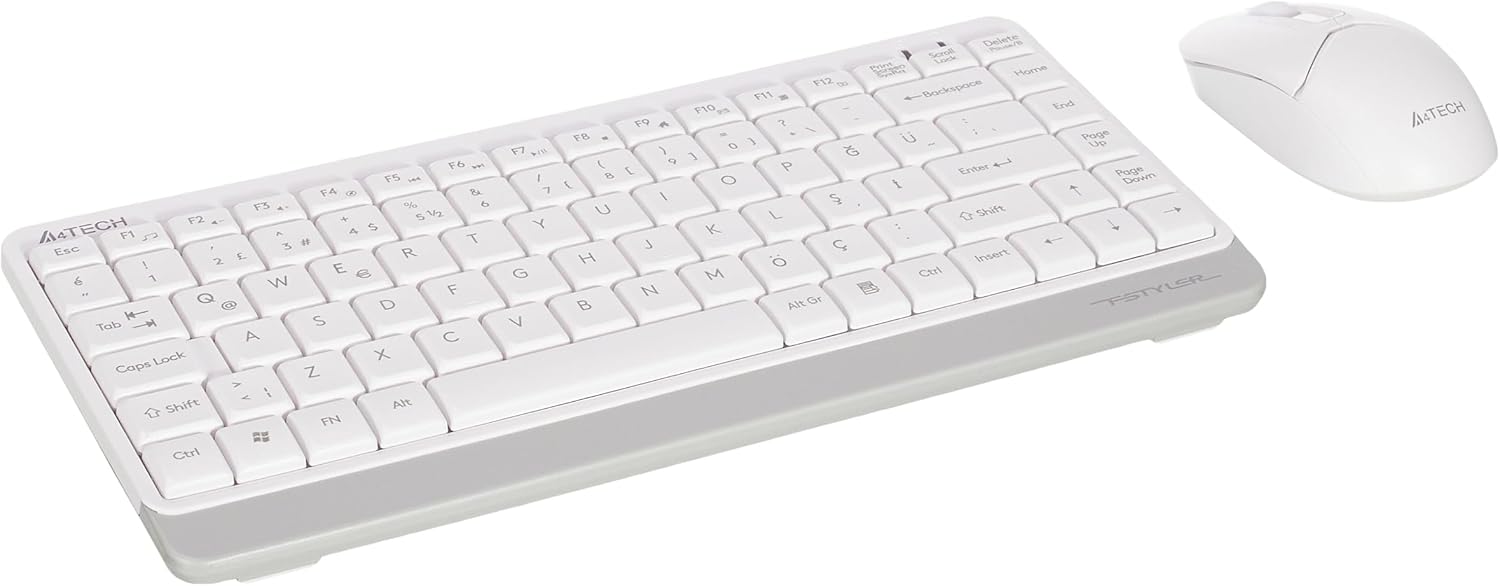
Image 1.1: A4tech FG1112 Fstyler Wireless Keyboard and Mouse Set (White)
2. Contenuto della confezione
Si prega di controllare il contenuto della confezione per assicurarsi che siano presenti tutti gli articoli:
- 1 x A4tech FG1112 Wireless Keyboard
- 1 x A4tech Fstyler Wireless Mouse
- 1 x ricevitore nano USB
- 2 batterie AAA (per la tastiera)
- 1 x AA Battery (for mouse, typically included)
- 1 x Manuale utente (questo documento)
3. Istruzioni per l'installazione
- Inserire le batterie:
- For the keyboard: Open the battery compartment cover on the underside of the keyboard. Insert two AAA batteries, ensuring correct polarity (+/-). Close the cover.
- For the mouse: Open the battery compartment cover on the underside of the mouse. Insert one AA battery, ensuring correct polarity (+/-). Close the cover.

Image 3.1: Mouse bottom view showing battery compartment and power switch.
- Collegare il ricevitore USB Nano: Locate the USB Nano Receiver, typically stored inside the mouse's battery compartment or packaged separately. Plug the receiver into an available USB port on your computer.
- Accensione:
- For the keyboard: Ensure the keyboard is powered on. There might be a power switch on the top right or underside.
- For the mouse: Slide the power switch on the underside of the mouse to the "ON" position.
- Connessione automatica: Your computer should automatically detect and install the necessary drivers for the keyboard and mouse. This process may take a few moments. Once complete, your devices are ready for use.
Video 3.1: A short demonstration of the A4tech Fstyler Wireless Keyboard and Mouse Set, showing its compact design and wireless connectivity. This video illustrates the product's features and ease of use.
4. Istruzioni per l'uso
4.1 Utilizzo della tastiera
The A4tech FG1112 keyboard features a compact design with a Q Turkish layout. It is designed for comfortable and quiet typing.

Immagine 4.1: In alto view of the A4tech FG1112 Wireless Keyboard, highlighting its Q Turkish layout.
Tasti multimediali e funzione:
The keyboard includes 12 multimedia and internet function keys integrated into the F1-F12 keys. To activate these functions, press the FN tasto contemporaneamente al tasto F desiderato.
- Tasto F1: Media Player
- Tasto F2: Volume basso
- Tasto F3: Volume su
- Tasto F4: Muto
- Tasto F5: Traccia precedente
- Tasto F6: Prossima traccia
- Tasto F7: Riproduci/Pausa
- Tasto F8: Fermare
- Tasto F9: Pagina iniziale
- Tasto F10: E-mail
- Tasto F11: Il mio computer
- Tasto F12: Calcolatrice

Image 4.2: Illustration of FN key functionality for multimedia controls.
4.2 Utilizzo del mouse
The A4tech Fstyler mouse provides precise 1200 DPI optical tracking for smooth and accurate cursor movement.

Immagine 4.3: In alto view of the A4tech Fstyler Wireless Mouse.
Funzioni di base:
- Clic sinistro: Primary function, used for selecting items, opening files, ecc.
- Clic destro: Secondary function, typically opens context menus.
- Rotella di scorrimento: Used for scrolling documents and web pages vertically. Can also function as a middle click button.
5. Manutenzione
- Pulizia: Utilizzare un panno morbido e asciutto per pulire la tastiera e il mouse. Per lo sporco ostinato, un panno leggermenteamp cloth can be used, but ensure no liquid enters the devices.
- Sostituzione della batteria: When the keyboard or mouse becomes unresponsive or exhibits delayed input, it's time to replace the batteries. Follow the "Insert Batteries" steps in the Setup section.
- Magazzinaggio: When not in use for extended periods, turn off the mouse to conserve battery life. Store the devices in a cool, dry place.
6. Risoluzione Dei Problemi
| Problema | Possibile soluzione |
|---|---|
| Tastiera/mouse non rispondono |
|
| Delayed or intermittent response |
|
| I tasti multimediali non funzionano |
|
7. Specifiche
| Caratteristica | Dettaglio |
|---|---|
| Marca | A4tech |
| Modello | FG1112 |
| Tecnologia di connettività | 2.4GHz wireless |
| Disposizione della tastiera | Q Turkish |
| Tipo di tastiera | Multimedia Membrane |
| DPI del mouse | 1200 DPI Optical |
| Fonte di alimentazione della tastiera | 2 batterie AAA |
| Fonte di alimentazione del mouse | 1 x AA Battery (typical) |
| Caratteristiche speciali | Wireless, Mini, Multimedia Keys, Optical Mouse, Laser Printed Keys, Water-resistant design (with drainage channels) |
| Peso del prodotto | 0.62 Kilograms (Set) |
| Dimensioni (tastiera) | Approx. 315mm (Width) x 146mm (Depth) x 25mm (Height) |
| Dimensioni (mouse) | Approx. 64mm (Width) x 108mm (Depth) x 35mm (Height) |

Image 7.1: Dimensions of the A4tech FG1112 Keyboard and Mouse.
8. Garanzia e supporto
This A4tech FG1112 Fstyler Wireless Keyboard and Mouse Set comes with a Garanzia di 2 anno dalla data di acquisto. Conservare la prova d'acquisto per eventuali reclami in garanzia.
For technical support, troubleshooting assistance, or warranty inquiries, please contact A4tech customer service through their official websito o il distributore locale.
Puoi trovare maggiori informazioni e risorse di supporto su A4tech Store on Amazon.