
SYLVOX S100MCMA0
Manuale di istruzioni per il supporto da parete per TV da esterno SYLVOX Full Motion (modello S100MCMA0)
For TV Sizes 40 to 75 Inches, VESA up to 600x400mm
1. Introduzione
This manual provides detailed instructions for the safe and proper installation, operation, and maintenance of your SYLVOX Full Motion Outdoor TV Wall Mount, Model S100MCMA0. This mount is designed for outdoor use and accommodates televisions ranging from 40 to 75 inches, with VESA patterns up to 600x400mm and a maximum weight capacity of 100 lbs (45.5 kg).
The mount features a robust double-arm articulated design, allowing for flexible adjustments including swivel, tilt, extension, and retraction to optimize your viewesperienza di acquisizione.
2. Informazioni importanti sulla sicurezza
WARNING: Failure to read and follow these instructions can result in serious personal injury, property damage, or voiding of your warranty.
- Installazione professionale: It is highly recommended that this product be installed by qualified professional personnel.
- Requisiti della parete: The installation wall must be solid and reliable. Suitable wall types include solid wood wall column structures, brick walls, or reinforced concrete vertical walls. Do not install on drywall or plaster without proper reinforcement.
- Compatibilità VESA: Prima dell'acquistoasing and installing, confirm that the mounting hole size on the back of your television is compatible with the VESA patterns supported by this mount (200x200mm, 300x200mm, 300x300mm, 400x300mm, 400x400mm, 500x400mm, 600x400mm).
- Capacità di peso: Do not exceed the maximum weight capacity of 100 lbs (45.5 kg). Overloading can lead to mount failure and injury.
- Posizionamento all'aperto: To prolong the service life of the mount, it is recommended to install it under sheltered eaves to avoid direct rain exposure.
- Gestione dei cavi: Ensure all cables are routed safely and securely to prevent tripping hazards or damage.
3. Contenuto della confezione
Verificare che tutti i componenti siano presenti prima di iniziare l'installazione. Se qualche componente risulta mancante o danneggiato, non procedere con l'installazione e contattare l'assistenza clienti.
- SYLVOX Full Motion Outdoor TV Wall Mount assembly
- Manuale di istruzioni
- Mounting hardware kit (includes bolts, nuts, screws, washers, etc. required for installation)

Immagine 1: Passoview of the SYLVOX Full Motion Outdoor TV Wall Mount components.
4. Specifiche
| Caratteristica | Specificazione |
|---|---|
| Marca | SILVOX |
| Numero di modello | S100MCMA0 |
| Tipo di montaggio | Montaggio a parete |
| Tipo di movimento | Articulating, Tilt |
| Materiale | Acciaio legato |
| Colore | Nero |
| Dimensioni TV compatibili | 40" - 75" |
| Capacità massima di peso | 100 libbre (45.5 kg) |
| Compatibilità VESA | 200x200mm, 300x200mm, 300x300mm, 400x300mm, 400x400mm, 500x400mm, 600x400mm |
| Distanza di estensione | Da 1.9" (49 mm) a 19.6" (500 mm) |
| Angolo di rotazione | +/- 45° (depending on TV size) |
| Angolo di inclinazione | Avanti 8°, indietro 5° |
| Peso dell'articolo | 12.87 libbre (5.84 kg) |
| Codice UPC | 810079220298 |
5. Configurazione e installazione
Prima di iniziare:
- Leggere attentamente tutte le istruzioni.
- Ensure you have all necessary tools (e.g., drill, stud finder, level, screwdriver, wrench).
- Confirm your wall type is suitable and can support the weight of the mount and your TV.
- Verify your TV's VESA pattern matches the mount's compatibility.
- It is strongly recommended to have at least two people for installation, especially when mounting the TV.
5.1 Fissaggio delle staffe TV al televisore
- Posizionare con cautela il televisore a faccia in giù su una superficie morbida e pulita per evitare di danneggiare lo schermo.
- Identifica i fori di montaggio VESA sul retro del televisore.
- Seleziona dal kit di ferramenta le viti, le rondelle e i distanziali adatti ai fori di montaggio del tuo televisore.
- Attach the vertical TV brackets to the back of your TV, ensuring they are centered and securely fastened. Do not overtighten.

Image 2: Illustration of the two-arm articulated design and VESA compatibility, showing how TV brackets attach.
5.2 Mounting the Wall Plate to the Wall
- Determine the desired height and location for your TV. Use a stud finder to locate wall studs if installing on a wood stud wall. For concrete or brick walls, use appropriate anchors (not always included, consult a professional).
- Position the wall plate template (if provided, or the wall plate itself) on the wall and mark the pilot hole locations. Use a level to ensure it is perfectly horizontal.
- Drill pilot holes at the marked locations. The size of the drill bit will depend on your wall type and the lag bolts used.
- Fissare la piastra a muro alla parete utilizzando i bulloni e le rondelle forniti. Serrare saldamente tutti i bulloni, ma non eccessivamente.

Immagine 3: Es.ample of the wall mount installed on an outdoor stone wall, demonstrating its robust structure.
5.3 Appendere la TV alla piastra a muro
- Con l'aiuto di qualcuno, sollevare con cautela il televisore con le staffe in dotazione e agganciarle alla piastra a muro.
- Assicurarsi che il televisore sia fissato saldamente alla piastra a muro.
- Engage any safety locking mechanisms (if present) to prevent the TV from accidentally disengaging from the mount.
6. Funzionamento del supporto (regolazioni)
The SYLVOX Full Motion Outdoor TV Wall Mount offers various adjustments to achieve your optimal viewangolo di ing.
6.1 Estensione e retrazione
The mount features flexible 6 articulating dual arms that allow the TV to extend up to 19.6 inches (500mm) from the wall and retract back to a minimum distance of 1.9 inches (49mm).

Image 4: Visual representation of the mount's flexible articulated arms, demonstrating extension and retraction capabilities.
6.2 Regolazione della rotazione
You can swivel the TV left or right by up to +/- 45 degrees, depending on the size of your television and its distance from the wall. Gently push or pull the TV to the desired angle.
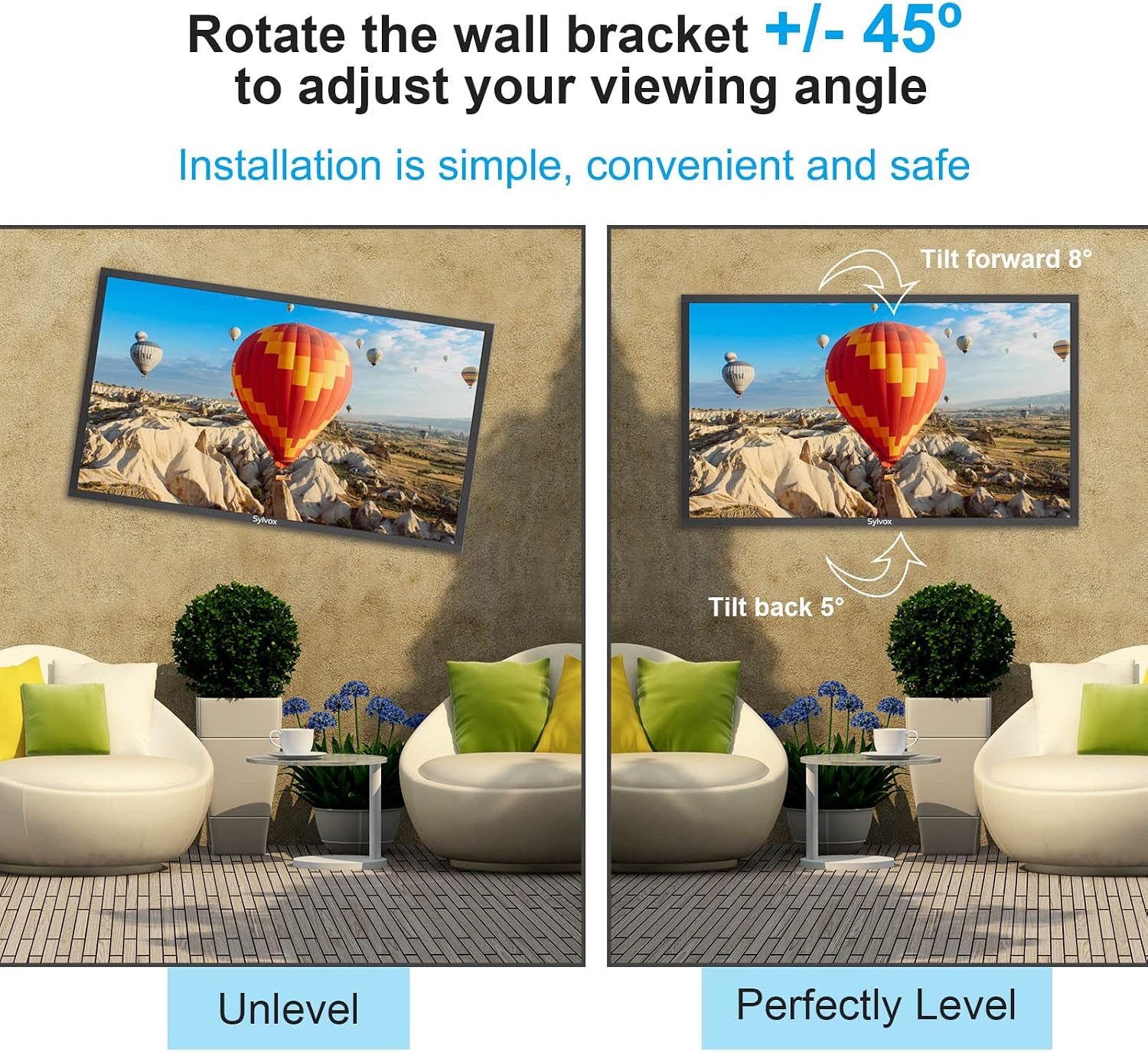
Image 5: Illustration of the swivel function, allowing adjustment of the viewing angle by rotating the TV +/- 45 degrees.
6.3 Regolazione dell'inclinazione
The mount allows for a forward tilt of 8 degrees and a backward tilt of 5 degrees. This can help reduce glare and provide a better viewangolo di visione da diverse altezze.
To adjust the tilt, loosen the tilt adjustment knobs or bolts on the TV brackets, set the TV to the desired angle, and then securely tighten the knobs/bolts.
6.4 Gestione dei cavi
The mount includes a free wire storage card slot and channels within the articulating arms to help organize and conceal power cables and other wires. This improves safety and maintains a tidy appearance.

Image 6: Detail of the mount's design, highlighting the integrated wire storage and cable management features for a clean installation.
7. Manutenzione
- Ispezione regolare: Periodically check all screws, bolts, and connections to ensure they remain tight and secure. Loose connections can lead to instability.
- Pulizia: Pulisci il supporto con un panno morbido eamp panno. Evitare detergenti abrasivi o solventi che potrebbero danneggiare la finitura.
- Protezione esterna: As recommended, installing the mount under sheltered eaves will significantly extend its lifespan by protecting it from direct weather exposure.
- Lubrificazione: If the articulating arms become stiff over time, a small amount of silicone-based lubricant can be applied to the pivot points.
8. Risoluzione Dei Problemi
Questa sezione affronta i problemi più comuni che potresti riscontrare con il supporto da parete per TV.
- Mount feels unstable after installation:
- Ensure all wall plate bolts are securely tightened into a solid wall structure.
- Verify that the TV brackets are correctly attached to the TV and securely hooked onto the wall plate, with any safety locks engaged.
- Confirm the TV weight does not exceed the mount's maximum capacity.
- Difficoltà nella regolazione della TV (rotazione/inclinazione/estensione):
- Check if any adjustment knobs or bolts are overtightened. Loosen them slightly to allow movement, then re-tighten once the desired position is achieved.
- Ensure no cables are snagged or obstructing movement.
- Apply a small amount of silicone lubricant to pivot points if movement is stiff.
- La TV non è in piano:
- Most mounts allow for minor post-installation leveling adjustments. Consult the specific instructions for your mount to adjust the level.
- Ensure the wall plate was installed perfectly level initially.
- Parti mancanti o componenti danneggiati:
- Do not proceed with installation. Contact SYLVOX customer support immediately for assistance.
9. Garanzia e assistenza clienti
The SYLVOX Full Motion Outdoor TV Wall Mount comes with a 5-year support and warranty dalla data di acquisto.
For warranty claims, technical assistance, or any questions regarding your product, please contact SYLVOX customer support through their official website or the retailer where the product was purchased. Please have your model number (S100MCMA0) and proof of purchase ready when contacting support.
Ask a question about this manual
Ask about setup, troubleshooting, compatibility, parts, safety, or missing instructions. Manuals+ will review the question and use this page’s manual context to help answer it.