
1. Introduzione
The ENGINDOT MET01 is a versatile 3-in-1 Electromagnetic Field (EMF) detector designed to measure electromagnetic radiation, electric fields, and ambient temperature. This device helps users identify potential sources of radiation in their environment, promoting a safer daily life. It is suitable for use in homes, offices, and various other settings.
2. Informazioni sulla sicurezza
- Leggere attentamente il presente manuale prima di utilizzare il dispositivo.
- Do not attempt to disassemble or modify the meter. This may cause damage and void the warranty.
- Tenere il dispositivo lontano dall'acqua e da ambienti ad alta umidità.
- Evitare di esporre il dispositivo a temperature estreme o alla luce solare diretta per periodi prolungati.
- Per garantire letture accurate, sostituire la batteria quando compare l'indicatore di batteria scarica.
- Smaltire le batterie secondo le normative locali.
3. Contenuto della confezione
Dopo aver aperto la confezione, verificare che tutti gli articoli elencati di seguito siano presenti e in buone condizioni:
- 1x ENGINDOT MET01 EMF Meter
- 1x Manuale utente (questo documento)
- 1 batteria da 9 V

Image: Contents of the ENGINDOT MET01 package, showing the meter, user manual, and a 9V battery.
4. Caratteristiche del prodotto
- Ampia applicazione: Detects invisible radiation from various sources such as TVs, induction cookers, refrigerators, cell phones, computers, electrical wires, Wi-Fi signals, and other low-frequency home appliances.
- Misurazione accurata: Measures electromagnetic fields from 0.1 to 199.9mG (resolution 0.1mG/0.01µT), electric fields from 1 to 1999V/M (resolution 1V/M), and ambient temperature from 0℃ to 50℃ (32℉ to 122℉).
- Multifunzionalità: Includes data hold, maximum value measurement, one-key data lock, manual/auto shut-off, adjustable safe value settings, and a large LCD display with sound and light alarm system.
- Larger Backlight Display: Ensures clear readings even in low-light conditions. The backlight and flashlight can be toggled by a long press of the MAX/BL button.
- Allarme sonoro e luminoso: Provides visual and audible alerts based on radiation intensity:
- Green light (Mute): Less than 4mG
- Yellow light (Low sound frequency): 4mG - 40mG
- Red light (High sound frequency): More than 40mG
5. Product Diagram and Display Overview
5.1 Funzioni dei pulsanti

Immagine: Oltreview of the ENGINDOT MET01 EMF Meter, highlighting the functions of its control buttons.
- ON/OFF Button (Red): Powers the device on or off. Also controls the sound alarm.
- SEL Button (Orange): Selects between testing Magnetic Field (mG/µT) and Electric Field (V/M).
- ℃/℉ Button (Orange): Alterna l'unità di misura della temperatura tra Celsius e Fahrenheit.
- MAX/BL Button (Orange): Short press for Max Data Hold & Lock. Long press (2 seconds) to turn ON/OFF the LCD backlight and flashlight.
5.2 Indicatori del display LCD

Immagine: dettagliata view of the ENGINDOT MET01 LCD display, indicating various measurement units and status icons.
- Audible Alarm Indicator: Shows when the sound alarm is active.
- Max Indicator: Visualizza il valore massimo misurato.
- Ambient Temperature Display Area: Mostra la temperatura ambiente attuale.
- Unità di temperatura: Indicates whether the temperature is in ℃ or ℉.
- Measuring Value Display Area: Shows the current electromagnetic field or electric field reading.
- Electromagnetic Field Strength Unit: Displays mG or µT.
- Electric Field Strength Unit: Displays V/M.
- Indicatore di batteria scarica: Alerts when the battery needs replacement.
- Indicatore di conservazione dei dati: Shows when the current reading is held on the display.
6. Impostazione
6.1 Installazione della batteria
- Individuare il coperchio del vano batteria sul retro del dispositivo.
- Per aprire il vano, far scorrere o sganciare il coperchio.
- Insert the included 9V battery, ensuring correct polarity (+ and - terminals match).
- Chiudere saldamente il coperchio del vano batterie.
6.2 Accensione/Spegnimento
Premere il rosso ACCESO/SPENTO pulsante per accendere il dispositivo. Tenere premuto il pulsante ACCESO/SPENTO button again for a few seconds to power it off.
7. Istruzioni per l'uso
7.1 Misurazione di base
- Accendere il dispositivo utilizzando il ACCESO/SPENTO pulsante.
- The device will default to EMF measurement (mG or µT). To switch to Electric Field (V/M) measurement, press the SEL button. Press again to cycle back to EMF.
- The ambient temperature will be displayed in the upper left corner. To change the temperature unit between Celsius (℃) and Fahrenheit (℉), press the ℃ / ℉ pulsante.
- Move the meter slowly around the area or object you wish to test. The display will show real-time readings.

Immagine: Examples of using the ENGINDOT MET01 EMF Meter to detect radiation from common household electronics.
7.2 Data Hold and Max Measurement
- Data Hold: During measurement, a short press of the MAX/BL button will freeze the current reading on the display. The "HOLD" icon will appear. Press again to release and resume real-time measurement.
- Max Measurement: When in Data Hold mode, the display will show the maximum value recorded since the device was powered on or the last reset.
7.3 Retroilluminazione e torcia
To activate or deactivate the LCD backlight and the integrated flashlight, press and hold the MAX/BL pulsante per circa 2 secondi.
7.4 Spegnimento automatico
The device features an automatic shut-off function to conserve battery power. If no operation is performed for a certain period (typically 15 minutes), the meter will power off automatically. This feature can usually be disabled or enabled through specific button combinations (refer to the included printed manual for advanced settings if available).
7.5 Ampie applicazioni
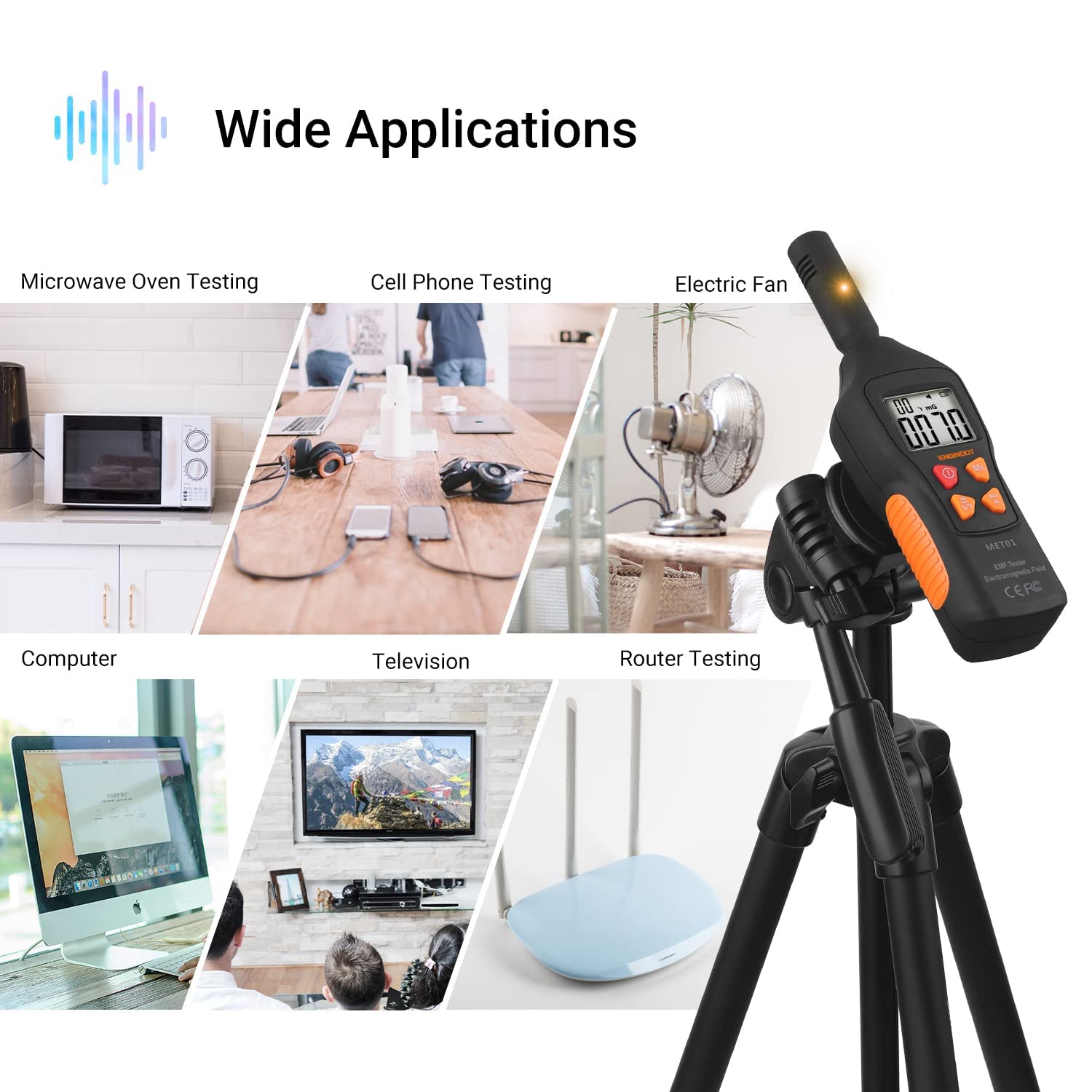
Image: The ENGINDOT MET01 EMF Meter is suitable for testing a wide range of electronic devices and environments.
8. Measurement Interpretation (Sound & Light Alarm)
The ENGINDOT MET01 provides clear indications of radiation intensity through a combination of colored LED lights and audible alarms:
- Green Light (Mute): Indicates a low radiation level, typically less than 4mG. The sound alarm is muted in this range.
- Yellow Light (Low Sound Frequency): Indicates a moderate radiation level, ranging from 4mG to 40mG. A low-frequency sound alarm will be active.
- Red Light (High Sound Frequency): Indicates a high radiation level, exceeding 40mG. A high-frequency sound alarm will be active, signaling a potentially significant radiation source.
The sound alarm can be toggled on or off by a short press of the ACCESO/SPENTO button while the device is powered on.
9. Manutenzione
- Pulizia: Utilizzare un panno morbido e asciutto per pulire l'esterno del dispositivo. Non utilizzare detergenti abrasivi o solventi.
- Magazzinaggio: When not in use for extended periods, remove the battery to prevent leakage and store the device in a cool, dry place.
- Sostituzione della batteria: Replace the 9V battery promptly when the low battery indicator appears on the LCD to ensure accurate and consistent performance.
10. Risoluzione Dei Problemi
| Problema | Possibile causa | Soluzione |
|---|---|---|
| Il dispositivo non si accende. | La batteria è scarica o non è installata correttamente. | Controllare la polarità della batteria. Sostituirla con una nuova batteria da 9 V. |
| Letture imprecise o fluttuanti. | Low battery. Interference from other electronic devices. | Replace battery. Move away from strong electromagnetic sources. Ensure proper measurement technique. |
| Backlight/Flashlight not working. | Non attivato correttamente. | Press and hold the MAX/BL button for 2 seconds to toggle. |
| Sound alarm not working. | Sound alarm is muted. | Press the ON/OFF button briefly to toggle the sound alarm. |
11. Specifiche
| Caratteristica | Specificazione |
|---|---|
| Numero di modello | MET01 |
| Electromagnetic Field Range | 0.1 - 199.9 mG |
| Electromagnetic Field Resolution | 0.1 mg/0.01 µT |
| Campo elettrico | 1 - 1999 V/M |
| Electric Field Resolution | 1 V/m |
| Intervallo di temperatura | 0 - 50 ℃ / 32 - 122 ℉ |
| Precisione della misurazione | ±15% |
| Stile di visualizzazione | LCD |
| Fonte di alimentazione | Batteria 9V (inclusa) |
| Peso dell'articolo | 200 grammi |
| Dimensioni del prodotto (L x P x A) | Dimensioni: 19.1 x 5.2 x 4 cm |
| Colore | Yellow, Green, Red (indicator lights) |
| Produttore | ENGINDOT |
12. Garanzia e supporto
For warranty information, technical support, or service inquiries, please refer to the official ENGINDOT websul sito o contattare direttamente il servizio clienti. I dettagli sono solitamente riportati sulla confezione del prodotto o sulle risorse online ufficiali del produttore.