
Introduzione
The Logitech POP Mouse is a compact, wireless mouse designed for enhanced productivity and personal expression. Featuring SilentTouch Technology for quiet clicks, a customizable top button for emojis or shortcuts, and a SmartWheel that shifts between precision and speed scrolling, it offers a versatile user experience. This mouse supports multi-device connectivity via Bluetooth, allowing seamless switching between up to three devices. It is built with durability in mind, offering up to 24 months of battery life and auto-sleep power-saving features.
Cosa c'è nella scatola
- Mouse Logitech POP
- 1 x AA Battery (pre-installed)
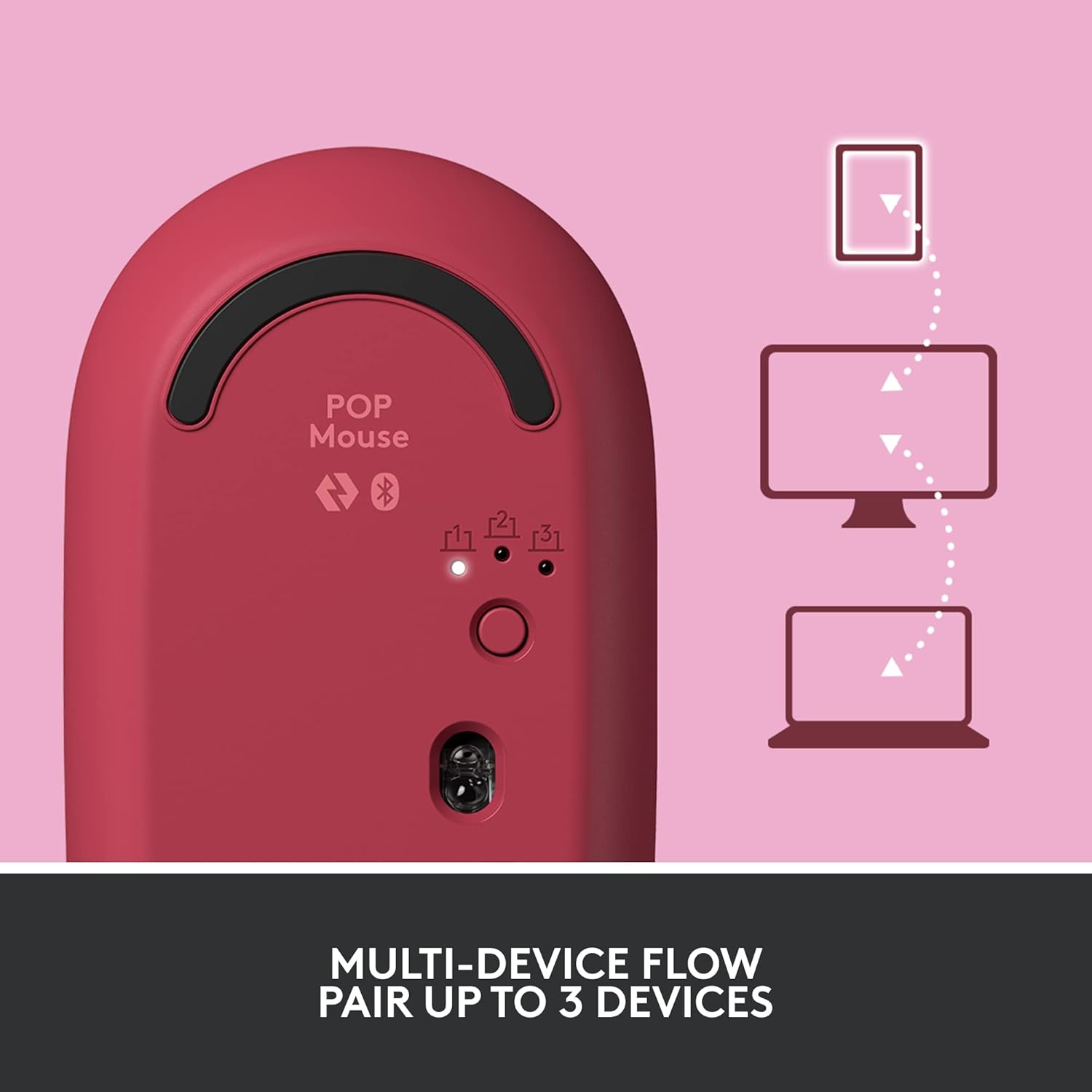
Image: The Logitech POP Mouse and an included AA battery, as typically found in the product packaging.
Impostare
1. Installazione della batteria
- Individuare il vano batteria sul lato inferiore del mouse.
- Gently slide the top cover of the mouse backward to remove it.
- Inserire la batteria AA inclusa, assicurandosi della corretta polarità (+/-).
- Riposizionare il coperchio superiore allineandolo e facendolo scorrere in avanti finché non scatta in posizione.
2. Accensione
- Flip the mouse over. Locate the On/Off switch on the bottom of the mouse.
- Slide the switch to the 'On' position (usually indicated by green color).
3. Accoppiamento del dispositivo (Bluetooth)
- On the bottom of the mouse, press and hold the Easy-Switch button (labeled with 1, 2, or 3) for 3 seconds until the LED light starts blinking rapidly. This indicates pairing mode.
- On your computer, tablet, or phone, open your Bluetooth settings.
- Selezionare "Logitech POP Mouse" dall'elenco dei dispositivi disponibili.
- Follow any on-screen prompts to complete the pairing process. The LED light on the mouse will turn solid for 5 seconds when connected.
4. Commutazione multi-dispositivo
- The POP Mouse can be paired with up to three devices. To switch between paired devices, simply press the Easy-Switch button on the bottom of the mouse. The corresponding LED (1, 2, or 3) will light up to indicate the active device.
Image: The Logitech POP Mouse can seamlessly connect and switch between up to three different devices, such as a tablet, desktop computer, and laptop.
Utilizzo del mouse
1. Funzioni di base
- Clic sinistro: Selezione primaria e interazione.
- Clic destro: Accede ai menu contestuali.
- Rotella di scorrimento: Scorre verticalmente i documenti e web pagine.
2. SmartWheel Technology
- The SmartWheel automatically shifts between high-precision scrolling for detailed work and super-fast scrolling for quickly navigating long documents or web pagine.

Image: The SmartWheel on the Logitech POP Mouse dynamically adjusts its scrolling mode for precision or speed.
3. SilentTouch Technology
- Enjoy a quiet working environment with SilentTouch Technology, which significantly reduces click noise without compromising tactile feedback.

Image: SilentTouch Technology ensures a quiet and comfortable user experience.
Personalizzazione
1. Pulsante superiore personalizzabile
- The top button, located below the scroll wheel, is customizable. By default, it opens an emoji menu for quick access to your favorite emojis.

Image: The customizable top button allows for quick access to an emoji menu on your screen.
2. Logi Options+ App
- Scarica il App Logi Options+ (Windows and macOS only) to personalize your POP Mouse.
- You can reassign the top button to perform various shortcuts, such as Snip Screen, Mic Mute, Voice-to-Text, or any other function you desire.
- The app also allows you to adjust pointer speed, scroll speed, and enable Flow for cross-computer control.
Manutenzione
- Pulizia: Utilizzare un morbido, damp cloth to clean the exterior of the mouse. Avoid harsh chemicals or abrasive materials.
- Sostituzione della batteria: Replace the AA battery when the low battery indicator light appears.
- Magazzinaggio: When not in use for extended periods, turn off the mouse using the On/Off switch to conserve battery life.
Risoluzione dei problemi
- Il mouse non si connette: Ensure the mouse is powered on and within range of your device. Check your device's Bluetooth settings to confirm it's enabled and the mouse is paired. Try re-pairing the mouse.
- Ritardo o movimento irregolare: Replace the battery if it's low. Ensure there are no obstructions between the mouse and your device. Avoid using the mouse on highly reflective or uneven surfaces.
- Custom button not working: Verify that the Logi Options+ App is installed and running on your computer. Check the button assignments within the app.
Specifiche
| Marca | Logitech |
| Numero di modello | 910-006545 |
| Tecnologia di connettività | Bluetooth 5.1 |
| wireless Range | 32.81 piedi (10 m) |
| Tecnologia | Logitech High Precision Optical Tracking |
| Numero di pulsanti | 4 (Left/Right click, Scroll wheel click, Top button) |
| Pulsante personalizzabile | Yes (Top button, via Logi Options+ App) |
| Tipo di batteria | 1 batteria AA |
| Durata della batteria | Fino a 24 mesi (può variare in base all'utilizzo) |
| Compatibilità del sistema operativo | Windows 10 o versioni successive, macOS 10.15 o versioni successive, iPadOS, Chrome OS, Android |
| Peso dell'articolo | 2.89 once |
| Dimensioni del prodotto (LxWxH) | 4.3 x 2.6 x 1.7 pollici |
| Materiale | Plastic parts include certified post-consumer recycled plastic (Heartbreaker Rose: 29%) |
Garanzia e supporto
Per informazioni sulla garanzia e supporto tecnico, visitare il supporto ufficiale Logitech website or refer to the warranty card included with your product. You can find detailed FAQs, troubleshooting guides, and contact options for customer service.
- Supporto online: Visita support.logi.com
- Registrazione del prodotto: Registra il tuo prodotto per ricevere aggiornamenti e supporto.