
1. Introduzione
Grazie per l'acquistoasing the Rosewill BLITZ K50 RGB BR Wired Gaming Mechanical Keyboard. This manual provides detailed instructions on how to set up, operate, maintain, and troubleshoot your new keyboard. Please read this manual thoroughly before use to ensure optimal performance and longevity of your device.
2. Contenuto della confezione
Si prega di controllare il contenuto della confezione per assicurarsi che siano presenti tutti gli articoli:
- Rosewill BLITZ K50 RGB BR Mechanical Gaming Keyboard
- Poggiapolsi staccabile
- Kit rimozione copritastiera
- Manuale dell'utente (questo documento)
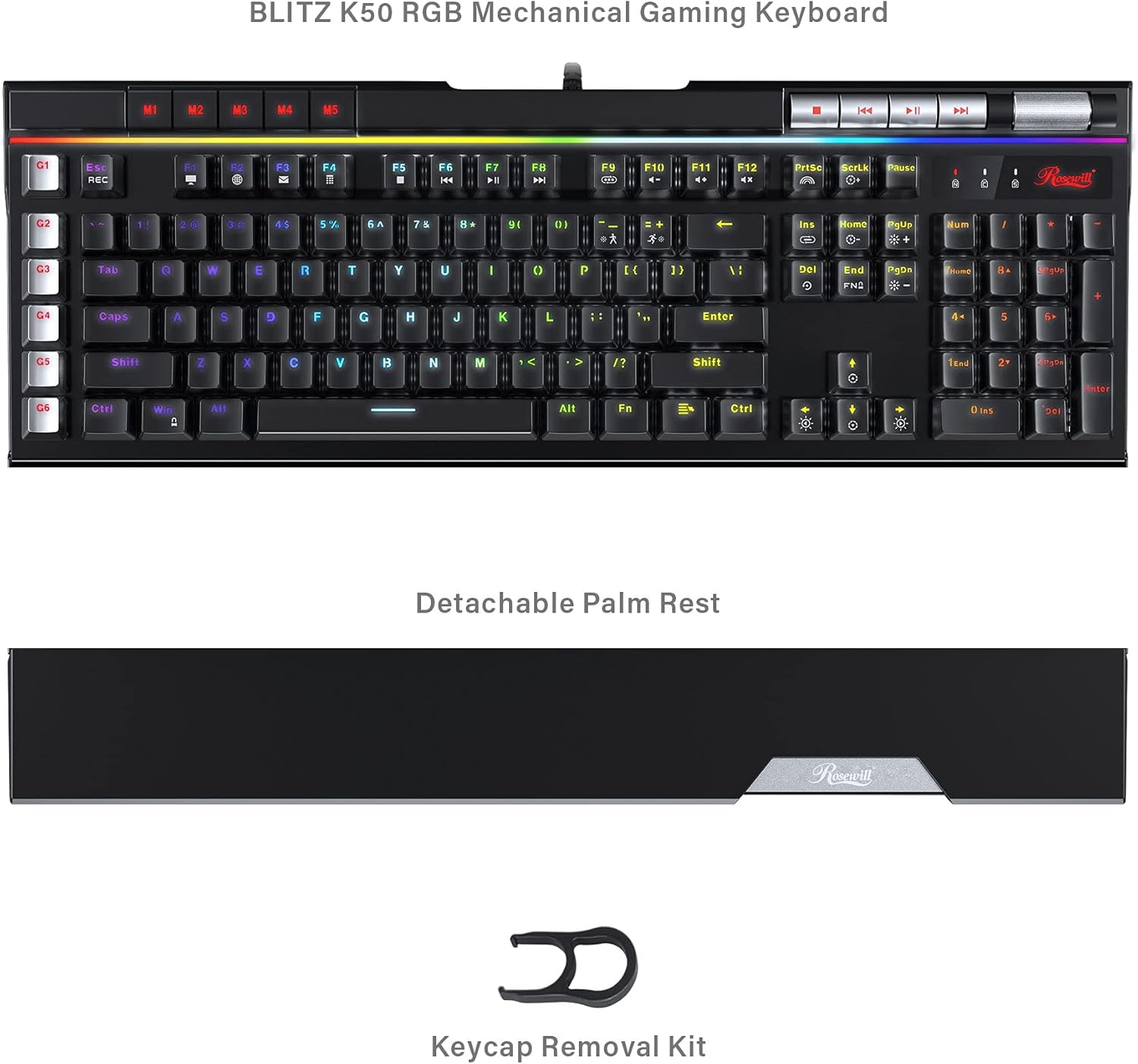
Image: The Rosewill BLITZ K50 RGB BR keyboard shown with its detachable palm rest and the included keycap removal kit, illustrating the complete package contents.
3. Prodotto finitoview
The Rosewill BLITZ K50 RGB BR is a full-sized wired gaming mechanical keyboard designed for performance and customization. It features durable Outemu brown tactile mechanical switches, N-Key rollover, and anti-ghosting for precise input during intense gaming sessions. The keyboard also includes dedicated macro keys, customizable RGB backlighting, and convenient media controls.

Immagine: Un completo view of the Rosewill BLITZ K50 RGB BR keyboard, showcasing its full layout, RGB backlighting, and dedicated function keys.
Componenti chiave:
- Interruttori meccanici: Equipped with genuine Outemu brown tactile mechanical switches for a responsive typing and gaming experience.
- Tasti macro (G1-G6): Six dedicated, programmable macro keys on the left side for custom command chains.
- Retroilluminazione RGB: Individual key backlighting with multiple customizable modes and effects.
- Controlli multimediali dedicati: Buttons for play/pause, skip, and a volume roller for quick audio adjustments.
- USB Passthrough Ports: Two built-in USB 2.0 ports for connecting additional peripherals.
- Poggiapolsi staccabile: Fornisce supporto ergonomico durante l'uso prolungato.
4. Impostazione
Follow these steps to set up your Rosewill BLITZ K50 RGB BR keyboard:
- Collegare la tastiera: Plug the USB connector of the keyboard cable into an available USB port on your computer. The keyboard is plug-and-play and does not require additional drivers for basic functionality.
- Fissare il poggiapolsi (facoltativo): Align the detachable palm rest with the bottom edge of the keyboard and gently push to secure it in place.
- Installa il software (facoltativo): For advanced customization, including macro programming and RGB lighting effects, download the BLITZ K50 RGB BR software suite from the official Rosewill websito. Seguire le istruzioni sullo schermo per l'installazione.

Image: A user operating the Rosewill BLITZ K50 RGB BR keyboard, demonstrating its typical setup on a desk with a computer monitor.
5. Istruzioni per l'uso
5.1. Funzioni di base della tastiera
The keyboard functions as a standard QWERTY keyboard. All standard keys (letters, numbers, symbols, function keys) operate as expected upon connection.
5.2. Controllo della retroilluminazione RGB
The BLITZ K50 RGB BR features 5 customizable RGB modes and 14 pre-programmed backlighting effects. Use the dedicated lighting control keys to cycle through modes and adjust brightness.
- Fn + Ins: Cycle through pre-programmed lighting effects.
- Fn + Casa: Adjust lighting brightness (5 levels).
- Fn + PagSu: Change lighting speed/direction for certain effects.
- Fn + Canc: Cycle through custom RGB modes.
- Fn + Fine: Adjust individual key color in custom modes.
- Fn + PagGiù: Reset lighting to default.
5.3. Macro Key Programming (G1-G6)
The six dedicated macro keys (G1-G6) can be programmed to execute complex command chains with a single press. Programming can be done via the keyboard's on-board recording function or through the software suite.
Registrazione di bordo:
- Premere il tasto RICORDA key (above G1). The REC indicator will flash.
- Press the desired macro key (G1-G6) you wish to program. The REC indicator will continue to flash.
- Digitare la sequenza di tasti che si desidera registrare.
- Premere il tasto RICORDA key again to save the macro. The REC indicator will turn off.
For more advanced macro programming, including delays and specific key combinations, use the BLITZ K50 RGB BR software.
5.4. Dedicated Media Controls & USB Passthrough
The keyboard features dedicated media control buttons and a volume roller for convenient audio management. Two USB 2.0 passthrough ports are also available for connecting other devices.

Immagine: Un dettaglio view of the multimedia control buttons and the metallic volume roller located on the top right of the keyboard, highlighting their accessibility.
- Pulsanti multimediali: Use the dedicated buttons for Play/Pause, Previous Track, and Next Track.
- Rullo del volume: Roll up to increase volume, roll down to decrease volume. Press to mute/unmute.
- Passaggio USB: Connect your mouse, headset, or other USB devices to the two USB 2.0 ports located on the keyboard for easy access.
5.5. Personalizzazione del software
The BLITZ K50 RGB BR software suite allows for comprehensive customization of your keyboard. You can customize lighting effects, program macros, reassign keys, and save up to 3 profiles.
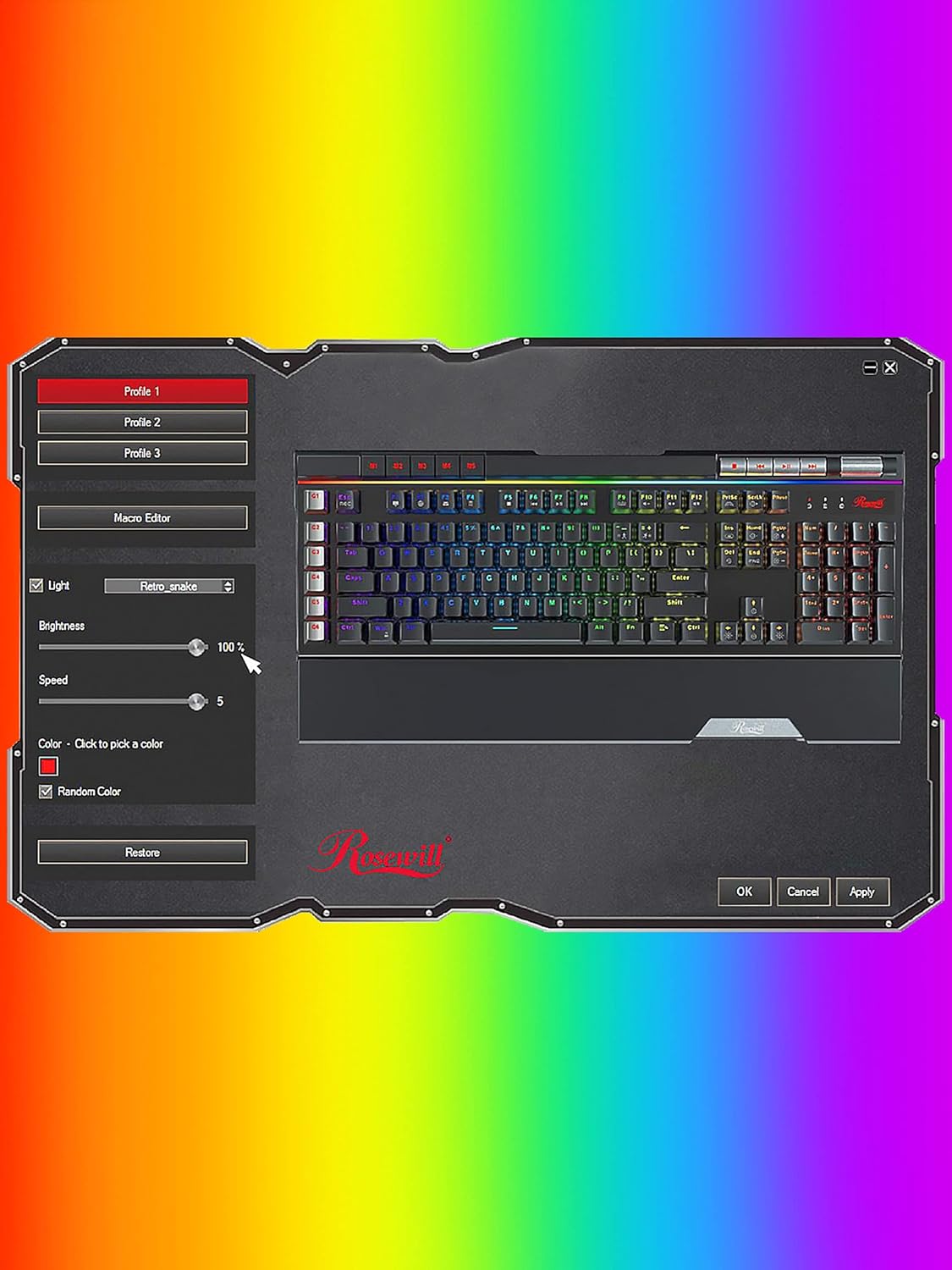
Image: A screenshot of the Rosewill BLITZ K50 RGB BR software interface, showing options for lighting control, macro editing, and profile gestione.
Refer to the software's built-in help or the Rosewill website for detailed instructions on using the software suite.
6. Manutenzione e cura
Per garantire la longevità e le prestazioni ottimali della tastiera, seguire queste linee guida per la manutenzione:
- Pulizia: Use a soft, dry cloth to wipe down the keyboard surface. For dust and debris between keycaps, use compressed air. The included keycap removal tool can be used to carefully remove keycaps for deeper cleaning.
- Evitare i liquidi: Non esporre la tastiera a liquidi. In caso di versamento di liquidi, scollegare immediatamente la tastiera e lasciarla asciugare completamente prima di ricollegarla.
- Magazzinaggio: Conservare la tastiera in un luogo fresco e asciutto, lontano dalla luce solare diretta e da temperature estreme.

Immagine: un primo piano view of the Outemu brown mechanical switches beneath removed keycaps, illustrating the internal components for maintenance and customization.
7. Risoluzione Dei Problemi
If you encounter issues with your keyboard, refer to the following troubleshooting steps:
- La tastiera non risponde:
- Assicurati che il cavo USB sia collegato saldamente al computer.
- Prova a collegare la tastiera a una porta USB diversa.
- Riavvia il computer.
- Retroilluminazione non funzionante o non corretta:
- Check if the brightness is set to maximum using Fn + Home.
- Cycle through lighting modes using Fn + Ins or Fn + Del.
- If using the software, ensure settings are applied and the software is running correctly.
- Try resetting the lighting to default (Fn + PgDn).
- I tasti macro non funzionano:
- Ensure macros are correctly recorded or programmed via the software.
- Check if the macro profile is active if using software.
- USB Passthrough ports not working:
- Ensure the keyboard's main USB cable is connected to a powered USB port on your computer.
- Try connecting a different device to the passthrough port to confirm the issue is with the port or the device.
8. Specifiche
Detailed technical specifications for the Rosewill BLITZ K50 RGB BR keyboard:
| Caratteristica | Specificazione |
|---|---|
| Numero di modello | BLITZ K50 RGB BR |
| Tipo di tastiera | Tastiera meccanica da gioco cablata |
| Tipo di interruttore | Outemu Brown Tactile Mechanical Switches |
| Numero di chiavi | 104 |
| Anti-ghosting | Rollover N-chiave |
| Retroilluminazione | RGB (14 pre-programmed effects, 5 customizable modes) |
| Tasti macro | 6 Dedicated (G1-G6) |
| Controlli multimediali | Dedicated buttons + Volume Roller |
| Passthrough USB | 2 porte USB 2.0 |
| Connettività | USB 2.0 |
| Compatibilità del sistema operativo | Windows XP / Vista / 7 / 8 / 10 and above |
| Dimensioni (L x P x A) | 47.6 x 22.8 x 3.9 cm (18.74 x 8.97 x 1.53 pollici) |
| Peso | 1.17 kg (2.58 libbre) |

Image: A technical diagram illustrating the length, width, and height measurements of the Rosewill BLITZ K50 RGB BR keyboard.
9. Garanzia e supporto
Rosewill products are designed for reliability and performance. For warranty information, technical support, or service inquiries, please visit the official Rosewill websito o contattare direttamente l'assistenza clienti. Si prega di conservare la prova d'acquisto per eventuali reclami in garanzia.