
DELTACO SH-P02E
Deltaco Smart Home SH-P02E Double Wi-Fi Smart Plug
Manuale d'uso
Introduzione
The DELTACO SH-P02E is a wireless dual-outlet smart plug designed for convenient control of your electrical devices and real-time energy monitoring. This manual provides comprehensive instructions for setting up, operating, and maintaining your smart plug to ensure optimal performance and safety.
Informazioni sulla sicurezza
- Non smontare o modificare il dispositivo.
- Ensure the total load connected to the smart plug does not exceed 13A (2990W).
- Evitare di esporre il dispositivo all'acqua, all'umidità o a temperature estreme.
- Utilizzare solo in ambienti interni asciutti.
- Tenere fuori dalla portata dei bambini.
- Scollegare il dispositivo dalla presa a muro prima della pulizia.
Contenuto della confezione
Si prega di selezionare la casella per i seguenti elementi:
- 1 x DELTACO SH-P02E Double Wi-Fi Smart Plug
- 1 x Manuale utente (questo documento)

Image: The retail packaging of the Deltaco SH-P02E Smart Plug, showing the product inside the box with branding and key features.
Prodotto finitoview
The DELTACO SH-P02E features two individually controllable outlets and a power button for manual control. The device is compact and designed to fit standard wall outlets.

Immagine: Frontale view of the Deltaco SH-P02E Smart Plug, showing the two power outlets and the power button on the side.

Immagine: Lato view of the Deltaco SH-P02E Smart Plug, highlighting the power button and the compact design.
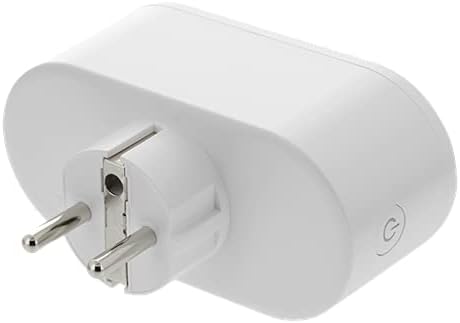
Immagine: Indietro view of the Deltaco SH-P02E Smart Plug, showing the electrical prongs for plugging into a wall outlet.
Impostare
1. Download the DELTACO SMART HOME App
The DELTACO SMART HOME app is required to control your smart plug. It is available for free on both Android and iOS devices.
- Cercare "DELTACO SMART HOME" in the Google Play Store (for Android) or Apple App Store (for iOS).
- Scarica e installa l'app.
- Registra un nuovo account o accedi se ne hai già uno.
2. Collegare la spina intelligente
Plug the SH-P02E smart plug into a standard wall outlet. Ensure it is within range of your Wi-Fi router.
3. Associa all'app
Follow the in-app instructions to add your new device. The app will guide you through the pairing process, which typically involves:
- Selecting "Add Device" or the "+" icon in the app.
- Choosing the correct device type (e.g., "Smart Plug" or "Electrical Outlet").
- Confirming the device is in pairing mode (often indicated by a blinking light).
- Entering your 2.4GHz Wi-Fi network name (SSID) and password. Note: The device only supports 2.4GHz Wi-Fi networks (802.11b/g/n).
- Waiting for the app to connect to the device.
Istruzioni per l'uso
Controllo base di accensione/spegnimento
You can turn the smart plug on or off in several ways:
- Via the App: Open the DELTACO SMART HOME app, select your SH-P02E device, and tap the power icon to toggle the entire plug on or off. Each outlet can also be controlled individually within the app.
- Manualmente: Press the physical power button on the side of the smart plug to turn it on or off.
Monitoraggio energetico
The SH-P02E features an energy monitoring system. Within the DELTACO SMART HOME app, you can:
- View real-time power consumption for connected devices.
- Access historical data, including daily and monthly total energy consumption.
Timer and Scheduling
Automate your devices using the app's timer and scheduling functions:
- Timer: Imposta un timer con conto alla rovescia affinché la spina si spenga dopo un intervallo di tempo specificato.
- Programma: Program specific times for the plug to turn on or off daily or on selected days of the week.
- Automazione: Configure advanced automation rules based on conditions like sunrise/sunset, device status, or other smart home triggers.
Integrazione del controllo vocale
The SH-P02E can be integrated with popular voice assistants for hands-free control:
- Assistente Google: Link your DELTACO SMART HOME account in the Google Home app. You can then use voice commands like "Hey Google, turn on the living room plug."
- Amazon Alexa: Enable the DELTACO SMART HOME skill in the Amazon Alexa app. Use commands such as "Alexa, turn off the lamp."
Manutenzione
Per garantire la longevità e il corretto funzionamento della tua presa intelligente:
- Pulire il dispositivo con un panno morbido e asciutto. Non utilizzare detergenti liquidi o spray.
- Mantenere il dispositivo libero da polvere e detriti.
- Conservare in luogo fresco e asciutto quando non si utilizza per lunghi periodi.
Risoluzione dei problemi
| Problema | Possibile causa | Soluzione |
|---|---|---|
| Il dispositivo non si connette al Wi-Fi. | Password Wi-Fi errata; rete Wi-Fi a 5 GHz; dispositivo troppo lontano dal router. |
|
| L'app non riesce a trovare il dispositivo. | Device not in pairing mode; app permissions. |
|
| Il controllo vocale non funziona. | Incorrect linking; device name issues. |
|
Specifiche
| Caratteristica | Dettaglio |
|---|---|
| Modello | SH-P02E |
| Marca | DELTACO |
| Colore | Bianco |
| Dimensioni (L x P x A) | Dimensioni: 1 x 1 x 1 cm |
| Peso | 192 grammi |
| Energia | Max 2990W (13A) |
| Wi-Fi standard | 2.4 GHz 802.11b/g/n |
| Numero di prese | 2 (controllabili individualmente) |
| Caratteristiche | Energy Monitoring, Timer, Scheduling, Voice Control (Google Assistant, Amazon Alexa) |
Garanzia e supporto
DELTACO products are designed for reliability and performance. For warranty information and technical support, please refer to the official DELTACO websito o contattare direttamente il servizio clienti.
Per le informazioni di supporto più recenti, visitare: www.deltaco.eu/support
Note: Information regarding spare parts availability and guaranteed software updates is not available at the time of this manual's publication.
Ask a question about this manual
Ask about setup, troubleshooting, compatibility, parts, safety, or missing instructions. Manuals+ will review the question and use this page’s manual context to help answer it.