
1. Introduzione
This manual provides comprehensive instructions for the installation, operation, maintenance, and troubleshooting of the Axis Communications M7116 Video Encoder. The M7116 is designed to integrate analog video surveillance systems into an IP-based network, allowing for remote monitoring and management of up to 16 analog cameras.
2. Informazioni sulla sicurezza
Please read all safety instructions carefully before installing or operating the device. Keep this manual for future reference.
- Assicurarsi che l'alimentazione soddisfi il volume specificatotage requisiti.
- Non esporre il dispositivo a umidità o temperature estreme.
- Evitare di bloccare le aperture di ventilazione per evitare il surriscaldamento.
- Only use accessories specified by Axis Communications.
- Affidare tutti gli interventi di assistenza a personale qualificato.
3. Contenuto della confezione
Verificare che tutti gli articoli siano presenti nel pacco:
- Axis Communications M7116 Video Encoder
- Adattatore di alimentazione
- Guida all'installazione
- Kit di montaggio (se applicabile)
4. Prodotto finitoview
The Axis M7116 is a 16-channel video encoder that digitizes analog video signals for network transmission. It features multiple BNC inputs for analog cameras, an Ethernet port for network connectivity, and serial ports for PTZ control.
4.1 Pannello frontale
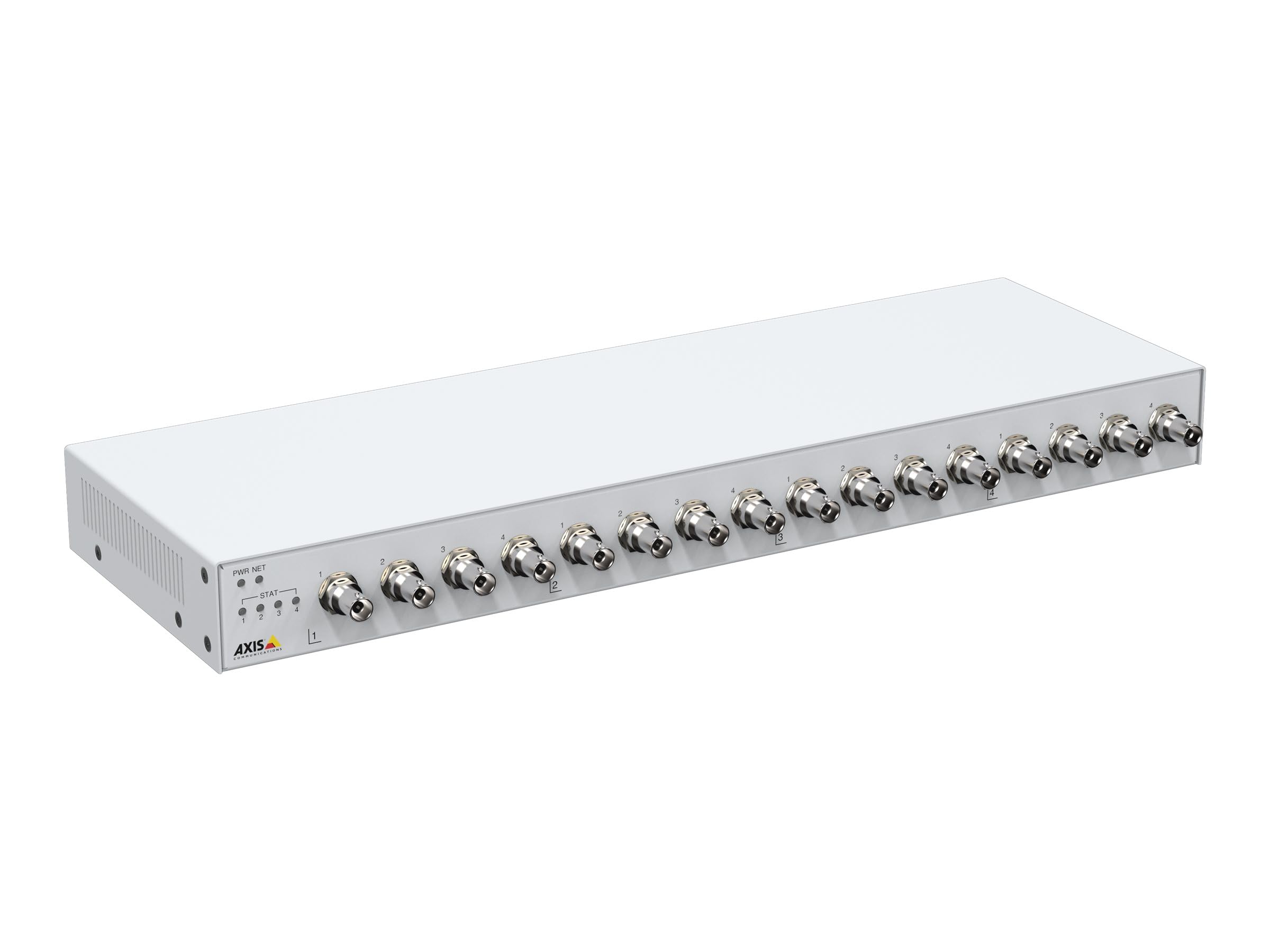
Figura 1: Davanti view of the Axis M7116 Encoder, showing 16 BNC video input connectors and status indicator LEDs on the left side.

Figura 2: Close-up of the front panel, highlighting the Power (PWR), Network (NET), and Status (STAT) LEDs, along with the first four BNC video input ports.
4.2 Pannello posteriore

Figura 3: Posteriore view of the Axis M7116 Encoder, showing the Ethernet port, power input, and RS-485/422 serial communication ports.
4.3 Indicatori
- LED PWR (alimentazione): Indica lo stato di alimentazione. Verde fisso per funzionamento normale.
- NET (Network) LED: Indicates network activity. Flashing green for data transmission.
- STAT (Status) LED: Indicates device status. Refer to the online help for detailed status codes.
5. Impostazione
Follow these steps to set up your Axis M7116 Encoder:
- Montaggio: Securely mount the encoder in a suitable location, ensuring adequate ventilation. The device is suitable for both indoor and outdoor usage, but ensure proper environmental protection if used outdoors.
- Collegare telecamere analogiche: Connect up to 16 analog cameras to the BNC input connectors on the front panel.
- Connetti alla rete: Connect an Ethernet cable (Cat 5e or higher) from the encoder's NET port to your network switch or router.
- Connetti alimentazione: Connect the power adapter to the power input on the rear panel and then plug it into a power outlet. The PWR LED should illuminate.
- Configurazione iniziale: Use the Axis IP Utility or a web browser to discover the device on your network and assign an IP address. Access the device's web interface for further configuration, including video settings, user management, and network parameters.
6. Istruzioni per l'uso
Once the M7116 Encoder is set up and configured, it will begin encoding video streams from the connected analog cameras. You can access and manage these streams through the device's web interfaccia o software di gestione video compatibile.
- Accesso al Web Interfaccia: Aprire un web browser and enter the IP address of the encoder. Log in with your credentials to access live views, recordings, and system settings.
- Video streaming: The encoder provides H.264 and MJPEG video streams. Configure resolution, frame rate, and compression settings as needed for each channel.
- Controllo PTZ: If PTZ (Pan/Tilt/Zoom) cameras are connected via the RS-485/422 ports, you can control them through the web interface or integrated VMS.
- Gestione eventi: Set up event triggers and actions, such as motion detection, tampering alarms, and scheduled recordings.
7. Manutenzione
Regular maintenance ensures optimal performance and longevity of your Axis M7116 Encoder.
- Pulizia: Gently clean the exterior of the device with a soft, dry cloth. Do not use liquid cleaners or aerosols. Ensure ventilation openings are free from dust and debris.
- Aggiornamenti del firmware: Controllare periodicamente le comunicazioni Axis website for firmware updates. Keeping the firmware up-to-date ensures access to the latest features, security patches, and performance improvements.
- Monitoraggio del sistema: Regularly check system logs and status indicators for any anomalies.
8. Risoluzione Dei Problemi
This section addresses common issues you might encounter with the M7116 Encoder.
| Problema | Possibile causa | Soluzione |
|---|---|---|
| Nessuna alimentazione (LED PWR spento) | Adattatore di alimentazione non collegato o difettoso; problema con la presa di corrente. | Check power cable connections. Test power outlet. Replace power adapter if necessary. |
| No network connection (NET LED off/no activity) | Ethernet cable disconnected or faulty; network configuration issue. | Verify Ethernet cable connection. Check network switch/router status. Confirm IP address settings. |
| No video from a camera channel | Analog camera not connected or faulty; BNC cable issue; encoder channel misconfigured. | Check camera power and functionality. Inspect BNC cable. Verify channel settings in the web interfaccia. |
| Impossibile accedere web interfaccia | Indirizzo IP errato; problema di connettività di rete; firewall che blocca l'accesso. | Ensure correct IP address. Check network connection. Temporarily disable firewall for testing. |
9. Specifiche
Key technical specifications for the Axis Communications M7116 Encoder (Model 02036-003):
- Marca: Comunicazioni dell'asse
- Numero modello: 02036-003
- Dimensioni del prodotto: 19.69 x 19.69 x 11.02 pollici
- Peso dell'articolo: 4.4 libbre
- Tipo di connettore: Ethernet, BNC
- Tipo di cavo: Ethernet (Cat 5e recommended)
- Dispositivi compatibili: Analog cameras, Network Video Recorders (NVRs), Video Management Systems (VMS)
- Caratteristica speciale: Tangle Free (referring to internal cabling/design)
- Utilizzi consigliati: Connecting electronic devices, specifically for integrating analog video into IP networks
- Sesso del connettore: Male-to-Female (for specific cable types)
- Numero di pin: 8 (for Ethernet)
- Conteggio unità: 1.0 Conteggio
- Specifiche soddisfatte: Direttiva RoHS
- Utilizzo interno/esterno: Indoor, Outdoor (with appropriate environmental protection)
- Numero di articoli: 1
- Produttore: AXIS - ENCODER/DECODER
- Prima data disponibile: 22 ottobre 2021
10. Garanzia e supporto
The Axis Communications M7116 Encoder comes with a Garanzia di 2 anno from the date of purchase, covering defects in materials and workmanship under normal use. For warranty claims or technical support, please contact Axis Communications customer service or visit their official websito per risorse di supporto, FAQ e informazioni di contatto.
Per informazioni di supporto più aggiornate, visitare: www.axis.com/support