
MURPISO U-pro2
Manuale utente degli auricolari wireless MURPISO U-Pro2
Model: U-Pro2 | Brand: MURPISO
Introduzione
Thank you for choosing the MURPISO U-Pro2 Wireless Earbuds. These earbuds are designed to provide a superior audio experience with advanced features such as Active Noise Cancellation (ANC), deep bass, and extended battery life. This manual will guide you through the setup, operation, maintenance, and troubleshooting of your new earbuds.

Image: The MURPISO U-Pro2 wireless earbuds resting inside their sleek black charging case, with the lid open, showcasingrazie al loro design compatto.
Impostare
1. Ricarica degli auricolari e della custodia
Before first use, fully charge the earbuds and the charging case. The earbuds provide 8-10 hours of playtime on a single charge, and the charging case extends this to a total of 35 hours. A full charge for the earbuds takes approximately 1.5 hours.

Image: An infographic illustrating the 35-hour total playtime, with 10 hours per charge for the earbuds and 35 hours with the charging case, along with a 1.5-hour charging time for the earbuds.
2. Abbinamento in un unico passaggio
- Apri il coperchio della custodia di ricarica. Gli auricolari si accenderanno automaticamente ed entreranno in modalità di associazione.
- Sul tuo dispositivo (smartphone, tablet, ecc.), attiva il Bluetooth e cerca i dispositivi disponibili.
- Select "MURPISO U-Pro2" from the list of devices to connect.
- Once paired, the earbuds will automatically connect to the last paired device when the charging case lid is opened.
The latest Bluetooth 5.2 technology ensures a faster, more stable connection with greater distance and reduced latency.

Image: A visual representation of the one-step pairing process, showing the earbuds connecting to a smartphone via Bluetooth, with a checkmark indicating successful connection.
3. Vestibilità comoda
The U-Pro2 earbuds feature an ergonomic design for a stable and comfortable fit. They come with 5 additional sizes of soft eartips to ensure a perfect seal and prevent ear pain even during extended use. Choose the eartip size that provides the best comfort and sound isolation for you.
Istruzioni per l'uso
1. Audio Quality and Deep Bass
Experience immersive and superior quality audio with the U-Pro2 earbuds. Equipped with 10mm drivers and high-quality audio decoding, they deliver powerful, thumping bass and clear Hi-Fi stereo sound, perfect for music, videos, and calls.

Image: A close-up diagram highlighting the 10mm drivers responsible for delivering premium bass in the earbuds.
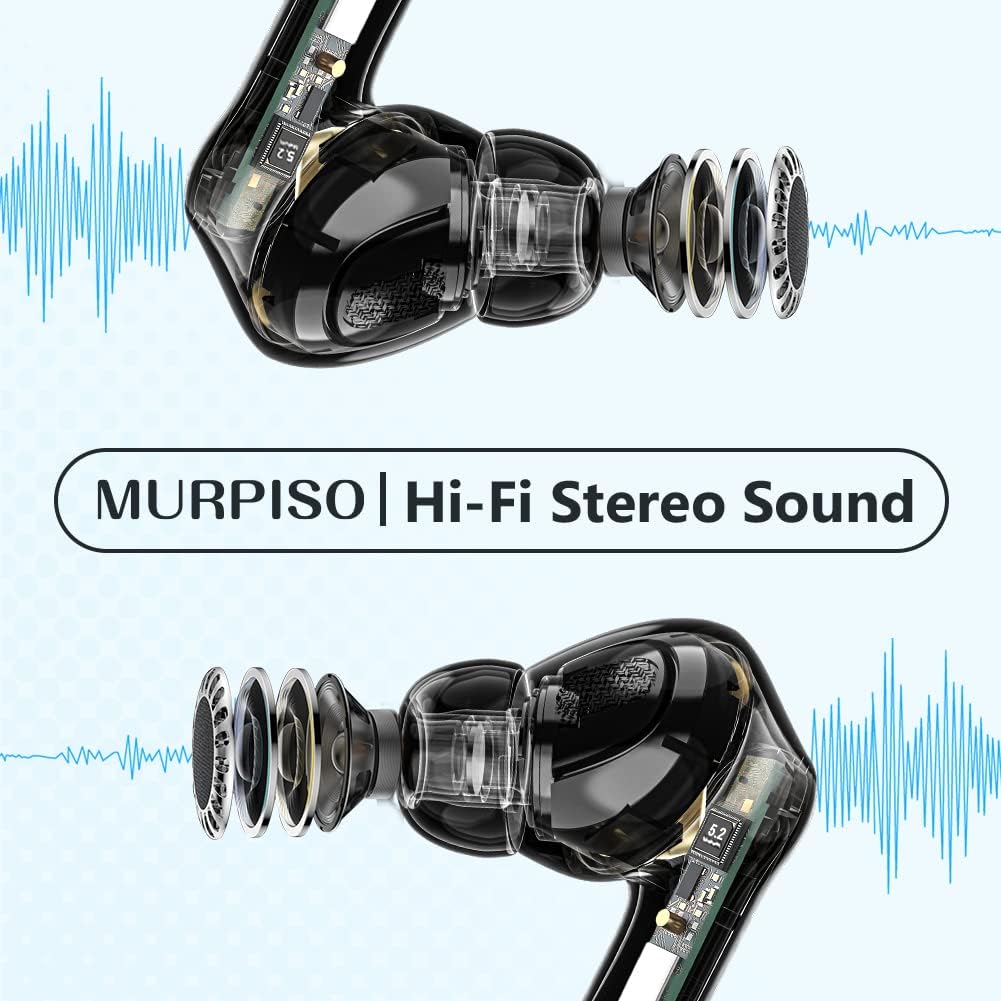
Immagine: Un trasparente view of the earbuds, showcasing their internal components and emphasizing the Hi-Fi Stereo Sound technology.
2. Cancellazione attiva del rumore (ANC)
The U-Pro2 earbuds feature advanced ANC technology to significantly reduce ambient noise. They offer three optional modes:
- ANC su: For maximum noise reduction, ideal for noisy environments like subways, buses, or offices.
- Modalità trasparenza: Ti consente di ascoltare l'ambiente circostante continuando a goderti l'audio, utile per la consapevolezza negli spazi pubblici.
- ANC disattivato: Disattiva la cancellazione del rumore, adatta ad ambienti silenziosi o per risparmiare la batteria.
Refer to the product's quick start guide or touch control instructions (if applicable) for switching between these modes.

Image: A person wearing the MURPISO earbuds on a train, demonstrating the effectiveness of Active Noise Cancellation in a busy environment.
3. Qualità della chiamata
Equipped with 4 microphones, the U-Pro2 earbuds ensure clear phone calls. The active noise cancellation mode also enhances call clarity by reducing background noise for both you and the person you are speaking with.
4. Resistenza all'acqua IPX6
The earbuds are rated IPX6 water-resistant, protecting them from sweat, splashes, and rain. This makes them suitable for workouts and outdoor activities. Nota: La custodia di ricarica non è resistente all'acqua.

Image: A person pouring water from a bottle onto their face, with the MURPISO earbud visible, illustrating its IPX6 water-resistant and ergonomic design.
Manutenzione
Una corretta manutenzione garantisce la longevità e le prestazioni ottimali dei tuoi auricolari.
- Pulizia: Pulisci regolarmente gli auricolari, in particolare i gommini e i contatti di ricarica, con un panno morbido, asciutto e privo di lanugine. Non utilizzare prodotti chimici aggressivi o materiali abrasivi.
- Magazzinaggio: Quando non li usi, riponi gli auricolari nella custodia di ricarica per proteggerli da polvere e danni.
- Cura della batteria: Avoid fully depleting the battery frequently. Charge the case and earbuds regularly, even if not in constant use, to maintain battery health.
- Esposizione all'acqua: While IPX6 rated, avoid prolonged exposure to water or submerging the earbuds. Dry them thoroughly if they get wet before placing them back in the charging case.
Risoluzione dei problemi
| Problema | Possibile causa | Soluzione |
|---|---|---|
| Gli auricolari non si associano/connettono | Bluetooth off on device, earbuds not in pairing mode, previously paired to another device. | Ensure Bluetooth is on. Place earbuds in case, close lid, then open to re-enter pairing mode. Forget "MURPISO U-Pro2" on your device's Bluetooth settings and re-pair. |
| Nessun suono o volume basso | Volume too low on device, earbuds not properly seated, dirty eartips/speakers. | Increase device volume. Adjust earbuds for a secure fit. Clean eartips and speaker mesh. |
| L'ANC non funziona in modo efficace | Incorrect ANC mode selected, improper fit. | Ensure ANC mode is active. Adjust earbuds for a tighter seal in your ear canal. Try different eartip sizes. |
| Gli auricolari non si caricano | Charging contacts dirty, charging case battery low, faulty cable/charger. | Clean charging contacts on earbuds and case. Charge the charging case. Try a different USB cable and power adapter. |
Specifiche
- Modello: U-Pro2
- Marca: MURPISO
- Connettività: Bluetooth 5.2
- Dimensioni del driver: 10mm
- Microfoni: 4 (per chiamate chiare)
- Tempo di riproduzione (auricolari): 8-10 ore (carica singola)
- Tempo di riproduzione totale (con custodia di ricarica): Fino a 35 ore
- Tempo di ricarica degli auricolari: Circa 1.5 ore
- Cancellazione del rumore: Active Noise Cancellation (ANC) with Transparency Mode
- Resistenza all'acqua: IPX6 (solo auricolari)
- Colore: Nero
- Fattore di forma: In-ear (auricolare)
- Materiale: Plastica
- Tipo di batteria: Ioni di litio (3 incluso)
Garanzia e supporto
For warranty information and customer support, please refer to the documentation included with your purchase or visit the official MURPISO websito. Se riscontri problemi non trattati in questo manuale, contatta il servizio clienti per ricevere assistenza.
Produttore: MURPISO
Ask a question about this manual
Ask about setup, troubleshooting, compatibility, parts, safety, or missing instructions. Manuals+ will review the question and use this page’s manual context to help answer it.