
YABER YABER-V5-MINI
Manuale utente del mini proiettore YABER V5
Model: YABER-V5-MINI
1. Introduzione
Grazie per l'acquistoasing the YABER V5 Mini Projector. This manual provides detailed instructions for setting up, operating, and maintaining your projector to ensure optimal performance and longevity. Please read this manual thoroughly before use and keep it for future reference.

Image: The YABER V5 Mini Projector, shown with its included carrying bag and mini tripod, highlighting its portability and accessories.
2. Cosa c'è nella scatola
Upon opening your YABER V5 Mini Projector package, please verify that all the following items are included:
- Mini proiettore YABER V5
- Borsa per il trasporto
- Mini treppiede
- Telecomando (batterie non incluse)
- Cavo di alimentazione
- Cavo HDMI
- cavo AV
- Manuale d'uso
- Copriobiettivo

Image: The retail packaging for the YABER V5 Mini Projector, indicating the product and its branding.
3. Caratteristiche del prodotto
- Dual-Band WiFi Connectivity (5G/2.4G): The V5 supports both 5GHz and 2.4GHz WiFi bands, providing faster and more stable wireless screen mirroring for smoother video and image transmission from your smartphone or tablet.
- Bluetooth 5.0: Equipped with Bluetooth 5.0, allowing seamless connection to external Bluetooth speakers, headphones, or AirPods for enhanced audio experience.
- Enhanced Brightness & 1080P Full HD Support: Features enhanced German jade glass lenses and increased brightness for clearer and more vibrant images. Supports Full HD 1080P resolution for a high-quality viewesperienza di acquisizione.
- Giant Screen & Zoom Function: Capable of projecting images from 45 to 200 inches. The digital zoom function allows you to reduce the image size from 100% to 50% using the remote control without moving the projector.
- Ampia compatibilità: Multiple input ports including HDMI, USB, VGA, AV, Audio, and TF card ensure compatibility with a wide range of devices such as TV boxes, Fire Stick TV, Chromecast, PCs, laptops, tablets, and smartphones.
- Lungo Lamp Vita: Utilizes SmarEco technology to minimize power consumption, extending the lampdurata fino a 100,000 ore.

Image: Illustration of the projector's dual-band (2.4GHz and 5GHz) WiFi capability, emphasizing faster transmission speeds for a smoother experience.

Image: The projector wirelessly connected to various Bluetooth audio devices like headphones and speakers, demonstrating its Bluetooth 5.0 capability.
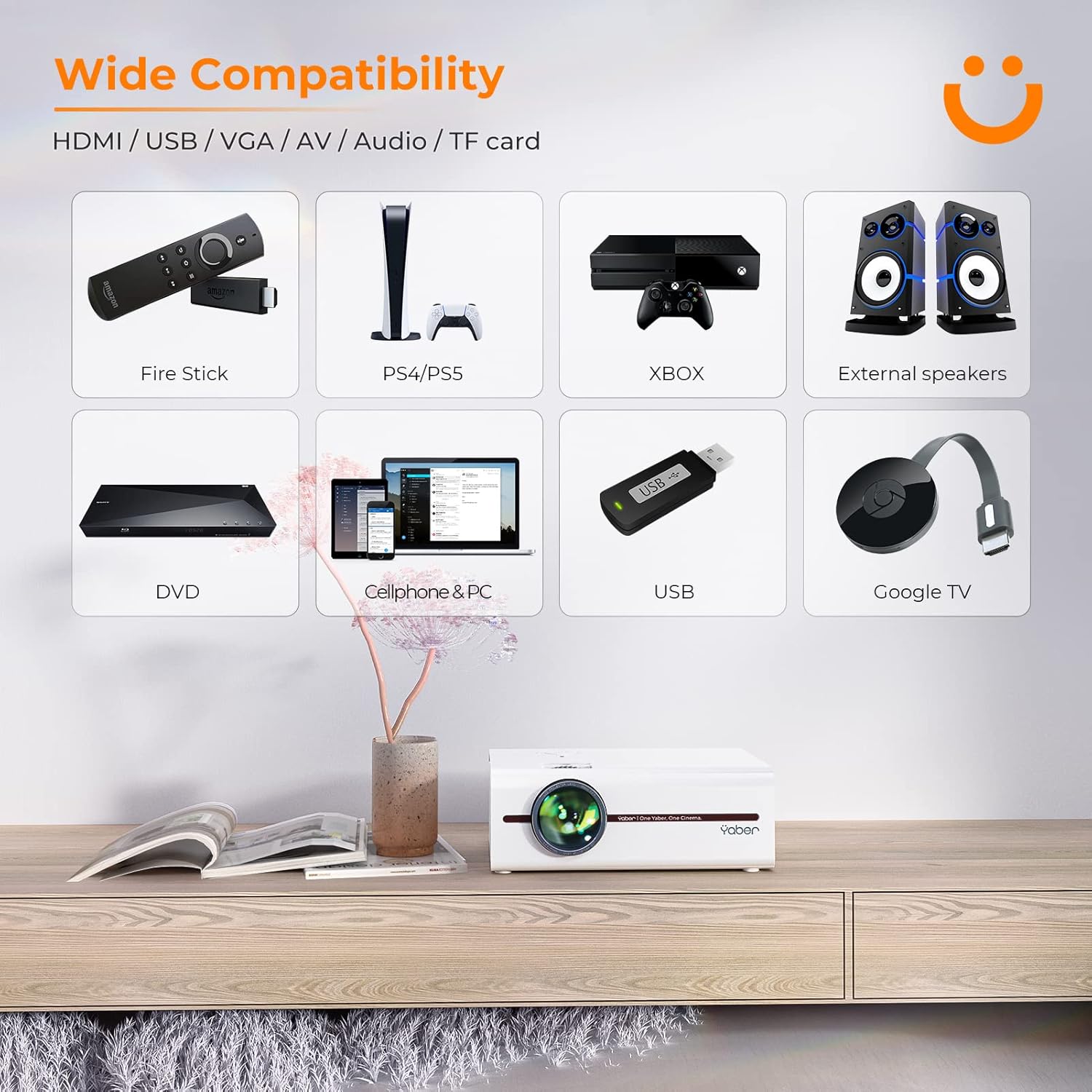
Image: A visual representation of the projector's wide range of compatible devices, including Fire Stick, PS4/PS5, Xbox, external speakers, DVD players, cellphones, PCs, USB drives, and Google TV, connected via various ports.
4. Impostazione
4.1 Posizionamento iniziale e potenza
- Place the projector on a stable, flat surface or mount it using a compatible tripod. Ensure proper ventilation around the unit.
- Collegare il cavo di alimentazione all'ingresso di alimentazione del proiettore e quindi a una presa di corrente.
- Premere il pulsante di accensione sul proiettore o sul telecomando per accenderlo.
4.2 Regolazione della messa a fuoco e della distorsione trapezoidale dell'immagine
Dopo l'accensione, regolare la messa a fuoco e la correzione trapezoidale per ottenere un'immagine nitida e rettangolare.
- Messa a fuoco: Ruotare l'anello di messa a fuoco sull'obiettivo del proiettore finché l'immagine non appare nitida e chiara.
- Correzione trapezoidale: Use the keystone adjustment dial or the remote control to correct any trapezoidal distortion, ensuring the image is perfectly rectangular. The V5 supports both mechanical and digital keystone correction.

Image: A hand holding the projector's remote control, illustrating the ease of adjusting the projected image, including focus and keystone correction.
4.3 Collegamento dei dispositivi
The YABER V5 offers various connectivity options:
- HDMI: Connect your laptop, game console, or streaming device via an HDMI cable.
- USB: Inserisci un'unità USB per riprodurre contenuti multimediali filedirettamente.
- AV: Use the AV cable for older devices like DVD players.
- VGA: Connect to computers with a VGA output.
- Carta TF: Inserire una scheda TF per la riproduzione multimediale.
4.4 Mirroring dello schermo wireless (WiFi)
To mirror your smartphone or tablet screen wirelessly:
- Assicurati che il proiettore e il dispositivo mobile siano connessi alla stessa rete Wi-Fi.
- Sul proiettore, selezionare la sorgente di ingresso 'Screen Mirroring'.
- Per i dispositivi iOS, apri il Centro di controllo e tocca "Screen Mirroring" o "AirPlay Mirroring", quindi seleziona il proiettore dall'elenco.
- For Android devices, enable 'Wireless Display', 'Smart View', 'Multi-screen', or similar function in your device settings, then select the projector.

Image: A visual comparison demonstrating the faster loading and transmission speed of 5GHz WiFi compared to 2.4GHz, highlighting the benefit for screen mirroring.
4.5 Connessione audio Bluetooth
To connect to a Bluetooth audio device:
- Abilita il Bluetooth sull'altoparlante esterno o sulle cuffie e impostalo sulla modalità di associazione.
- Sul proiettore, accedere al menu delle impostazioni Bluetooth.
- Seleziona il tuo dispositivo dall'elenco dei dispositivi disponibili per l'associazione.

Image: The YABER V5 projector wirelessly connected to an external Bluetooth speaker, illustrating the enhanced audio experience possible.
5. Istruzioni per l'uso
5.1 Accensione/spegnimento
- To power on, press the power button on the projector or remote.
- Per spegnere, premere nuovamente il pulsante di accensione. Confermare lo spegnimento se richiesto.
5.2 Selezione della sorgente di input
Use the 'Source' button on the remote or projector to cycle through available input sources (HDMI, USB, AV, VGA, TF Card, Screen Mirroring).
5.3 Navigazione nel menu
Use the arrow keys on the remote or projector to navigate through the on-screen menu. Press 'OK' or 'Enter' to confirm selections. Use 'Return' or 'Exit' to go back or close the menu.
5.4 Adjusting Projection Size (Zoom Function)
To adjust the projection size without moving the projector, use the digital zoom function via the remote control. This allows you to shrink the image from 100% down to 50%.

Image: An illustration showing the digital zoom function, allowing the projected image size to be adjusted from 100% down to 50% without physically moving the projector.
6. Manutenzione
6.1 Pulizia della lente
Utilizzare un panno morbido e privo di lanugine, specificamente progettato per lenti ottiche, per pulire delicatamente la lente del proiettore. Evitare l'uso di detergenti abrasivi o di esercitare una pressione eccessiva.
6.2 Pulizia del corpo del proiettore
Pulire l'esterno del proiettore con un panno morbido e asciutto. Non utilizzare detergenti liquidi o solventi.
6.3 Ventilazione
Ensure the projector's ventilation vents are clear and unobstructed to prevent overheating. Do not block the vents during operation.
6.4 Lamp Vita
The YABER V5 projector lamp has an estimated lifespan of up to 100,000 hours. No user replacement is typically required for the lamp.
7. Risoluzione Dei Problemi
If you encounter issues with your YABER V5 Mini Projector, please refer to the following common problems and solutions:
| Problema | Possibile causa | Soluzione |
|---|---|---|
| No image/No signal | Sorgente di ingresso selezionata non corretta; Collegamento del cavo allentato; Dispositivo non acceso. | Selezionare la sorgente di ingresso corretta. Controllare tutti i collegamenti dei cavi. Assicurarsi che il dispositivo collegato sia acceso. |
| Immagine sfocata | Messa a fuoco non regolata; distorsione trapezoidale non corretta. | Adjust the focus ring on the lens. Use keystone correction to square the image. |
| Nessun suono | Volume troppo basso; Disattivato; Dispositivo audio esterno non connesso/associato. | Increase volume. Unmute the projector. Ensure Bluetooth device is paired or external speakers are properly connected. |
| Screen mirroring issues (freezing/disconnection) | Weak WiFi signal; Network congestion; Device compatibility. | Ensure strong WiFi signal (preferably 5G). Reduce network traffic. Try a wired connection if wireless is unstable. |
| Il telecomando non funziona | Batterie scariche; ostruzione tra telecomando e proiettore. | Replace batteries. Ensure no objects are blocking the IR receiver on the projector. |
If the problem persists after trying these solutions, please contact YABER customer support for assistance.
8. Specifiche
| Caratteristica | Dettaglio |
|---|---|
| Numero di modello | YABER-V5-MINI |
| Risoluzione dello schermo | 1920 x 1080 (supportato Full HD) |
| Tecnologia di connettività | Bluetooth, Wi-Fi (5G/2.4G), USB, HDMI, VGA, AV, TF Card |
| Caratteristiche speciali | Portable, Built-in Wi-Fi, Bluetooth, Digital Zoom, Hi-Fi Stereo Speaker |
| Uso consigliato | Cinema in casa |
| Dimensioni del prodotto | 8.19 x 6.63 x 3.07 pollici |
| Peso dell'articolo | 2.2 libbre |
| Lamp Vita | Fino a 100,000 ore |
9. Garanzia e supporto
YABER provides comprehensive support for your V5 Mini Projector:
- Politica di reso di 6 mese: Enjoy a 6-month return period from the date of purchase.
- Garanzia di 3 anni: The projector is covered by a 3-year warranty for repairs.
- Supporto tecnico professionale a vita: YABER offers professional technical assistance for the lifetime of the product.
For any inquiries or support needs, please contact YABER customer service through their official channels or the retailer where you purchased the product.
Ask a question about this manual
Ask about setup, troubleshooting, compatibility, parts, safety, or missing instructions. Manuals+ will review the question and use this page’s manual context to help answer it.