
1. Introduzione
This manual provides detailed instructions for the installation, operation, and maintenance of the Huanyang 1.5KW 2HP Variable Frequency Drive (VFD) Inverter. This VFD is designed for precise motor speed control in various applications, including lathes, mills, car hoists, pumps, and conveyors. It supports both single-phase and three-phase input, providing a three-phase output for motor control. The VFD utilizes Sine Wave Pulse Width Modulation (SPWM) for its control system, ensuring excellent performance and efficiency.
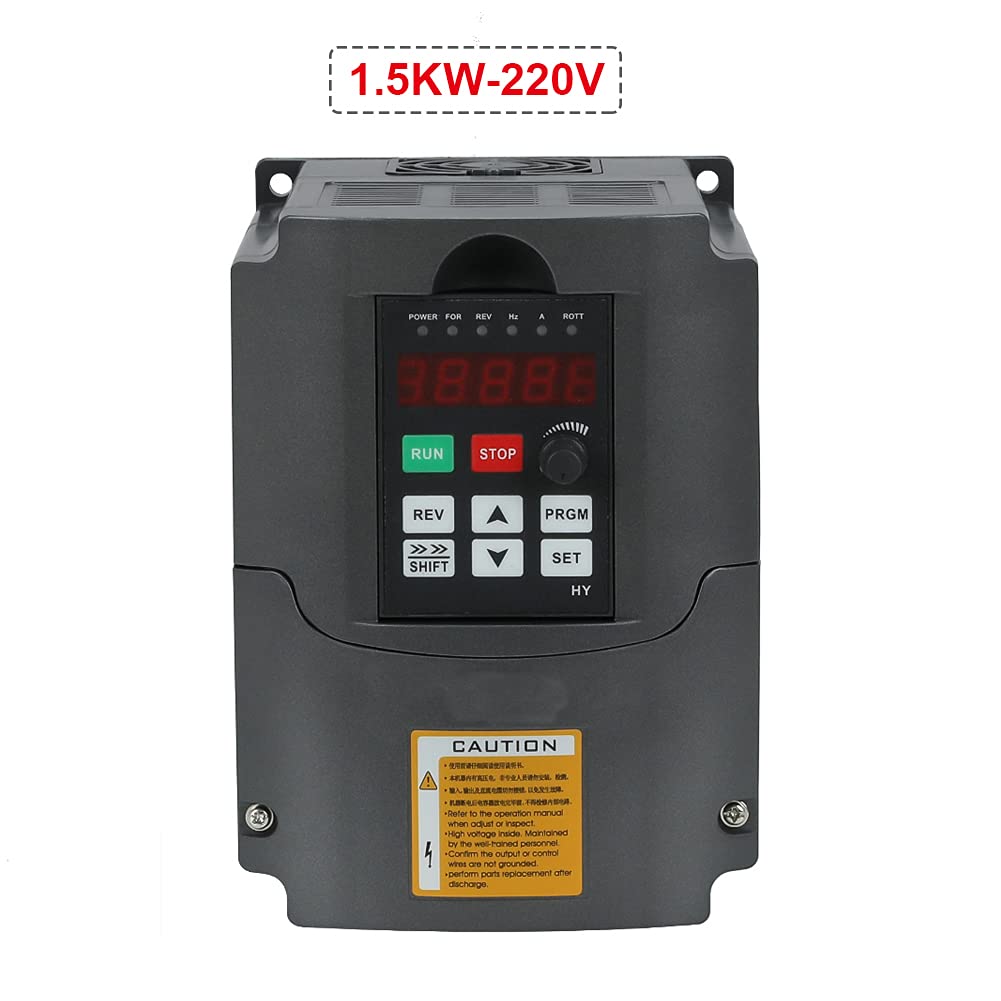
Figure 1: Huanyang 1.5KW 2HP Variable Frequency Drive Inverter.
2. Informazioni sulla sicurezza
AVVERTIMENTO: Improper installation or operation can lead to serious injury or death. Read this manual thoroughly before installation and operation. Only qualified personnel should install, operate, and maintain this equipment.
- Always disconnect power before performing any wiring, inspection, or maintenance.
- Assicurare la corretta messa a terra del VFD e del motore.
- Do not touch electrical components when power is applied. High voltage is present even after power is disconnected; wait for capacitors to discharge.
- Verificare il volume immessotage matches the VFD's specifications (220V).
- Install the VFD in a clean, dry, and well-ventilated environment, away from direct sunlight, corrosive gases, and excessive vibration.
- Utilizzare cavi di diametro adeguato per i collegamenti elettrici per evitare il surriscaldamento.
- Assicurarsi che tutti i collegamenti siano sicuri e adeguatamente isolati.
- Per i requisiti di installazione, fare riferimento ai codici e alle normative elettriche locali.
3. Prodotto finitoview
3.1 Caratteristiche principali
- Fase di ingresso: Supports 1-phase or 3-phase 220V input.
- Fase di uscita: 3-phase 220V output.
- Sistema di controllo: Sine Wave PWM (SPWM) for precise motor control.
- Funzione PLC: Easy PLC function for 16-segment speed and inverter control.
- Funzionamento silenzioso: Carrier frequency adjustable up to 16KHz for soundless working.
- Capacità anti-jamming: Prestazioni anti-inceppamento estremamente elevate.
- Low Speed Torque: 0.5Hz-150% low output rated torque.
- Tecnica AVR: Volume automaticotage Regulation (AVR) ensures stable load capability.
- Error Protection: Perfect error protection and short circuit starting protection.
- Comunicazione: RS485 communication port with standard international MODBUS protocol.
3.2 Componenti e interfaccia

Figure 2: Front panel with display and control buttons, showing internal access.
The VFD features a user-friendly control panel with a digital display and various buttons for operation and parameter setting. The main control buttons include RUN, STOP, REV (Reverse), SHIFT, UP, DOWN, PRGM (Program), and SET.

Figura 3: dettagliata view of the VFD's terminal block for power and control wiring.
The terminal block provides connections for input power (R, S, T for 3-phase or L1, L2 for single-phase), output to the motor (U, V, W), and various control signals. This model is equipped with two rows of terminals for comprehensive control options.
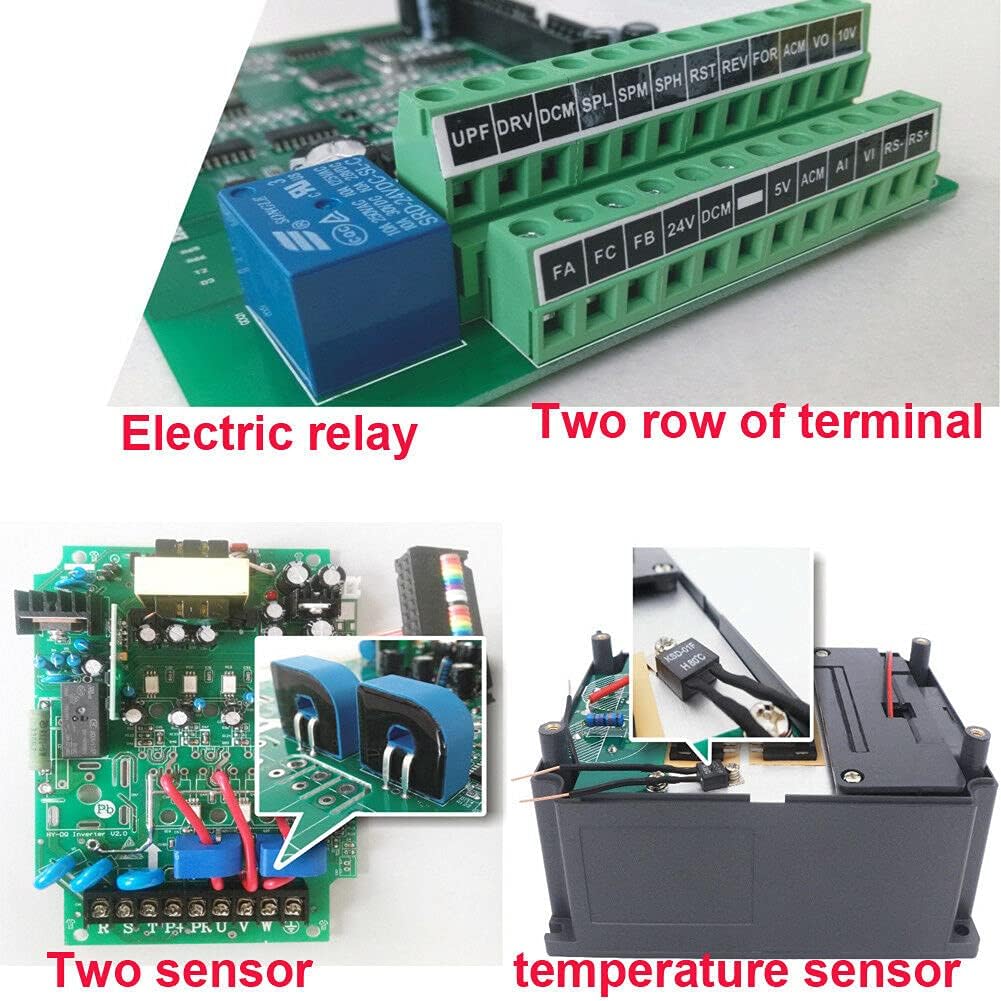
Figura 4: Interno view highlighting the electric relay and two sensors, contributing to enhanced functionality and protection.
Internally, the VFD incorporates robust components such as an electric relay and two sensors, which contribute to its reliable operation and protective features. It also features bigger capacitors and transformers for improved performance and stability compared to some other models.
4. Specifiche
| Caratteristica | Valore |
|---|---|
| Numero di modello | USTS15220V-D-AMZ |
| Potenza nominale | 1.5KW (2HP) |
| Ingresso volumetage | 220 Volts (Single or 3 Phase) |
| Volume di uscitatage | 220 Volt (trifase) |
| Valutazione attuale | 7A |
| Metodo di controllo | Sine Wave PWM (SPWM) |
| Porta di comunicazione | RS485 (MODBUS) |
| Frequenza portante | Adjustable up to 16KHz |
| Peso dell'articolo | 3.99 libbre |
| Dimensioni del pacco | 9.5 x 9.4 x 7.6 pollici |
| Colore | Nero |

Figure 5: Approximate dimensions of the VFD unit.
5. Configurazione e installazione
5.1 Montaggio
Mount the VFD vertically on a stable, non-flammable surface in an area with adequate ventilation. Ensure sufficient clearance around the unit for heat dissipation. Avoid mounting in direct sunlight or areas with excessive dust, moisture, or corrosive substances. Use appropriate fasteners to secure the unit firmly.

Figura 6: lato view of the VFD, showing ventilation grilles for proper airflow.
5.2 Collegamenti di cablaggio
All wiring must be performed by a qualified electrician in accordance with local and national electrical codes. Ensure power is disconnected before making any connections.
- Potenza in ingresso (220 V): Connect the incoming AC power to the input terminals (R, S, T for 3-phase or L1, L2 for single-phase). This VFD supports both single-phase and three-phase 220V input.
- Uscita motore: Connect the three-phase motor leads to the output terminals (U, V, W). Ensure correct phase sequence for desired motor rotation.
- Messa a terra: Connect the ground terminal of the VFD to a reliable earth ground. The motor frame must also be properly grounded.
- Terminali di controllo: Utilize the control terminals for external control signals such as start/stop commands, speed reference (e.g., potentiometer, 0-10V, 4-20mA), and fault indications. Refer to the detailed wiring diagram in the full product manual for specific terminal assignments.
- Comunicazione RS485: If using MODBUS communication, connect the RS485 A and B lines to the designated terminals.
Note: Always refer to the wiring diagram provided with your specific VFD unit for precise terminal identification and connection instructions.
6. Istruzioni per l'uso
6.1 Funzionamento di base
- Accensione: After ensuring all connections are secure and safe, apply power to the VFD. The digital display will illuminate.
- Avviamento del motore: Premere il tasto CORRERE pulsante sul pannello di controllo per avviare il motore.
- Arresto motore: Premere il tasto FERMARE pulsante per arrestare il motore.
- Direzione inversa: Premere il tasto RIVISTA button to change the motor's rotation direction.
6.2 velocità di controllo
Motor speed can be controlled via the built-in potentiometer, external analog signals (e.g., 0-10V, 4-20mA), or digital inputs, depending on parameter settings.
- Potenziometro: Rotate the potentiometer knob on the control panel to adjust the output frequency and thus the motor speed.
- External Analog Input: If configured, an external voltage or current signal connected to the AI terminals can control the speed.
- Ingressi digitali: Pre-set speeds can be selected using digital input terminals, often used with the PLC function.
6.3 Impostazioni dei parametri
The VFD has numerous parameters that can be adjusted to customize its operation for specific applications. These parameters control motor characteristics, acceleration/deceleration times, control modes, and protective functions.
- Entra in modalità programma: Premere il tasto PRGM pulsante per accedere alla modalità di impostazione dei parametri.
- Parametri di navigazione: Utilizzare il UP E GIÙ arrow buttons to scroll through parameter groups and individual parameters.
- Seleziona parametro: Premere IMPOSTATO per selezionare un parametro da modificare.
- Regola valore: Utilizzare il UP E GIÙ buttons to change the parameter value. The SPOSTARE button can be used to move the cursor for digit selection.
- Salva valore: Premere IMPOSTATO di nuovo per salvare il nuovo valore.
- Uscita dalla modalità Programma: Premere PRGM to exit the parameter setting mode and return to the main display.
Consult the comprehensive parameter list in the full product manual for detailed descriptions and recommended settings for each parameter.
6.4 Funzioni avanzate
- Funzione PLC: The VFD includes an easy PLC function that allows for programming up to 16 segments of speed and inverter control, enabling complex automated sequences without an external PLC.
- Comunicazione RS485: The built-in RS485 port supports the standard MODBUS protocol, allowing the VFD to be integrated into a larger control system for remote monitoring and control.
7. Manutenzione
Regular maintenance ensures the longevity and reliable operation of your VFD. Always disconnect power and wait for capacitors to discharge before performing any maintenance.
- Pulizia: Pulire periodicamente l'esterno del VFD e le aperture di ventilazione per evitare l'accumulo di polvere, che può ostacolare il raffreddamento. Utilizzare un panno morbido e asciutto. Non utilizzare detergenti liquidi.
- Ispezione: Controllare regolarmente i collegamenti elettrici per verificarne la tenuta e l'eventuale presenza di segni di usura o danni. Verificare la presenza di rumori o odori insoliti durante il funzionamento.
- Controllo ambientale: Ensure the operating environment remains within specified temperature and humidity ranges and is free from excessive dust or corrosive elements.
- Controllo della ventola: Verificare che la ventola di raffreddamento funzioni liberamente e non sia ostruita.
8. Risoluzione Dei Problemi
This section provides general guidance for common issues. For detailed error codes and advanced troubleshooting, refer to the complete product manual.
| Problema | Possibile causa | Soluzione |
|---|---|---|
| Il VFD non si accende | No input power; Blown fuse; Wiring error | Controllare l'alimentazione; ispezionare i fusibili; verificare il cablaggio di ingresso. |
| Il motore non funziona | STOP button pressed; Fault condition; Incorrect parameters; Motor wiring error | Press RUN; Check display for fault codes and clear; Verify motor parameters and wiring. |
| Il motore gira a velocità errata | Incorrect speed reference; Parameter settings incorrect | Adjust potentiometer or external signal; Check frequency and motor parameters. |
| Guasto di sovracorrente | Sovraccarico del motore; Cortocircuito nel cablaggio del motore; Rapida accelerazione/decelerazione | Reduce load; Check motor wiring; Increase acceleration/deceleration times. |
| Sovravoltage/Sottovoltage colpa | Unstable input power; Regenerative braking | Controllare l'input voltage stability; Consider braking resistor if regenerative braking is an issue. |
9. Garanzia e supporto
For specific warranty terms, conditions, and technical support, please refer to the documentation provided at the time of purchase or contact the manufacturer, Huanyang, directly. Warranty coverage typically includes defects in materials and workmanship under normal use. Keep your purchase receipt as proof of purchase.
Contact information for support can usually be found on the product packaging, the manufacturer's official website, or through your authorized dealer.