
Thinkware X1000
Thinkware X1000 Dash Cam User Manual
Model: X1000 | Brand: Thinkware
1. Introduzione
La Dash Cam Thinkware X1000 fornisce una registrazione video 2K QHD 1440p chiara e nitidatage da entrambe le fotocamere anteriore e posteriore in un design compatto. Dotato di un sensore di immagine Sony Starvis IMX335, offre video 4 volte più vividitage and features a 156-degree wide-angle view per ridurre al minimo i punti ciechi.
This advanced dash cam includes a branded 32GB SD card with Sudden Power Off Recovery (SPOR) and a format-free recording system with pre-allocated memory, eliminating the need for regular SD card formatting. Footage can be easily viewed using the Thinkware Viewsoftware.
When parking mode is active, the included hardwire cable allows the dash cam to function as a CCTV camera, monitoring your vehicle and its surroundings. The device continuously monitors the car battery's health and condition, shutting down if any battery issues are detected. Parking mode offers four recording options: Time Lapse, Energy Saving, Motion Detection, and Impact Detection.
Enhance your camera's capabilities with optional Thinkware accessories, such as the Thinkware Radar and GPS antenna for access to GPS maps and a speed camera database.
"The silent witness, you can rely on it."
Thinkware Dash Cam - For peace of mind on the road. Since 1997, I-Mondz has been a leading provider of location-based services and innovative smart car information technologies, specializing in dash cams for motorcycles and cars.
With various recording modes and continuous capture, your Thinkware dash cam is always ready to preserve exceptional moments of your journey. All Thinkware cameras utilize a super capacitor designed with temperature protection, providing an emergency power source in case of malfunction or sudden power loss, allowing the unit to save the last 10 seconds of an incident.
We support our products with a free technical assistance hotline and offer professional nationwide installation service for your peace of mind. Rest assured that you have a reliable silent companion with you at all times.
2. Caratteristiche del prodotto

Caratteristiche in sintesi: This image displays key features including 2K QHD recording, 3.5-inch Touch LCD, Windows & Mac Viewer compatibility, Dewarping Technology, Thermal Self Protection, Super Night Vision 3.0, Time Lapse recording, and Energy Saving Mode.

Schermo LCD touch da 3.5": This image highlights the interactive features of the touchscreen, such as Video Playback, Live View, Road Safety Warnings, and the ability to Adjust Settings directly on the device.

Parking Modes: This image illustrates the various parking modes available: Time-lapse, Energy Saving, Super Night Vision, and Impact & Motion detection.
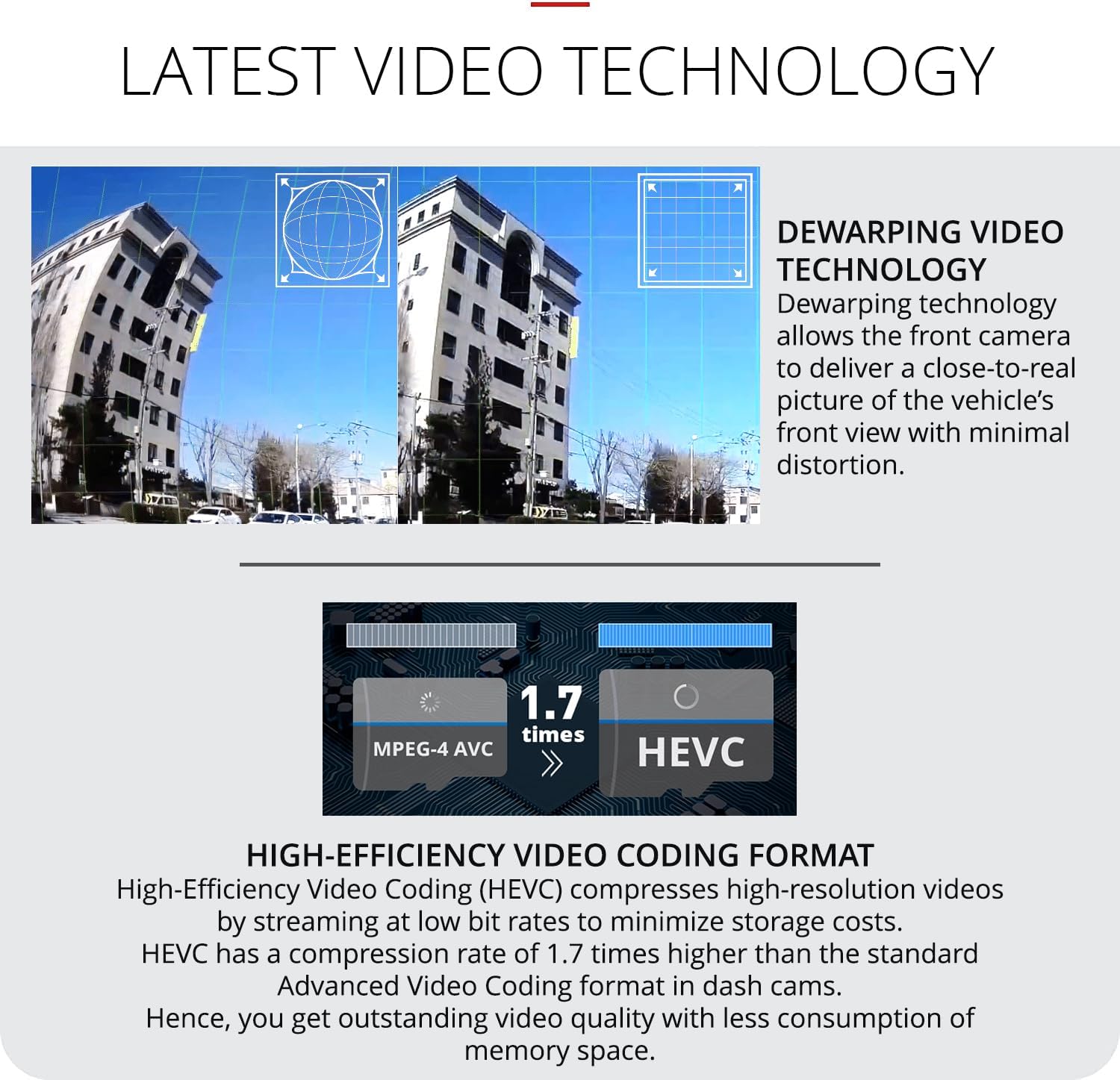
Latest Video Technology: This image details the Dewarping Video Technology for minimal distortion and High-Efficiency Video Coding (HEVC) for efficient high-resolution video compression.

Autonomous Recording Modes: This image explains the different recording modes: Continuous Recording, Incident Recording (triggered by G-sensor), Manual Recording, and Fail-safe Recording (for power loss protection).
Caratteristiche principali:
- Reliable Car Dash Camera: Captures clear front and rear footage with Sony Starvis IMX335 image sensors. Dual camera records 2K QHD 1440p 24/7, with a 156-degree wide-angle view to reduce blind spots.
- Smart Touchscreen Experience: Easily access menus and view pippotage at any angle or time. Adjust settings without removing the SD card on the 3.5-inch full touch IPS LCD screen. Optional GPS antenna available for global GPS maps access.
- Revolutionary Night Vision: Super Night Vision 3.0 captures the best quality in low-light conditions during parking and continuous modes. Combined with image signal and real-time processing, it captures greater detail at night, protecting your car at all times.
- Modalità di parcheggio avanzata: The included hardwire cable allows the dash cam to monitor your vehicle and its surroundings while parked. The device continuously monitors the car battery's health and condition and shuts down if any battery issues are detected.
- Trusted Certifications: The X1000 dash cam's Dewarping technology provides an undistorted front view of the road with minimal distortion. The lens enhancement design considers the color and angle of the windshield/rear window to enhance overall image quality.
3. Guida all'installazione
Follow these steps to set up your Thinkware X1000 Dash Cam:
- Preparare la scheda SD: The included 32GB Thinkware SD card is pre-formatted. Insert it into the dash cam's SD card slot. Ensure the camera is off before inserting or removing the card.
- Montare la telecamera anteriore:
- Pulisci la zona del parabrezza dove verrà montata la dash cam.
- Attach the front camera to the windshield using the provided windshield mount. Ensure it is positioned to capture a clear view della strada davanti a te senza ostacolare la guida view.
- Fissare saldamente il supporto.

Prodotto finitoview: This image shows the main Thinkware X1000 dash cam unit and the separate rear camera, illustrating their compact design and how they might be positioned.
- Installare la telecamera posteriore (facoltativo):
- Montare la telecamera posteriore sul lunotto posteriore, assicurando una visione chiara view.
- Connect the rear camera to the front unit using the provided rear camera cable (6 meters/19.7 feet). Route the cable neatly along the vehicle's interior trim.
- Collegamento elettrico:
- Use the provided hardwire cable for continuous power and parking mode functionality. Connect it to your vehicle's fuse box according to the installation instructions (professional installation recommended).
- Alternatively, for basic operation, connect the dash cam to your vehicle's cigarette lighter socket using a compatible power adapter (not explicitly listed as included, but standard for dash cams).
- Accensione iniziale: Once connected, start your vehicle. The dash cam will power on automatically.
- Regola impostazioni: Use the 3.5-inch touchscreen to navigate the menu and adjust initial settings such as time, date, recording resolution, and G-sensor sensitivity.
4. Istruzioni per l'uso
4.1. Modalità di registrazione
The Thinkware X1000 supports several recording modes:
- Registrazione continua: Automatically records videos in one-minute segments with an auto-looping mechanism. Older filevengono sovrascritti quando la scheda di memoria è piena.
- Registrazione dell'incidente: The Active Impact Monitoring System automatically saves footage ten seconds prior to and after a collision registered by the 3-axis G-Sensor.
- Registrazione manuale: Allows you to manually capture events whether your vehicle is in motion or not.
- Fail-safe Recording: Provides backup power (super capacitor) to ensure safe storage of any recording in the event of sudden power loss.
Autonomous Recording Modes: This image visually represents the four primary recording modes: Continuous, Incident, Manual, and Fail-safe, each with an icon and brief description.
4.2. Modalità di sorveglianza del parcheggio
When hardwired, the X1000 provides advanced parking surveillance with four sub-modes:
- Modalità temporizzata: Records at 2 frames per second (2fps) to reduce video file size, allowing for longer recordings while parked. This mode is ideal for capturing potential bumps, scrapes, and incidents when you are away from your vehicle.
- Modalità risparmio energetico: Reduces power consumption for even longer video recording. The device goes to sleep and wakes up within a second to record for 20 seconds if an impact is detected by the built-in G-sensor.
- Rilevamento del movimento: Registra quando viene rilevato un movimento attorno al veicolo.
- Rilevamento impatto: Registra quando viene rilevato un impatto.

Timelapse Parking Mode: This image illustrates the Time-lapse parking mode, showing a parking lot and the "2FPS Recording" icon, indicating how the dash cam records efficiently while parked.

Energy Saving Mode 2.0: This image depicts the Energy Saving Mode, showing a battery icon and a car in a parking lot, emphasizing reduced power consumption for extended recording periods.
4.3. Viewing Footage
- Riproduzione sul dispositivo: Use the 3.5-inch LCD touchscreen to view registrato footage directly on the dash cam. Navigate through the file list to select and play videos.
- Pensare il software Viewo Software: Per dettagli viewing and management, remove the SD card and insert it into a computer. Use the Thinkware Viewer software (available for Windows and Mac) to review pippotage, regola le impostazioni e scarica i video.
Interfaccia touchscreen: This image shows the user interacting with the dash cam's touchscreen, highlighting options like "Live View," "File List," and "Settings" for easy navigation and control.
5. Manutenzione
- Gestione della scheda SD: While the Thinkware X1000 features a format-free recording system, it is recommended to periodically back up important footage and format the SD card (e.g., once a month) to maintain optimal performance and prevent data corruption. Format the SD card via the dash cam's settings menu or using the Thinkware Viewsoftware.
- Pulizia: Gently wipe the camera lens and screen with a soft, lint-free cloth. Do not use abrasive cleaners or solvents.
- Aggiornamenti del firmware: Check the official Thinkware website regularly for firmware updates. Keeping your dash cam's firmware up-to-date ensures optimal performance, new features, and bug fixes.
- Protezione della temperatura: The dash cam is designed with thermal self-protection to prevent overheating. Ensure proper ventilation around the device, especially in hot climates.
6. Risoluzione Dei Problemi
| Problema | Possibile causa | Soluzione |
|---|---|---|
| La dash cam non si accende. | No power supply; loose connection; vehicle battery issue. | Check power cable connection. Ensure vehicle's ignition is on (if not hardwired). Verify vehicle battery health, especially if using parking mode. |
| La registrazione si interrompe o footage è corrotto. | Errore scheda SD; scheda SD piena; scheda SD incompatibile. | Format the SD card. Use a high-quality, Thinkware-recommended SD card. Ensure the SD card is properly inserted. |
| Scarsa qualità video (sfocato, scuro). | Lente sporca; impostazioni di risoluzione errate; condizioni di scarsa illuminazione. | Clean the camera lens. Check video resolution settings (ensure 2K QHD is selected). Super Night Vision 3.0 should improve low-light recording. |
| La modalità parcheggio non funziona. | Not hardwired; low vehicle battery voltage; incorrect settings. | Ensure the dash cam is hardwired correctly. Check vehicle battery voltage (the dash cam will shut down if voltage is too low). Verify parking mode settings are enabled. |
| La dash cam emette segnali acustici frequenti. | Collision detection sensitivity too high; road safety warnings. | Adjust G-sensor sensitivity settings via the touchscreen menu. Review road safety warning settings. |
7. Specifiche
- Nome modello: X1000
- Marca: Pensare il software
- Dimensioni del prodotto: 19 x 12.3 x 14 cm; 145.15 grammi
- Colore: Nero
- Tipo di montaggio: Supporto per cruscotto
- Orientamento: Anteriore e posteriore
- Tecnologia di connettività: Wifi
- Caratteristiche speciali: Night Vision, Built-in GPS (with optional antenna)
- Risoluzione di acquisizione video: 1080p (Note: Product description states 2K QHD 1440p, this might be a discrepancy in the provided data, user manual will prioritize the higher resolution as advertised for recording capability)
- Componenti inclusi: 32GB Micro SD Card, Front Windshield Mount, Hardwire Cable, Rear Camera Cable (6m/19.7ft), Rear View Camera, Dash Cam Unit, Adhesive Cable Clips (3 pcs), CS Contact Info.
- ASIN: B09G6KNZL5
- Prima data disponibile: 17 settembre 2022
Note: While the "Video Capture Resolution" in specifications states 1080p, the product description and feature bullets consistently mention 2K QHD 1440p recording capability. The manual assumes the higher resolution is the primary recording mode.
8. Garanzia e supporto
Thinkware provides comprehensive support for its products.
- Assistenza tecnica: A free technical assistance hotline is available for product support.
- Servizio di installazione: Professional nationwide installation service is offered for your convenience.
- Informazioni sulla garanzia: Specific warranty duration and terms are typically provided with the product packaging or can be found on the official Thinkware website. Please refer to your product's warranty card for details.
For further assistance, please refer to the contact information provided with your product or visit the official Thinkware support websito.
Ask a question about this manual
Ask about setup, troubleshooting, compatibility, parts, safety, or missing instructions. Manuals+ will review the question and use this page’s manual context to help answer it.