
DOBE TY-1793
Manuale dell'utente del controller wireless
Modello: TY-1793
Introduzione
Grazie per l'acquistoasing the DOBE Wireless Controller. This manual provides detailed instructions on how to set up, operate, and maintain your controller. Please read this manual carefully before use and keep it for future reference.
This controller is designed for use with Nintendo Switch, Android mobile devices, Android TV boxes, and personal computers. It offers both wireless Bluetooth and wired USB connectivity.
Contenuto della confezione
- 1 x Wireless Controller (TY-1793)
- Cavo di ricarica 1 x USB-C
- 1 x Manuale utente (inglese)

Image: The product packaging, clearly indicating the wireless controller, USB-C cable, and compatibility with N-S / Android / PC.
Prodotto finitoview
Familiarize yourself with the various components of your wireless controller.

Immagine: Frontale view of the TY-1793 wireless controller, showing the dual analog sticks with orange accents, D-pad, ABXY buttons, Turbo button, and other function buttons.

Immagine: Lato view of the TY-1793 wireless controller, highlighting the ergonomic grip and trigger buttons.
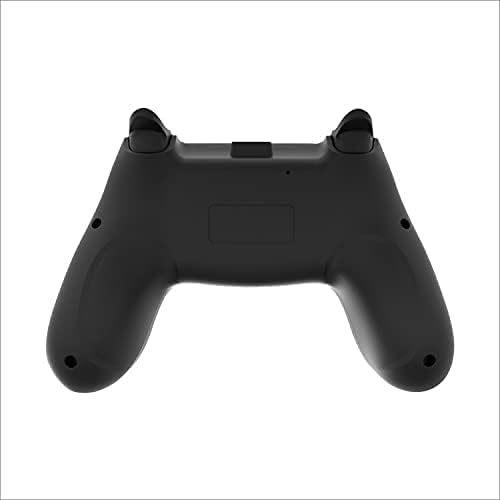
Immagine: Posteriore view of the TY-1793 wireless controller, showing the battery compartment or charging port area.
Impostare
Caricamento del controller
Before first use, fully charge the controller. Connect the supplied USB-C cable to the controller's charging port and the other end to a USB power source (e.g., computer USB port, USB wall adapter). The indicator lights will show charging status and turn off when fully charged.
- Volume di lavorotage: CC 3.7V
- Ingresso di carica Voltage: CC 5V
- Charging Input Current: 300mA
- Capacità della batteria: 400 mAh
Connessione ai dispositivi
Connessione Bluetooth (senza fili)
- Assicurati che il controller sia carico.
- Accendi il controller premendo il pulsante Home.
- On your device (Nintendo Switch, Android mobile/TV box), go to Bluetooth settings or controller pairing menu.
- Select "TY-1793" or similar from the list of available devices to pair.
- Una volta effettuata l'associazione, le spie luminose sul controller si stabilizzeranno.
Bluetooth transmission distance: <10m
Wired USB Connection (PC/Android)
- Connect the USB-C cable to the controller.
- Connect the other end of the USB-C cable to a USB port on your PC or Android device.
- The controller should be automatically recognized by your device. Drivers may be installed automatically.
Istruzioni per l'uso
Controlli di base
- Stick analogici: Utilizzato per il controllo del movimento e della telecamera.
- Tasto direzionale: Directional input for menus and certain games.
- Pulsanti ABXY: Pulsanti di azione standard.
- Bottoni sulle spalle (L/R, ZL/ZR): Additional action buttons, often for triggers or special abilities.
- Pulsante Home: Ritorna alla schermata iniziale del sistema.
- +/- Pulsanti: System-specific functions (e.g., Start/Select, Plus/Minus).
Funzioni speciali
Funzione Turbo
The controller features a Turbo function for rapid firing of buttons. To activate Turbo for a button:
- Press and hold the desired action button (e.g., A, B, X, Y, L1, R1).
- Tenendo premuto il pulsante di azione, premere il Turbosoffiante pulsante.
- Release both buttons. The Turbo function is now active for that button.
To deactivate Turbo for a button, repeat the steps above.
Vibration feedback
The controller supports motor vibration feedback for an immersive gaming experience. This function is automatically enabled when supported by the game and connected device.
6-Axis Gyroscope (Motion Control)
The controller is equipped with a 6-axis gyroscope, enabling motion control in compatible games, particularly on Nintendo Switch.
Manutenzione
- Mantenere il controller asciutto. Evitare l'esposizione a umidità o liquidi.
- Non esporre il controller a temperature estreme.
- Pulisci il controller con un panno morbido e asciutto. Non utilizzare prodotti chimici aggressivi o materiali abrasivi.
- Quando non lo si utilizza, conservare il controller in un ambiente pulito e privo di polvere.
- Evitare di far cadere o di sottoporre il controller a forti urti.
Risoluzione dei problemi
- Il controller non si accende:
- Ensure the controller is fully charged. Connect it to a power source using the USB-C cable and allow it to charge for at least 30 minutes before attempting to turn it on again.
- Controller does not connect via Bluetooth:
- Assicurarsi che il controller sia in modalità di associazione.
- Verifica che il Bluetooth sia abilitato sul tuo dispositivo.
- Move the controller closer to the device (within 10m).
- Remove any previous pairings of the controller from your device's Bluetooth list and try pairing again.
- Riavviare sia il controller che il dispositivo.
- I pulsanti o gli stick analogici non rispondono:
- Assicurarsi che il controller sia collegato correttamente (cablato o wireless).
- Prova a riavviare il controller e il gioco/dispositivo.
- Se si utilizza una connessione cablata, provare una porta USB o un cavo diverso.
- Pulisci la zona attorno ai pulsanti e agli stick per rimuovere eventuali detriti.
Specifiche
| Caratteristica | Dettaglio |
|---|---|
| Modello n. | TY-1793 |
| Connettività | Bluetooth (Wireless), USB (Wired) |
| Compatibilità | Nintendo Switch, Android Mobile, Android TV Box, PC |
| Tipo di batteria | Polimeri di litio incorporati |
| Capacità della batteria | 400mAh |
| Volume di lavorotage | CC 3.7V |
| Ingresso di ricarica | DC 5V / 300mA |
| Portata Bluetooth | <10 metri |
| Dimensioni (confezione) | 17.50 x 11.50 x 6.80 cm (6.89 x 4.53 x 2.68 pollici) |
| Peso (confezione) | 0.372 kg |
| Codice UPC | 6972520252617 |
Garanzia e supporto
For warranty information and technical support, please refer to the contact details provided on the product packaging or the official DOBE websito. Conserva la ricevuta d'acquisto come prova d'acquisto.
Per ulteriore assistenza, contattare l'assistenza clienti.
Ask a question about this manual
Ask about setup, troubleshooting, compatibility, parts, safety, or missing instructions. Manuals+ will review the question and use this page’s manual context to help answer it.