
1. Introduzione
Welcome to the BIGGERFIVE Vigor 2 Kids Fitness Tracker Watch manual. This guide provides detailed instructions for setting up, operating, maintaining, and troubleshooting your new fitness tracker. The Vigor 2 is designed to help children aged 5-12 track their daily activity, monitor heart rate and sleep, and encourage healthy habits.
2. Informazioni sulla sicurezza
Si prega di leggere tutte le istruzioni di sicurezza prima di utilizzare il dispositivo.
- Non tentare di smontare o modificare il dispositivo.
- Tenere il dispositivo lontano da temperature estreme.
- Supervise children during use, especially during charging.
- Consult a doctor before starting any new exercise program, especially for children with pre-existing health conditions.
- Questo dispositivo non è un dispositivo medico e non deve essere utilizzato per scopi diagnostici o terapeutici.
3. Contenuto della confezione
Verificare che tutti gli articoli siano presenti nel pacco:
- Orologio fitness tracker BIGGERFIVE Vigor 2
- Cavo di ricarica
- Manuale di istruzioni (questo documento)
4. Impostazione
4.1. Carica del dispositivo
Before first use, fully charge the fitness tracker.
- Connect the charging cable to the charging port on the back of the tracker.
- Collegare l'estremità USB del cavo a un adattatore di alimentazione USB standard (non incluso) o alla porta USB di un computer.
- The battery icon on the screen will indicate charging status. A full charge takes approximately 2 hours.

Image: The BIGGERFIVE Vigor 2 Fitness Tracker connected to its charging cable, illustrating the charging process.
4.2. Installing the BIGGERFIVE App
The BIGGERFIVE Vigor 2 requires the companion app for full functionality.
- Cercare "BIGGERFIVE" in the Apple App Store (for iOS devices) or Google Play Store (for Android devices).
- Scarica e installa l'app.
4.3. Associazione del dispositivo
- Assicurati che il Bluetooth sia abilitato sul tuo smartphone.
- Open the BIGGERFIVE app and follow the on-screen instructions to create an account.
- Seleziona "Aggiungi dispositivo" o un'opzione simile all'interno dell'app.
- Choose "BIGGERFIVE Vigor 2" from the list of available devices.
- Confirm the pairing request on both the app and the fitness tracker if prompted.

Image: A smartphone screen displaying the BIGGERFIVE app interface, showing steps, distance, calories, and sleep data.
4.4. Setting Up a Family Account
The BIGGERFIVE app supports family accounts to manage multiple trackers.
- Within the app, navigate to the "Family Account" section.
- Crea un figlio profiles and link each Vigor 2 tracker to the respective child's profile.

Image: A smartphone screen showing the BIGGERFIVE app's family account feature, allowing parents to manage multiple child profiles and their fitness trackers.
5. Utilizzo del dispositivo
5.1. Navigazione di base
The Vigor 2 features a touch-sensitive button at the bottom of the screen for navigation.
- Singolo tocco: Short press to cycle through different screens (Time, Steps, Heart Rate, etc.).
- Premere a lungo: Press and hold to activate certain functions or enter sub-menus (e.g., start a workout, confirm a selection).
5.2. Monitoraggio delle attività
The tracker automatically records daily activity.
- Passaggi: Visualizza il numero totale di passi effettuati.
- Distanza: Mostra la distanza stimata percorsa.
- Calorie: Indicates calories burned.
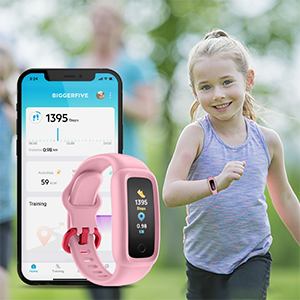
Image: The BIGGERFIVE Vigor 2 screen showing a step counter display.
5.3. Modalità Sport
The Vigor 2 supports over 10 sport modes.
- Access sport modes through the device menu.
- Select the desired activity (e.g., Walking, Running, Cycling, Dancing, Basketball, Football, Tennis, Climbing, Workout).
- Long press to start and end a workout session.

Image: The BIGGERFIVE app displaying icons for various sport modes like walking, cycling, basketball, and tennis.
5.4. Monitoraggio della frequenza cardiaca
The device monitors heart rate automatically throughout the day.
- View real-time heart rate on the tracker screen or in the app.
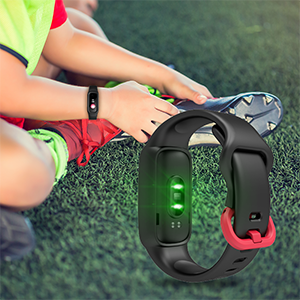
Image: The BIGGERFIVE Vigor 2 screen showing a heart rate display in beats per minute (BPM).
5.5. Monitoraggio del sonno
The Vigor 2 automatically tracks sleep patterns.
- Wear the tracker to bed for accurate sleep data.
- Review sleep duration, deep sleep, light sleep, and awake times in the BIGGERFIVE app.
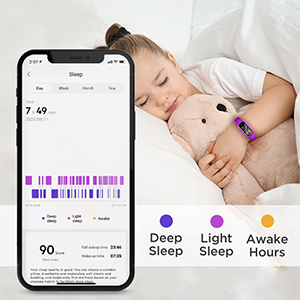
Image: A smartphone screen displaying the BIGGERFIVE app's sleep tracking feature, showing sleep duration and different sleep stages.
5.6. Silent Alarm Clock
Set silent alarms through the BIGGERFIVE app.
- Alarms vibrate gently on the wrist to wake the user without disturbing others.
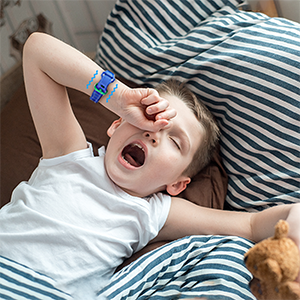
Image: The BIGGERFIVE Vigor 2 on a child's wrist, illustrating the silent alarm clock feature.
5.7. Cronometro
The tracker includes a stopwatch function.
- Navigate to the stopwatch screen on the device.
- Use the touch button to start, pause, and reset the timer.
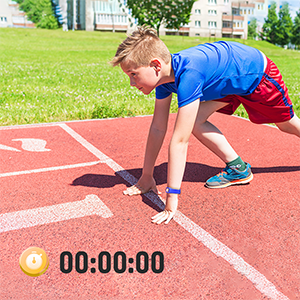
Image: The BIGGERFIVE Vigor 2 screen showing the stopwatch function with a timer displayed.
5.8. Quadranti personalizzati
Personalize the tracker with different watch faces.
- Select and apply new watch faces through the BIGGERFIVE app.
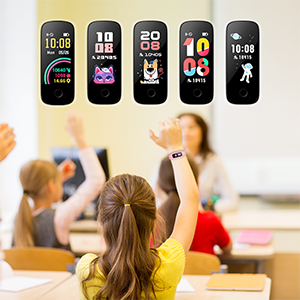
Image: A selection of customizable watch faces available for the BIGGERFIVE Vigor 2 Fitness Tracker.
6. Manutenzione
6.1. Pulizia
- Pulisci regolarmente il tracker e il cinturino con un panno morbido eamp stoffa.
- Evitare l'uso di prodotti chimici aggressivi o materiali abrasivi.
- Prima di procedere alla ricarica, assicurarsi che i contatti di ricarica siano puliti e asciutti.
6.2. Resistenza all'acqua (IP68)
The BIGGERFIVE Vigor 2 is IP68 waterproof, suitable for swimming and water activities.
- Do not use in hot water or saunas.
- Dopo l'esposizione ad acqua salata o clorata, sciacquare con acqua dolce.

Image: A child wearing the BIGGERFIVE Vigor 2 Fitness Tracker while playing in water, highlighting its IP68 waterproof rating.
6.3. Cura della batteria
- Caricare regolarmente il dispositivo per preservare l'integrità della batteria.
- Evitare di scaricare completamente la batteria per periodi prolungati.
- Battery life is approximately 7 days on a 2-hour charge.
7. Risoluzione Dei Problemi
7.1. Il dispositivo non si accende
- Assicurarsi che il dispositivo sia completamente carico. Collegarlo al caricabatterie per almeno 10 minuti.
- Try a soft reset by pressing and holding the touch button for 10-15 seconds.
7.2. Not Pairing with App
- Verifica che il Bluetooth sia abilitato sul tuo smartphone.
- Ensure the tracker is close to your phone during pairing.
- Riavvia sia il tracker che lo smartphone.
- Controlla se l'app è aggiornata all'ultima versione.
- If you have multiple trackers, ensure you are trying to pair the correct one.
7.3. Inaccurate Step Count
- Ensure the tracker is worn snugly on the wrist.
- Calibrate the tracker through the app if available.
- Movement of the arm not associated with walking (e.g., waving) may sometimes be counted as steps.
7.4. Heart Rate/Sleep Data Not Showing
- Ensure the tracker is worn correctly and snugly on the wrist.
- For sleep tracking, wear the device throughout the night.
- Sync the device with the app regularly to transfer data.
7.5. Lo schermo non risponde
- Riavviare il dispositivo.
- Assicurarsi che lo schermo sia pulito e asciutto.
8. Specifiche
| Caratteristica | Dettaglio |
|---|---|
| Nome del modello | BF200 |
| Marca | BIGGERCINQUE |
| Dimensioni dello schermo | 0.96 pollici |
| Tipo di visualizzazione | Elettronico |
| Risoluzione | 128x128 |
| Connettività | Bluetooth |
| Grado di impermeabilità | IP68 (fino a 1.5 metri) |
| Tipo di batteria | Polimero di litio |
| Durata della batteria | Fino a 7 giorni |
| Tempo di carica | Circa 2 ore |
| Materiale della fascia | Silicone |
| Materiale della cassa | Plastica |
| Peso dell'articolo | 0.02 chilogrammi |
| Dimensioni | Dimensioni: 20 x 1.5 x 1 cm |
| Pubblico di destinazione | Unisex Kids (Ages 5-12) |
| Applicazioni supportate | Sleep Monitor, Pedometer, Heart Rate Monitor |
| Dispositivi compatibili | Most Android 6.0+ and iOS 9.0+ smartphones |
9. Garanzia e supporto
9.1. Informazioni sulla garanzia
The BIGGERFIVE Vigor 2 Fitness Tracker Watch comes with a 1-year warranty. Please retain your proof of purchase for warranty claims. The warranty covers manufacturing defects but does not cover damage caused by misuse, accidents, or unauthorized modifications.
9.2. Assistenza clienti
For further assistance, technical support, or warranty inquiries, please contact BIGGERFIVE customer service.
- Visit the official BIGGERFIVE websito per i contatti.
- Per le informazioni di contatto del venditore, fare riferimento alla piattaforma di acquisto.