
1. Introduzione
This manual provides essential instructions for setting up, operating, and maintaining your Fossil Bronson HR Hybrid Smartwatch (Model FTW7059). This device combines the classic aesthetics of a traditional watch with modern smartwatch functionalities, including heart rate monitoring, activity tracking, and smartphone notifications. Please read this manual thoroughly before using your watch.
2. Impostazione
2.1 Unboxing e carica iniziale
Upon unboxing, ensure all components are present: the Fossil Bronson HR Hybrid Smartwatch and its charging cable. Before first use, fully charge your watch. Connect the charging cable to the watch's charging points and a USB power source. A full charge typically takes approximately 2 hours.
2.2 Installazione e associazione dell'app
- Scarica il Fossil Smartwatches app dall'app store del tuo smartphone (disponibile per iOS e Android).
- Apri l'app e crea un account o accedi.
- Follow the on-screen instructions to add a new device. Select your Bronson HR Hybrid Smartwatch from the list.
- The app will guide you through the Bluetooth pairing process. Ensure your watch is sufficiently charged and your phone's Bluetooth is enabled.
- Once paired, the app will synchronize with your watch, allowing you to customize settings and view dati.
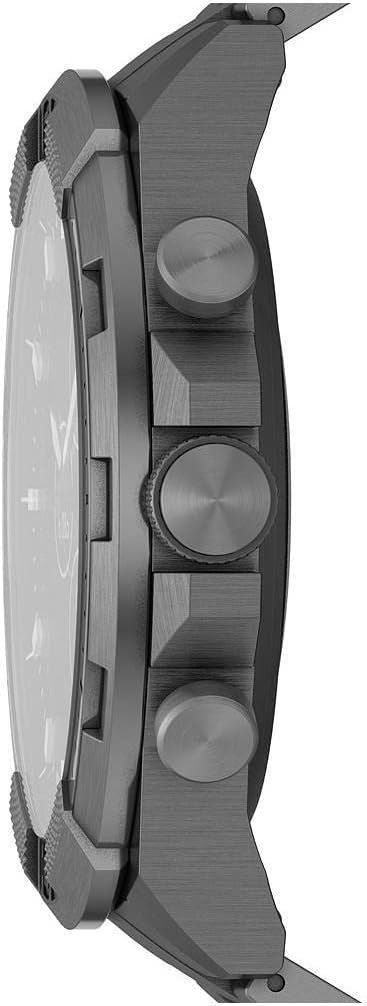
Immagine: Lato view of the Fossil Bronson HR Hybrid Smartwatch, highlighting the functional buttons and crown.
3. Istruzioni per l'uso
3.1 Navigazione di base
Your Bronson HR Hybrid Smartwatch features a traditional watch face with physical hands and a discreet digital display. It is operated primarily through its three side buttons and the crown.
- Spintore superiore: Customizable function (e.g., view date, control music).
- Corona centrale: Used for navigating menus on the digital display and confirming selections.
- Spintore inferiore: Customizable function (e.g., start workout, check heart rate).
3.2 Monitoraggio dell'attività e della salute
The watch continuously tracks your heart rate, steps, and sleep patterns. This data is synchronized with the Fossil Smartwatches app, where you can view detailed statistics and progress over time.
- Frequenza cardiaca: The watch monitors your heart rate throughout the day and during workouts.
- Passaggi: Tracks your daily step count and estimated distance.
- Sonno: Automatically detects sleep and tracks sleep stages (light, deep, awake) and duration.
3.3 Notifiche e funzioni intelligenti
Once paired with your smartphone, the watch can display notifications for calls, messages, and app alerts. You can customize which notifications appear via the Fossil Smartwatches app.
- Notifiche smartphone: Receive discreet vibrations and text previews on your watch.
- Controllo della musica: Controlla la riproduzione musicale sul tuo smartphone direttamente dall'orologio.
- Tempo atmosferico: View condizioni meteorologiche attuali e previsioni.
- Calendario: See upcoming events from your synced calendar.

Image: The hybrid display of the Fossil Bronson HR Smartwatch, illustrating various data points like heart rate, steps, and weather.
4. Manutenzione
4.1 Pulizia dell'orologio
Pulisci regolarmente il tuo orologio per mantenerne l'aspetto e la funzionalità. Usa un panno morbido eamp cloth to wipe the case and band. For stainless steel bands, a mild soap solution can be used, followed by thorough rinsing and drying. Avoid harsh chemicals or abrasive materials.
4.2 Resistenza all'acqua
The Fossil Bronson HR Hybrid Smartwatch is water-resistant. It is suitable for everyday use, including splashes, rain, and showering. However, it is not recommended for diving or high-pressure water activities. Avoid pressing buttons underwater.
4.3 Cura della batteria
To maximize battery life, avoid extreme temperatures. Charge the watch fully when the battery is low. The watch offers over 2 weeks of battery life on a single charge, depending on usage.
4.4 Aggiornamenti software
Ensure your Fossil Smartwatches app is up to date, as it delivers firmware updates to your watch. These updates can improve performance, add new features, and fix bugs.
5. Risoluzione Dei Problemi
5.1 Watch Not Connecting to Phone
- Assicurati che il Bluetooth sia abilitato sul tuo smartphone.
- Check if the watch is sufficiently charged.
- Riavvia sia l'orologio che lo smartphone.
- Try unpairing and re-pairing the watch through the Fossil Smartwatches app.
5.2 Inaccurate Tracking Data
- Assicurati che l'orologio sia indossato comodamente al polso, né troppo largo né troppo stretto.
- Pulisci il sensore della frequenza cardiaca sul retro dell'orologio.
- Aggiorna il firmware dell'orologio tramite l'app.

Immagine: Indietro view of the Fossil Bronson HR Hybrid Smartwatch, displaying the heart rate sensor and Fossil logo.
5.3 Durata breve della batteria
- Ridurre la frequenza delle notifiche.
- Assicurarsi che l'orologio sia completamente carico ogni volta.
- Avoid using the watch in extreme temperatures.
5.4 Il display non risponde
- Perform a soft reset by holding down the middle crown for approximately 10-15 seconds until the watch restarts.
- Assicurarsi che l'orologio sia carico.
6. Specifiche
| Numero di modello | FTW7059 |
| Marca | Fossile |
| Tipo di visualizzazione | Analog with Digital Screen |
| Materiale della cassa | Acciaio inossidabile |
| Materiale della fascia | Acciaio inossidabile |
| Colore della fascia | Grigio |
| Forma della cassa | Girare |
| Dimensioni dello schermo | 44 millimetri |
| Larghezza di banda | 22 millimetri |
| Livello di resistenza all'acqua | Impermeabile |
| Sistema operativo | AsteroidOS |
| Tecnologia di connettività | Bluetooth |
| Dispositivi compatibili | Smartphone (iPhone and Android) |
| Tipo di cella della batteria | Ossido d'argento |
7. Garanzia
This product is covered by a manufacturer's warranty. For detailed information regarding warranty terms, conditions, and duration, please refer to the official Fossil webo la scheda di garanzia inclusa nell'acquisto. Conservare la prova d'acquisto per eventuali reclami in garanzia.
8. Supporto
Per ulteriore assistenza, supporto tecnico o per view frequently asked questions, please visit the official Fossil support website. You can typically find contact information for customer service there as well.


