
1. Introduzione
This manual provides detailed instructions for the installation, operation, and maintenance of your WOLFBOX T10 Plus 2.5K Mirror Dash Cam. Please read this manual thoroughly before using the device to ensure proper functionality and safety. This device is designed to record video footage from your vehicle's front and rear perspectives, offering features such as GPS tracking, Wi-Fi connectivity, and parking monitoring.
2. Contenuto della confezione
Verifica che tutti gli articoli elencati di seguito siano inclusi nel tuo pacchetto:
- 1x WOLFBOX T10 Plus Mirror Dash Cam (Front Camera integrated)
- 1x WDR/HDR Rear Camera
- 1x antenna GPS
- 1 scheda TF da 32 GB
- 1x 21FT Backup Camera Cable
- 1x 11.5FT Car Charger
- 4x cinghie di montaggio in gomma
- 1x strumento per tagliare i cavi dell'auto
- 1x Manuale utente (questo documento)

Figure 2.1: Contents of the WOLFBOX T10 Plus package, including the mirror dash cam, rear camera, GPS module, and 32GB TF card.
3. Prodotto finitoview
The WOLFBOX T10 Plus integrates a high-resolution front camera into a 10-inch touch screen rearview mirror. It is accompanied by a separate rear camera and a GPS module for comprehensive vehicle monitoring.
3.1 componenti chiave
- Mirror Dash Cam Unit: The main unit featuring a 10-inch LCD touch screen, integrated front camera, and control buttons/ports.
- Telecamera posteriore: A separate camera for recording the rear view, typically mounted on the license plate area or rear window.
- Modulo GPS: Connects to the main unit to record location and speed data.
- Carta TF: Used for storing recorded video footage.

Figure 3.1: The front camera lens on the mirror dash cam is adjustable, allowing for optimal positioning to avoid obstructions from the vehicle's original rearview specchio.
4. Configurazione e installazione
Proper installation is crucial for optimal performance. It is recommended to consult a professional for installation if you are unsure.
4.1 Montaggio della Dash Cam a specchio
- Fissare la dash cam sullo specchietto retrovisore alla parte posteriore esistente del veicoloview specchio utilizzando le cinghie di montaggio in gomma fornite. Assicurarsi che sia fissato saldamente e non ostruisca il view.
- Adjust the integrated front camera lens to ensure it captures a clear view della strada da percorrere.
4.2 Collegamento del cavo di alimentazione
- Collegare il caricabatteria per auto alla porta di ingresso dell'alimentazione della dash cam.
- Collegare l'altra estremità del caricabatteria per auto alla presa di corrente da 12 V del veicolo (presa accendisigari).
- Route the power cable neatly along the vehicle's interior trim using the provided trim tool to avoid interference with driving.
4.3 Installazione della telecamera posteriore
- Mount the rear camera at the rear of your vehicle, typically above the license plate or on the rear window. Ensure it has a clear, unobstructed view.
- Connect the rear camera cable to the rear camera input port on the main dash cam unit.
- For parking assist functionality, connect the red wire of the rear camera cable to the positive terminal of your vehicle's reversing light. This enables the parking guidelines to appear when shifting into reverse.
- Route the rear camera cable discreetly through the vehicle's interior to the main unit.
4.4 Connecting the GPS Module
- Connect the GPS antenna to the designated GPS port on the mirror dash cam.
- Montare l'antenna GPS sul cruscotto o sul parabrezza in una posizione con una vista libera view del cielo per garantire una ricezione ottimale del segnale.
5. Istruzioni per l'uso
5.1 Accensione/spegnimento
- The device will automatically power on and begin recording when your vehicle's ignition is turned on (if connected to a switched power source).
- To manually power off, press and hold the power button. The device will automatically power off when the vehicle's ignition is turned off.
5.2 Touch Screen Operations
The 10-inch touch screen allows for intuitive control:
- Scorri verso sinistra/destra: Passa dalla fotocamera frontale view, telecamera posteriore viewoppure una visualizzazione a schermo diviso che mostra entrambi.
- Swipe Up/Down (Left side of screen): Regola la verticale viewangolazione della fotocamera.
- Swipe Up/Down (Right side of screen): Regola la luminosità dello schermo.
- Rubinetto: Access menu options or confirm selections.

Figure 5.1: Demonstrates various touch screen gestures for switching camera views and adjusting display settings.
5.3 Navigazione nel menu
Tap the screen to reveal menu icons. Navigate through settings to configure recording resolution, loop recording duration, G-sensor sensitivity, parking monitor mode, Wi-Fi settings, and more.
6. Caratteristiche spiegate
Registrazione ad alta risoluzione 6.1
The T10 Plus records in 2.5K (2560x1440P) for the front camera and 1080P (1920x1080P) for the rear camera, capturing clear details. Wide Dynamic Range (WDR) technology enhances image quality in varying light conditions, including low light and strong headlights, providing improved night vision.

Figure 6.1: Visual comparison highlighting the enhanced detail and clarity provided by 2.5K resolution compared to 1080P.

Figura 6.2: un example of video quality in low-light conditions, showcasing the effectiveness of WDR technology for clear night vision.
6.2 Built-in Wi-Fi
The integrated Wi-Fi allows you to connect your smartphone (iOS or Android) to the dash cam via the WOLFBOX app. This enables you to view cibo vivotage, download recorded videos, and share them directly from your phone.

Figure 6.3: The WOLFBOX app interface on a smartphone, demonstrating video playback and options for sharing recorded content.
6.3 GPS integrato
The GPS module accurately records your driving route, speed, and location. This data can be reviewed using a dedicated GPS player on your computer, providing valuable evidence in case of incidents.

Figure 6.4: A computer screen showing a map with a recorded driving route and speed data, illustrating the GPS tracking feature.
6.4 Supercapacitor
The T10 Plus utilizes a supercapacitor instead of traditional lithium batteries. This enhances safety, especially in extreme temperatures (-4°F to 158°F), and significantly increases the device's lifespan and charging efficiency.

Figure 6.5: An illustration of a supercapacitor, highlighting its internal components and integration into electronic circuitry.
6.5 Parking Assist
When the rear camera's red wire is connected to the reversing light, the dash cam displays parking guidelines on the screen when the vehicle is in reverse. The 310° wide-angle view helps reduce blind spots, and the guidelines can be adjusted by swiping up or down on the screen.
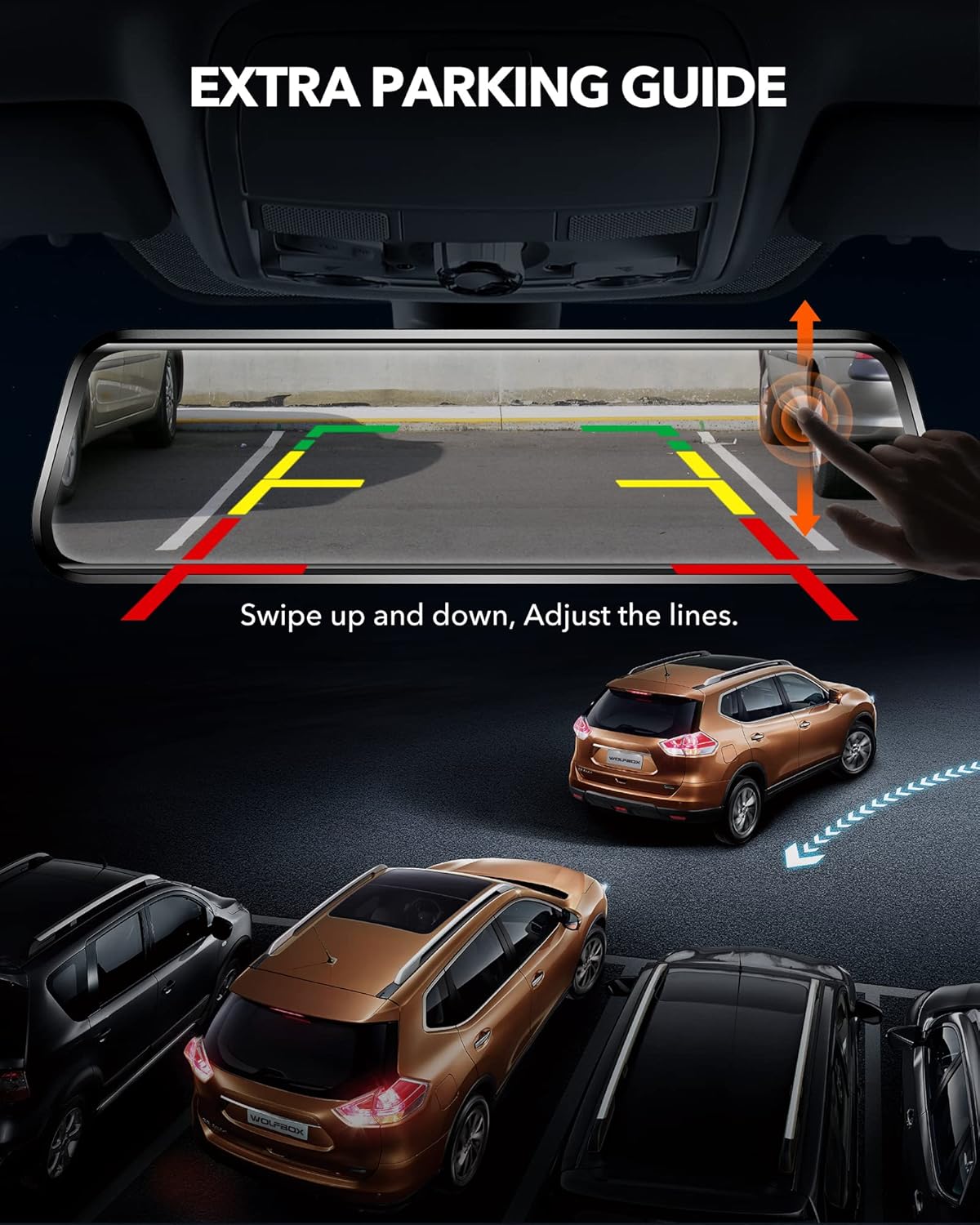
Figure 6.6: The dash cam display showing dynamic parking guidelines, which can be adjusted vertically to assist with precise parking maneuvers.
6.6 24-Hour Protection
- Registrazione in loop: Registra continuamente, sovrascrivendo il foo sbloccato più vecchiotage quando la scheda TF è piena.
- Sensore G: Automatically detects sudden impacts or collisions and locks the current video segment to prevent it from being overwritten.
- Registrazione manuale di emergenza: Allows you to manually lock a video segment by pressing a button.
- Monitoraggio del parcheggio: Provides continuous time-lapse recording or event-triggered recording when the vehicle is parked, offering surveillance against potential incidents.

Figure 6.7: A visual representation of the 24-hour parking monitoring feature, showing a vehicle under continuous surveillance in a parking environment.

Figure 6.8: An image depicting a police officer, representing the use of recorded footage as evidence in accident investigations.

Figure 6.9: An image illustrating a person peering into a car, symbolizing the dash cam's role in deterring theft and providing surveillance.
7. Manutenzione
7.1 Pulizia del dispositivo
Use a soft, dry cloth to clean the dash cam screen and lens. Avoid using abrasive cleaners or solvents that could damage the device.
7.2 Formatting the TF Card
It is recommended to format the TF card regularly (e.g., once a month) to maintain optimal recording performance and prevent data corruption. This can typically be done through the device's settings menu.
7.3 Aggiornamenti firmware
WOLFBOX may release firmware updates to improve performance or add new features. Check the official WOLFBOX website or contact customer support for information on available updates and installation instructions.
8. Risoluzione Dei Problemi
If you encounter issues with your WOLFBOX T10 Plus, refer to the following common problems and solutions:
- Il dispositivo non si accende: Assicurarsi che il caricabatterie per auto sia collegato saldamente sia alla dash cam sia alla presa di corrente da 12 V del veicolo. Verificare che la presa di corrente del veicolo funzioni.
- Problemi di registrazione: Verify that a TF card is inserted and properly formatted. Check the TF card's capacity and ensure it is not full. If the issue persists, try a different TF card.
- GPS signal problems: Assicurarsi che l'antenna GPS sia montata in una posizione con una vista libera view del cielo. Evitare di posizionarlo sotto oggetti metallici o vetri oscurati che potrebbero bloccare il segnale.
- Problemi di connessione Wi-Fi: Make sure Wi-Fi is enabled on the dash cam and your smartphone. Ensure you are within range of the dash cam's Wi-Fi signal. Restart both devices if necessary.
- Rear camera display problems: Controllare il collegamento del cavo della telecamera posteriore sia alla telecamera posteriore che all'unità principale. Assicurarsi che il cavo non sia danneggiato.
- Riflesso dello schermo: Adjust the screen brightness using the touch screen gestures. Consider using an anti-glare film if glare remains an issue.
For further assistance, please contact WOLFBOX customer support.
9. Specifiche
| Caratteristica | Specificazione |
|---|---|
| Marca | SCATOLA DEL LUPO |
| Nome del modello | T10 |
| Numero modello articolo | T10 Plus |
| Risoluzione della fotocamera frontale | 2.5K (2560x1440P) |
| Risoluzione della telecamera posteriore | 1080P (1920x1080P) |
| Dimensioni dello schermo | 10 pollici |
| Tipo di visualizzazione | LCD, schermo completamente touch |
| Davanti Viewangolo di ing | 170 gradi |
| Posteriore Viewangolo di ing | 140 gradi (circa) |
| Magazzinaggio | Scheda TF (32 GB inclusa) |
| Fonte di alimentazione | Car Charger (11.5FT) |
| Caratteristiche speciali | GPS Tracking, Wi-Fi, WDR Technology, Super Night Vision, G-sensor, Emergency Recording, Loop Recording, Parking Monitor, Supercapacitor |
| Temperatura di esercizio | Da -4°C a 158°C (da -20°F a 70°F) |
| Dimensioni | Dimensioni: 24.61 x 1.7 x 6.48 cm |
| Peso | 1.09 kg |
10. Garanzia e supporto
WOLFBOX stands behind its products with a 12-month after-sales guaranteeInoltre, Servizio post-vendita 24 ore su 24, 7 giorni su 7 is available to assist with any product-related questions or issues.
For technical support, warranty claims, or general inquiries, please refer to the contact information provided in your product packaging or visit the official WOLFBOX websito.