
1. Introduzione
The MustOOL MT336 is a versatile 2-in-1 True RMS Digital Clamp Meter and Oscilloscope. This device allows for non-contact measurement of AC current waveforms, DC/AC voltage, resistance, capacitance, frequency, and temperature. It features a waveform display for quick analysis and includes functions like diode testing and continuity checks. Designed for safety and efficiency, it is an essential tool for electrical measurements.
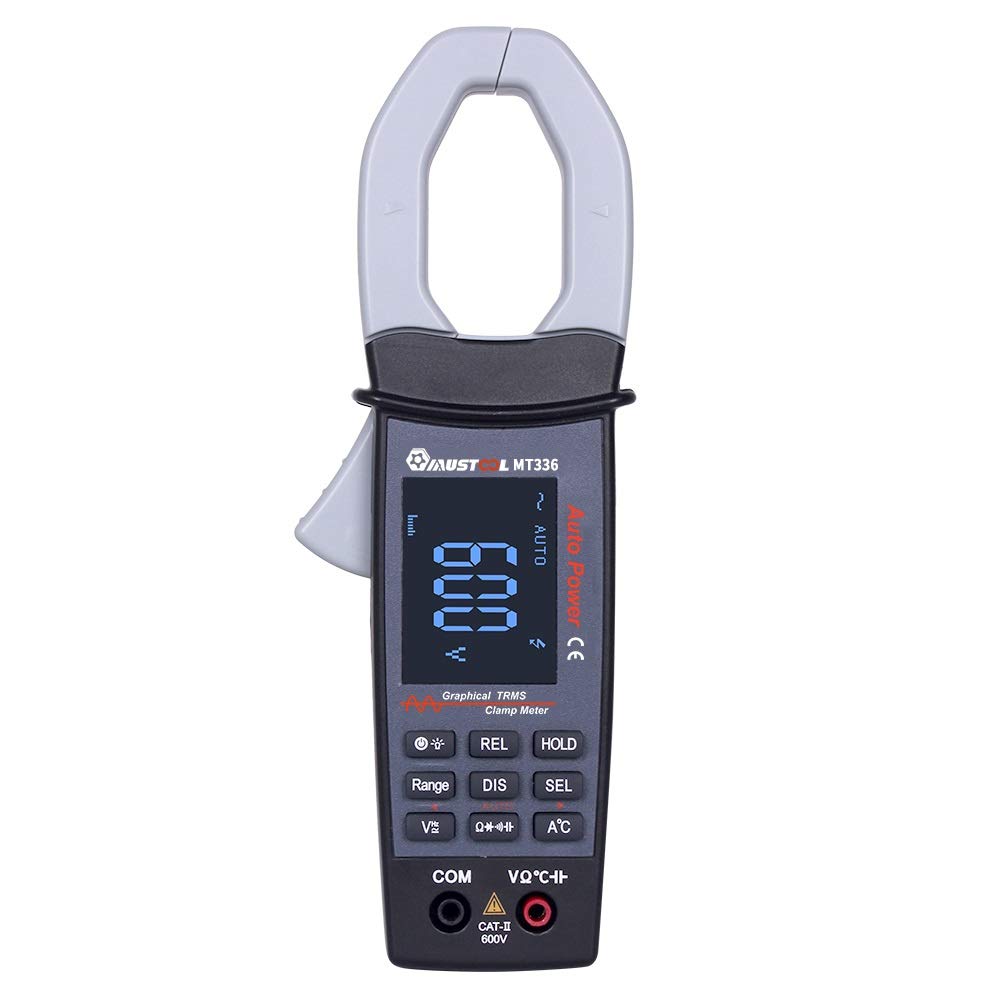
Figure 1: MustOOL MT336 Digital Clamp Meter in use, showing its display.
2. Informazioni sulla sicurezza
Rispettare sempre le precauzioni di sicurezza quando si utilizzano apparecchiature di prova elettriche. La mancata osservanza di queste precauzioni può causare scosse elettriche, lesioni o danni al misuratore o all'apparecchiatura sottoposta a prova.
- Non superare i limiti massimi di input per nessuna funzione.
- Ensure the test leads are in good condition and properly connected before use.
- Non utilizzare il misuratore se appare danneggiato o se il coperchio della batteria non è chiuso correttamente.
- Prestare estrema attenzione quando si lavora con il voltagsuperiore a 60 V CC o 30 V CA RMS.
- Scollegare sempre l'alimentazione dal circuito prima di effettuare misurazioni di resistenza, capacità o diodi.
- Remove test leads from the meter before opening the battery compartment.

Figura 2: Posteriore view of the MT336, highlighting safety warnings and battery information.
3. Componenti del prodotto
The MustOOL MT336 clamp meter includes the following main components:
- Clamp Mascella: Per la misurazione della corrente alternata senza contatto.
- Grilletto: Apre e chiude il clamp mascella.
- Schermo LCD: Shows measurement readings, waveforms, and function indicators.
- Pulsanti funzione: For selecting modes, ranges, and other features.
- Input Jacks (COM, VΩHz): Per collegare i puntali di prova per voltage misure di resistenza, capacità, frequenza, diodi e continuità.
- Temperature Probe Input: For connecting the included temperature probe.
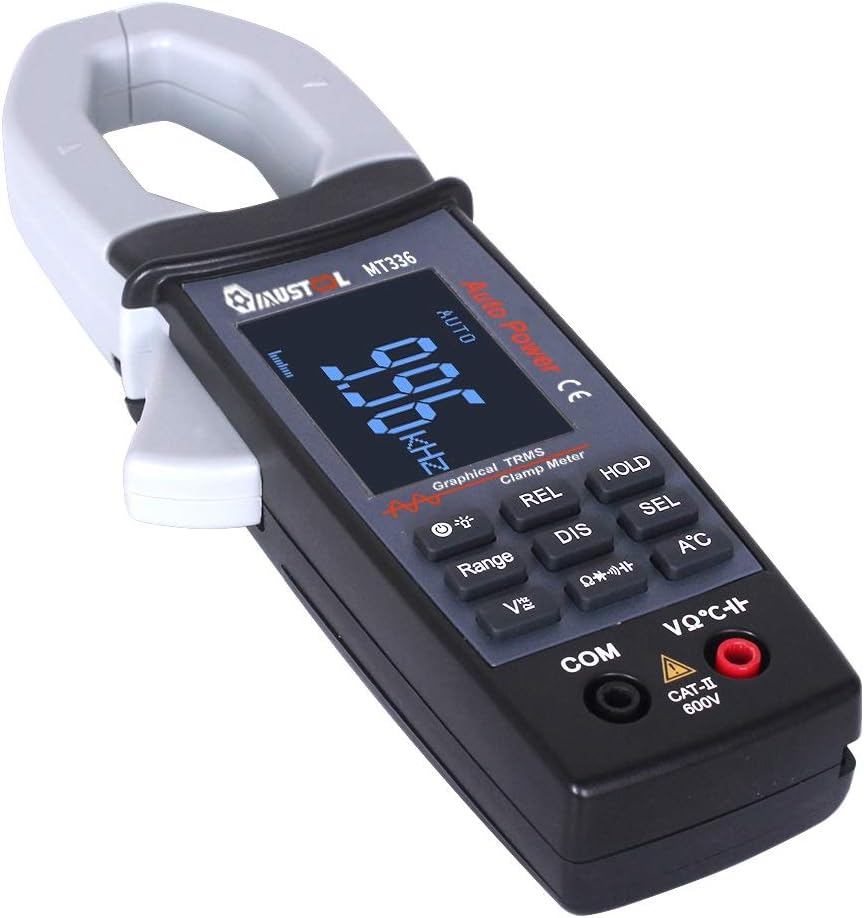
Figura 3: Oltreview of the MT336 clamp meter, showing its main parts.
4. Impostazione
4.1 Installazione della batteria
- Ensure the meter is powered off and no test leads are connected.
- Individuare il vano batterie sul retro del misuratore.
- Svitare il coperchio del vano batteria.
- Insert three AAA 1.5V batteries, observing correct polarity.
- Riposizionare il coperchio del vano batteria e fissarlo con la vite.
4.2 Collegamento dei puntali di prova
Per volumetage, misure di resistenza, capacità, frequenza, diodo e continuità:
- Inserire il puntale nero nel COM Jack di ingresso (comune).
- Inserire il puntale rosso nel VΩHz presa di ingresso.
For temperature measurements, connect the temperature probe to the designated input ports.
5. Istruzioni per l'uso
5.1 Accensione/spegnimento
Press the power button to turn the meter on. The meter will automatically shut down after 15 minutes of inactivity to conserve battery life. Press the power button again to turn it off manually.
5.2 Misurazione della corrente alternata (Clamp Funzione)
- Select the AC current mode (usually indicated by 'A~' or a similar symbol).
- Premere il grilletto per aprire il clamp mascella.
- Racchiudere un singolo conduttore (non un cavo di alimentazione con più fili) all'interno del clamp mascella.
- Rilasciare il grilletto per chiudere saldamente la ganascia attorno al conduttore.
- Read the AC current value and waveform on the display.

Figure 4: Measuring AC current and waveform using the clamp funzione.
5.3 CA/CC voltage Misurazione
- Collegare i puntali di prova come descritto nella Sezione 4.2.
- Seleziona il volume appropriatotage mode (DCV or ACV).
- Touch the red and black test probes to the points where voltage deve essere misurato.
- Leggi il vol.tage valore sul display. Per AC voltage, the waveform may also be displayed.

Figura 5: Misurazione del volume CAtage and waveform from a power outlet.
5.4 Resistenza, capacità, frequenza, diodo e continuità
For these functions, ensure the circuit is de-energized before connecting the test leads. Select the desired function using the mode buttons and follow standard measurement procedures for multimeters.
- Resistenza (Ω): Measures the electrical resistance of a component.
- Capacità (F): Measures the capacitance of capacitors.
- Frequenza (Hz): Misura la frequenza di un segnale CA.
- Prova del diodo: Controlla il volume in avantitagla caduta di un diodo.
- Test di continuità: Indicates if a circuit is complete with a low resistance path (typically with an audible beep).
5.5 Misurazione della temperatura
Connect the temperature probe to the meter's designated input. Select the temperature function and place the probe tip on the object or area to be measured. The temperature will be displayed in Celsius or Fahrenheit.
6. Manutenzione
6.1 Pulizia
Pulire il misuratore con un panno asciutto e morbido. Non utilizzare abrasivi o solventi. Mantenere i terminali di ingresso liberi da sporco e umidità.
6.2 Sostituzione della batteria
When the low battery indicator appears on the display, replace the batteries as described in Section 4.1. Use three new AAA 1.5V batteries.
6.3 Conservazione
If the meter is not used for an extended period, remove the batteries to prevent leakage and damage. Store the meter in a cool, dry place away from direct sunlight.
7. Risoluzione Dei Problemi
| Problema | Possibile causa | Soluzione |
|---|---|---|
| Il misuratore non si accende. | Batterie scariche o installate in modo errato. | Sostituire le batterie assicurandosi che la polarità sia corretta. |
| Nessuna lettura o "OL" visualizzato. | Open circuit, out of range, or incorrect function selected. | Check connections, select appropriate range/function, or ensure circuit is closed. |
| Letture imprecise. | Low battery, dirty test leads/terminals, or external interference. | Replace batteries, clean leads/terminals, move away from strong electromagnetic fields. |
| Waveform not displayed correctly. | Signal frequency too high/low, or incorrect range. | Ensure signal is within 1kHz ACV/ACA. Adjust range if available. |
8. Specifiche
Specifiche generali:
- Display: 128 x 64 LCM with white backlight on black screen (45mm x 35mm)
- Energia: 3 batterie AAA 1.5V
- Spegnimento automatico: Circa 15 minuti di inattività
- Archiviazione dati: 100 data points, 10 waveforms
- Dimensioni: Dimensioni: 78 mm x 210 mm x 36 mm
- Peso: 220g (senza batterie)
- Ambiente operativo: 0°C to 40°C; <75% RH
- Ambiente di archiviazione: -10°C to 60°C; <90% RH
- Valutazione di sicurezza: CATII 600V
Measurement Specifications (Accuracy ±(rdg + dgt)):
| Funzione | Allineare | Precisione |
|---|---|---|
| Volume DCtage | 400 mV / 4 V / 40 V / 400 V / 600 V | ±(1.5% + 10) |
| Volume ACtage (TRMS) | 4V / 40V / 400V / 600V | ±(2.0% + 10) |
| Corrente alternata | 40A / 400A | ±(2.5% + 10) |
| Resistenza | 400Ω / 4kΩ / 40kΩ / 400kΩ / 4MΩ / 40MΩ | ±(1.0% + 5) |
| Capacità | 4nF / 40nF / 400nF / 4uF / 400uF / 4mF | ±(4.0% + 10) |
| Frequenza | Da 9.999 Hz a 30 kHz | ±(2.0% + 10) |
| Temperatura | -20℃ a 250℃ | ±(2.0% + 3) |
| Test diodi | Circuito aperto voltage approx. 3V, max test current approx. 2mA | N / A |
| Test di continuità | Judgment resistance approx. 50Ω | N / A |
| Larghezza di banda analogica | ACV / ACA 1 kHz | N / A |
9. Garanzia e supporto
For warranty information and technical support, please refer to the official MustOOL websito o contatta il tuo rivenditore. Conserva la ricevuta d'acquisto come prova d'acquisto.
The package includes: 1x Clamp Meter, 1x Pair of Test Leads, 1x English User Manual, 1x Temperature Probe.