
1. Introduzione
This manual provides detailed instructions for the installation, operation, and maintenance of your EONON GA2190K 10.1-inch Android 10 Car Navigation System. Please read this manual thoroughly before using the product to ensure proper functionality and safety.

Figure 1: EONON GA2190K Car Navigation System
2. Caratteristiche principali
- Processore ad alte prestazioni: Equipped with an advanced 8-core CPU, 4GB RAM, and 64GB ROM for smooth operation and amplo stoccaggio.
- Connettività avanzata: Built-in 4G module and Wi-Fi support for internet access, plus Bluetooth 5.0 for faster data transfer and hands-free communication.
- Integrazione smartphone: Compatible with wired Apple CarPlay and wired Android Auto for seamless smartphone connectivity.
- Funzione di mirroring: Supports both wireless and wired mirroring for iPhone and Android smartphones via the 'EasyConnection' app.
- Superior Display: 10.1-inch IPS touch panel with 1024x600 resolution, offering clear visuals from any angle and a customizable UI.
- Audio migliorato: Built-in DSP (Digital Sound Field Processing) with a 48-band graphic equalizer and 8 EQ modes for a personalized audio experience.
- Riproduzione multimediale: Integrated DVD player and RCA output for full-screen sharing to external monitors.
- Funzioni espandibili: Supports offline navigation with a dedicated map card, TV viewing with an external digital tuner, AHD backup cameras, OBD2 diagnostics, and drive recorders.
3. Prodotto finitoview e componenti
3.1 Caratteristiche dell'unità principale

Figura 2: Oltreview of GA2190K's main features including 4G, AHD camera support, 8-core CPU, 4GB RAM, 64GB ROM, 10.1-inch IPS display, Android 10, iPhone connectivity, DSP, unique UI, and built-in CD/DVD player.
3.2 Accessori inclusi

Figure 3: Standard accessories included with the GA2190K unit. These typically include GPS antenna, power cable, AV cables, microphone, USB cables, 4G antenna, backup camera input, 10A fuse, mounting screws, and disassembly tools.
4. Configurazione e installazione
Proper installation is crucial for the optimal performance of your EONON GA2190K. It is recommended that installation be performed by a qualified professional.
4.1 General Installation Guide (for similar models)
Video 1: This video demonstrates the installation process for the IAH10D 10.1-inch car navigation system, which shares similar installation principles with the GA2190K. It covers mounting the unit into a double DIN opening.
Video 2: This video illustrates the panel removal and installation method for the UX7SKJ-PRO-MAX, which can be helpful for understanding general panel handling for EONON units.
Video 3: This video demonstrates the front panel removal and installation method for the UX6SKJ-PRO-MAX, providing general guidance for similar EONON units.
4.2 Panel Assembly and Disassembly
The display panel is detachable from the main unit. Follow these steps for proper handling:
- Align the display panel with the main unit, ensuring the connectors are properly oriented.
- Gently push the panel onto the main unit until it clicks into place.
- To remove, simultaneously press the safety switches on both sides inwards and lift the panel upwards.
- Carefully disconnect the ribbon cable by pushing the clips inwards and pulling the cable downwards.
Video 4: This video demonstrates the process of attaching and detaching the display panel from the main unit, including handling the ribbon cable.
5. Istruzioni per l'uso
5.1 Sistema Android 10 finitoview
The GA2190K runs on a powerful Android 10 system, offering a smooth and responsive user experience. You can install various applications from the Google Play Store.

Figure 4: Android 10 interface and iPhone connection capabilities.
5.2 Connectivity (Wi-Fi, 4G SIM, Bluetooth)
Stay connected on the go with multiple options:
- Wifi: Connect to a Wi-Fi hotspot from your smartphone for internet access.
- SIM 4G: Directly insert a 4G SIM card into the unit for independent internet connectivity (check regional frequency band compatibility).
- Bluetooth 5.0: Enjoy hands-free calling and high-quality audio streaming from your smartphone.

Figure 5: Visual representation of Wi-Fi, 4G, Bluetooth 5.0, and mirroring functionalities.
5.3 CarPlay e Android Auto
Integrate your smartphone for a safer and more convenient driving experience:
- Apple CarPlay cablato: Connect your iPhone (iPhone 5 or later) to access navigation, make calls, send messages, and play music via Siri voice control or the touch screen.
- Android Auto cablato: Connect your Android smartphone (requires EONON A0585 USB dongle, sold separately) to use Google Assistant, navigation, and media apps.
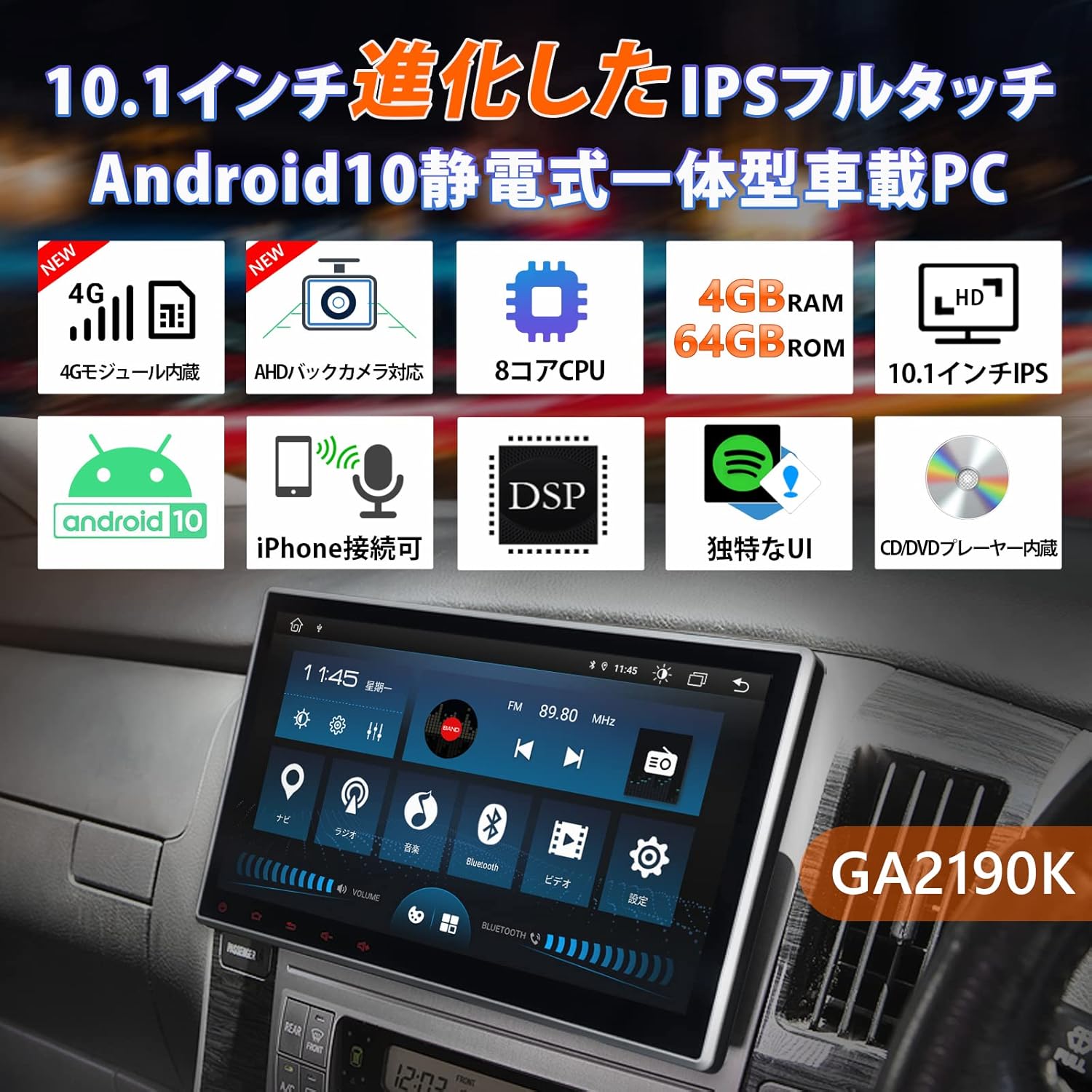
Figure 6: CarPlay and Android Auto interfaces displayed on the unit.
5.4 Funzione di mirroring
Share your smartphone's screen directly to the GA2190K display:
- Use the built-in 'EasyConnection' app to mirror photos, music, and videos from your iPhone or Android smartphone.
- Supporta sia connessioni wireless che cablate.
5.5 Display e interfaccia utente
The 10.1-inch IPS display offers vibrant visuals and a user-friendly interface:
- IPS Touch Panel: 1024x600 ultra-high resolution for clear images from any viewangolo di ing.
- Unique UI Design: Customizable UI colors to match your preference, providing a personalized experience.
- Visualizzazione multi-finestra: Eseguire due applicazioni contemporaneamente sullo schermo, ad esempio la navigazione e la musica.
Video 5: Questo video fornisce una panoramicaview of the UI and features of a similar EONON unit (GA2198J), demonstrating multi-tasking, app installation, and QLED display capabilities.
Video 6: This video introduces the UI of a similar EONON unit, showcasing split-screen functionality, volume control, media player integration, and day/night mode switching.
Video 7: This video demonstrates various functions of a similar EONON unit (UX7SKJ-PRO-MAX), including map display, music playback, video playback, and system information.
5.6 Audio Features (DSP, Equalizer)
Experience superior sound quality with advanced audio processing:
- DSP integrato: Digital Sound Field Processing with a 56-bit double-precision mode for precise sound signal adjustment.
- Equalizzatore grafico a 48 bande: Customize your audio with a detailed equalizer and 8 preset EQ modes.
- Correzione del tempo: Adjust sound field and time delay for optimal listening.

Figure 7: Visual interface for DSP and graphic equalizer settings.
5.7 Navigazione
Navigate with ease using various map options:
- Mappe offline: Use a dedicated map card (EONON G3047, sold separately) for navigation without an internet connection.
- Mappe online: Utilize Google Maps or other navigation apps downloaded from the Play Store.
5.8 funzioni aggiuntive
- Controllo del volante: Collegalo ai comandi al volante del tuo veicolo per un utilizzo più comodo.
- Supporto per telecamera di backup AHD: Connect AHD backup cameras (EONON A0126J, A0119N, sold separately) for enhanced parking safety.
- Diagnostica OBD2: Link with an OBD2 car diagnostic tool (EONON V0056, sold separately) to monitor vehicle data.
- Modalità Drive Recorder: Connect drive recorders (EONON R0020, R0019H, R0018H, sold separately) to view pippotage sul grande schermo.
- TV Viewin: Connect an external digital tuner (EONON V0050, sold separately) to watch TV in your car.

Figure 8: IPS touchscreen, panel adjustment, and backup camera integration.

Figura 9: Oltreview of navigation, TV, AHD camera, OBD2, drive recorder, and RCA output functionalities.
6. Specifiche
| Caratteristica | Specificazione |
|---|---|
| Dimensioni dello schermo | 10.1 pollici |
| Tipo di visualizzazione | Schermo LCD IPS |
| Risoluzione | 1024x600 |
| Sistema operativo | Androide 10 |
| Memoria RAM | 4 GB |
| ROM | 64 GB |
| Processore | 8 core |
| Connettività | Bluetooth 5.0, Wi-Fi, 4G (SIM card support), USB |
| Tipo di sintonizzatore | AM/FM |
| Dispositivi compatibili | Smartphone |
| Tipo di mappa | Strada |
| Caratteristiche speciali | Hands-free, CarPlay, Android Auto, Mirroring, DSP, DVD Player |
| Tipo di montaggio | Supporto per cruscotto |
| Dimensioni del prodotto | Dimensioni: 24.5 x 20.5 x 15.3 cm |
| Peso del prodotto | 3.57 kg |
7. Manutenzione
To ensure the longevity and optimal performance of your EONON GA2190K, follow these general maintenance guidelines:
- Pulizia: Utilizzare un panno morbido e asciutto per pulire lo schermo e l'esterno. Evitare detergenti abrasivi o solventi.
- Aggiornamenti software: Regularly check for and install system software updates to ensure stability and access to new features.
- Temperatura: Evitare di esporre l'unità a temperature estreme, alla luce solare diretta per periodi prolungati o a elevata umidità.
- Connessioni via cavo: Controllare periodicamente tutti i collegamenti dei cavi per assicurarsi che siano saldi e privi di danni.
8. Risoluzione Dei Problemi
If you encounter any issues with your EONON GA2190K, please refer to the following common troubleshooting steps:
- Nessun potere: Controllare tutti i collegamenti elettrici e la scatola dei fusibili del veicolo. Assicurarsi che l'accensione sia inserita.
- Nessun suono: Verificare le impostazioni del volume, controllare i collegamenti degli altoparlanti e assicurarsi che sia selezionata la sorgente audio corretta.
- Touchscreen non reattivo: Prova a riavviare l'unità. Se il problema persiste, esegui un ripristino delle impostazioni di fabbrica (nota: questa operazione cancellerà tutti i dati utente).
- Problemi di connessione Bluetooth/Wi-Fi: Ensure Bluetooth/Wi-Fi is enabled on both the unit and your smartphone. Try re-pairing devices or restarting the unit.
- Problemi di navigazione: Assicurarsi che l'antenna GPS sia installata correttamente e abbia una visuale libera view of the sky. Check map data for updates.
For more complex issues or if troubleshooting steps do not resolve the problem, please contact Eonon customer support.
9. Garanzia e supporto
Eonon is committed to providing quality automotive electronics. For any product-related inquiries, technical assistance, or warranty claims, please contact our customer support team. Our dedicated team is ready to assist you with any questions or concerns.
Please refer to your purchase documentation or the official Eonon websito per termini di garanzia specifici e informazioni di contatto.

Figure 10: Eonon Brand Logo


