
1. Introduzione
Grazie per l'acquistoasing the VILINICE BL89 Native 1080P Projector. This manual provides essential information for the safe and efficient operation of your projector. Please read it thoroughly before use and retain it for future reference.
The VILINICE BL89 projector delivers a native 1920x1080P resolution, 9000 Lux brightness, and an 8000:1 contrast ratio, designed for a high-quality viewing experience. It features a long-lasting LED lamp and versatile connectivity options.

Image: The VILINICE BL89 Native 1080P Projector set up for a home theater experience, including a 100-inch screen.
2. Informazioni sulla sicurezza
To ensure safe operation and prolong the life of your projector, please observe the following precautions:
- Non ostruire le aperture di ventilazione. Garantire un flusso d'aria adeguato attorno al proiettore per evitare il surriscaldamento.
- Non guardare direttamente nell'obiettivo del proiettore quando lamp è acceso. La luce intensa può causare danni agli occhi.
- Keep the projector away from water or any liquids. Do not operate in damp ambienti.
- Posizionare il proiettore su una superficie stabile e piana per evitare che cada.
- Utilizzare solo l'adattatore di alimentazione fornito con il proiettore.
- Scollegare il proiettore durante i temporali o quando non viene utilizzato per lunghi periodi.
- Non tentare di riparare il proiettore da soli. Per qualsiasi intervento di assistenza, rivolgersi a personale qualificato.
- This projector is less harmful to children's eyesight than television due to diffuse reflection imaging, but direct viewing of the lens should still be avoided.
3. Contenuto della confezione
Si prega di verificare che tutti gli articoli siano presenti al momento del disimballaggio:
- VILINICE BL89 Projector
- Cavo di alimentazione
- Telecomando
- Cavo HDMI
- cavo AV
- Manuale d'uso
- Schermo del proiettore da 100 pollici
4. Prodotto finitoview
Familiarize yourself with the various parts and connections of your VILINICE BL89 projector.
Davanti View

Immagine: Frontale view of the VILINICE BL89 projector, highlighting the projection lens.
Posteriore e Laterale Views (Porte e controlli)

Immagine: posteriore e laterale view of the VILINICE BL89 projector, illustrating the power input, HDMI ports, USB ports, VGA port, AV port, and control panel.
- Lente: Proietta l'immagine sullo schermo.
- Anello di messa a fuoco: Regola la nitidezza dell'immagine.
- Correzione trapezoidale: Corregge la distorsione trapezoidale dell'immagine.
- Pannello di controllo: Power, menu, source, navigation buttons.
- Porte HDMI (x2): Connect to HDMI-enabled devices (laptops, TV sticks, game consoles).
- Porte USB (x2): Collegare unità USB per la riproduzione multimediale.
- Porta VGA: Collegare ai computer con uscita VGA.
- Porta AV: Collegati ai dispositivi più vecchi tramite un cavo AV.
- Audio Out (AUX): Collegare altoparlanti esterni o cuffie.
- Potenza in ingresso: Collegare il cavo di alimentazione.
5. Impostazione
5.1 Posizionamento del proiettore
Choose a suitable location for your projector. The optimal projection distance ranges from 1.2 meters (approximately 5 feet) to 5 meters (approximately 30 feet), yielding screen sizes from 44 inches to 300 inches. For the included 100-inch screen, position the projector at an appropriate distance to fill the screen.

Image: A family enjoying a movie projected onto a 100-inch screen, demonstrating typical projector placement.
5.2 Collegamento di alimentazione
- Collegare il cavo di alimentazione alla porta di ingresso dell'alimentazione del proiettore.
- Collegare l'altra estremità del cavo di alimentazione a una presa di corrente.
- Premere il pulsante di accensione sul proiettore o sul telecomando per accenderlo.
5.3 Collegamento dei dispositivi di input
The VILINICE BL89 projector supports various input sources:
- HDMI: Connect TV sticks (e.g., Amazon Fire Stick, Roku), laptops, game consoles (Playstation, Xbox), or Blu-ray players using an HDMI cable.
- USB: Insert a USB flash drive into a USB port for direct media playback.
- VGA: Collegare computer o laptop più vecchi tramite un cavo VGA.
- AV: Connect legacy devices like DVD players using the provided AV cable.
- Smartphone/Tablet: Connect via HDMI adapter (not included) or screen mirroring devices (e.g., Chromecast).
Image: Visual representation of compatible devices and their connection types for the VILINICE BL89 projector.
6. Istruzioni per l'uso
6.1 Accensione/spegnimento
Premere il pulsante di accensione sul proiettore o sul telecomando per accendere o spegnere l'unità.
6.2 Regolazione della messa a fuoco e della distorsione trapezoidale dell'immagine
After powering on, adjust the image for clarity and correct shape:
- Messa a fuoco: Ruotare l'anello di messa a fuoco vicino all'obiettivo finché l'immagine non appare nitida e chiara.
- Correzione trapezoidale: If the image appears trapezoidal (wider at the top or bottom), use the manual keystone correction dial (±15°) to adjust the image to a rectangular shape.
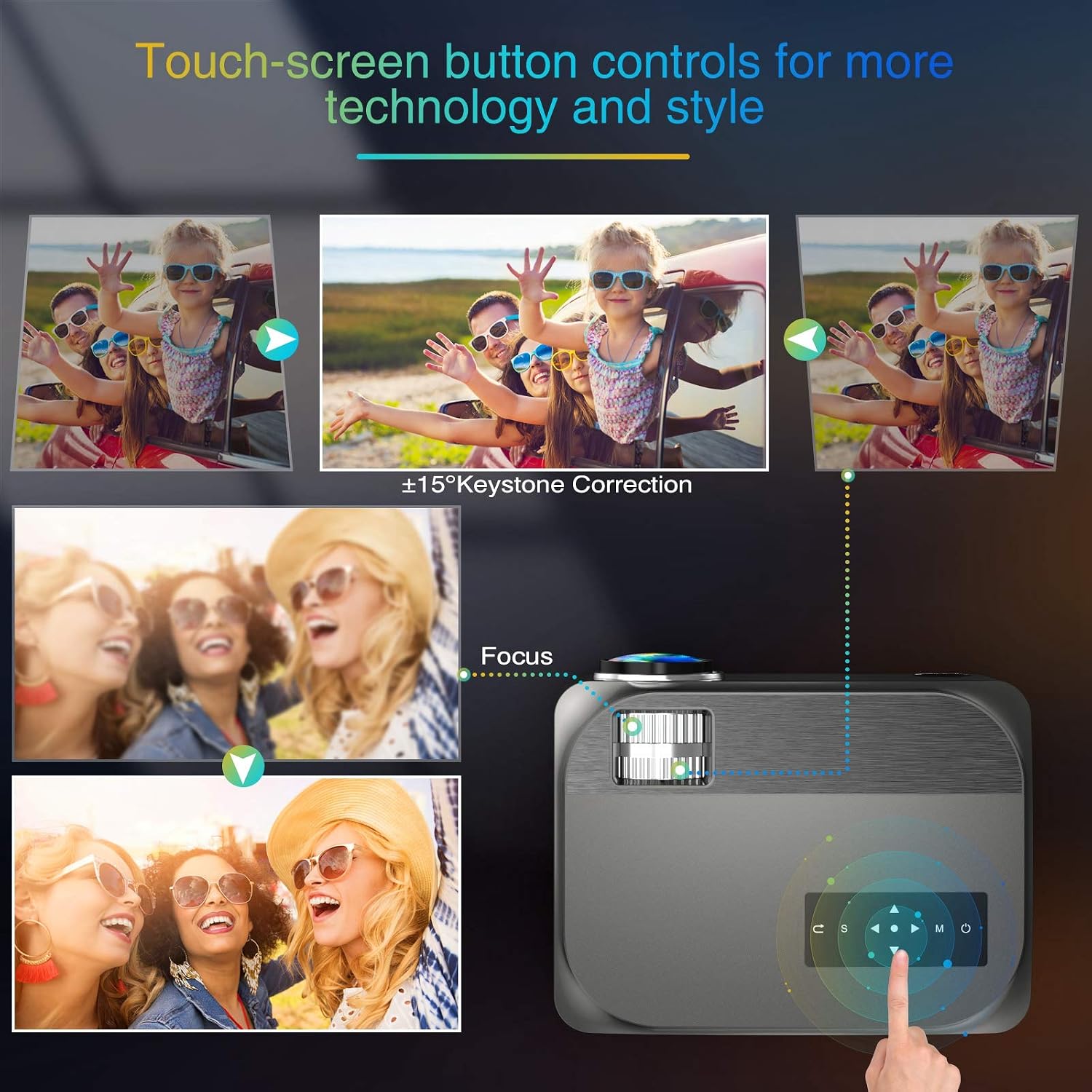
Image: Visual guide for adjusting keystone correction and focus on the VILINICE BL89 projector.
6.3 Funzione Zoom
The projector features a -25% zoom function, allowing you to reduce the image size without moving the projector. This is particularly useful for ceiling-mounted installations. Use the remote control to access and adjust the zoom setting.

Image: Illustration of the projector's zoom function, showing how the image size can be reduced from 100% to 75%.
6.4 Selezione della sorgente di input
Press the 'Source' button on the projector or remote control to cycle through available input sources (HDMI1, HDMI2, USB1, USB2, VGA, AV). Select the input corresponding to your connected device.
6.5 Uscita audio
The projector has built-in 10W HiFi stereo speakers. For an enhanced audio experience, you can connect external speakers or headphones to the 3.5mm audio out (AUX) port.

Immagine: una vista dall'alto view showing the VILINICE BL89 projector in use, emphasizing its integrated Hi-Fi stereo sound system.
6.6 Servizi di streaming
Due to app copyright restrictions, direct streaming of services like Netflix, Prime Video, or Hulu is not supported via the projector's internal system. To watch content from these platforms, connect an external device such as a laptop, Amazon Fire TV Stick, Roku, or Chromecast via an HDMI port.
7. Manutenzione
7.1 Pulizia della lente
Utilizzare un panno morbido e privo di lanugine, specificamente progettato per lenti ottiche, per pulire delicatamente la lente del proiettore. Evitare l'uso di detergenti abrasivi o di esercitare una forza eccessiva, che potrebbero graffiare la lente.
7.2 Pulizia del corpo del proiettore
Pulire l'esterno del proiettore con un panno morbido e asciutto. Non utilizzare detergenti liquidi o spray.
7.3 Ventilazione
Regularly check that the ventilation openings are clear of dust and debris to ensure proper airflow and prevent overheating. The projector's ECO-mode helps extend the lamp vita.
7.4 Lamp Vita
Il LED lamp in your VILINICE BL89 projector has an estimated operating life of up to 100,000 hours, significantly reducing the need for lamp sostituzione.
8. Risoluzione Dei Problemi
Se riscontri problemi con il proiettore, fai riferimento ai seguenti problemi comuni e alle relative soluzioni:
| Problema | Possibile causa | Soluzione |
|---|---|---|
| Nessuna immagine o immagine sfocata | Focus not adjusted; Keystone not adjusted; Lens cap on; Incorrect input source. | Adjust the focus ring; Adjust keystone correction; Remove lens cap; Select correct input source. |
| Nessun suono | Volume too low; Mute enabled; External audio device not connected or configured correctly; Source device volume low. | Increase projector volume; Disable mute; Check external audio connections; Increase volume on source device. |
| Il telecomando non funziona | Batteries dead or incorrectly inserted; Obstruction between remote and projector; Remote out of range. | Replace batteries; Remove obstructions; Ensure remote is within range and pointed at the IR receiver. |
| Il proiettore si surriscalda e si spegne | Ventilation blocked; Operating in high ambient temperature. | Ensure ventilation openings are clear; Operate in a well-ventilated area. |
| L'immagine è distorta o scolorita | Faulty cable connection; Source device issue; Projector settings. | Check and re-secure all cable connections; Test with a different source device; Reset projector display settings. |
9. Specifiche
| Caratteristica | Dettaglio |
|---|---|
| Marca | VILINICE |
| Numero di modello | BL89 |
| Risoluzione nativa | Risoluzione Full HD 1920 x 1080P |
| Luminosità | 9000 lux |
| Rapporto di contrasto | 8000:1 |
| Tipo di visualizzazione | LCD |
| Durata operativa della sorgente luminosa | 100,000 ore |
| Correzione Keystone | Manuale ±15° |
| Funzione di zoom | -25% |
| Dimensioni della proiezione | 44" - 300" |
| Distanza di lancio | 1.2 - 5 Meters (5 - 30 ft) |
| Altoparlanti incorporati | 10W HiFi Stereo Sound |
| Tecnologia di connettività | HDMI, USB, VGA, AV, AUX |
| Dispositivi compatibili | TV Box, Amazon Fire Stick TV, Chromecast, Laptop, Speakers, Playstation, Xbox, DVD player, Card reader, USB stick, Media players, iPad, iPhone, Android smartphone |
| Metodo di controllo | Remote Control, App (if applicable) |
| Colore | Grigio |
| Cosatage | 130 Wattora |
10. Garanzia e supporto
10.1 Informazioni sulla garanzia
The VILINICE BL89 Projector comes with a 2-year warranty. Additionally, upon product registration, you may receive an extended 3-month return period and a 24-month promise.
10.2 Supporto tecnico
VILINICE offers lifetime technical support for this product. If you have any questions, require assistance, or encounter issues not covered in this manual, please contact VILINICE customer service. Refer to the product packaging or the official VILINICE website for contact details (e.g., email address or support portal).