
1. Introduzione
The ENGINDOT Rotary Tool Kit, model RTD35ACL, is a versatile power tool designed for a wide range of precision tasks. With its variable speed control and numerous accessories, it is suitable for applications such as cutting, engraving, drilling, sanding, polishing, and grinding. This manual provides essential information for safe and effective operation, setup, maintenance, and troubleshooting.

Figure 1.1: The ENGINDOT Rotary Tool Kit and its included accessories.
2. Informazioni sulla sicurezza
Dare sempre priorità alla sicurezza quando si utilizzano utensili elettrici. Leggere e comprendere tutte le istruzioni prima dell'uso. Conservare questo manuale per riferimento futuro.
- Protezione degli occhi: Indossare sempre occhiali di sicurezza o maschere per proteggere gli occhi dai detriti volanti.
- Protezione della mano: Indossare guanti adeguati per proteggere le mani.
- Area di lavoro: Assicuratevi che l'area di lavoro sia pulita, ben illuminata e libera da ostacoli.
- Pezzo sicuro: Fissare sempre saldamente il pezzo in lavorazione per evitare che si muova durante il funzionamento.
- Ventilazione: Lavorare in un'area ben ventilata, soprattutto quando si generano polvere o fumi.
- Scollegare quando si cambiano gli accessori: Always unplug the tool from the power source before changing accessories or performing maintenance.
- Velocità corretta: Select the correct speed for the accessory and material being worked on.
- Evitare il sovraccarico: Do not force the tool; let the tool and accessory do the work.
- Tenere lontani i bambini: Do not allow children or untrained individuals to operate the tool.
3. Contenuto della confezione
Your ENGINDOT Rotary Tool Kit includes the following items:

Figura 3.1: dettagliata view di tutti gli accessori inclusi nel kit.
- 1 x Rotary Tool
- Casella degli strumenti 1 x
- 1 x Accessory Case
- 1 x Transparent Shield
- 1 x Albero flessibile
- 1 x mandrino autoserrante
- 1 x Drilling Guide
- 25 x Fiberglass Cutting Off Wheels
- 1 x Punta da trapano
- 5 x Mesh Cutting Discs
- 2 x mandrini
- 3 x HSS Drills
- 14 x nastri abrasivi
- 1 x gambo di levigatura
- 30 x Carta abrasiva
- 1 x Chiave inglese
- 1 x Allen Wrench
- 1 x Collet (φ3.2mm)
- 3 x Diamond Grinding Needles
- 1 x Engraving Cutter
- 8 x Grinding Wheels with Shanks
- 4 x Felt Wheels
- 1 x Mandrel (for felt wheels)
- 1 x spazzola in acciaio
4. Prodotto finitoview
The ENGINDOT Rotary Tool features a robust design with user-friendly controls and versatile attachments.

Figure 4.1: Main components of the rotary tool.
Caratteristiche principali:
- Quick-change Keyless Chuck: Allows for fast and easy accessory changes without needing a collet wrench. It accommodates attachments from 1/8'' to 1/32''.
- 6 Variable Speed Adjustment: Control the rotational speed from 10,000 RPM to 32,000 RPM, enabling precise work on various materials and tasks.
- Design ergonomico: Lightweight and features a rubber handle for comfortable extended use.
5. Configurazione e installazione degli accessori
Proper installation of accessories is crucial for safe and effective operation. Always ensure the tool is unplugged before changing any accessories.
5.1. Installing the Keyless Chuck
The keyless chuck allows for quick changes of various bits. Simply twist the chuck to open or close the jaws around the accessory shank.

Figure 5.1: The keyless chuck for easy accessory changes.
5.2. Installing a Sanding Band
- Scollegare lo strumento rotante.
- Select the appropriate sanding band and sanding shank.
- Slide the sanding band onto the rubber drum of the sanding shank.
- Insert the sanding shank into the keyless chuck and tighten securely.
5.3. Installing a Cutting Disc and Protective Shield
- Scollegare lo strumento rotante.
- Attach the desired cutting disc to a mandrel.
- Install the protective shield onto the tool's head, ensuring it is securely fastened.
- Insert the mandrel with the cutting disc into the keyless chuck and tighten.

Figure 5.2: The protective cover provides safety during cutting and grinding.
5.4. Installing the Cutting Guide
- Scollegare lo strumento rotante.
- Attach the cutting guide to the tool's head.
- Adjust the depth of the cutting guide as needed for your application.
- Insert the appropriate cutting or drilling bit into the keyless chuck and tighten.

Figure 5.3: The cutting guide assists in precise cuts and drilling.
5.5. Installing the Flexible Shaft
The flexible shaft provides enhanced maneuverability for detailed work.
- Scollegare lo strumento rotante.
- Unscrew the collet nut and remove the collet from the rotary tool.
- Insert the drive shaft of the flexible shaft into the collet opening of the rotary tool.
- Secure the flexible shaft by tightening the collet nut onto the tool.
- Insert the desired accessory into the chuck of the flexible shaft and tighten.
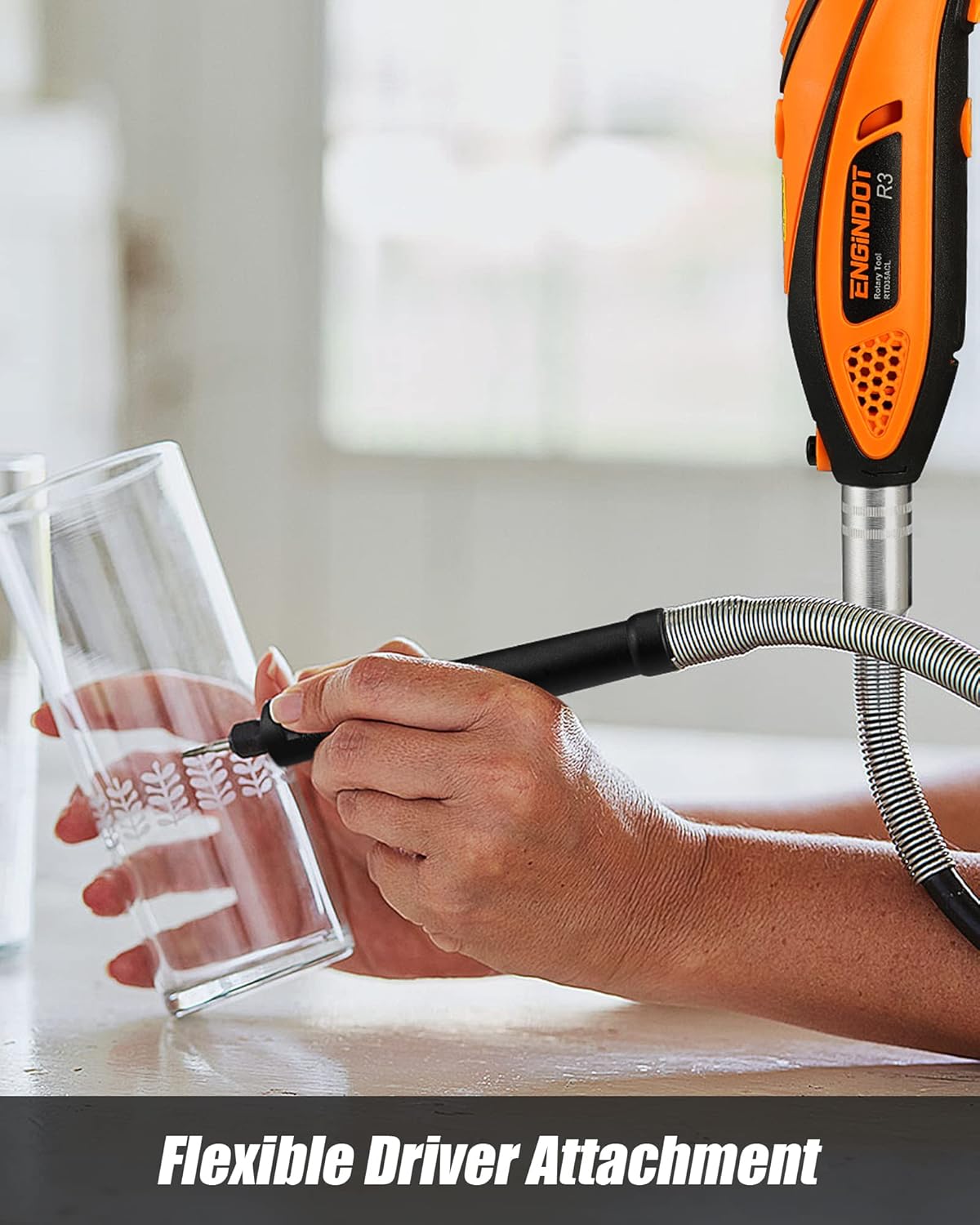
Figure 5.4: The flexible shaft allows for precise control in detailed tasks.
6. Funzionamento
Once accessories are installed, you can begin using your rotary tool for various applications. Always ensure the workpiece is stable and you are wearing appropriate safety gear.
6.1. General Usage Steps
- Select the appropriate accessory for your task.
- Install the accessory and any necessary attachments (e.g., protective shield, cutting guide, flexible shaft).
- Plug in the rotary tool.
- Accendere lo strumento utilizzando l'interruttore On/Off.
- Adjust the speed using the variable speed dial to match the material and task. Start with a lower speed and increase as needed.
- Apply gentle pressure and let the tool do the work. Avoid excessive force.
- After use, turn off the tool and unplug it before removing accessories.
6.2. Esempio di applicazioneamples
- Carteggiatura: Use sanding bands or discs to smooth rough edges or surfaces.
- Incisione/Intaglio: Utilize diamond grinding needles or engraving cutters for detailed work on wood, metal, or glass.
- Taglio: Employ cutting discs for precise cuts on various materials. Always use the protective shield.
- Perforazione: Use drill bits for small holes. The drilling guide can assist in maintaining accuracy.
- Lucidatura/Pulizia: Attach felt wheels or steel brushes with polishing compound to shine surfaces or remove rust.
7. Manutenzione
Una manutenzione regolare garantisce la longevità e le prestazioni ottimali del vostro utensile rotante.
- Pulizia: After each use, clean the tool and accessories to remove dust and debris. Use a soft cloth; do not use harsh chemicals.
- Sostituzione della spazzola: The motor brushes may need replacement over time. Refer to the exploded view diagram (Figure 4.1) for the location of the replaceable motor brush caps.
- Magazzinaggio: Store the tool and accessories in their original carrying case in a dry, secure location away from children.
- Ispezione del cavo: Ispezionare regolarmente il cavo di alimentazione per verificare la presenza di eventuali danni. Non utilizzare l'utensile se il cavo è danneggiato.
8. Risoluzione Dei Problemi
If you encounter issues with your rotary tool, refer to the following common troubleshooting steps:
| Problema | Possibile causa | Soluzione |
|---|---|---|
| Lo strumento non si accende | No power supply, faulty switch, worn motor brushes | Check power connection, ensure switch is ON, inspect/replace motor brushes. |
| Vibrazione eccessiva | Bent accessory shank, improperly installed accessory | Replace bent accessory, re-install accessory securely in chuck. |
| L'utensile si surriscalda | Overloading, blocked ventilation slots | Reduce pressure, clear ventilation slots, allow tool to cool. |
| Prestazioni ridotte | Worn accessory, worn motor brushes | Replace accessory, inspect/replace motor brushes. |
9. Specifiche

Figure 9.1: Technical specifications of the ENGINDOT Rotary Tool.
| Specificazione | Dettaglio |
|---|---|
| Marca | ENGINDOT |
| Numero di modello | RTD35ACL |
| Fonte di alimentazione | Elettrico con cavo |
| Voltage | 120 Volt |
| Cosatage | 135 Watt |
| Massima velocità di rotazione | 32000 giri al minuto |
| Velocità variabile | 6-step adjustment (10,000 - 32,000 RPM) |
| Dimensioni del prodotto | Dimensioni: 23.5 x 6 x 5 cm |
| Peso dell'articolo | 1.83 kg |
| Materiale | Rubber (handle) |
| Caratteristica speciale | Portatile |
| Usi consigliati | Cutting, Engraving, Drilling, Sanding, Polishing, Grinding |
10. Garanzia e supporto
ENGINDOT products are manufactured to high-quality standards. For warranty information, technical support, or service inquiries, please refer to the contact information provided with your product packaging or visit the official ENGINDOT websito. Conservare la prova d'acquisto per eventuali reclami in garanzia.