
Introduzione
This manual provides detailed instructions for the LENVII CW888 Bluetooth Wireless 1D/2D QR Barcode Scanner. Please read this manual carefully before using the device to ensure proper operation and to maximize its performance and lifespan. This scanner supports multiple connection methods and is designed for efficient barcode data collection.
Impostare
1. Contenuto della confezione
Verificare che tutti i componenti siano presenti:
- LENVII CW888 Barcode Scanner
- Base di ricarica
- Cavo USB
- Manuale dell'utente (questo documento)
2. Caricamento dello scanner
The scanner is equipped with a 2200 mAh built-in battery. Before initial use, fully charge the scanner.
- Charging with Base: Place the scanner onto the charging base. Ensure the scanner is properly seated.
- Ricarica con cavo USB: Connect the USB cable directly to the scanner and a power source (e.g., computer USB port, USB wall adapter).
A full charge takes approximately 5 hours. The scanner will emit five short beeps (low frequency) and stop scanning when the battery is low. Connect the USB cable for charging when this occurs.
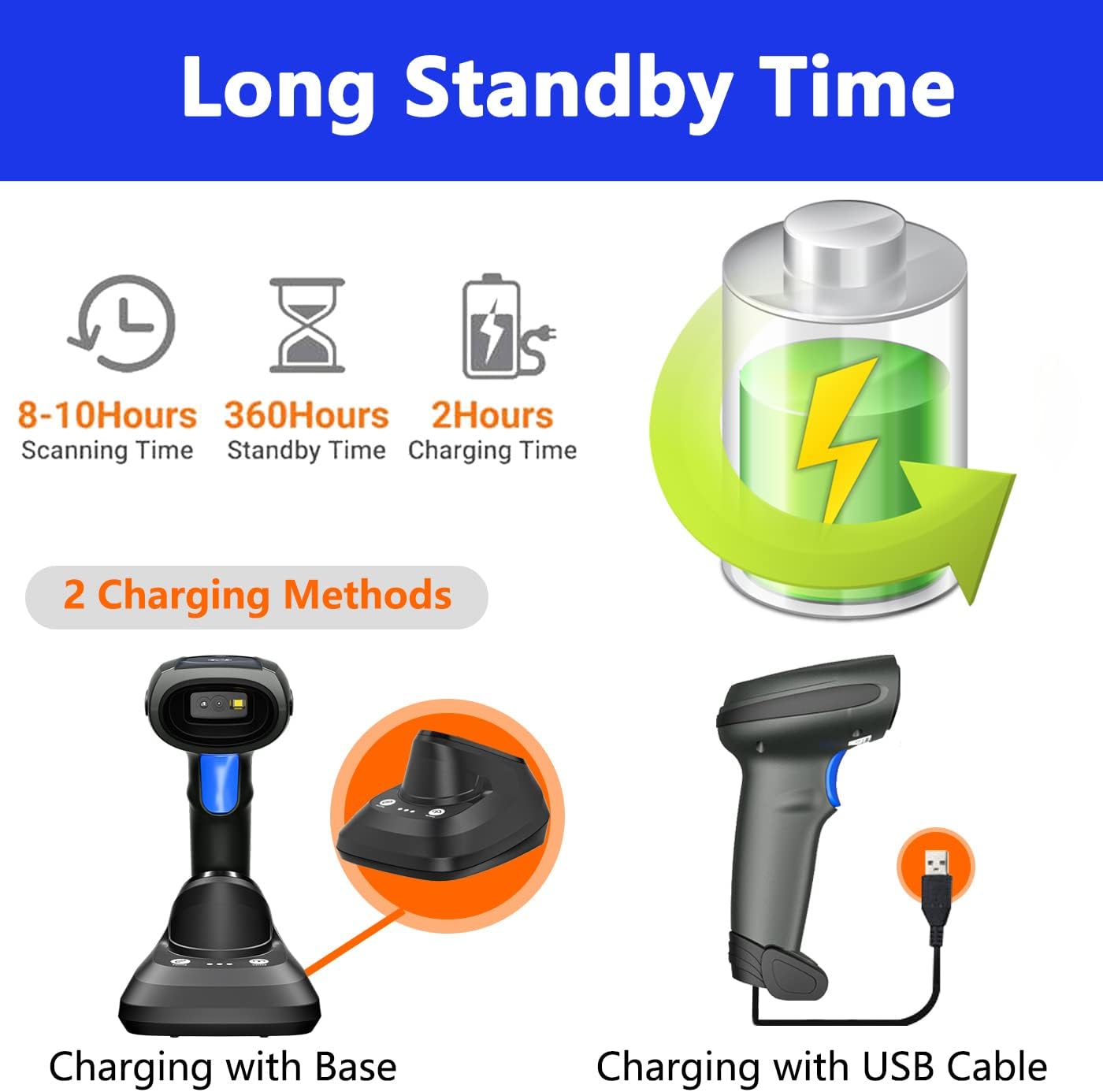
Image: Two charging methods for the LENVII CW888 barcode scanner: using the charging base or directly via USB cable.
3. Metodi di connessione
The LENVII CW888 scanner offers three connection options:
3.1. Connessione Bluetooth
Connect the scanner wirelessly to Bluetooth-enabled devices such as smartphones, tablets, or computers.
- Assicurarsi che lo scanner sia acceso.
- Attiva il Bluetooth sul tuo dispositivo host (ad esempio, smartphone, tablet, computer).
- Scan the Bluetooth pairing barcode (usually found in the quick start guide or by scanning a specific configuration code).
- On your device, search for available Bluetooth devices and select "LENVII CW888" (or similar name) to pair.
- Una connessione riuscita sarà indicata da un suono o da una luce specifici sullo scanner.
3.2. 2.4G Wireless Connection (via Charging Base)
Use the charging base as a wireless receiver for a 2.4G connection to your computer.
- Connect the charging base to your computer via the USB cable.
- The computer should automatically recognize the base as a HID keyboard device.
- Ensure the scanner is powered on and within range of the base.
- The scanner and base should automatically establish a 2.4G wireless connection.
3.3. Connessione cablata USB
Connect the scanner directly to your computer using the USB cable for a wired connection.
- Collegare il cavo USB dello scanner a una porta USB disponibile sul computer.
- The computer will recognize the scanner as a plug-and-play device, requiring no additional drivers.
- The scanner is ready for use once recognized.

Image: Illustration of the three connection types: Bluetooth, 2.4G wireless via charging base, and USB wired, along with compatible operating systems.
4. Compatibilità
The LENVII CW888 barcode scanner is compatible with various operating systems and devices:
- Sistemi operativi: Windows (7/8/10/XP), Linux, Mac OS
- Dispositivi: Laptops, Tablets, Smartphones, PCs
Istruzioni per l'uso
1. Scansione dei codici a barre
The scanner supports both 1D and 2D barcode types, including those on screens (mobile phones, computers).

Immagine: Examples of supported 1D and 2D barcode types, including QR codes, Data Matrix, and various linear barcodes.
Tipi di codici a barre supportati:
- 1D: UPC / EAN / JAN, UPC-A and UPC-E, EAN-8 and EAN-13, JAN-8 and JAN-13, ISBN / ISSN, Code 39 (with full ASCII), Codabar (NW7), Code 128 and EAN 128, Code 93, etc.
- 2D: QR Code, Data Matrix, PDF417, Aztec, Maxicode.
The scanner features an advanced decoding chip capable of recognizing colorful, blurry, distorted, and reflective barcodes, improving efficiency for mobile payments and various scanning environments.
2. Modalità di scansione
Lo scanner offre due modalità di scansione principali:
- Modalità di attivazione chiave: Premere il pulsante di attivazione per scansionare ogni codice a barre singolarmente.
- Modalità di scansione continua: The scanner continuously emits a scanning beam, allowing for hands-free operation when placed on the charging base.

Image: Comparison of Key Trigger Mode, where the user presses a button for each scan, and Continuous Scanning Mode, which allows hands-free operation with the scanner on its base.
3. Modalità di caricamento dati
Lo scanner supporta due metodi di caricamento dei dati:
- Modalità di caricamento istantaneo: I dati del codice a barre vengono caricati in modo sincrono sul dispositivo connesso subito dopo la scansione.
- Modalità di archiviazione: The scanner can store up to 1,500,000 barcodes in its internal 16MB memory. Data can be collected and stored, then uploaded to the computer together at a later time. This is useful for inventory management or when out of range.

Image: Visual representation of Instant Upload Mode, where scanned data is immediately sent to the device, and Storage Mode, where data is saved internally (16MB capacity) for batch upload.
4. Distanza di trasmissione
The effective transmission range varies based on the environment:
- Obstacle Environment (Bluetooth): Fino a 49 piedi (15 metri).
- Obstacle Environment (2.4G Wireless): Fino a 98 piedi (30 metri).
- Ambiente senza barriere: Fino a 262 piedi (80 metri).

Image: Diagram illustrating the effective transmission distances for the scanner under different conditions and connection types.
5. Cradle Functionality
The charging base (cradle) provides additional functionality beyond charging:
- Abbinamento con un clic: Simplifies the pairing process with the scanner.
- One-Click Upload: Facilitates quick data upload from the scanner's storage memory to the connected device.
- Registrazione dei dati: The base also supports data logging functions.

Image: Close-up of the charging cradle, highlighting the "One click pairing" and "One click upload" buttons, along with LED indicators for pairing status, data upload, and power.
6. Adding Prefix/Suffix
The scanner can be configured to add custom prefixes or suffixes to scanned barcode data. This feature is typically enabled by scanning specific configuration barcodes found in the full user manual or quick start guide.

Image: Illustration of how prefixes and suffixes can be added to barcode data after scanning.
Manutenzione
1. Cura della batteria
- The scanner has a 2200 mAh battery, providing approximately 9 hours of continuous operation on a full charge.
- Il tempo di ricarica è di circa 5 ore.
- When the battery is low, the scanner will emit five short beeps. Connect it to a power source immediately.
- Evitare di scaricare completamente la batteria frequentemente per prolungarne la durata.
- Quando non si utilizza lo scanner per lunghi periodi, conservarlo in un luogo fresco e asciutto.

Image: Information on the scanner's battery performance, including scanning time, standby time, and charging duration.
2. Pulizia
- Per pulire la parte esterna dello scanner, utilizzare un panno morbido e asciutto.
- Per la finestra di scansione, utilizzare un panno per la pulizia delle lenti o un panno morbido leggermente damppulito con un detergente delicato e non abrasivo.
- Do not use harsh chemicals or abrasive materials, as they can damage the device.
- Prima di procedere alla pulizia, assicurarsi che il dispositivo sia spento.
Risoluzione dei problemi
1. Lo scanner non si connette
- Controlla la potenza: Assicurarsi che lo scanner sia acceso e che la batteria sia sufficientemente carica.
- Connessione Bluetooth: Verify Bluetooth is enabled on your host device and the scanner is in pairing mode. Re-pair if necessary.
- Connessione wireless 2.4G: Ensure the charging base is properly connected to the computer via USB and the scanner is within range.
- Connessione cablata USB: Prova una porta USB o un cavo diverso. Assicurati che il cavo sia collegato saldamente.
- Autisti: The scanner is plug-and-play; no specific drivers are usually needed. If issues persist, restart your computer.
2. Unable to Scan Barcodes
- Tipo di codice a barre: Confirm the barcode type is supported by the scanner (refer to "Supported Barcode Types" section).
- Condizione del codice a barre: Ensure the barcode is not severely damaged, smudged, or too small/large. While the scanner can read blurry/distorted codes, extreme cases may fail.
- Distanza e angolo: Regolare la distanza e l'angolazione tra lo scanner e il codice a barre.
- Illuminazione: Assicurare un'illuminazione adeguata, evitando però l'abbagliamento diretto sul codice a barre.
- Modalità di scansione: Verify the scanner is in the correct scanning mode (Key Trigger or Continuous).
3. Data Not Uploading
- Connessione: Assicurati che lo scanner sia correttamente collegato al tuo dispositivo (Bluetooth, 2.4G o USB).
- Modalità di caricamento: If in Storage Mode, ensure you have initiated the "One-Click Upload" process from the charging base or via a specific command barcode.
- Focus dell'applicazione: Ensure the target application (e.g., text editor, POS software) on your device is active and ready to receive input.
Specifiche
| Caratteristica | Dettaglio |
|---|---|
| Numero di modello | CW888 |
| Dimensioni (L x P x A) | Dimensioni: 19 cm x 8 cm x 10 cm |
| Peso | 210 grammi |
| Tipo di batteria | 1 ione di litio (incluso) |
| Capacità della batteria | 2200 mAh |
| Tempo di funzionamento | ca. 9 ore (uso continuo) |
| Tempo di ricarica | Circa 5 ore |
| Tecnologia di connettività | Bluetooth, wireless 2.4G, cavo USB |
| Dispositivi compatibili | Laptop, Tablet, Smartphone, PC |
| Sistema operativo compatibile | Windows (7/8/10/XP), Linux, Mac OS, Android, iOS |
| Image Sensor (Pixels) | 640 pixel (O) * 480 pixel (V) |
| Sorgente luminosa | Puntamento: LED da 617 nm; Illuminazione: LED da 6500K |
| Capacità di decodifica (1D) | UPC / EAN / JAN, UPC-A and UPC-E, EAN-8 and EAN-13, JAN-8 and JAN-13, ISBN / ISSN, Code 39 (with full ASCII), Codabar (NW7), Code 128 and EAN 128, Code 93, etc. |
| Capacità di decodifica (2D) | Codice QR, Data Matrix, PDF417, Aztec, Maxicode |
| Distanza di scansione | 40-200 mm @ UPC / EAN 13mil PCS = 90%; 20-250 mm @ QR 20mil PZ = 100% |
| Angolo di scansione | 65° di elevazione / 30° / 55° |
| Precisione di lettura | ≥4 milioni |
| Capacità di archiviazione dei dati | 16 MB (fino a 1,500,000 codici a barre) |
| Volume di eserciziotage | 5 Volt (CC) |
| Massima temperatura di conservazione | 60 gradi Celsius |
| Origine | Cina |
Garanzia e supporto
1. Informazioni sulla garanzia
LENVII stands behind the quality of this wireless handheld scanner. Specific warranty terms and duration may vary by region and retailer. Please retain your proof of purchase for warranty claims.
2. Assistenza clienti
If you encounter any issues or have questions regarding the LENVII CW888 barcode scanner, please contact LENVII customer support. We are committed to providing satisfactory assistance.
For support, please refer to the contact information provided with your product packaging or visit the official LENVII websito.