
1. Introduzione
Grazie per l'acquistoasing the eKids Cocomelon Karaoke Machine, Model CO-550. This portable Bluetooth party speaker is designed to provide hours of musical fun for children, featuring built-in Cocomelon songs, a real working microphone, and versatile connectivity options. This manual provides essential information for safe and optimal use of your new karaoke machine.
2. Prodotto finitoview
2.1 Caratteristiche principali
- Connettività Bluetooth: Wirelessly stream audio from any compatible Bluetooth device.
- Canzoni integrate: Includes 24 popular Cocomelon songs for immediate entertainment.
- USB Audio Player: Connect a USB drive to play your own MP3 music files.
- Microfono realmente funzionante: Sing along with the included wired microphone.
- Design adatto ai bambini: Lightweight and portable with a built-in handle.
- Batteria ricaricabile: Enjoy portable use with the integrated rechargeable battery (USB charging cable included).
- Jack per cuffie: Per l'ascolto privato.
2.2 Componenti
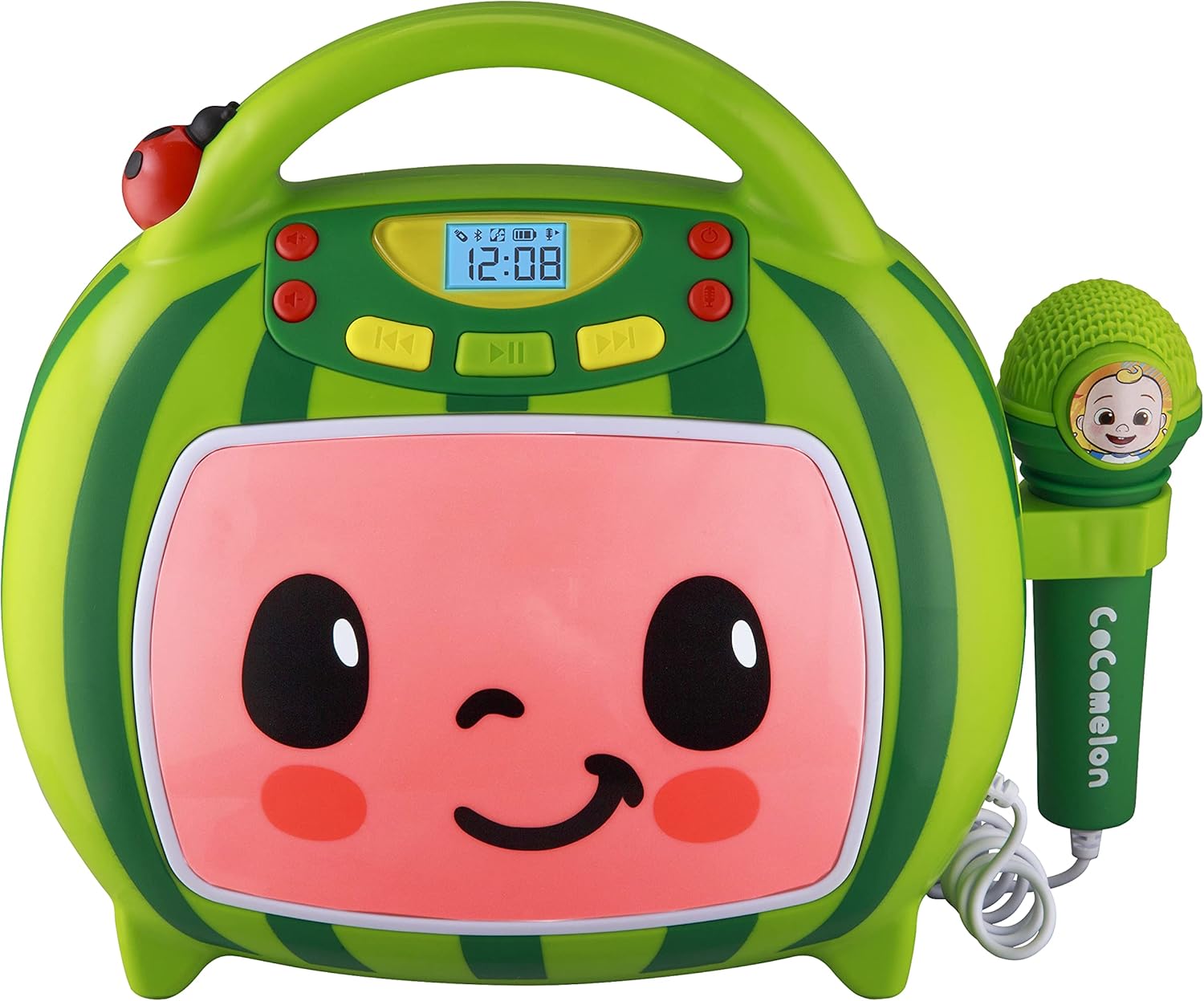
Davanti view of the eKids Cocomelon Karaoke Machine, featuring the watermelon-themed design and integrated microphone.

An annotated diagram detailing the dimensions, control buttons (volume, play/pause, power), microphone jack, USB port, and battery compartment of the karaoke machine.
Il pacchetto include:
- eKids Cocomelon Karaoke Machine
- Microfono cablato
- Cavo di ricarica USB
3. Impostazione
3.1 Installazione della batteria
The karaoke machine requires 1 Lithium Ion battery. Ensure the battery is correctly installed according to the polarity markings in the battery compartment, located on the back of the unit.
3.2 Accensione iniziale
- Locate the Power ON/OFF button on the unit.
- Press and hold the Power ON/OFF button to turn on the device. The display will illuminate.
4. Istruzioni per l'uso
4.1 Associazione Bluetooth
- Accendi il dispositivo karaoke. Entrerà automaticamente in modalità di associazione Bluetooth.
- On your compatible device (e.g., smartphone, tablet), enable Bluetooth and search for available devices.
- Select 'eKids Cocomelon' from the list of devices to pair.
- Once paired, you can stream audio wirelessly from your device to the karaoke machine.

The karaoke machine is shown with icons indicating its compatibility with various Bluetooth-enabled devices such as PCs, smartwatches, tablets, and mobile phones.
This video demonstrates the Bluetooth pairing process for the eKids Cocomelon Karaoke Machine, showing how to connect a mobile device to stream music wirelessly.
4.2 Riproduzione audio USB
- Insert a USB drive containing MP3 music files into the USB port located on the back of the unit.
- The machine will automatically detect the USB drive and begin playing music.
- Use the playback controls (Play/Pause, Forward, Reverse) to navigate your music.
4.3 brani incorporati
The karaoke machine comes pre-loaded with 24 Cocomelon songs. To play these songs, ensure no Bluetooth device is connected and no USB drive is inserted. Use the playback controls to select and play the desired song.

A visual representation of the 24 pre-loaded Cocomelon songs, including popular titles like 'Hello Song' and 'Wheels on the Bus'.
4.4 Uso del microfono
- Plug the wired microphone into the microphone jack on the side of the unit.
- Adjust the microphone volume using the dedicated controls.
- Sing along to your favorite tunes!

A young child engaging with the eKids Cocomelon Karaoke Machine, holding the microphone and singing along.
Un oltreview video mostraasing the eKids Cocomelon Karaoke Machine in action, highlighting its portability, microphone, and various functions for children's entertainment.
4.5 Controlli
- Accensione/spegnimento: Accende o spegne l'unità.
- Volume UP/DOWN: Adjusts the overall sound volume.
- Riproduci/Pausa: Avvia o mette in pausa la riproduzione.
- Avanti/indietro: Passa alla traccia successiva o precedente.
- Microfono ATTIVATO/DISATTIVATO: Attiva o disattiva il microfono.
5. Manutenzione
- Pulizia: Wipe the unit with a soft, dry cloth. Do not use abrasive cleaners or immerse in water.
- Magazzinaggio: Quando non viene utilizzato, conservare l'apparecchio per karaoke in un luogo fresco e asciutto, lontano dalla luce solare diretta.
- Cura della batteria: If the unit will not be used for an extended period, remove the battery to prevent leakage.
6. Risoluzione Dei Problemi
| Problema | Soluzione |
|---|---|
| L'unità non si accende. | Check battery installation and ensure the battery is charged. |
| Nessun suono dall'altoparlante. | Increase volume. Ensure Bluetooth device is connected and playing, or USB is inserted correctly. |
| Il Bluetooth non si connette. | Ensure the unit is in pairing mode. Turn off and on Bluetooth on your device. Move closer to the unit. |
| Il microfono non funziona. | Ensure the microphone is securely plugged in and the microphone ON/OFF switch is activated. |
7. Specifiche
| Caratteristica | Dettaglio |
|---|---|
| Numero di modello | CO-550 |
| Peso dell'articolo | 2.12 libbre |
| Dimensioni del prodotto | 12 x 4 x 1 pollici |
| Batterie | 1 batteria agli ioni di litio richiesta |
| Connettività | Bluetooth, USB |
| Conteggio parlanti | 1 |
| Componenti inclusi | Cavo USB |
8. Garanzia e supporto
Per informazioni sulla garanzia o supporto tecnico, fare riferimento ai recapiti forniti sulla confezione del prodotto o visitare il sito ufficiale eKids websito. Conserva la ricevuta d'acquisto come prova d'acquisto.
9. Informazioni sulla sicurezza
- This product is intended for children aged 18 months and up.
- Si consiglia la supervisione di un adulto durante l'uso.
- Non esporre l'unità all'acqua o a umidità eccessiva.
- Non tentare di smontare o modificare l'unità.
- Keep the USB cable and microphone cord away from young children to prevent choking hazards.
- Smaltire le batterie in modo responsabile, nel rispetto delle normative locali.