
1. Prodotto finitoview
The MAKINGTEC B-40 Laser Measure is a compact and versatile digital device designed for accurate distance, area, and volume measurements. It features an LCD backlit display, multiple measurement modes, and a durable, waterproof design. This manual will guide you through its functions and proper usage.
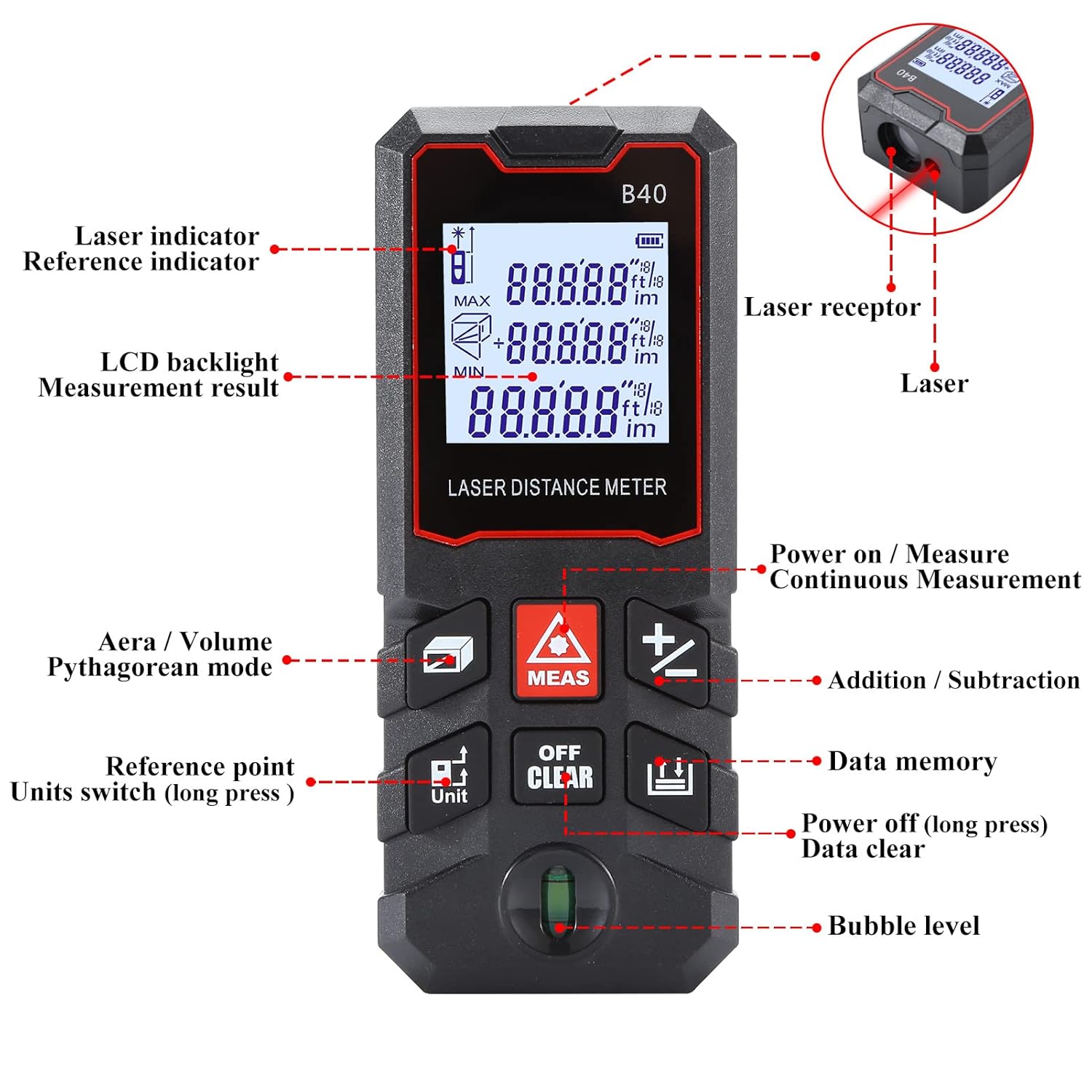
Figura 1.1: Davanti view of the MAKINGTEC B-40 Laser Measure with key components labeled. This includes the laser indicator, LCD backlight, measurement result display, area/volume/Pythagorean mode button, reference point/units switch, power on/measure button, continuous measurement, addition/subtraction, data memory, power off/data clear, and bubble level.
2. Configurazione e utilizzo iniziale
2.1 Installazione della batteria
The MAKINGTEC B-40 Laser Measure operates on alkaline batteries, which are typically included. To install or replace batteries:
- Individuare il coperchio del vano batteria sul retro del dispositivo.
- Aprire il coperchio facendolo scorrere o sbloccandolo.
- Inserire le batterie, rispettando la corretta polarità (+/-).
- Chiudere saldamente il coperchio del vano batterie.
2.2 Accensione/Spegnimento
- Per accendere: Premere il tasto MISURA button. The device will turn on and be ready for measurement.
- Per spegnere: Premere a lungo il tasto SPENTO/CANCELLA per più di 2 secondi.
3. Funzionamento di base
This section covers the fundamental steps for using your laser measure.
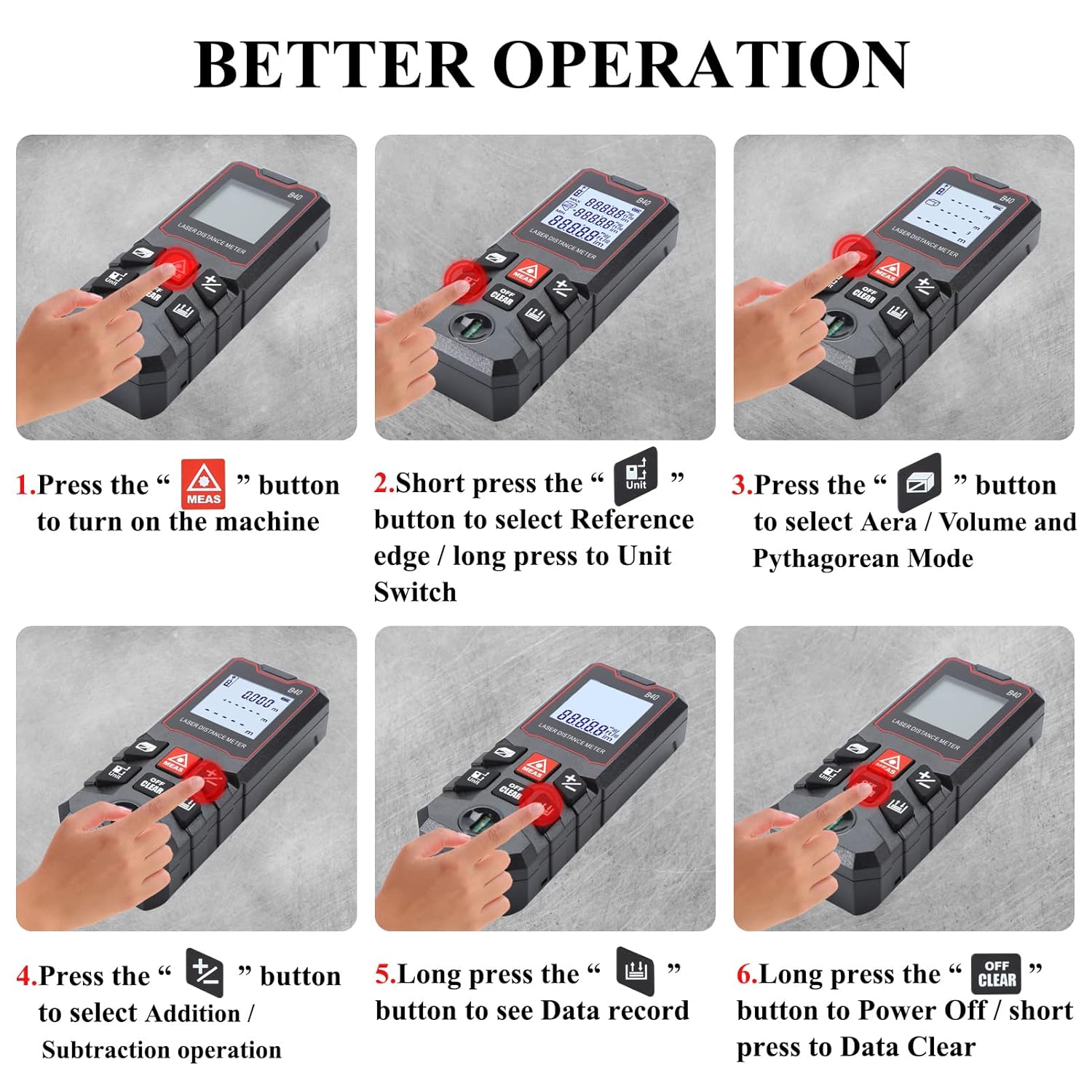
Figura 3.1: Visual guide for basic operations including powering on, selecting reference point, choosing measurement modes, performing addition/subtraction, viewing data records, and powering off.
3.1 Misurazione della distanza singola
- Assicurati che il dispositivo sia acceso.
- Puntare il laser sulla superficie bersaglio.
- Premere il tasto MISURA una volta il pulsante. La misurazione verrà visualizzata sullo schermo.
3.2 Commutazione unità
The device supports multiple units of measurement. To switch between units (meter, feet, inch, feet+inch, inch with fraction mode):
- Premere a lungo il tasto Unità pulsante. L'unità scorrerà le opzioni disponibili.

Figura 3.2: Illustration of unit switching sequence and reference point adjustment using the 'Unit' button.
3.3 Regolazione del punto di riferimento
The measurement reference point can be set from the front or the back of the device. This is crucial for accurate measurements depending on where the device is placed.
- Premere brevemente il tasto Unità button to toggle between front and back reference points. An icon on the display will indicate the current reference point.
3.4 Addizione e sottrazione
The B-40 allows for adding or subtracting measurements.
- Eseguire una misurazione.
- Premere il tasto + pulsante per l'aggiunta o il - pulsante per la sottrazione.
- Perform the next measurement. The result will be added or subtracted from the previous one.
3.5 Conservazione dei dati
Il dispositivo può memorizzare fino a 50 gruppi di dati di misurazione.
- A view stored data, long press the Memoria dati pulsante.
- To clear data, short press the SPENTO/CANCELLA pulsante mentre viewing dati.
4. Modalità di misurazione
The MAKINGTEC B-40 offers several advanced measurement functions.

Figura 4.1: Espressione visivaamples of the different measurement modes available on the device.
4.1 Misurazione continua
This mode allows for dynamic measurement, continuously updating the distance as the device is moved. It is useful for finding minimum and maximum distances.
- Premere il tasto MISURA pulsante per accedere alla modalità di misurazione continua.
- Move the device, and the display will show real-time measurements, along with minimum and maximum values.
- Premere MISURA di nuovo per uscire.
4.2 Misurazione dell'area
Per calcolare l'area di uno spazio rettangolare:
- Premere il tasto Area/Volume/Pitagora finché sul display non compare l'icona dell'area.
- Misurare il primo lato (lunghezza) premendo MISURA.
- Misurare il secondo lato (larghezza) premendo MISURA.
- Il dispositivo calcolerà e visualizzerà automaticamente l'area.
4.3 Misura del volume
To calculate the volume of a cubic space:
- Premere il tasto Area/Volume/Pitagora finché non appare l'icona del volume.
- Misurare la lunghezza, la larghezza e l'altezza in sequenza premendo MISURA dopo ogni misurazione.
- Il dispositivo calcolerà e visualizzerà automaticamente il volume.
4.4 Pythagorean Mode
This mode uses the Pythagorean theorem to calculate indirect measurements, such as height or distance, when direct measurement is not possible.
- Premere il tasto Area/Volume/Pitagora button until the desired Pythagorean mode icon appears (e.g., for single or double Pythagorean calculations).
- Follow the on-screen prompts to measure the required sides (hypotenuse, base) by pressing MISURA per ciascuno.
- Il dispositivo calcolerà e visualizzerà il lato sconosciuto.
5. Manutenzione e cura
Proper maintenance ensures the longevity and accuracy of your MAKINGTEC B-40 Laser Measure.
5.1 Pulizia
- Pulire il dispositivo con un panno morbido, damp panno. Non usare detergenti abrasivi o solventi.
- Clean the laser lens carefully with a soft cloth, similar to cleaning camera lenses, to avoid scratching.
5.2 Conservazione
- Conservare il dispositivo in un luogo fresco e asciutto, lontano dalla luce solare diretta e da temperature estreme.
- Se si conserva il prodotto per periodi prolungati, rimuovere le batterie per evitare perdite.
5.3 Durata
The MAKINGTEC B-40 has an IP54 protection rating, meaning it is protected against dust ingress and splashing water from any direction. While durable, avoid submerging the device in water or exposing it to heavy rain.

Figura 5.1: The device is designed with IP54 protection, offering resistance to dust and water splashes.
6. Risoluzione Dei Problemi
Se riscontri problemi con il tuo dispositivo, fai riferimento ai seguenti problemi comuni e alle relative soluzioni:
| Problema | Possibile causa | Soluzione |
|---|---|---|
| Il dispositivo non si accende. | Batterie scariche o esaurite; installazione errata delle batterie. | Sostituire le batterie; assicurarsi che la polarità sia corretta. |
| Misurazioni imprecise. | Lente laser sporca; punto di riferimento errato; superficie instabile. | Clean the laser lens; verify reference point setting; ensure stable measurement conditions. |
| Il display è scuro o illeggibile. | Batteria scarica; temperatura estrema. | Sostituire le batterie; utilizzare entro l'intervallo di temperatura specificato. |
7. Specifiche
Key technical specifications for the MAKINGTEC B-40 Laser Measure.
| Caratteristica | Dettaglio |
|---|---|
| Marca | MAKINGTEC |
| Numero di modello | B-40 laser measure |
| Campo di misura | 0.03-40 m (0.1-131 piedi) |
| Precisione | ±1/16 di pollice |
| Valutazione internazionale di protezione | IP54 (impermeabile, antipolvere) |
| Materiale | Metallo, Plastica |
| Peso dell'articolo | 85 grammi |
| Dimensioni del prodotto | 10.9L x 4.9W x 2.5H centimetri |
| Tipo di batteria | Alkaline (Batteries Included: Yes) |
| Display | LCD retroilluminato |
| Archiviazione dei dati | 50 gruppi |

Figura 7.1: The B-40 Laser Measure offers fast and precise measurements with an accuracy of ±1/16 inch.
8. Video dimostrativo del prodotto
Watch this official product video for a visual demonstration of the MAKINGTEC B-40 Laser Measure's features and operation.
8.1 video: An official demonstration of the MAKINGTEC B-40 Laser Measure, showcasing its design, button functions, and various measurement capabilities including length, area, and unit switching. This video provides a comprehensive visual guide to the device's operation.
9. Garanzia e supporto
The MAKINGTEC B-40 Laser Measure comes with a 12-month return policy. Additionally, a 1-year extended warranty by Onsitego is available for purchase, providing further protection for your device.
For further assistance or inquiries, please refer to the contact information provided with your purchase or visit the official MAKINGTEC support channels.